We remain fully operational. Our teams are working around the clock to ensure your deliveries continue safely.

Laden Sie die App herunter


Kundendienst
Copyright © 2025 Desertcart Holdings Limited
Laden Sie die App herunter
Buy anything from 5,000+ international stores. One checkout price. No surprise fees. Join 2M+ shoppers on Desertcart.
Desertcart purchases this item on your behalf and handles shipping, customs, and support to Austria.
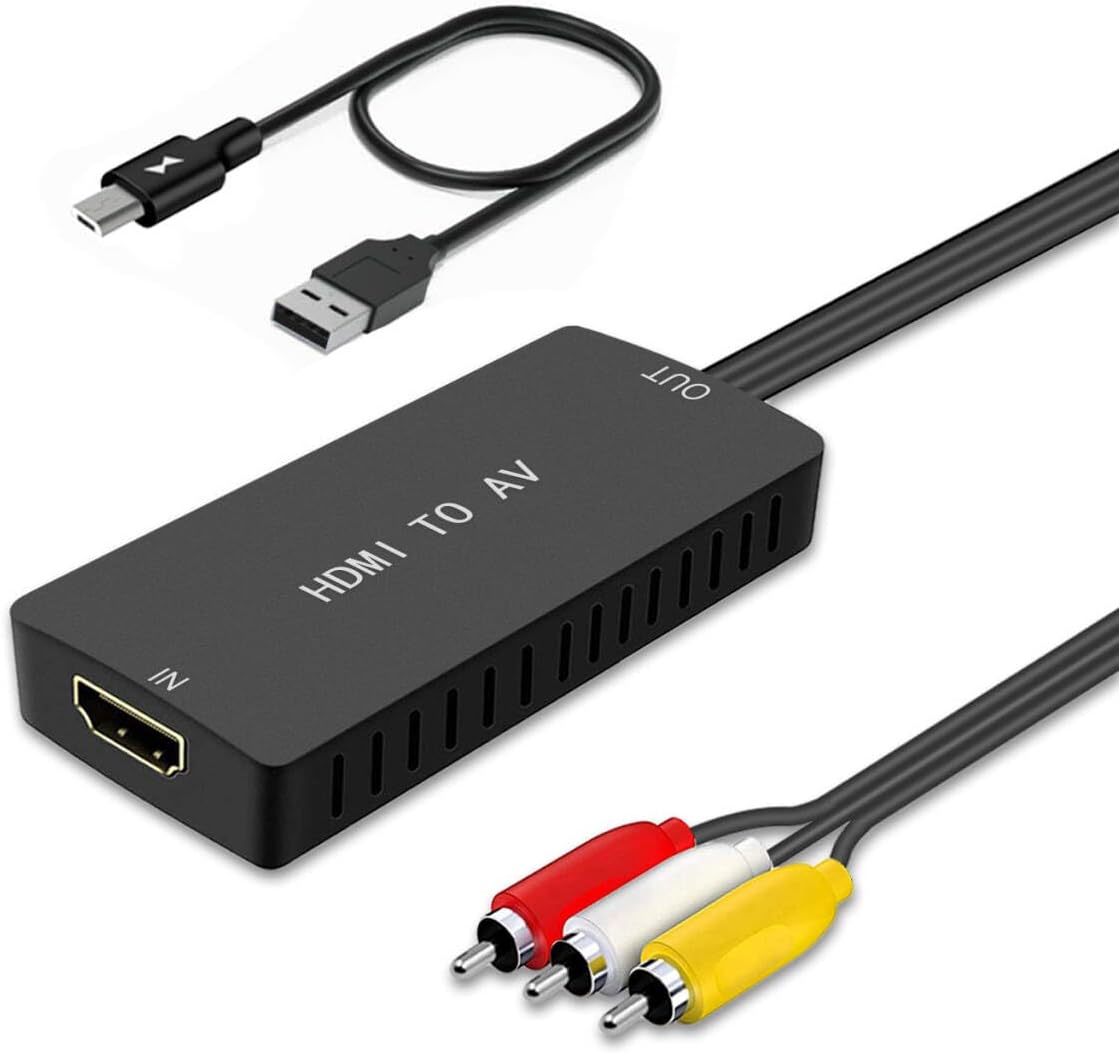
🔄 Upgrade your vintage setup with modern magic!
The LVY HDMI to RCA Converter is a compact, plug-and-play adapter that transforms HDMI signals (480i to 1080p) into composite AV output compatible with NTSC and PAL formats. Ideal for connecting contemporary devices like Fire Stick, Roku, and Blu-Ray players to legacy RCA TVs and projectors, it offers broad compatibility and hassle-free setup backed by a 2-year warranty.


| ASIN | B0814Z34XG |
| Best Sellers Rank | #58 in Video Converters |
| Brand | LVY |
| Color | HDMI to RCA converter |
| Compatible Devices | Cellular Phones, PC |
| Connector Type | HDMI |
| Current Rating | 1 Amps |
| Customer Reviews | 4.3 out of 5 stars 6,210 Reviews |
| Finish | Hdmi,Projector |
| Input Voltage | 5 Volts |
| Item Dimensions | 3.14 x 1.5 x 0.5 inches |
| Item Type Name | HDMI to RCA Converter |
| Item Weight | 0.1 Kilograms |
| Item dimensions L x W x H | 3.14 x 1.5 x 0.5 inches |
| Manufacturer | LVY |
| Model Number | hdmi to av converter |
| Number of Items | 1 |
| Number of Ports | 1 |
| Package Quantity | 1 |
| Power Plug Type | Type A - 2 pin (North American) |
| Specific Uses For Product | Camera,Dvd Player,Player,Projector,Tv |
| UPC | 750076279533 |
| Warranty Description | 2 years warranty |
| Warranty Type | 24-month warranty and friendly customer service |
D**J
Works great and DOES work for iPhone/iPad to stereo
PROS: it’s small, simple design, cost effective, and and most importantly it works. Despite the exception in the description this converter DOES connect an iPad or iPhone to a car stereo ‘A/V in’ port using the following: 1. From phone/iPad via Apple Lightning or c-usb to HDMI out (and obviously need an HDMI cable from the apple adapter) 2. HDMI cable to this converter HDMI in port 3. This converter A/V RCA outs to a female RCA to 3.5mm AV adapter 4. 3.5mm Av adapter to stereo A/V in It’s important you know the ring order of the 3.5mm plug and match with the required ring order required by stereo. It may require you to swap connectors at the converter to female rca adapter junction to get the right ring order on the rca to 3.5 mm. In my situation, my stereo requires 3.5mm jack plug to have LVGR order (ring 1- left, 2-video, 3-ground, 4-right). You can’t change the ring ground is on with the adapter so I was limited to what I could find. The only RCA to 3.5mm I found where ground was also on third ring had the following order RLGV (ring 1-right/white, 2-left/ref, 3-ground,4-video/yellow). So essentially to make the rings match what my stereo needs them to be on the 3.5 mm jack in, I attached this hdmi converter rcas as follows: 1. Converter red/left audio rca to adapter white (thus making ring 1 now left audio), 2. Converter yellow video to adapter red 3. Converter white to adapter yellow Now my rings on 3.5mm are LVGR. CONS: Just one minor con. Cables could be a bit longer and of higher quality (my only non-5 star metric). If you gave people two options, this one, and one with higher quality cables for $5-$10 more, people would probably buy the higher quality one. I would. When connected to vehicle there is engine noise and ground loop feedback in the audio that requires a separately purchased ground loop isolator device placed on the audio rca’s prior to insert to back of stereo. This kind of ground loop feedback is often due to the power source for this converter is probably from a 12V lighter outlet to USB. UPDATE: Another minor CON, having to buy another piece of equipment, a GLI ($10-20), to address the ground loop. To address the ground loop issue I inserted a Boss audio L/R audio RCA ground loop isolator (GLI) between the converter and adapter RCAs prior to insert to back of stereo and it eliminated nearly all the hiss and engine noise. Theres also a ground loop isolator available for purchase that is placed between the adapter 3.5mm out and inserts into the 3.5mm ‘av in’ on stereo but I opted for the RCA version. I imagine it too would work in lieu of the RCA GLI but I can’t vouch for it not having tried it. See photos and video
G**N
Great for analog TV'S with RCA connections
Worked very well for hooking up a Roku stick to an old portable television set!
L**.
Easy to use
So I have a television that I’ve had from probably more than five years the HDMI cables finally blew out but the TV was perfectly in good conditions so I googled some stuff up and I found this so I bought it.The TV I own is a element TV. So I will tell you that I have the Apple thing plugged into it LOL sorry I don’t know what it called . So I didn’t need my husband to help me plug in this thing or anything easy to use and this is the first day I used it so I can’t tell you long-term but I will be updating you guys in a couple months and see how long they can keep this TV going. For now I am 100% satisfied I do recommend not the greatest quality like luxury wise I guess you were saying for seven bucks or 10 I don’t remember how much it cost but this works. I’m sure this thing will Save you the money that you would have to pay for a new TV and with Covid and all going on this is a good find.
J**R
Easy to hookup
Works well
E**G
Family memories
Works like a charm.
T**N
Works Exactly As I Figured It Would
I have an old Sanyo t.v. that "has a flat screen" (not to be confused with 'IS a flat screen', Lol) and is an old school tube type that I haven't used since April 2014. I decided I could use this old Sony Blu-Ray Disc player that I had in my closet to either cast from my tablet or use Netflix and Prime that's built into it to watch t.v. in my garage. I took the converter out of it's packaging, plugged in everything to where it went. I powered on the t.v. and BDP, turned the t.v. to the correct input and it showed "No Signal". I got a little worried and powered it off and on again and unplugged the HDMI cable and plugged it back in and I made a little more progress. This time I could see the BDP home screen but it was black and white and it was tracking vertically, so I did the same stuff again and cycled through the inputs and it worked perfectly. The image is distorted but not as bad as I thought it would be and the picture is of poorer quality than what we're used to (considering how t.v.s have advanced in the past 8 to 10 years) but it's good enough to watch a sports broadcast or anything like that in the garage if there's a big game on and we want to cook and hang out outside. Considering the age and quality of the t.v., the picture is surprisingly decent. The converter is definitely worth it in my opinion.
M**E
2 of 2 units showed the attached defect
I originally ordered this converter in order to adapt my PC's HDMI output to composite. For a while the first one I received worked correctly, and I frankly had no issues with it. I was somewhat annoyed that, by default, it took in an HD signal and downscaled it rather than just acting as a 640x480 monitor, but I was able to set the resolution in Windows and display a proper signal accordingly. It's worth noting that this converter will output a 480p signal at 30fps, which should be fine for most cases. On most TVs though the output signal will still be interlaced, meaning you'll get artifacts like dot crawl. If you're buying a converter like this you probably don't care about that, but it's worth mentioning. Note that if you attempt to output a custom 640x240 progressive resolution through the converter, it will produce an interlaced half-height image rather than a proper progressive output with scan lines. On to the defect. After less than a month of use, my first unit began displaying the issue shown in the attached photo. Colors would be displayed incorrectly or swapped. The picture would also have moving distortions across it, as demonstrated by the purple band on the right side of the photo. I confirmed that this was not an issue with the TV by testing each input with a known good source. I also confirmed that the HDMI cable wasn't the source of the issue by testing via the adapter's "disconnected" screen (shown in the photo). The issue was not due to the NTSC/PAL switch being set incorrectly. I assumed that the particular unit was just faulty and used Amazon's replacement form to exchange it for a new one. When I received the new unit though, it had the *exact same issue* straight out of the box. I've now submitted a refund claim and do not plan on buying another. Overall, this thing is typical Amazon e-waste. It's likely drop shipped from some overseas supplier, and there's clearly no regard for testing or quality control. I don't know what caused the issue that I had, but frankly I don't care. If you advertise a plug-and-play solution then the bare minimum that it should do is work, end of story.
A**S
A Versatile and Affordable HDMI to RCA Converter - Perfect for Traveling!
I recently purchased the HDMI to RCA Converter, and I must say, it has exceeded my expectations in terms of functionality, value for money, and ease of use. This compact little device truly packs a punch when it comes to converting HDMI signals to composite video and audio, making it an essential tool for anyone looking to bridge the gap between modern and older home entertainment systems. First and foremost, let's talk about how well this converter fits into any setup. Its compact size allows for easy portability, making it a perfect companion for those who are always on the go. Whether you're traveling or simply need a reliable converter for multiple locations, this gem will fit snugly into your bag without taking up much space. One of the standout features of this HDMI to RCA Converter is its remarkable value for money. Compared to other similar products on the market, this one offers excellent quality at an affordable price. You won't have to break the bank to enjoy seamless connectivity between your HDMI devices and older TVs or projectors. Installation is a breeze with this converter, thanks to its user-friendly design. There are no complicated setups or technical know-how required. Simply plug in your HDMI source into the input port, connect your RCA cables to the output ports, and voila! You're ready to enjoy your favorite movies, shows, or presentations on your old-school TV or projector. Despite its affordable price, the converter doesn't compromise on performance. The signal conversion is smooth, ensuring that the video and audio quality remain intact during the process. You'll be impressed by the clarity and sharpness of the visuals, making your viewing experience all the more enjoyable. However, it's worth mentioning that the overall build quality of the converter feels a bit cheap. While it doesn't affect the performance, some users might prefer a sturdier construction. That being said, if you handle it with care and avoid unnecessary rough handling, this converter should last you a long time. Lastly, I appreciate the softness of the device. The smooth finish not only adds a touch of elegance but also protects it from scratches and potential damage. It's clear that the manufacturer has paid attention to even the smallest details, ensuring that their product stands out from the competition. In conclusion, the HDMI to RCA Converter is an incredibly useful and versatile tool for anyone who needs to connect HDMI devices to older TVs or projectors. Its compact size, affordability, ease of installation, and softness make it a standout choice in the market. Despite feeling a bit cheap, it delivers exceptional performance, maintaining the integrity of both video and audio signals. If you're a frequent traveler or simply looking for an affordable solution to connect your HDMI devices to older displays, this converter is definitely worth considering.
TrustPilot
vor 1 Woche
vor 5 Tagen