We remain fully operational. Our teams are working around the clock to ensure your deliveries continue safely.

Laden Sie die App herunter


Kundendienst
Copyright © 2025 Desertcart Holdings Limited
Laden Sie die App herunter
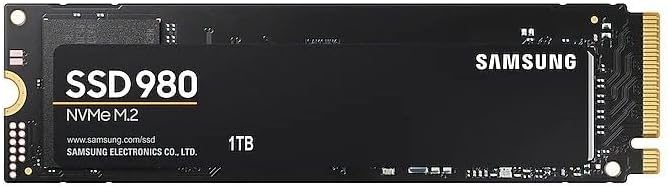




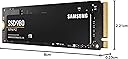
🚀 Upgrade your workflow with speed and stamina that won’t quit!
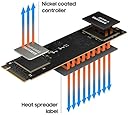
The Samsung 980 1TB NVMe M.2 SSD leverages PCIe 3.0 x4 technology and HMB to deliver blazing sequential read speeds up to 3,500MB/s. Designed for gamers, professionals, and value seekers, it combines high endurance (600 TBW) with advanced thermal controls and a 5-year warranty. Samsung Magician software enhances performance monitoring and optimization, making it a top-tier internal storage solution for laptops and desktops.


| ASIN | B08TJ2649W |
| Best Sellers Rank | #13,016 in Computers & Accessories ( See Top 100 in Computers & Accessories ) #80 in Internal Solid State Drives |
| Box Contents | Solid state drive, Quick guide |
| Brand | Samsung |
| Brand Name | Samsung |
| Cache Memory Installed Size | 160 |
| Color | Black |
| Compatible Devices | Desktop, Laptop |
| Connectivity Technology | PCIe |
| Customer Reviews | 4.6 out of 5 stars 51,982 Reviews |
| Data Transfer Rate | 3500 Megabits Per Second |
| Digital Storage Capacity | 1000 GB |
| Form Factor | M.2 |
| Global Trade Identification Number | 08806090572210 |
| Hard Disk Form Factor | 2280 Inches |
| Hard Disk Interface | PCIE x 4 |
| Hard Disk Type | Solid State Hard Drive |
| Hard-Drive Size | 1 TB |
| Hardware Connectivity | PCI Express 3.0 |
| Importer Contact Information | Samsung Electronics Pvt.Ltd., 6th Floor, DLF Centre, Sansad Marg, New Delhi-110001 |
| Installation Type | Internal Hard Drive |
| Item Dimensions L x W x Thickness | 8L x 2.2W x 0.2Th Centimeters |
| Item Type Name | Internal SSD |
| Item Weight | 8 Grams |
| Manufacturer | Samsung, Samsung Electronics Co., Ltd. Semiconductor Business Test & Package Center, #158 Baebang-Ro Baebang-Eup, Asan-city Chungcheongnam-Do, 31489 Republic of Korea |
| Manufacturer Contact Information | Samsung Electronics Co., Ltd. Semiconductor Business Test & Package Center, #158 Baebang-Ro Baebang-Eup, Asan-city Chungcheongnam-Do, 31489 Republic of Korea |
| Media Speed | 3000, 3500 |
| Model Name | 980 |
| Model Number | MZ-V8V1T0BW |
| Network Connectivity Technology | PCIe |
| Number of Items | 1 |
| Packer Contact Information | Samsung Electronics Co., Ltd. Semiconductor Business Test & Package Center, #158 Baebang-Ro Baebang-Eup, Asan-city Chungcheongnam-Do, 31489 Republic of Korea |
| Product Features | Hardware Encryption |
| Read Speed | 3500 Megabytes Per Second |
| Special Feature | Hardware Encryption |
| Specific Uses For Product | Business, Gaming, Multimedia |
| Unit Count | 1 Count |
| Warranty Description | 5 year manufacturer |
H**A
fast and durable
its good, works fast and have not found any issue or what so ever
R**H
Budget Upgrade
Ultimate superfast, only used to imagine purchasing this item. My dream came true with SBI debit card discount and the price came down to my reach. with ignorance i purchased SATA based SSD earlier with less capacity whereas this SSD is a high quality SSD used in Apple Devices. Now my very old ASUS A320MK motherboard functions with good improvement as i replaced the processor 2200G with 3400G and replaced WD120GB SSD (SATA not NVME) with this Samsung SSD. Added some Corsair Vengeance 8GB more.
C**Y
Not the best value, but good performance
Samsung recently switched their top prosumer line from MLC to TLC/3D NAND. They call it 3-bit MLC, which is exactly what TLC is. For those looking at higher endurance, the MLC-based 970 Pro is still the drive to get. Sequential writes are quicker on the old drive and a 1TB unit will have 1200TBW endurance as opposed to 600TBW for the 980 Pro. This means that durability of the 980 Pro is halved from the 970 PRO line, but it does mean that all 9xx series NVMe now have TLC. Therefore it makes very little sense to get this over the 970 EVO Plus, which runs the 980 Pro close. There are a few notable differences though. The PCIe 4.0 interface on the 980 Pro only offers an improvement in peak bandwidth. Controller optimisations are where you get drive speed differences from. Samsung moved the controller to the same 8nm node as the nVidia 30xx series GPUs, and thus offer much lower operating temperatures and better power efficiency. The 970 EVO+ in my system runs 105C without a heatsink and peak writes, the 980 PRO tops out at about 78C in the same conditions. I do use a heatsink but like to test stuff just the same. Most of the speed bumps over older lines and other drives come from the massive SLC cache, coupled with 1GB onboard DDR4 memory, you can get above 100GB of high-speed writing at a time. The new Elpis controller offers 4 times the number of queues per channel and as a result you can expect 22k IOPS at 4k QD1, which is staggering. But on the desktop, you hardly notice any of this. I upgraded to this from a Crucial P1, which is a QLC DRAM-less drive and is one of the slowest NVMe units ever created. The 980 Pro feels a bit snappier and game load times are down by about 30%, but when comparing 10 sec to 7 sec it basically makes no difference. Either the 970 EVO+ or the 980 (non-pro) would be good options. The latter has no DRAM buffer, so it begins to crawl once the SLC cache is full - after about 50GB. The EVO+ has a smaller SLC cache, but the DRAM buffer makes sure that you won't notice. The prime difference is when writing large datasets to the drive, or doing a drive fill. The price drop on the PRO line is a good move, but it comes with a stack of compromises. Samsung now has a crowded range with 4 choices between 10 and 20k, so you should choose what suits your needs the best. I feel my 970 EVO+ is actually the better value, and by quite a bit.
J**E
Boot time reduced from 15mins to 18 secs. Works fantastic. Easy to install and use.
It is easy to install. I bought this for my laptop, Asus vivobook 15, before I had Toshiba HDD which was very slow FYI. It took around 15 minutes to boot and when windows update starts laptop totally lags and not able to use anymore. After installing SSD, the boot time is 17 seconds. The packaging is good. Value for money I would say. System is not heating like before it is good. This is my initial review. Let me use it for some more time and give you a better review. (P.S they don't provide the screw to lock your SSD, you have to arrange it)
P**R
Best Quality SSD
First time it take only 10-15sec to boot. I was surprised that it just take very less time, when i clone my old ssd with new 980 1tb. Performance is good enough… 2300mbps write and read speed on standard mode(Samsung magician app). I was not tested on performance mode. Free space 931gb out of 1000gb(1TB). I face no heating issue. 38-45 Celsius on December. 980 doesn’t have dram but 980 plus have..
S**P
Best nvme ssd in its range
My pc was lagging a lot due to old 7200 rpm hdd. Even booting up took like 4-5 minutes. And daily usage became like hell. I finally decided to change that crap when it crashed and my whole pc got bugged, like whole desktop became useless. I then began searching which SSD to fit in my pc, there were many options to choose from, such as Seagate, wd, crucial and this one. I was a bit skeptical about endurance as I am a heavy pc user. While others claimed about 300 tbw of endurance, this one claims 600 tbw of endurance, which sounds promising. Only time can tell it's real endurance. And as I trust samsung a lot, so I decided to buy this despite a bit high price tag. It came in like a week. Installation was easy, just you have to incline it at 45° from the slot and then push it. Whole windows 10 was installed and desktop became ready in like 10 minutes. Apps also installed in blazing fast speeds, now my pc boots up within 10 seconds. Now chrome opens up in seconds, instead of minutes in that old hdd. It also comes with magician software, through which you can monitor this SSD. Overall, it was a good purchase.
S**.
Easiest way to Glow up your PC
I went for 980 500GB variant, as it seemed to be most value for money... especially considering my HP pavilion supports PCIE Gen 3, so going with 980Pro which was costlier and is PCIE gen4 made no sense. For those who don't know, even though Gen4 is backward compatible, it actually performs at lower read write speed on a Gen3 motherboard than an actual Gen3 SSD. I used Hasleo clone tool to clone my HDD to the SSD and continued with the GPT partition, my motherboard supports EFI booting. I had to choose the Bootfile during booting from the SSD as there was no way to change the priority, then it logged into the windows on the SSD, then I deleted and recreated the HDD windows partitions..And now the laptop directly boots into the SSD windows. Took me 30 minutes for the entire process including SSD installation, partitioning and Windows cloning. The laptop is pretty fast now. Even my download speed has increased significantly, which I didn't expect, probably because of some buffer being used by the Windows which was earlier on HDD and now on SSD. I mean, I downloaded the Samsung Magician, which is a 307 MB file, it downloaded instantly and i am using Airtel 5g mobile network. I would suggest everyone to install Samsung Magician, it not only tells you different parameter such as temperature and health of your SSD, but lets you perform different diagnostic scans. But, most importantly it allows you to do "Over Provisioning" on your SSD, which is basically allocating certain percentage of your SSD, which will increase the life of the SSD. So, if you have no space issue, you can allocate about 5-10% of your SSD which is supposed to drastically increase the performance and health of the drive. I got the 500GB, so I allocated 10%, which decreased my drive capacity by 46GB.
K**A
i wana replacement
its not working i mean no detected , work for only 18 months..
TrustPilot
vor 3 Wochen
vor 1 Monat