

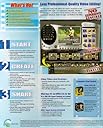
Video Studio 5.0
Beschreibung
With VideoStudio 5 you can easily edit your videos without any prior experience. Capture, organize, and trim your clips. Add effects, titles, and transitions. Build audio tracks with CD music, narration, or MP3s. Output the final product to a camcorder, video Web page, or CD-ROM. The guided step-by-step creation process will have you up to speed quickly. VideoStudio 5 features drag-and-drop control for easy video creation. Storyboard and Timeline views allow for enhanced workflow. Over 100 adjustable transitions, such as dissolves and wipes, create seamless and visually appealing edits. Use customizable video filters for stylish effects, and touch up flawed video with contrast and color adjustments. Add professional-looking titles, including 3-D titles, and graphics. You can also have unlimited scrolling titles for end credits. When you're finished creating your video, there are numerous options for sharing your work with others. You can output directly to a DV camcorder or VCR, video Web page, or electronic greeting card. Popular Web video formats are supported, including QuickTime, RealVideo, and Windows Media. If you have hardware that supports MPEG-2, you can edit frame-accurate MPEG-2 files, or make DVD-compliant video files for DVD-ROM.
Rezensionen
A**D
R**E
B**S
J**K
D**H
Häufige Fragen
TrustPilot