Buy anything from 5,000+ international stores. One checkout price. No surprise fees. Join 2M+ shoppers on Desertcart.
Desertcart purchases this item on your behalf and handles shipping, customs, and support to Austria.
🔒 Secure Your Space, Elevate Your WiFi!
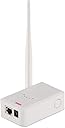
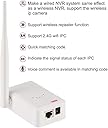
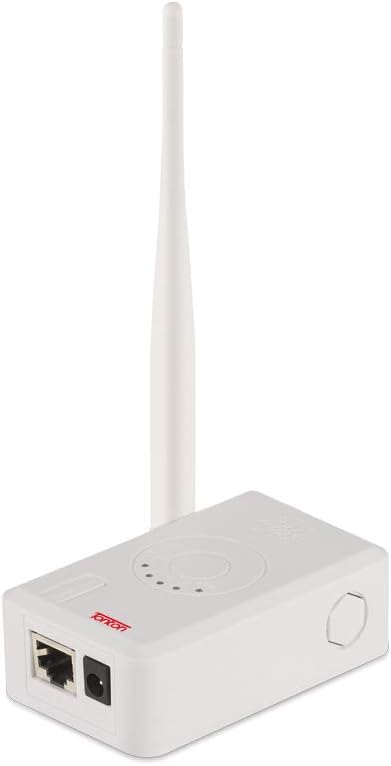
The Tonton WiFi Range Extender enhances the connectivity of your wireless security camera system, offering a robust 330ft range, easy plug-and-play installation, and compatibility with various devices, all while maintaining a sleek and discreet design.
| ASIN | B07L56NBLV |
| Best Sellers Rank | #153 in Surveillance DVR Kits |
| Brand | Tonton |
| Built-In Media | Instruction manual |
| Color | White |
| Compatible Devices | Security Camera |
| Connector Type | RJ45 |
| Customer Reviews | 3.5 out of 5 stars 207 Reviews |
| Data Transfer Rate | 2.4 GHz |
| Frequency | 2.4 GHz |
| Frequency Band Class | Dual-Band |
| Frequency Bands Supported | 2.4 GHz |
| Item Weight | 6.5 Ounces |
| Manufacturer | Tonton security |
| Mfr Part Number | IPC-R2404 |
| Model Number | R2404 |
| Range | 330 Feet |
| Special Feature | WPS |
| Special Features | WPS |
| UPC | 654913789325 |
| Wireless Communication Standard | 2.4 GHz Radio Frequency |
| Wireless Compability | 2.4 GHz Radio Frequency |
A**B
Extend security camera distance with a repeater
Set up Repeater (Ton Ton) Amazon purchase to Security camera #1 and NVR recorder 1-20-26. - Go to Video Manager on a "Firstrend Security Camera System" by right clicking on the TV screen monitoring all 4 cameras or just 1. Then left click on REPEATER button on Video Manager window. Repeater window opens and displays NVR left side, Channels 1-8 in middle of display, with + signs on rightside of channels. A Connection Information box to the rightside displays Channel and Signal strength "30 - 42 ". Channel #1 shows highest strength "40" when done because of Repeater boosting signal. - Push + sign on rightside of ROUTER button and a button with yellow line around rectangle with arrow pointing down on left side and #1 showing on rightside in rectangle with a faint hightlited background to show that I can click on drop-down arrow and choose 1 - 4 channels then click the one I want to connect with. After clicking #1 Channel, a #1 CH will display inside of a button that will be on the rightside of the + sign. - Now pare the NVR to the repeater, it must be no more than 1 meter away, by pressing the reset button on the repeater 3 seconds then release, you will see the NVR light on the repeater flash fast (paring), then go to a steady light (Connected). Then you will see a green dashed line connect from NVR to the ROUTER button, after you REFRESH TV screen. - Now have camera less than 1 meter away from Repeater and press reset button for 10 seconds then release, and camera light on repeater will flash fast (paring), then goes to a steady light which shows the Repeater and Camera are connected (pared up). Then you will see a green dashed line from the NVR button, to ROUTER, thru the + sign, and connect to the CH1 BUTTON (rectangle). You have successfully connected the NVR, REPEATER and the CAMERA. The TV screen should display the #1 Channel (CAM1) clearly and signal strength should be the highest out of the 4 channels I have connected up. - Each time you make a change on the Configuration of the network you must refresh the TV screen by clicking the REFRESH button to display the changes on the TV. - Carefully wipe the lenses on the camera with a clean paper towel and lense solution to remove any dirt or build up and TV display will look MUCH clearer, reducing glare from lights. Manual book instructions are difficult to read because of Chinese word composition. I wrote notes in my own words & the set up process was much easier. The FIRSTREND SECURITY CAMERA system I purchased May of 2019 from Amazon is still working very well and worth the money. The channel #1 just needed a boost from the Repeater since it is furtherest from NVR. Both are easy to set up once you read thru instructions and reference some You Tube videos if needed. Playback from NVR is good for 2 weeks since I run it continuously. I find this more reliable then motion triggering when to record. INFRARED LIGHT capability at night is better then expected and have helped several neighbors with security problems at night. Just having the cameras in view of the public is a good deterent to would-be criminals. Even a real-looking fake camera is a good deterent. 🤔😅
D**N
Will not work for my wireless camera
I gave a one star for two reasons. 1) the Customer Service telephone system. The info gives a west coast number. But in reality Customer Service is in China. The phone transfers to a China number but It just rings. Course I am trying to time to California time not China. There was no voice mail to give direction. 2. Product description: was able to finally get information that this product requires a network connection on the wireless camera. Not sure how many wireless cameras have this dual capability but mine does not. This should be stated and not say easily connects to wireless camera. I would give the Customer Service person (Abby I think) high marks. Once I was contacted through a text she helped me understand that this would not work for my system. The Amazon returns system was painless.
G**N
Instructions aren't great but product works great.
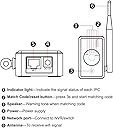
As other reviews have stated, the instructions aren't fantastic. And they kind of say the same things in several places in them but the process is pretty straight forward and issue free as long as you follow it in order. Connect the repeater to a camera you want to extend with the cable, hold the pair button for 3+ seconds, it will pair to the camera. Unplug it, take the repeater and plug it into the NVR with the cable, hold the pair button for 10+ seconds, and select matching mode in NVR, it will pair to the NVR. Then I put the repeater in between desired camera and NVR. and plugged it in it came on and displayed that it had connection with the camera and NVR. Then I went to the NVR and right clicked and hit "wireless add" and it pulled the camera right up. Then back out, right click, go to video manage, then repeater, it should list RP1-auto, click the "+" sign, and add the channel you want to go through the repeater. For me, the "auto Repeater" check box in the repeater dialogue screen had to be unchecked. To give an idea of layout. My NVR is in the bottom level of a 1200 sqft/floor split level home on one side of the house, and the camera is on the outside of the attached garage which is on the other side of the house. And signal went from 1-2 bars, to a solid 3 bars. For the price of this repeater compared to others, I would say it's definitely worth buying.
J**N
All RJ45 connectors are not the same
Not all routers / extenders follow 802.11n/ac standards. Read your WiFi system's specs carefully before you purchase this extender because some systems are proprietary systems and are designed to use only certain extenders. This extender can be used with an OHWOAI Surveillance Camera and probably just a few others.
L**W
Good repeater
It is working great, exactly as advertised. Paired up with a competing brand with no problems. My only issue was with Amazon fulfillment. It was advertised as prime, 2 day shipping. And it took seven days to get to me. Shipped next day via UPS GROUND.from California to Washington State. Amazon was not very helpful when I brought it to their attention. Sunday and memorial day accounts for 2 days, but it should have shipped 2 day air.
I**N
EXCELLENT!
I just connected this … set it as a repeater and WOW!! My cameras signal went from frozen to FULL BARS !! The downside is that if you’re using it wirelessly as a REPEATER for IPC wireless cameras, you can only link TWO cameras on it… not the “up to 4 cameras” advertised capacity. If you use it AS A ROUTER (connecting this with Ethernet cable to the NVR) then you can connect 4 cameras WIRED. I needed it wirelessly so I used it as a REPEATER therefore I was only able to link two cameras to it.
A**X
Don’t do it
What a load of useless garbage
M**R
Made my wifi camera system usable!!
Prior to purchase of this extender I had four new wireless security cameras with a signal weak enough to keep dropping them offline. This made the overall system less than reliable or useful even though the camera system itself was excellent. I tried adding a higher range antenna to each camera but this did not noticeably improve the signal. I then purchased this extender, and the addition of this product now allows me to get consistent video from all four cameras without degrading any of the camera images or night performance at all. I highly recommend this product if your wireless video system needs a boost - it is a low cost and effective option with excellent technical support via email from Tonton staff as well.
Trustpilot
2 months ago
3 weeks ago