🎮 Elevate Your Gaming Aesthetic!
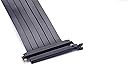
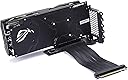
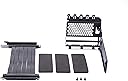
The Phanteks PH-VGPUKT_02 is a universal vertical GPU bracket designed to showcase your graphics card, such as the NVIDIA GeForce RTX 3090, while ensuring compatibility with PCI-E 3.0, 2.0, and 1.0. With an easy installation process and a robust powder-coated steel construction, this bracket is perfect for gamers and modders looking to enhance their PC's visual appeal.

| ASIN | B07MW73HTJ |
| Antenna Location | Gaming |
| Best Sellers Rank | #6,471 in Computer Graphics Cards |
| Brand | Phanteks |
| Built-In Media | 220mm Riser Cable |
| Compatible Devices | Desktop |
| Customer Reviews | 4.4 out of 5 stars 3,646 Reviews |
| Display Resolution Maximum | 3840x2160 |
| Global Trade Identification Number | 00886523001508 |
| Graphics Card Interface | PCI-Express x16 |
| Graphics Coprocessor | NVIDIA GeForce RTX 3090 |
| Graphics Description | Universal vertical GPU bracket compatible with PCIE 3.0 x16, designed for showcasing graphics cards such as NVIDIA GeForce RTX 3090. |
| Graphics Processor Manufacturer | NVIDIA |
| Graphics RAM Type | DDR5 SDRAM |
| Graphics Ram Type | DDR5 SDRAM |
| Item Type Name | Bracket |
| Item Weight | 430 g |
| Manufacturer | Phanteks |
| Mfr Part Number | PH-VGPUKT_02 |
| Model Name | PH-VGPUKT_02 |
| Model Number | PH-VGPUKT_02 |
| Recommended Uses For Product | Gaming |
| UPC | 886523001508 |
| Unit Count | 1 Count |
| Video Output Interface | VGA, HDMI, Display Port, DVI, USB-C |
| Video Processor | NVIDIA |
| Warranty Description | 2 year manufacturer |
G**Y
perfect mount for the right case
CoolerMaster’s was stupidly blocky. CableMod’s moved the entire rig farther towards the front. Phantek’s was just right for me. *In order to use this mount, your case must be one with an open back design, with no bars crossing the PCIe slot area.* Installation is simple enough: 1. extension cable is screwed onto the mount. 2. gpu slots into extension cable and is screwed onto mount. 3. cable is plugged into mobo and the mount is plugged onto the case like a regular gpu. 4. secure mount using the 3 thumbscrews. The mount uses up 6 slots, and holds my 2.5slot MSI Trio without tipping over on flat surfaces. When installed in my Inwin 103 case (with 7 slots), I had just enough room to fit a regular 120x25mm fan underneath to support it. The metal finish looks good and doesn’t feel cheap, and came with a couple of adhesive pads to protect the smooth bottom of the mount (I wasn’t too worried about it scratching anything so I left it aside). I have no way to test if it can hold itself up without issues in the long run, but for now my card is safely secured with no sign of play. I bought this with this intention to bypass my case’s 305mm gpu-length limit while using a 240mm side-radiator. I was able to overcome that limit and use my 330mm card, whilst also setting up the radiator in push/pull orientation. Good mount.
_**_
Works perfectly in Lian Li O11D-Xl - NO MODIFICATIONS REQUIRED
First off, if you are on the x570 chipset you MUST switch your pci slots to gen 3 prior to install, or your system will not detect your gpu. This was the only hiccup I encountered. I wish it mentioned this in the documentation for the mount, because I was briefly concerned the included riser cable was bad. However after some googling i figured out the issue, switched it to PCI 3.0, and then it worked fine. So I purchased this for my O11 Dynamic XL despite a few reviewers saying they needed to bend or cut some of the metal on this mount in order to get it to fit. That is NOT the case - maybe Phantek revised the design recently, but this installed perfectly - no issues at all with the fit. See pictures. All in all, this is a fantastic product, and gives your build a really great look, and the price is about half what Lian Li tries to charge for their O11D-specific vertical gpu mount.
T**O
Works very Well
I used it with a Lian Li Lancool 2 case and an MSI GTX 1650 S graphics card into a PCI-E x16 version 3.0 slot. The reason I wanted a GPU riser bracket for my case is because I had obstructions in the way of putting a graphics card this long onto my motherboard. The reason I purchased this Phanteks GPU bracket is because it was over $15 cheaper than the case brand one. It holds my dual fan graphics card very sturdy. It blends in very well with the case. It includes the screws to install it and was packaged very nicely along with the riser cable in a large box with plenty of foam protection and an instruction sheet on top. It was simple to install. This bracket lifted my graphics card up and over the obstructing devices. It also does make my PC look pretty awesome with the graphics card turned sideways behind the glass door like that. There is plenty of room, about 3 inches, between the graphics card fans and the glass side of the case. I am very happy I ordered this GPU bracket the same time I ordered my new graphics card - otherwise I would've been waiting a couple more days to be using it. I also saved some cash by going with this Phanteks brand instead of the case brand. I am happy with this Phanteks product. All that being said, isn't it something how a GPU bracket can cost more than half the price of a large PC case with hinged lower doors, hinged glass doors on both sides, 3 fans, LED lighting with controller, cables for front panel connections, trays, panels, drive cages, etc?
D**G
My long journey has come to an end
Bought for the Lian Li o11 Dynamic. After trying at least 3 other riser cables and solutions for vertical GPU mounting (all of them failing spectacularly for one reason or another) I found this treasure. This one being $30 is 50% cheaper than the other solutions I've tried. Pouring over the reviews, I was wary that (seemingly) this device required some hacking in order to fit in the o11 Dynamic. I'm happy to say that as of Dec 2019, I think Phanteks may have silently revised their design. Mine did not require any cutting or sawing to fit into the o11 Dynamic, it just worked. Granted, it's not easy to install--you need to mount the riser to the bracket FIRST... then the GPU... THEN put the bracket on the case, which isn't the easiest thing to do. Additionally, the PCIe riser cable is slightly too long, so it bends unnaturally and is subject to an uneasy amount of pressure. Last, the quality of the metal is a bit flimsy for super heavy GPUs (I run an AORUS RTX card, and those are triple slot MONSTER heavy cards). You can add some padding beneath the bracket to prevent sagging or bending of metal. ALL OF THOSE THINGS ASIDE... This solution is my dream. It works and the result is glorious. In addition to the above, I found myself pleasantly surprised. With a vertical GPU mount, I found my GPU temps dropped 3-5 degrees C. I think this is because the vertical orientation allows the GPU to dissipate hot air more easily upward into the case, rather than it getting trapped underneath.
J**.
best vertical mount mod on the market
i build gaming systems for a living, and out of the many thousands of rigs ive put together since the late 90s, this is one of the coolest, simplest mods ive seen come down the pipe in a long time. i ordered this for my personal gaming rig, which is housed in a white Lian Li PC011 Dynamic, and my graphics card is a fat and heavy MSI Gaming X GTX 1080. once installed, it holds that gpu pretty well, tho i wouldnt want to ship it installed like that. installation in my case, with the rest of my entire system still installed, only took a few minutes. i simply removed my gpu, any extra pci slot covers and screws. then i screwed the REALLY NICE pci-e ribbon extension to the base of the mount, slotted the mount into the back of the case, and screwed in the BOTTOM thumb screw. i did that for a reason. next i slotted my big heavy graphics card into the base, and i let the whole assembly sag a little (swiveling on that bottom thumb screw) so that i could put the 2 screws in to secure my gpu. once those were tightened in, i slid it all up into place and tightened the other 2 thumb screws, and BAM, vertical gpu. it looks excellent, and really changes the whole look of my case. do take note however, if your case has ribs in between the pci slot openings in the back, about 4 or 5 of them will need to be cut out so that it is a fully open hole. my case didnt need that, so it went in super quick. id say from start to finish, it was about 15 minutes total. and now im typing this review on that system. overall, big thumbs up for Phanteks for this simple and fairly cheap mod. they are really becoming one of the better companies to offer pc customization parts, and without breaking the bank. well done
W**T
The best generic option for vertical GPU mounting
Pretty easy to install, you do need to give some thought to how it will connect to your motherboard and which way you're going to bend the cable. I mounted my GPU to the bracket first, then plugged the extension cable into the PCIe slot while holding the bracket nearby, then positioned it and tightened the screws down. It's easier to install the bracket by itself, then put the GPU in, but the way my case was designed made that next to impossible. So yeah, just do some test fittings and make a plan. The metal is not at all "flimsy" as some reviews have stated. Sure, you could bend the crap out of it if you wanted to, but you can do that with any panel on your case too. Once the GPU is screwed into the bracket, and the bracket is then screwed into the expansion slots of the case, it's very sturdy. They could have made the base where the connector sits longer and/or wider, but I actually like it because it's no bigger than it needs to be. It leaves the bottom of the GPU open so any fans you have right underneath aren't totally blocked. I wish they made a white version since I have a white case, but the bracket mostly disappears when installed. And thanks to the cable and connector being separate pieces you could just take the metal part and spray paint it if you want. Overall a great product at a great price. * Update * Bought a second one for my new build and it didn't work. With some research I discovered if you have an X570 motherboard with a PCIe 4.0 GPU it won't work. You have to set the PCIe slot you're using to 3.0 and then it works. Not an issue now since none of the cards on the market can max out the 3.0 bus anyway, but hopefully they make a 4.0 compatible cable soon.
D**A
Very good gpu bracket, me and son are very satisfied!
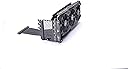
These are very nice vertical gpu bracket for the price! First i bought one for my build ( first and second pic ) and then ordered another one for my sons build because i was convinced that its good and just works perfectly fine with no performance degradation at all. I ran the 3d mark benchmark for 2 hours straight back to back and there was no issues at all. I didnt feel like doing it for more than 2 hours i dont have time for that.lol not all case will accomodate this bracket, so make sure check your case before you order one. I had to cut all of the skinny steel parts where the covers for the horizontal gpu rear end sits on the back of my sons case (3rd pic) because they were not removable like my cyberpower pc case. I use phanteks enthoo for his build. I wish the gpu to mobo cable were thinner and little less stiff though, because from the way they looks and feel, they seems to be pushing the gpu away from the mobo, but so far mine and my sons pc are still works great.
A**R
This doesn't work 9 times out of 10!
I have been building computers for about 15 years now and never have I had something so stubborn and useless that was so cool at the same time. I tried this in two different cases, both required modification including cutting steel to make them fit and the cards be accessible. It is NOT universal, it's just as "universal" as taking a door from a submarine and trying to install it as your back door. Yeah, sure, with an engineering degree and some welding skills you can make it work! So dumb! As far as functionality, it's USELESS! I've tried this on two boards, one that is less than a year old and one that is brand new. In both boards (and using two different verified working video cards) I was unable to make the cards installed into this adapter actually output video to a monitor or a television. That's not to say it doesn't work ever, it did output video 4 or 5 times out of about 50 boot cycles. Randomly, with no rhyme or reason, it would suddenly output video and then on restart it just wouldn't do it again. I thought this was an issue with the riser, I swapped it for a new one and same issue. I thought it was the card, swapped it, same issue. Board?! Swapped it! SAME ISSUE! It doesn't matter what slot this is installed in, what model of board, CPU, memory, etc. It doesn't even matter if it's mounted or laying down! Sometimes it works, all the other times it does not. USELESS! I wrote this review to help people understand that from my perspective this is a piece of garbage. I've exhausted my ability to care about this brand and style of adapter for now. I really want to find one that works and truly is universal but after so much trouble with this one and knowing that the new PCIe 4.0 cards will only be outputting 3.0 (from what I've read anyway) using this adapter it makes me extremely hesitant to bother with any of them right now. Cool factor when it's installed, 10/10. Everything else, -10/10. Please do not spend your time messing with this adapter. You've been warned!
O**R
Veel moeite ervoor gedaan eindstand werkt niet
Ik heb veel moeite ervoor moeten doen waaronder delen ervan zagen en of snijden om hem in mijn case te laten passen in de Lian li mini case eindstand werkt het gpu vertical mount niet eens. Ik ben erg teleurgesteld en ga zeker mijn geld terug vragen voor een product dat defect is. Helaas is dit ook gebeurd tijdens een compleet nieuwe computer beeld en hierdoor heb ik vertraging . had graag gehoopt dat alles in 1x ging maarja.
だ**ん
MASTER CASE H500Mなど比較的新しいケース(後ろのスリットが全部取れるやつ)にはピッタリ 非常にお勧め!
これいいです。もともとH500Mは縦置き仕様のケースでしたが、AORUS RTX2070では2.7くらいのスロット幅なのでガラス面とファンが数ミリしか空きません。これ以外の商品で元のスロットから内部側へ少し離れて取り付けるブラケットもありますが、ケース内での見映えや配線がかっこ悪くなります。その点この製品であれば元のスロットを活用できますので、縦置きしたいならケースを変えてでもこれは購入価値あります。マザボはAUROS X570のPIE-e4.0仕様ですが、もきちんと3.0で自動認識するので、付属のライザケーブルでも問題なくARGB機能も生きています。ベンチマークは特にやってませんが、CoD WW2のフル解像度でも何らプレーには問題なしでした。ライザケーブル自体は少し硬いものの、スリットが入っており、マザボからのグラボ接続では柔軟性の問題なしです。※初回の立ち上げのみ、ビデオカードエラー出ましたが、リセットした後は問題なく認識、動いています。ブラケットはしっかり、本体側にネジ止めすれば耐久性も問題ありません。
A**I
Excellent, un seul point noir
Franchement excellent, si je dois donner un.mauvais point ce sera celui ci: Attention, les emplacements des vis pour le fixer sont surélevés, je ne comprends pas cette decision, on galère a essayer d atteindre les trous du boitier a cause de ces espaces en plus, j'ai mis pres de15mn a essayer de faire correspondre les 3 vis a la fois, sinon j aurais eu que 2 sur 3 vis de fixées. J'ai du modifier mon boitier moi même pour l installer, attention à ceux qui ne sont pas doués en bricolage, c etait éprouvant meme pour moi, donc au pire faites vous aider par qqun de compétent avec de bons outils. Sinon ce produit est pratique, peu cher, je n ai pas encore testé les perfs apres installation mais le cable semble de qualité.
O**A
Perfect
I ordered it last night and it delivered to me today. It was perfect for my ( steampunk sp8 case) and i didnt need any modification just install it and run. There is no temperature or performance difference at all. Thanks
C**M
Lian Li DXL ve RTX3080 tam uyum
Lian Li DXL kasa için aldım EVGA RTX 3080 FTW3 Ultra ile montajı yaptım. Uyumlu ve güzel oldu tek konu kablo PCI-e gen 3 takmadan önce bios ta gerekli düzenlemeyi yapmanız lazım
Trustpilot
1 month ago
1 week ago