


Desertcart purchases this item on your behalf and handles shipping, customs, and support to Austria.
🖱️ Elevate your workspace with precision and style—because your desk deserves the best.
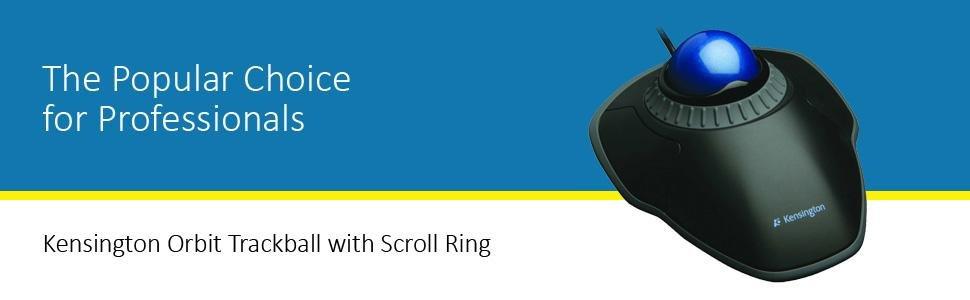
The Kensington K72337US Black USB trackball mouse offers ambidextrous usability with a compact design that saves desktop space. Featuring a smooth scroll ring for quick navigation and wired USB connectivity, it’s compatible with both PC and Mac systems. Its ergonomic wrist support and plug-and-play setup make it a practical, comfortable choice for professionals seeking efficient, reliable input devices.



| ASIN | B002OOWB3O |
| Antenna Location | Office |
| Are Batteries Included? | No |
| Are Batteries Required | No |
| Brand | Kensington |
| Brand Name | Kensington |
| Button Quantity | 2 |
| Colour | Black |
| Compatible Devices | Personal Computer |
| Connectivity technology | USB, Wired |
| Customer Reviews | 4.3 out of 5 stars 5,488 Reviews |
| EU Spare Part Availability Duration | 5 Years |
| Enclosure Material | Plastic |
| Global Trade Identification Number | 00085896723370 |
| Hand Orientation | Ambidextrous |
| Hardware Platform | personal computer |
| Item Dimensions L x W | 20.3L x 15.2W centimetres |
| Item Weight | 0.65 Pounds |
| Manufacturer | Kensington |
| Manufacturer Part Number | K72337US |
| Minimum Required Operating System Version | Windows Vista |
| Model Name | Orbit Mit Schnörkelring |
| Model Number | K72337US |
| Movement Detection | Optical, Trackball |
| Movement detection technology | Optical , Trackball |
| Network Connectivity Technology | USB, Wired |
| Number of Batteries | 1 AA batteries required. |
| Number of buttons | 2 |
| Operating System | Windows, macOS |
| Pattern | Mouse |
| Power Source | Corded Electric |
| Product Features | Trackball |
| Product Finish Type | Glossy |
| Range | 30.0 feet |
| Special feature | Trackball |
| Style Name | Wired USB |
| Theme | Computer |
| UPC | 016622822432 777785625413 809385660928 803982770622 085896723370 |
| Unit Count | 1.0 count |
C**R
Practical and comfortable
Great to use for both hands. Very useful wheel to scroll The removable Little wrist extension ramp means there is no need to use extra padding and supports the wrist
G**T
My third one
I have arthritis in my thumbs and this is much more comfortable to use. I have had one for over 4 years, this is a replacement for the previous one which stopped working. I have another at the office but without the scroll ring (I recommend the scroll ring version) They have rocketed in price since I bought the first for £26, and I would have hoped it would last longer. However, I love it and would struggle to find another style that was as comfortable.
V**N
Kensington mouse
Comfortable to use but the left click mechanism on the mouse is loud and draws attention to others around you. This is unfortunate as its a pricely product.
T**H
Great for Disabled People
As a disabled person, I use this while I'm lying down. This allows mean to use a laptop.
A**S
Very easy to use.
I've used Microsoft trackballs before but no longer available so I was forced to look for an alternative. This one works fine and fits my hand well.
B**.
better.than a mouse.
The best a man can get.
G**K
Excellent device - silly price
This is an excellent trackball - don't cheap out and get one without a scroll ring (unless you never scroll), but don't pay this much either. Same thing on amazon.co.uk for £20.99, or amazon.com for $31.12
M**N
Figure out drag and drop and you're good to go. Works out of the box for Ubuntu 15.04
Solved my problem. New laptop, touchpad was interfering with typing. I bought an optical mouse at Microcenter. Made the mistake of buying a cheap mouse. I went there specifically thinking trackball but came back with a cheap optical mouse. Decided to go with this device because it's well rated. Ordered it. Received within a few days with standard shipping. Plugged it in using Ubuntu 15.04 no problem. I did not anticipate the adjustment required for drag and drop. I'm left handed. After switching the buttons I can click and hold my primary mouse button, drag and drop, no prob. I did spend some time looking for an app to provide click to drag because system mouse settings do not provide it. I found that switching the mouse buttons makes it easy to hold down the primary button and drag back and forth, up and down to my heart's content then release the button when I get to where I want to be. I actually like drag and drop with the trackball more than the mouse now that I've used it a bit because with a mouse you're still holding the mouse when you release the button which can incur additional unintended movement. With the trackball, once you lift your finger off the ball the cursor stays put. The scrollring is awesome. With a 13" laptop there are concessions with the keyboard that required a function key to scroll with the keyboard. The cheap optical mouse had a scrollwheel which was tedious to use. The scrollring on the trackball is precise, zippy and easy to use. I was thinking I might be missing something with two buttons instead of three but a third button to paste doesn't matter. With my setup I can select text with the trackball, release my primary button, click again and drag to a new location while holding the button, release to paste text at the cursor location. Most likely drag and drop 101 but I'm very pleased. I decided on the wired trackball because any device, wireless or not, will occupy a usb port. My conclusion is, can't beat it for the money. Great value. Does everything I need it to straight out of the box. I hope my review saves someone else who may be moving over to a trackball some of the time I put into looking for click lock to drag solutions. You don't need 'em. Just configure the device so you can comfortably hold your primary button while articulating the ball. 9/7/2015 Update. I bought my trackball used. After using it for awhile I noticed that it would sometimes catch inside its cradle causing the cursor to jump. The ball had a small scratch in the plastic. Using a fingernail emery board I smoothed it out then polished with metal polish. Now it's perfect.
A**O
Very comfortable.
They say these things have a learning curve, but that's nonsense. It's instantly a massive improvement over using the mouse. Much more comfortable, much more accurate.
A**H
Muito bom
Muito bom mesmo. Sou canhoto, e estou acustomado com O Marble Mouse, que usei uns 10 anos. Esse é mais largo, e um pouco mais dificil coordenar os dedos com botao/bola para selecionar texto. A bola roda super bem e a roda de scroll é otima. Funciona no Windows 11 sem fazer nada. 2 ressalvas: 1) Tamanho maior que Marble Mouse e deslizamento perfeito, sem fricão da bola, dificulta um pouco a precisão, cordenando dedo anel e indicador (sou canhoto). Mas nada que não da p/ aprender com tempo. 2) Essa parte para apoiar a mão... É muito confortavel com, 10x melhor que sem. Pulso fica reto. Mas... a fixação é meia boca. Imaginei algo mais... firme. Não sei porque não fabricaram o mouse junto com a peça. Funciona, e depois de colocar não vou usar sem, mas estou imaginando que, no futuro, vou ter que colar ela para uma fixação mais permanente. Mesmo com as ressalvas, 5 estrelas, É muito bom.
C**N
commentaires
Rien à rajouter
V**A
Muy bueno pero no es para cierto tipo de trabajos.
El Trackball para labores cotidianas es destacado, preciso, se mueve como la seda, el scroll es muy bueno, pero yo encontré 2 inconvenientes. 1.- Tengo una PC de la empresa que tiene restricciones de administrador y por políticas de seguridad, no te permiten instalar controladores o software ajenos a los que dichas políticas permite. Al instalarlo en esta PC no lo reconoció, esto seguramente a lo antes mencionado, y la compra fue pensada para utilizarlo exclusivamente en esta PC, ya que al ser USB debería tener una latencia muy baja comparado con el wireless. 2.- Lo intenté probar en mi laptop y ahí reconocí todas sus bondades. Pero tiene un pequeño gran inconveniente. Yo ocupo demasiado seleccionar con click izquierdo y moviendo el mouse, puede ser texto, pueden ser celdas de excel, notas, etc. Es el pan de cada día en mi trabajo. Esta acción en el Trackball no es cómoda, al ser tan rápido en su respuesta, incluso bajando la configuración de velocidad, hace que cuando seleccione texto, celdas, etc, cometa muchos errores, porque en lugar de utilizar el índice como lo hacía en el mouse convencional, debo utilizar el pulgar y con el índice o dedo medio, seleccionar lo que necesito. Al ser tan sensible el Trackball la selección que se hace ya no es precisa, se mueve demasiado por que cualquier roce accidental de la pelotita ya te cambió la selección que habías hecho y tienes que hacerlo de nuevo. Esto hizo que en muy poco tiempo de probarlo me terminara doliendo casi igual la muñeca que con un mouse convencional. Esta es mi experiencia, definitivamente me lo quedaría si fuera Wireless y para mi uso personal, pero para lo que lo necesitaba, que es trabajo de oficina en casa, no es lo que estoy buscando. Iba a aventarme un "tiro" con los de sistemas para que me permitieran instalar el controlador para usarlo en la PC del trabajo, pero al tener esa mala experiencia en lo que es seleccionar con el trackball, he decidido mejor devolverlo y buscar algo que se adapte más a lo que requiero. Pienso comprar uno wireless en el futuro pero para mi laptop personal, donde esta acción de seleccionar no es para nada recurrente, es decir para cosas sencillas, para eso el trackball es perfecto, pero para mi trabajo definitivamente no.
Trustpilot
1 month ago
1 week ago