


🌟 Elevate your workspace with panoramic clarity and seamless multitasking!
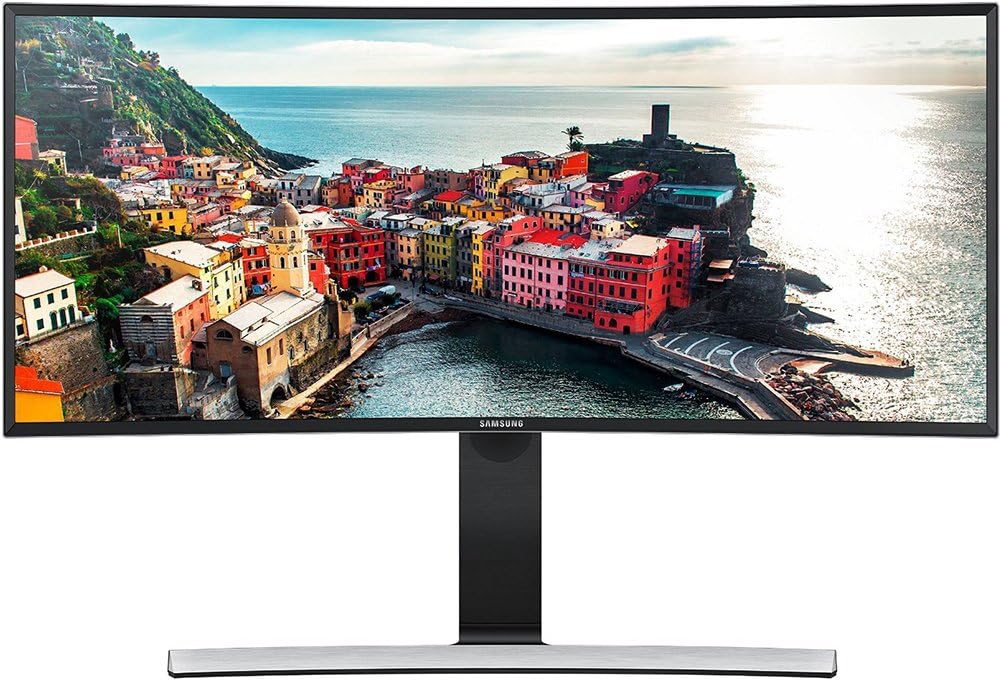
The Samsung 34-Inch Curved Screen LED-Lit Monitor S34E790C features a 21:9 ultra-wide curved panel with a stunning 3440x1440 WQHD resolution, designed to reduce distortion and enhance immersion. It includes an ergonomic height-adjustable stand with tilt, a 4-port USB hub for easy peripheral access, and Picture-by-Picture functionality for efficient multi-source viewing, making it ideal for professionals seeking productivity and style.


| ASIN | B00Q7VCSGU |
| Adaptive Sync | FreeSync, G-Sync |
| Additional Features | Curved, USB Hub |
| Aspect Ratio | 21:9 |
| Best Sellers Rank | #636,267 in Electronics ( See Top 100 in Electronics ) #12,234 in Computer Monitors |
| Brand | Samsung |
| Brightness | 300 cd/m2 |
| Built-In Media | Height Adjustable Stand With Tilt Functionality, Samsung 34-Inch Curved Screen Led-Lit Monitor |
| Color | Black High Glossy |
| Connectivity Technology | HDMI, USB |
| Contrast Ratio | 3000:1 candela |
| Customer Reviews | 4.1 out of 5 stars 234 Reviews |
| Display Resolution Maximum | 3440 x 1440 Pixels |
| Display Technology | LED |
| Display Type | LED |
| Global Trade Identification Number | 00887276105840 |
| Hardware Connectivity | USB |
| Has Color Screen | No |
| Image Contrast Ratio | 3000:1 candela |
| Item Weight | 22 Pounds |
| Manufacturer | Samsung IT |
| Model Name | LS34E790CNS/ZA |
| Model Number | S34E790C |
| Mounting Type | Wall Mount |
| Native Resolution | 3440x1440 |
| Number of Component Outputs | 2 |
| Picture Quality Enhancement Technology | LED backlighting, Color enhancement, Stereo sound |
| Refresh Rate | 60 Hz |
| Resolution | QHD Ultra Wide 1440p |
| Response Time | 4 Milliseconds |
| Screen Finish | Glossy |
| Screen Size | 34 Inches |
| Screen Surface Description | Glossy |
| Shape | Rectangular |
| Specific Uses For Product | personal, gaming, business |
| Total Number of HDMI Ports | 2 |
| Total USB 3.0 Ports | 4 |
| Total Usb Ports | 4 |
| UPC | 887276105840 779177306542 |
| Unit Count | 1.0 Count |
| Viewing Angle | 178 Degrees |
| Warranty Description | 1 year (parts/labor) |
V**®
Here's Lookin' At You, Kid!
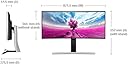
It's been pretty ironic for me, as this monitor was an impulse buy when it was on sale for $600 last August. Even then, that's not a cheap purchase. So I have been trying to sell it ever since October. Yet through thick and thin, through about 5 other monitors that have come and gone, this monitor still remains, as my best and most favorite so far. It might not be the best monitor at any price point; it might not be the best gaming monitor; it might not have the best image quality that I've ever had - that belongs to the LG Electronics 34UM65 34-Inch Screen LED-Lit Monitor where the image almost literally jumps out of the screen at you. But I also bought that at $600(although in 2014), and when you combine everything that this Samsung monitor includes, I feel it comes out on top. To be honest, I am only giving this a 5-star rating at the $600 price I bought it for, and even up to $700 it's worth it. But any higher than that, then I would recommend the LGs for their brightness and image quality. Here are some of the key points: 1. Similar to it's cousin, the Samsung 32" WQHD LED Monitor (S32D850T) , the build quality is superb. I would actually give the nod to the 32" - it has more metal and feels more higher quality. The 32" is also noticeably heavier. The back of this monitor is plastic as compared to the metal of the 32". But the plastic is high quality - thick, sturdy, and also heavy. It exudes quality, and it should, since it is one of Samsung's flagship monitors(the other being the Samsung 32" UHD Professional LED Monitor (U32D970Q) . 2. You can adjust the height by 4 inches. At its lowest setting, it stands 17.5 inches tall from the bottom to the top of the monitor, and 21.5 inches at its highest height setting. Although you cannot swivel the screen left or right, you can tilt it from -2 degrees down to 20 degrees up. With both of these variables, you can instantly turn your desktop from a sitting to a standing desktop. All you would need, then, is to change the height of your keyboard and mouse. 3. There are several picture modes you can choose from, when the monitor reads the source as an AV unit(cable box, game console, etc.), but not when you're in PC mode. In PC mode, all image/picture adjustments are curiously locked. You would need to tune the brightness and other settings from the computer side. 4. The sound is decent. Not great, but passable, and better than most laptops' speakers. 5. The image quality is good, but not great. It doesn't jump out at you like the expensive version of the IPS panels that LG uses. 6. There are cool features like picture-in-picture, where it can show 2 sources, like one from the TV, and one from the computer. And the other is from 2 different computers, so 2 people can use this monitor at the same time. Hopefully this helps you somehow. I really enjoy this monitor, and if you can find it at the right price for you, I definitely recommend it.
R**S
To 4K or not to 4k
This was a tough decision. I have a decent build only slightly dated. It is a custom water cooled 7990 gpu driven machine. My old monitor set up has been 3 1080p screens in eyeinfinity @5760x1080. With my current build I was mostly maxing out every game I had with maybe a setting here or there on high rather then ultra.. I have been eyeing 4k monitors for some time. Looking for my next screen. Frankly the set up I had was getting bothersome. I found my self straining my eyes to see across all 3 screens...the bezels were getting to me and I was ready for something new. However, besides gaming I work form home...countless hours a day..and I really needed a way to stay productive with the least amount of work arounds. After reading several reviews of 4k monitors I found three major issues.. *4k monitors would require new GPUs for me to run ultra. *4k monitors has tiny text. *4k monitors aren't yet compatible with all programs. Enter this ultra wide curved from Samsung. Games run flawlessly and are simply breathtaking to me. I have more FPS with my setup on this resolution that I did @5760x1080 which means I won't be needing GPUS for another few years. The curve is subtle yet satisfying. HD movies are more enjoyable. Best of all..the picture in picture feature works flawlessly. With my work laptop hooked into one port and the gaming PC hooked into the other I can swap screens, see one in a little box..make it a big box..move it around to each corner..side by side...I swear it's way more productive than the old triple monitor set up. I have less eye strain in just a few days use and the only complain I have is that netflix wants to watch t.v. shows in 4:3 when the sources are set to side by side. Not a big issue tho..really.. The screen it self had issues..the menu button is brilliant and super easy to use without looking ...most of all when people walk into my office they drool a little. 4k? maybe one day... but this monitor seems to be the best productivity / gaming monitor I have ever owned and I have no complaints!!
S**N
If you are like me, obsessively researching the pros and cons between ...
If you are like me, obsessively researching the pros and cons between VA & IPS panels, just stop. I work at home, and wanted the space of at least two 1080p 24" monitors, which I had prior to this, with one I finally ended my search on this Samsung S34E790c, and the minute I took it out of the box, I just knew this was the one. Once connected to my Windows 10 computer, DisplayPort to GTX 970, I absolutely was ASTONISHED at the image in front of me. I had more workspace then my two monitors above, and this thing plays MMOs like nothing I could ever have imagined. The joystick menu is surprisingly good, the quality inside and out is beyond my expectations. Speaking of gaming, let's get things straight. Just about everyone that talks about gaming monitors seems to talk about FPS (First Person Shooters) only. There is MORE to gaming then just first person shooters, and this is an absolute BEAUTY playing any game I tried, including Aion, Star Wars The Old Republic, Skyforge, and Guild Wars 2. ALL THESE games supported the 3440x1440 resolution, and look beautiful doing it. You will instantly hear your graphics card kick the fan to maximum with this resolution, but gameplay doesn't seem to suffer much on these mmos. For laughs, I even through Star Wars, The Force Unleashed II against it, and besides some ghosting with quick camera shifts, it played this game nicely as well. Although I haven't finished calibration, there are some problems with black scenes in movies, but this was never meant to be used for movie night. Regardless, it is still enjoyable to watch movies on here regardless. I bought this mainly for easier multitasking, more room on my desk, and got everything I hoped for with this purchase. You will not be disappointed with this Samsung monitor. I was so close to going with IPS, but glad I didn't.
C**7
Beautiful yet Frustrating
Completely amazing. I love it. This is the most gorgeous monitor I've ever seen, and the more I use it the more I feel like I'm experiencing true visual luxury. It shows so much more detail and color depth than my old 24" S-IPS 1920x1200 monitor did. Using Dual 21" 1080p monitors at work now feels like a huge letdown after enjoying this monster at home. I love the curved screen too. Did I mention that I love it? Such a great visual experience... I'll admit there is one thing I'm not fond of. The single joystick/button on the back that controls On/Off, Source and Menu is a pain to use. It doesn't register all the clicks and is still confusing/annoying even after almost 2 months of use. But it doesn't matter! Because the monitor itself is so awesome.. Update: I've had this for 14 months now and it's still a fantastic monitor but that stupid button thing is driving me crazy. You have to click it "in" once to get the menu to come up and then click again "directionally" to make a menu selection. If you're not super careful you'll get a completely unexpected result. If you want to turn off your computer and monitor, you can't wait to be sure the computer is off or else the monitor goes into power save mode and won't respond. Then you wind up clicking a bunch of times to wake up the monitor, and clicking some more to get it to navigate the menu to turn it off. And there's a noticeable error rate where it doesn't respond to a click or, worse, I don't click "in" perfectly horizontally, causing it to think I've made a menu selection I didn't. I wound up inadvertently changing the settings several times because of this. I came back here to drop it down a star because lately I've found myself thinking about replacing this $600 monitor with a different brand just to get normal buttons for Power and Input. That would be a gigantic waste of money but it tells you how annoying this feature is. Now I know why people hate BMW's iDrive so much. Aside from that annoyance, the monitor itself works great, no stuck pixels or other issues. It's nice and big and fills my field of vision great. I'm enjoying looking at it right now. Images are very sharp and I generally love it as long as I'm not trying to click that dang joystick button hemorrhoid on the back.
B**S
Lets be honest
This is a fantastic looking monitor. Once you get it calibrated. Really convenient for multitasking and awesome for video editing another applications that utilize the fullscreen. Most of my applications actually utilize the fullscreen. Movies though: not so much. The 21:9 thing is really awesome, but YouTube videos in 21:9 and Netflix movies in 21:9 Still will not fill the monitor. It will be a litter box within your 16:9 letterbox. (Basically a centered rectangle) These websites only recognize 16:9 format. (For now) There is somewhat of a workaround: you can zoom into the screen using accessibility, but you see the flaw in that: depletes the quality. This is not a 4K display. This is not optimum monitor in its class for photo and video editing because of the ‘meh’ color accuracy. Even using a calibration device such as the “color munki.” Using a PS4; it stretches the image, and we are talking a 1080p image. It doesn’t look bad; but it PALES in comparison to 4K. Great monitor; had it for 2 years and had zero issues. Just not the one for me in hind-sight, I would have gotten a 32”+ 4K moniter with better color accuracy for editing. Netflix 4K? Don’t bother. It doesn’t recognize it as 4K and doesn’t do anything.
M**U
Exceeds expectations.
Wonderful. Adjustable height provides enough clearance to flip open a MacBook Air or MacBook Pro (mid-sized, not the small ones) underneath. Could not find another 34" screen that would accommodate this layout. Downloaded Window Tidy app which is really convenient for partitioning the Samsung's real estate into halves, thirds, quarters, or any custom layout(s) you want. Didn't think much of the USB hub feature and powered USB outlets when I bought it, but now charge my iPhone and Chromecast plugged into the HDMI via the two USB power ports. The other two act as a hub for my Mac extended layout keyboard and webcam. The best part is all the cables can be hidden behind the vertical post of the adjustable stand, so my desktop is clear and looks nice from both the front and back. Was looking into a dual monitor system with a nice height adjustable stand ($200-400) so this ended up being about the same price. After having used many dual monitor systems at work and home, I would never go back. This is an amazing product, the curve is important because the screen is so large. Otherwise you'd have to slide your chair over to read an email or look at a webpage or Excel doc on the other side of the monitor. The curve is just enough so you don't have to do that.
M**W
If you want quantity NOT QUALITY, get this monitor
Awful image quality for videos, games or anything in motion really. There are dark shadows and discoloration when things are moving on the screen. This is a subpar product, I am victim of a sales job on 4K and curved features, but the image quality is worse than ANY monitor I've owned since 1992! Eliminated other problems, used same PC/GPU to test other monitors, all fine except this one. Used different cabling, didn't help. I am using the display port cable that came with the monitor. See the attached video that shows that still images look OK, but when the window is moved, there are dark and blurry outlines to it. This makes watching movies and playing games impossible, what a low quality, cheaply made product! I will take consumer protection action against everyone involved, selling this is criminal, and Samsung (and everyone else involved) thinks they can get away with it - well once they hear from the consumer protection agencies, attorney general's office and the BBB, they'll think twice putting high priced low quality products out there on the market!
R**S
The bar has been lowered for VA panels.
Just a quick note before we start here. I'm an image quality enthusiast and that is why I wanted a VA panel. I've owned and used VA panels in the past and I've seen great things from them for color handling, contrast and black level. Also, I mess with settings a lot and I definitely messed around with the settings on this monitor... Just mentioning these things so that you know I'm not a granny who watches her VCR tapes on a modern HD tv and thinks it looks great. I'm not really sure how low the bar is these days for consumer PC Monitors but if this is any indication then I'm a little shocked... well, not really. I own a VA paneled Samsung TV from 2007-ish that has an amazing picture... saturated colors, great contrast, very little color shift, great viewing angles, reasonable input lag, etc... It cost me around $2,200 when I bought it. I use old-ish VA paneled Dell monitors at work... they exhibit the same great attributes with just a hair less apparent contrast. I would expect a modern VA panel to function as well, if not better than these old VA panels... this one doesn't. This monitor disappoints so much on the viewing angle, color shift, and apparent contrast... it also has horrible color and gamma. If you sit directly in front of this thing with your eyes in the middle of the screen and a couple of feet back then you'll witness the worst color shift I have ever seen from a monitor. Not only that but the color shift is visible mostly in the black to darker shades so that anytime you play a game with dark areas or watch a movie (pretty much all movies have a lot of black and dark scenes) you will be greatly distracted by these issues. I'm not sure if this color shift issue is responsible for the lack of apparent contrast but in my mind this screen has worse contrast than my home Dell IPS monitor from 2004 which isn't really all that highly rated for contrast in the first place... and my little IPS monitor doesn't have the EXTREMELY DISTRACTING color shift issues that this thing has. I'm not sure what's going on here since this would seem to be a premium-priced monitor... but I think I know. I've seen "high-end" TVs that my friends and family members have bought in the last few years and all of these have had far worse picture quality than my almost 10 year old TV and I think the reason for this comes solely down to profit margin. Whatever they were doing to achieve great image quality back in 2007-ish was probably really expensive and they have since found out that all consumers care about is high brightness output and a thin form factor when they go to visit a showroom. Now these big companies spend a lot less on good image quality and still charge high prices for this junk while they sit back and count their money. I really wanted to like this one but look elsewhere if image quality is of any concern to you. I fiddled with the few image controls that they supply on board the monitor and I messed around with the Nvidia desktop color settings and there is nothing you can do to get a reasonable image out of this thing. Also, two of the onboard gamma settings are jacked up to help alleviate the terrible black-crush on this thing so you have to trade off black-crush for weird gamma. There really is a thing such as a "natural" looking image that can be achieved with screens and you will not be able to find it with this monitor. Also, any pixel response setting other than "standard" is going to leave you with some really unpleasant overshoot issues. The "fast" one has some extreme overshoot in the dark greyish-blue range that make it unusable and don't even try the "fastest" setting. Good points: -the resolution is great... but any monitor with this resolution will have that going for it -the 21:9 aspect is great for games and movies (widescreen gaming with no bezels!)... but any monitor with this aspect will have that going for it -the size is great... but any monitor of this size will have that going for it -the stand goes up and down... hard to believe but some $1000-ish monitors don't even have a stand that does this -has speakers What-were-they-thinking points: -no dedicated power button... you have to click the one existing button on the back then jog it down to "power" on the menu, then press it again -speakers have no volume buttons/knob... maybe this is normal but if so then... why? -why does this image quality look so much worse than all of my old monitors/TVs from the early 2000s? Seriously... save you money or find something else. I thought about purchasing one of the similar IPS screens but I wouldn't mind having black levels that don't exhibit the horrible "IPS glow" that modern IPS screens tend to have. My Dell IPS monitors from 2004 don't have this issue (at least, not as much)... what happened? ...spoilers, profit margin happened. Also, because of the horrible color shift of this Samsung VA monitor you actually get an issue that is very similar to IPS glow where the bottom of the monitor shows glowing on a black screen unless you shift it up so that your eyes are level with the bottom of the screen. You also get glowing from all of the corners when you are looking directly at the middle of the screen. Conclusion, it looks decent with very bright content such as webpages so this might be good for people who do nothing but facebook, email and twitter. Any medium-toned to dark content will look bad on this thing because of the color shift and IPS-glow-ish nature of the screen. BTW, you see this issue through all levels of backlight brightness... it is only less apparent when there is a lot of bright stuff on the screen to drown it out. There, you've been warned. You know who you are...
S**E
Samsung 4 Life!
Waited to write a review on this item cuz I wanted to test fire it for at least a month before giving feedback. So far so excellent! This is the mother of all computer monitors for your avid gamer. With a 4ms response time, there is no noticable delay. 3440x1440 resolution gives me the best picture I can desire without going into the 4k world. For those of you concerned about the 21:9 aspect ratio for gaming, so far I can attest to the fact that BF4 and SimCity are compatible with this ratio, and from what I have read, current games are geared for it as well. A bit trickey when it comes to finding half decent wallpapers (LOL). Good job Samsung! If you are like me and only consider buying a monitor every 5 or 6 years, I definitely recommend this product even if it does run you over $1000. You should not be disappointed. Also, I would like to give props to onedealoutlet Canada for expediting this monitor to me. I am in a pretty remote place and they got me this product in 4 days!
A**O
Increíble
El monitor llego en perfecta condiciones, el monitor trabaja muy bien y no trae ningún pixel muerto es una buena compra este monitor.
C**2
Very good screen
Very good screen, a much easier way to use your computer than having multiple screens. It is worth the investment. After using it for a while the only problem is the lack of headphone output.
R**T
Great monitor
It's a great monitor. My only reservation may be unrelated but for some reason when the monitor turns off to save power all the open windows shrink and are placed on top of each other at the top left of the screen.
A**R
No regrets!
I've read lots of reviews that went on and on in paragraphs which is fine so here is my review in one word... WoW Recommendation: Buy now, you won't regret it.
Trustpilot
1 week ago
2 days ago