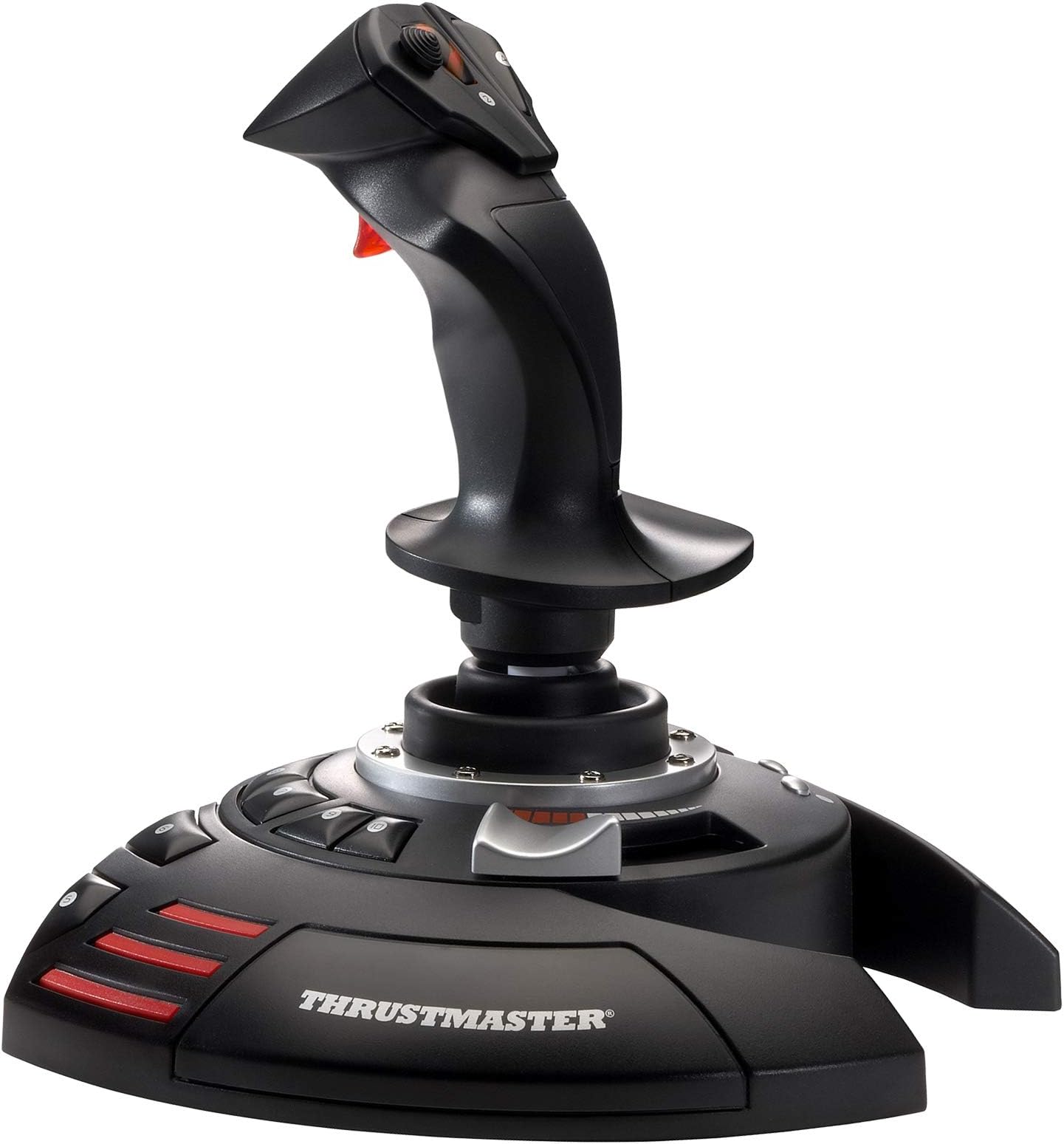
Thrustmaster T-Flight Stick X USB Ergonomic Flight Sim Joystick - PC
Product ID: 1376299
⚡Instant plug & play USB
🎯Adjustable resistance control
🪨Weighted stable base
Desertcart purchases this item on your behalf and handles shipping, customs, and support to Austria.
🛫 Elevate your cockpit game—fly smarter, faster, and sharper with Thrustmaster T-Flight Stick X!
The Thrustmaster T-Flight Stick X is a USB flight joystick designed for PC and PlayStation 3, offering instant plug-and-play setup with no driver installation. It features adjustable resistance for personalized control, a heavy weighted base for stability, and an integrated throttle and twist rudder system for comprehensive flight management. With 12 programmable buttons and onboard memory, it supports customizable profiles for diverse flight simulation experiences. Compatible with Windows 11 and popular flight sims, it delivers professional-grade precision and convenience in a compact, ergonomic design.


| Additional Features | Programmable Buttons, Additional Axes, Integrated Throttle |
| Asin | B000U1OOH4 |
| Best Sellers Rank | #1,429 in Video Games (See Top 100 in Video Games) #6 in PC Game Flight Controls |
| Brand Name | Thrustmaster |
| Button Quantity | 12 |
| Color | Black |
| Compatible Devices | PlayStation 3, PC |
| Compatible Video Game Console Models | Sony PlayStation 3 CECH-4012C |
| Connectivity Technology | USB |
| Controller Type | Joystick |
| Customer Reviews | 4.2 4.2 out of 5 stars (2,564) 4.2 out of 5 stars |
| External Testing Certification | Não aplicável |
| Global Trade Identification Number | 00663296412461 |
| Hardware Platform | Desktop, Laptop |
| Included Components | Instructions manual & flightstick |
| Item Dimensions | 9.29 x 8.66 x 9.25 inches |
| Item Dimensions D X W X H | 8.66"D x 9.25"H |
| Item Part Number | 2960694 |
| Item Type Name | Flight Stick |
| Item Weight | 1188 g |
| Manufacturer | Thrustmaster |
| Manufacturer Part Number | 2960694 |
| Model Name | Thrustmaster T-Flight Stick X |
| Model Number | 2960694 |
| Package Quantity | 1 |
| Power Source | Battery Powered |
| Upc | 663296412461 |
| Warranty Description | one year |
W**H
Decent flight stick for PC games
Seemingly a good flight stick. I opted to purchase this stick over the latest Thrustmaster 1600 (orange and black) due to the many bad reviews about z axis issues. Hopefully this stick is pre COVID manufactured and has old school Thrustmaster quality. It has a good feel, like the original grey (not orange) 1600 stick. It's buttons feel more solid, robust than the original grey 1600 stick. No drift in any axis, throttle has indent midway. It worked right out of the box. I'm using Windows 11 pro, no drivers were needed to be downloaded. Only minor issue is it only having 12 buttons. Button 3 which is near the trigger can too easily be pressed accidentally, I don't map it now to avoid that issue. The USB cord is permanently attached unlike more modern sticks and a tad short when compared to my Winwing and Turtlebeach stick. I'm using an external powered USB 3.0 hub with it, no issues. It seems getting the top hat to function in games like Battlefield 1, V, 2042 is not like it was decades ago with bf1942. They just worked back then. I tried using a Turtlebeach flight stick, a Winwing Ursa Minor and now this Thrustmaster X for top hat viewing. This Thrustmaster was the only one's tophat to somewhat function properly (could not always view behind me with a down south position but rather I could southwest or southeast then rear view, else I had to map to a button). My other sticks, no go.. their tophat won't work in the games. Yet all my sticks are seen and fully functioning within Windows 11 joystick calibration program. This is all probably by design..they want you to use gamepads rather than flight sticks because of console kids preferences..lame!
D**E
Work perfectly
I upgraded my computer to a gaming computer so I could run MSFS 2020. Let me also mention I am running Windows 11. I tried using my older MS Sidewinder Flight Stick with the game but for some reason the aircraft were uncontrollable. I switched to an older Logitech flight stick I also had and even that was unusable. In the course of trying to figure out why the MS flight stick wasn't working it broke so I was forced to look for a new flight stick. I looked through all the flight sticks on Amazon and for some reason this one I seemed to like the most. I looked at reviews on the web and some people were saying this stick didn't work with Steam games and others were saying it didn't work with Windows 11. However all the other reviews were very positive. I figured for $40 it was worth taking a chance, if it didn't work at least I had a new flight stick I could use with MSFS X. When the stick arrived I plugged it into the USB port and Windows 11 recognized it immediately. I launched MSFS 2020 and went to the control options and the stick was there and the buttons were already pre-programmed. MSFS gives you the option to change the button settings but I left them as they were, it just took me a while to get use to them since it was a change from my Sidewinder stick. The first takeoff I tried was perfect and I flew to another local airport and landed perfectly. The flight stick worked perfectly and flawlessly. There is also a knob on the bottom the stick you can use to adjust the tension to your liking. On my computer this stick is compatible with Windows11 and Steam. The only con I have with this flight stick is the arrangement of the buttons. Some of them like the brake release, landing gear toggle and elevator trim kind of require an awkward reach to get to. While I can reassign them I like keeping them off the stick itself. I hope on the future Thrustmaster considers moving these buttons to a more ergonomic location on the base of the stick. All in all I give this flight stick a 10/10 and is an excellent value for the money.
D**I
Reliable and easy to use flight stick with good value
The Thrustmaster T-Flight Stick X is a solid and reliable flight stick that works well for both beginners and casual flight sim players. Setup is easy, and the controls are responsive and intuitive. The stick feels comfortable to use, and the button layout makes flying straightforward. Build quality is good for the price, and while it’s lightweight, it doesn’t feel cheap. Accuracy is solid for most flight games, though it’s not meant to compete with high-end simulation gear. Overall, it’s a great value flight stick that performs well and is easy to use, but the simpler design keeps it from being a full 5 star product.
J**Z
Perfect for a budget joystick, no need for more.
This joystick 🕹️ is awesome. It calibrates into FSX with no effort, immediately assigns the most important keys, FSX recognized it immediately. This is the perfect joystick 🕹️ for both, airplanes and helicopters, no need for more.
G**Y
Terrible throttle
Buttons are great. Stick is great. Throttle is terrible, very stiff, worst I've ever seen, don't buy it. The stick-slip on the throttle prevents fine changes, which is critical for helicopter flying and most airplane flying. Continued use may loosen it, but I'm not counting on it. The spring-loaded detent on the throttle is also a terrible idea, what are they thinking?
K**R
Works well on the games it works on.
I don't play a ton of games that require a joystick but I thought I'd by fairly nice one. The button all work well and the joystick feels good. However it didn't work with some games but worked with some so old I wasn't sure it would work. Tested the following The mid 90s Star Wars fighter games and they all worked. Simple Planes worked. IL Sturmovick no response. Flight Simulator X no response. Wings over Europe no response. I just don't have that many joystick games so other may have better luck but since it worked with the two games I wanted to use it with the most I am fairly satisfied. If it worked with almost all games it would have gotten a 5.
W**E
Simply wonderful. Get one.
This arrived in perfect condition and installed by plugging it into the USB port. All games that I have that use a joystick recognize it. You can reprogram 12 buttons to anything you want. It is well built and I use a tempered glass plate about 20" x 20" for my keyboard; when I place the joystick on the glass, the feet are so well made that it does not move, as if stuck in place. There's even a dial underneath to tighten/losen the action of the stick. It totally works with serious flight programs and games as well; I even got out MW4 (oh!) and used it to test the stick out and I'm still playing it now, as it is so fun with this stick. Simply wonderful. Get one. [edit 3/3/15 by me] I have overlooked one issue for the Left-Handed user: button 3 is in an inaccessible place for a leftie; holding the joystick in your left hand with your index finger on the trigger, button 3 is up and to the right at the top of the stick, in front of button 4 - it is all but unreachable by a lefty. HOWEVER, it has 12 fully programmable buttons and you can store them within the stick! Sorry for not mentioning this button 3 issue before.
M**W
Amazing joystick, very versatile
I absolutely love this joystick. It's extremely accurate, well built, versatile, and great looking. I've had this joystick for over a year and it's still working great. The roll and pitch axis do wonders in combat simulators and the yaw is very accurate and easy to control. The hat switch is also a nice addition and at the same time conveniently located. Pros: -Great design; sturdy and rigid -Palm and thumb rest -Accurate handling; great for combat sims -You can change the joystick's resistance -Ergonomic hand design for RIGHT-HANDED ONLY. Left-handed fliers beware, you can't hold this well with your left hand. -Good variety of buttons -Good upper and lower fire button (great for shooting lower and higher caliber armament separately) -Nice array of lower buttons -"Throttle" is easy to control with 50% click Cons: -Not for left-handed people (I'm right-handed but I know lefties will suffer if they use this) -"Throttle" not so accurate -Only 4 buttons on the stick itself. It would be nice to have 5 on the stick. Note: I use this for War Thunder and works fantastically. I've also tried on X-Plane and it works well too.
C**T
Very good,
Works well with my Flight Simulator.
M**.
TUTTA UN'ALTRA ESPERIENZA DI GIOCO
Semplicemente fantastico! Ho da sempre avuto la passione per gli aerei, ho perciò deciso di acquistare Flight Simulator per PC Essendo un game quasi impossibile da utilizzare con il solo uso della tastiera, ho deciso di acquistare questo Flight Stick X Inutile dire che l'esperienza di gioco è totalmente cambiata e di come l'input dei comandi sia così preciso ed efficace. Lo stick in particolare è in grado di governare l'aereo lungo tutti i suoi assi di movimento ma non solo! E' in grado di comandare anche manetta, carrello e tanto altro! Da acquistare senza pensarci due volte
K**B
Bra känsla och stryktålig
Känns bra i handen, men fartreglaget är i minsta laget. För den som ska spela riktiga flygsimulatorer behövs något en något hetare modell, men för mig var den här perfekt.
I**C
Well worth the effort
I am not a serious Flight Sim player, but I do like to have fun shooting stuff out of the sky, and also like a bit of fun on Flight Sim X. I have to say I was very impressed with the Thrustmaster T Flight Stick X. I use it on PC and it was just a plug-n-play situation. The keys are nicely positioned and it feels sturdy enough that you know it will last. Good ergonomics and the buttons and throttle / twist action all make it an enjoyable addition to your game playing for what it not a lot of money. Personally, I would really recommend this one..
E**.
Awesome flight stick!
This flight stick is very stylish, customizable and comfortable! I have the resistance set to the minimum so that changing directions is effortless, but it is capable of tightening for those who prefer to use more force to push the stick. This can be used for emulators and even PC games that don't support it, because you can use a free program called JoyToKey to convert the inputs into keyboard buttons. Keep in mind that this doesn't have to be used exclusively for flight games, It can be used for all kinds of games. Overall I'm very happy with this product and I highly recommend it!
Trustpilot
4 days ago
3 days ago