

Buy anything from 5,000+ international stores. One checkout price. No surprise fees. Join 2M+ shoppers on Desertcart.
Desertcart purchases this item on your behalf and handles shipping, customs, and support to Austria.
🚀 Unlock Ultra-Fast USB 3.0 Powerhouse for Your Next-Level Setup!
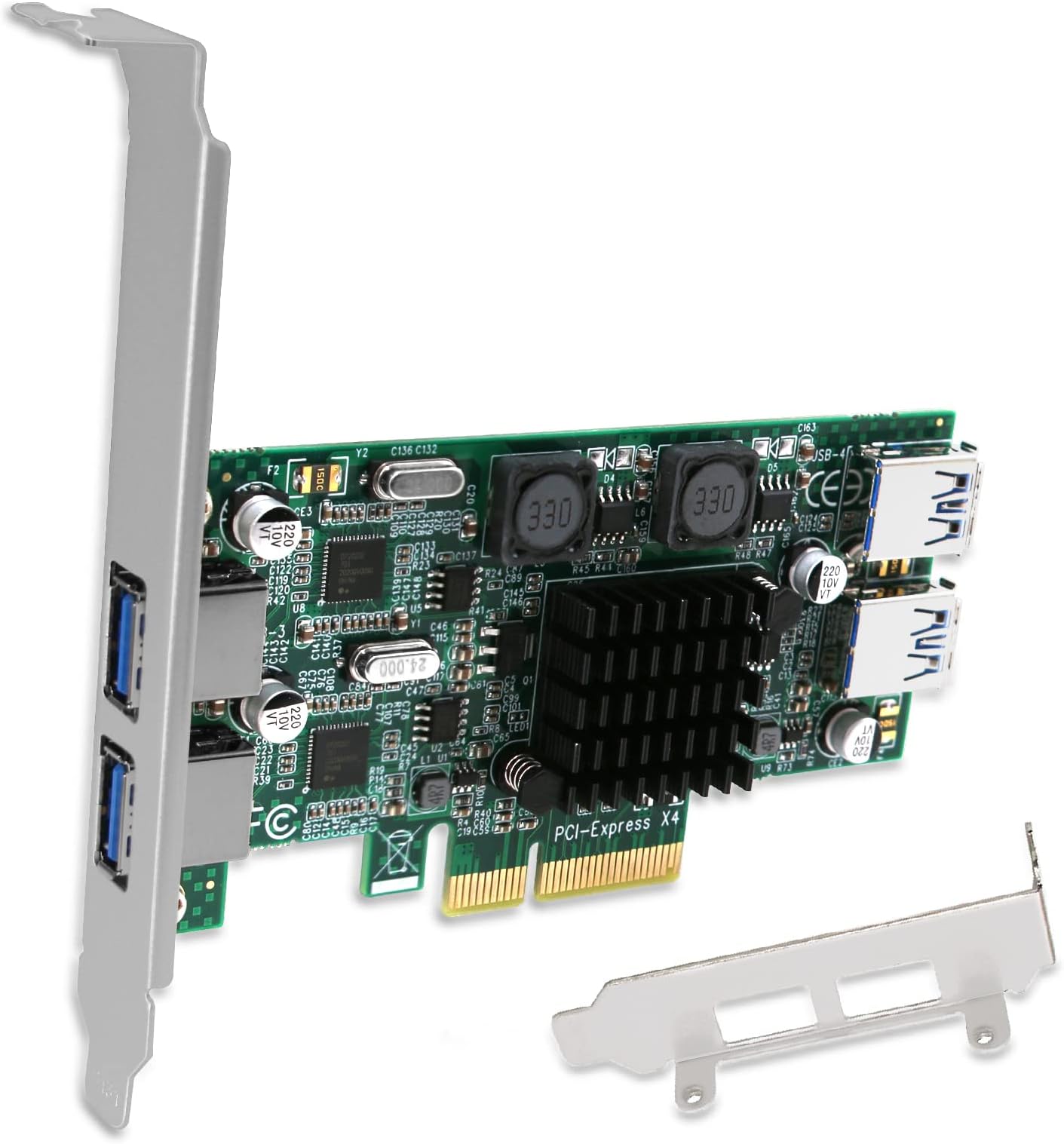
The FS-2C-U4-Pro is a premium PCIe x4 USB 3.0 expansion card delivering dual independent 5Gbps channels (10Gbps total) across 4 USB-A ports. Featuring FebSmart’s self-powered technology, it supplies stable power without extra PSU cables, ensuring safe, high-bandwidth connections for demanding USB 3.0 devices. Compatible with Windows, macOS, and Linux, and equipped with both full and low-profile brackets, it’s designed for professionals seeking reliable, high-speed USB expansion in desktops, workstations, and NAS environments.


| ASIN | B07NTZ84LD |
| Best Sellers Rank | #295 in Internal USB Port Cards |
| Brand | FebSmart |
| Compatible Devices | Personal Computer |
| Customer Reviews | 4.2 out of 5 stars 52 Reviews |
| Hardware Interface | PCIE x 4, USB 3.0 |
| Item Type Name | 2X Channel 10Gbps Banwidth 4-Ports 5Gbps USB-A Ports PCIE USB 3.0 Expansion Card. |
| Manufacturer | FebSmart Co.,Ltd |
| Mfr Part Number | FS-2C-U4-Pro |
| Model Number | FS-2C-U4-Pro |
| Number of Items | 1 |
| Operating System | Windows 11, 10, 8.x, 7, Vista, XP (32/64bit) and Windows Server 2003, 2003R2, 2008, 2008R2, 2012, 2012R2, 2016, 2019, 2022 (32/64bit). Linux Kernels. |
| Style | 2X Channel 10Gbps Banwidth 4-Ports 5Gbps USB-A Ports PCIE USB 3.0 Expansion Card. |
| Style Name | 2X Channel 10Gbps Banwidth 4-Ports 5Gbps USB-A Ports PCIE USB 3.0 Expansion Card. |
| Warranty Description | 1 Year Limited Parts Warranty. |
C**R
Works, thogh read more
I just bought this a weak ago, and it has lived up to its ads on what it does. It has two independent usb 3.0 controllers, and both are connected to asmidia pci bridge(hint: it does get close to maximum bandwidth on both extenral ports.) This is an upgrade for me from an cheap 1x pcie febsmart 2 port black model I bought in 2019. That model is now unused, and it also was great. I am giving this product 5 stars, only downside is more then 3 times the price that pcie x1 low profile 2 port card was. So far febsmart products have yet to fail me, and this card due to dual controllers can handle two vga adapters at once. There is another model that has 4 controllers and 4 external ports and 2 usb 3.0 heaaders, but I am warry of that interference with my case due to several reviews saying it blocks the input of usb 3.0 cables due to zero clearence and whatnot. This product the 2 controller does not have that issue, and I installed the low profile bracket and as advertised it does not require power. In the future my plan is to buy a dock and connect to this. When I get it, I will edit this review and report of any problems. EDIT: It works! Wavlink dock usb 3.0 docking station. Using one of the 2 indipendentant controllers, this allows 4 montiors on my desktop with two coming from pc and two from dock.
C**Y
Works with two 5 bay USB 3.0 desktop attached storage devices.
I have two 5 bay USB storage devices attached to my computer. Each one has 5 12 tb drives and the other has 5 10 tb drives. The USB off of my mother board would only see 5 of the drives, and even then it would constantly lose connection. I then bought a cheaper USB card (around $20) and it also had similar problems. I read somewhere about this product and decided to try once more before giving up. This card worked perfectly. My Plex server has been running just fine on the storage devices for the past two weeks. It shows that sometimes it is worth paying more for something that just works. Very happy with the product. I am buying another one for my gaming PC with a Valve Index.
Q**S
Works out of the box in Linux
Bought this to get USB 3 on my old Supermicro X9SRL-F motherboard. dd'd Debian 10 netinstall iso to a USB flash drive and installed Debian to a USB to SATA SSD connected to this PCIe card and it worked right out of the box. Debian 10 install recognized the PCIe card and whats connected to it without any issues.
J**O
[UNRAID] [KVM] [Multiple Controllers] It just works!
Used this for my UNRAID setup and it works with no fuss. Only issue was with IOMMU grouping (not a factor of this card) Especially useful for USB devices that act as a bus and don't display other devices until under load. Note: "NOT for Linux. NOT for MAC". This is nonsense meant to protect themselves. It should work for all mainstream linux distos with no headache. Tested on both RedHat and Ubuntu 16.04.
D**K
Linux plug and play, may have to modify your case to access the ports
Worked great out of the box, plug and play for my Linux box. Since the USB ports are turned I had to bend my spacer brackets on the case to gain full access to the cards USB ports.
Z**R
Almost works...
Rear external ports work great, even with a hub attached - I bought this card because it has two dedicated controllers/channels for the 2x2 ports (a controller for the rear ports and a separate controller for the two internal ports). However, the two internal ports should have had the 20 pin connector to connect to USB-3 front panel-mounts, not two individual type A ports - all USB-3 front panels with more than one port have the 20 pin connector! (Would probably work fine with a single-port panel-mount that includes a type A cable to connect to the card internally - but there's 2 internal ports on this card that I want to connect to my front panel on my system.) I had to purchase an adapter cable to connect FebSmart's internal ports to the 20-pin cable from my front panel-mount dual-port USB-3, here's the adapter cable: B00NGEZBKQ (Amazon), type A to 20 pin. Now one of the two ports on my front panel-mount do not recognize any drive and the other port acts like USB 2 (Windows gives me an alert that the drive can perform faster in a high speed port). I opened my computer and manually tested the two internal ports on this card by directly inserting a USB-3 drive - Windows recognized the USB-3 drives and no alert about using a high speed port. I purchased another adapter cable (B00NGEZBKQ) to check if it was this adapter, nope. I also purchased another front dual-port panel-mount to check if it's the front panel or not, nope - same issues. I have Windows 7 and installed FebSmart's drivers properly; the card is in a gen2 PCIE x16 slot. So what's the problem here? I contacted FebSmart and no reply, even tho it says "Lifetime tech support. Get prompt tech-support..." There aren't many USB-3 cards that offer more than one dedicated controller, because otherwise all ports on most cards share the transfer speed (divides/reduces it between devices). In that case then why would you want a 4 or 6 or 8 port USB-3 card? You have to consider what you're going to use the FebSmart's internal ports for - and if they'll work for you. In this case they have not worked for me - I have to figure out how to use the two internal ports to be used for a front panel-mount USB-3 so I can have full speed transfers between two USB-3 devices - where a device on the rear port and a device on the internal port would not have to share/reduce the transfer speed. Right now I have an extension USB-3 cable connected to an internal port on the FebSmart card and it's sticking out the hole where my front panel-mount used to be. Not acceptable.
T**R
4-Port PCIE USB 3.0 Card, unable to get it recognized
Notice: This product was received at no charge as part of the Amazon Vine program but this is an unbiased review. This expansion card has impressive specs with 4-Ports PCIE USB 3.0 at 5Gbps for Windows and Linux Desktop PCs, 2X Dedicated 5Gbps Channels 10Gbps Bandwidth, built in FebSmart Self-Powered Technology (FS-2C-U4-Pro). The card is a strange design with two of the USB ports being on the front and the other two being on the back side. I guess you have to run a connection cable to ports on the outside of the case to utilize the back side ports. They say it’s “plug and play” but in my case, not so much. It connects to your computer through the PCI slot. I installed the card in the one PCI slot I had available in my case. The pins only take up half of the slot. I downloaded the drivers from the company website, but no go. There’s not even any power in the USB outlets on the card. The indicator lights on the several flash drives I tried showed there was no connection and no power. I’ll admit I’m not a Windows PC power user. I know my way around to do some things, but finding a driver file in the registry and apply that to the card, and to find whether an expansion card is compatible with the slots in my computer is beyond what I can do. That said, I tried a few things, but none of them worked. I went to the Device Manager, but the computer was unable to locate the installed drivers. At this point, I’m not sure if it’s a non-compatible PCI slot, or if it’s because of the card, or because the computer is unable to apply the drivers to the card. It may be a good card or not. My recommendation is this card is best for someone who is savvy about installing cards in a PC computer. 3 stars for not being “plug and play”
A**W
win 7 computer did not recognize
computer did not recognize.
Trustpilot
3 days ago
1 month ago