We remain fully operational. Our teams are working around the clock to ensure your deliveries continue safely.

DOWNLOAD THE APP


Copyright © 2025 Desertcart Holdings Limited
DOWNLOAD THE APP


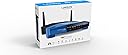

🚀 Elevate your home network to pro-level speed and control — don’t get left buffering!
The Linksys WRT1200AC is a dual-band Wi-Fi 5 router featuring AC1200 speeds (N400 + AC867 Mbps), a powerful 1.3 GHz dual-core CPU, and beamforming antennas for extended coverage. It offers four gigabit Ethernet ports, USB 3.0, and eSATA for high-speed wired connections and network storage sharing. Open source firmware compatibility allows advanced customization, while Smart Wi-Fi app support provides remote network management. Ideal for large households with multiple devices, it delivers reliable, high-performance connectivity for gaming, streaming, and smart home setups.


| ASIN | B00UVN20T0 |
| Antenna Location | Home |
| Antenna Type | Retractable |
| Best Sellers Rank | #53,178 in Computers & Accessories ( See Top 100 in Computers & Accessories ) #1,352 in Computer Routers |
| Brand | Linksys |
| Color | Blue |
| Compatible Devices | Personal Computer |
| Connectivity Protocol | Wi-Fi |
| Connectivity Technology | WiFi^USB |
| Control Method | App |
| Coverage | Large Household |
| Customer Reviews | 4.1 out of 5 stars 736 Reviews |
| Data Transfer Rate | 3 Gigabits Per Second |
| Frequency | 5 GHz |
| Frequency Band Class | Dual-Band |
| Global Trade Identification Number | 00745883684748 |
| Is Modem Compatible | No |
| Item Weight | 2.11 Pounds |
| LAN Port Bandwidth | 1000 Mbps |
| Manufacturer | Linksys |
| Maximum Upstream Data Transfer Rate | 1200 Megabits Per Second |
| Mfr Part Number | WRT1200AC |
| Model Name | WRT1200AC |
| Model Number | WRT1200AC |
| Number of Antennas | 2 |
| Number of Ports | 3 |
| Operating System | Mac, PC, Windows, Windows, Mac OS |
| Other Special Features of the Product | WPS |
| Security Protocol | WPA2 |
| Special Feature | WPS |
| UPC | 809392583388 809199910059 745883684748 |
| Warranty Description | 1 year hardware limited warranty |
| Wi-Fi Generation | Wi-Fi 5 |
| Wireless Communication Standard | 802.11ac |
| Wireless Compability | 802.11ac |
D**E
No longer compatible with my ISP in 2025. Was good for years.
Been using it for 7 years and keeps working. I installed OpenWRT I have on LAN a gaming computer, laptop, and network printer. On Wifi have 2 cameras that record online 24/7, use laptop on Wifi for school tests, cell phone. And sometimes have guests over on Wifi with cell phones and using my Roku wifi. Carry my phone around listening to music or videos over wifi. 3 bedroom, 1 bath house with a basement. The router is in the basement and signal only cut off on the last foot of the far end of the house. So I just don't roll over to that side of the bed. Surprised it reaches 95% of the house even though the router is directly under the main air duct, it still reaches upstairs to each room. UPDATE Nov 8, 2025: After a few years of use, as of August 2025, this no longer works on my ISP. I moved 3 miles to another home. New ISP line to house. Same ISP, but for some reason this router is in conflict and drops out every hour for 10 seconds or so for months. I didn't have issues at old house the whole time. I tried factory resets, and different cables. I have two of these routers. Version 1 and Version 2. I tried both. I tried updating OpenWRT. The solution was to get a more modern router.
S**T
Gaming, streaming, game streaming; all of it is flawless on this router.
Very fast, handles 23 wireless devices with ease, easy to setup, and has enough range to cover a 1300sqrft house and most of the street. I bought this to replace a D-Link DIR-810L router, which was dropping wifi connections and slowed to a crawl. My 30Mbps internet dropped down to .2Mbps, and no amount of resetting/rebooting/re-flashing firmware would fix the problem. I even replaced my modem to make sure that it was not just a crappy Xfinity Modem doing this to me. After reading several positive reviews of this product, and already being a fan of Linksys from past experience, I ordered this lovely router on friday. I learned that amazon apparently delivers on sundays in my city, as my shiny new WRT1200AC was on my doorstep before noon on sunday. Seeing as how my internet had been borderline unusable for almost a week, to the point where I had to order this over my LTE, you can understand why that made my day. The router was shipped in a standard amazon box, with about 20 of those giant bubble wrap things covering every angle of the router packaging. So it's no surprise that the router box had no dents or scratches, in fact it looks like it was taken directly from the factory. The plastic wrap didn't have so much as a fingerprint on it. The setup was probably the easiest of any router I have every used. Just screw on the included antennas, reboot your modem, plug the router into the modem with the included ethernet cable, and plug in the power cord for the router. That's the only physical setup needed, then you just join the network that the router comes preset with, and you are already online. I changed my SSID and password simply for security (and so I wouldn't have to type a new password into 23 different devices). From the time I opened the box and started plugging cables in, to the time I had customized my own network settings and could browse the web was 27 minutes flat. I have six computers (two Macs, four PC's), five iPhones, three Xbox 360's, three Apple TV's, two iPad's, two iPod's, a Blu-ray player, and an Xbox One all running through wifi. Not one device has dropped connection, and I can game stream from my Xbox One to my MacBook Pro (running windows 10 through parallels) on the "Very High" quality setting with no noticeable lag. (across my house and in my garage) I can do LAN file transfers between my computers at 103MBps over wifi. (Megabytes, not megabits) System link with three Xbox 360's playing Halo and Call of Duty work flawlessly. (even while using four wireless controllers per console) The Linksys WRT1200AC handles 23 devices connected wirelessly with ease, I have no problems with anything now. The D-Link router had issues with multiple Xbox consoles running, and obviously keeping a solid connection to the internet. The design is also a plus, while still being a running joke in the family, as it looks like a baby spaceship to most of us. The only thing I can complain about is that it seems like the USB ports for hosting hard drive as a NAS do not work with enclosures. I tried plugging in an old hard drive attached to a SATA to USB enclosure just to see if the feature worked, and my router locked up until I unplugged it and rebooted the router. However, plugging in a portable Western Digital USB3 hard drive worked perfectly. So it may just be some driver incompatibility issue with my enclosure. Running since sunday morning with 23 devices continuously connected to it, it hasn't dropped once and is still cool to the touch. Make sure you have enough space for where you are putting this router though, it's much bigger than it looks. The Linksys WRT1200AC takes up the same size as an Xfinity Modem/Router combo on it's side. Overall, a fantastic router with a great design and extremely long range. I am once again able to take full advantage of my internet speeds and use every device in my house at once.
J**D
Best 802.11ac OpenWRT router in 2015?
This review is for those looking to use OpenWRT instead of the Linksys Firmware. STOCK FIRMWARE: My only Linksys firmware comments are: 802.11ac works great with 500Mbit real world throughput, the default password is "admin", and you do not need to sign up for "Linksys Smart Wi-Fi": Below the login box, there's a tiny link that says "Local router login". Use that instead of the Smart Wi-Fi login. BACKGROUND: If you want a performant 802.11ac OpenWRT router, your choices are limited. You can get an Atheros MIPS based product, but the CPU performance is years out of date. The Broadcom options won't work with OpenWRT. You could go full x86. Or finally, there are some new ARM options with non-Broadcom chipsets, like this WRT1200AC with its Marvell chipset. OPENWRT: I installed OpenWRT Chaos Calmer 15.05rc3 (mvebu-armada-385-linksys-caiman) with no problems. Both 2.4ghz and 5ghz work great. PERFORMANCE: This device gives my entire home great connectivity, 5ghz 802.11ac has 400Mbit+ real world performance, down to 300Mbit at 25 feet. My 802.11n experience is 50MBit in 2.4ghz, 130-180MBit in 5ghz, real world performance. Sending 30Mbit of SQM QOS WAN->LAN uses 3% CPU. Contrast this to 50% on a device like the Archer C7. Using OpenVPN, 30Mbit traffic takes only 20% of the CPU. This traffic rate is not even achievable on a lower class device like the Archer C7. The WRT1200AC seems to draw about 7 watts of power. Using the USB 3.0 interface, I was able to pull about 700Mbit from an external disk. This device may "only" have a 2x2 802.11ac radio, but real world performance seemed to match the 3x3 radio in the Archer C7 (client was a MacBook Pro with 3x3 radio) BUILD QUALITY: The WRT1200AC is very well built with quality materials and has a solid feel. It has a heatsink on the SoC and a large area of copper under the wireless chips. BAD: The included ethernet cable is not twisted pair, it is flat. The included power supply seems strangely cheap. I suspect the power supply will fail long before the router does. OVERALL: A mighty impressive router, almost the dream: dual core ARM with 512MB RAM, dual wifi bands, many gigabit ports, USB 3.0, SATA, and it can run OpenWRT. You'll love it!
I**E
Surprisingly good for the price.
So, the only reason I am giving this 4 stars is due to the occasional muddled mess that is the UI, it's a bit on the confusing side, while I bought it as a home router, I would not recommend it as such unless you know what you're doing in regards to router and switch setup. If I called the Web GUI bad for this router I would be lying but at the same time I would say that first time users of this product should follow it's setup instructions. It is an amazing router let down only by the fact that in a household setting, you may not be able to use both the 2.4GHz and the 5.0GHz bands. This is because few devices have 5GHz receptors. Overall I'd say it's a 4 star rating leaning to a 4.5 because as a technician it was a lot of fun to setup and maintain, I like it a lot and intend to use it as necessary, plus the extra features are really nice. As a customer and owner of this product I withhold my right to review it as I see fit, and will post an updated review if I feel this review is biased, this is because I do not believe in static reviews, and I also believe that amazon requesting me to review this product less than one week after it arrives is a bit on the ridiculous side.
C**M
Unstable Router Requiring Frequent Rebooting
Original review of 1-16-16: I used to be a big Linksys fan but my last two router purchases have not fared well. In the old days of wireless I bought a very reliable WRT54G which I kept for years. Based on that purchase I bought a WRT160n which also proved to be reliable. I then purchased an EA4500 (dual bands, faster speeds) and while the older Linksys were very good, the EA4500 turned out to be unusable. Bluetooth which also operates on the 2.4 GHz band badly conflicted with this router even when set to a width of 20 MHz. The EA4500 was a loss of $130 as it was too late to return. And then I purchased a WRT1200AC, I gave Linksys the benefit of the doubt based on my two earlier units and assumed that the EA4500 was just an anomaly, a mistake on my part. The WRT1200AC worked ok initially but then it started to drop Wi-Fi speeds on both bands requiring regular rebooting (sometimes several times a day). The issue was thoroughly tested. It was not the ISP as wired connections remained stable. It was not traffic/channel congestion as I live far from the city and can hardly see any other Wi-Fi signals. When I do see them (with a Net Analyzer) their strengths are at a minimum, usually at -85 to -90 RSSI so a non-issue for me. In fact my router is the only one that shows up on the 5 GHz band, no other 5 GHz routers around, but the speed issue developed with the 5 band as well so it was not congestion. I can go into great detail here but in summary I spent hours on the phone with Linksys, hours on their Customer Support Forum, and hours trying possible configurations on both bands regarding channels, widths, network mode, security, etc. all to no avail. IMO there is an issue with this model which shows up on some units and not on others. If you go to the Linksys Customer Forum website, or even their main sales website, you will find many others complaining of the same issue with both the WRT1200AC and its brother, the WRT1900AC. Both degrade download speeds down to 1-2 Mbps and the only solution is to reboot the router, nothing else works. This occurred with all my devices so it was not the computer. Besides, I still have the old reliable WRT160n and speeds do not degrade with it at all. My unit came with the latest firmware, version 1.0.4.167471, but to make sure there was no FW corruption I downloaded a fresh copy of the FW from the Linksys site, reset the router to factory settings and re-flashed the FW. I then reconfigured the router from scratch, not from backup, but this did not help either as the issue persisted. And in reference to the review below (when sorted by date) I tried channels 1, 6, and 11, not Auto as I know that Auto is not a good choice. That "solution" did not work for my unit. Update of 1/31/16: Since none of the above helped, I called Linksys and requested a warranty replacement - received the replacement on 1/23/16 and unfortunately it lasted 5 days before the same issue developed again, dropping Wi-Fi speeds requiring regular reboots. Today I rebooted the router at about 8 am and by 10 am the 5 GHz band had dropped to 2.1 Mbps so another reboot was required. I have ordered a new router, different brand - we will see... Update of 2/14/16: My replacement router, a TP-Link Archer C9, has been online since 2/1/16 -- so far so good, stable performance with no reboots and solid speeds. The TP-Link has about the same range on the 2.4 GHz band as the Linksys but slightly less range on the 5 GHz band. The Linksys had an excellent range on both bands, it is unfortunate that the Wi-Fi speeds were not stable. I hope this is fixed with a future firmware or a future Version 2 hardware. I was told by Customer Service that they are working on this issue for the WRT1900AC and the 1900ACS but not for the 1200AC. So my recommendation is to stay away from these routers until these issues are resolved. On a good note, their Customer Service staff was very courteous and professional. Contrast that with Netgear which has a bad reputation for gouging users after 90 days even though their so called warranty is 1 year. They might as well offer a 90 day warranty since they charge customers for calls after 90 days - not so at Linksys so kudos to Linksys on this.
K**.
Poor Quality of Service (QOS) Support.
Its a great router and very easy to set up. My only problem is that support for Quality of Service (QOS) is very poor. Quality of Service is used to prioritize some types of traffic over another. For example, QOS lets you have a good experience over Voice and Video (i.e. no stuttering) on a busy Internet link from your house while doing multiple large File Transfers. The router will slow down the File Transfers over your internet connection to the web and thus provide enough bandwidth for Voice and Video. The Linksys WRT 1200AC router has "dummied down" QOS and it is only for downlinks. You can prioritize download traffic for selected applications and games included in lists provided by Linksys. You are out of luck if you want to prioritize something not on the lists. For instance, I need QOS to manage my Uplink Speed for MS OneDrive (think big disk drive in the cloud). This Linksys Router doesn't have any way to set up QOS for uploads or a menu pick for OneDrive. As a result, Onedrive hogs my slow uplink (2 MBps) when uploading a file. This slows down all Network Handshaking which is need for Web Browsing and just about everything else you do on the web.. Specifically, I can't even browse the web when One Drive is uploading. Other routers such as my old Dlink have had this capability for years. The open source replacement microcode / software from this router that may better support QOS is still not ready for prime time. Bummer!
J**K
Solid all around - easy to setup - fast with great range!
I got this router last night. Just a few notes, my old router (Linksys E2500) was a pretty good modem, however in my new apartment, it did not go as far as I was hoping compared to the range I had in my old house, maybe thicker walls, maybe just more congestion over the bands since there nearly everyone is running routers and appliances over the 2.4 & 5ghz bands these days. I am a tech person, so I chose to setup my router manually, and honestly it was an absolute breeze. I was confused about the sign in part initially, where the software gives you a username and password, but the password was not working. Later I read more and found that setting it up manually, the router just had a standard admin password. After setup: I noticed a small speed increase, nothing major, but I believe it is simply better equipped to handle higher speeds, so I am topping out around 125mbps down. The QoS is easy to prioritize devices and applications to give speed where you need it. Range has increased dramatically as well as stability in wireless connection and performance. I have a TV a few rooms away which I connected wirelessly, and had trouble streaming especially in HD from vudu, however last night I noticed the quality of video was considerably better, and it never had to buffer at all, so that was a big win for me! Pros: Range is pretty great on it Speed Ease of setup Very attractive menu for the router Capabilities (eSATA + USB 3.0) Visually attractive hardware (it does look cool especially with all of the lights on) Cons: Price might be a bit higher than some would like
P**N
Excellent purchase
I previously had a $39 TP-link router that worked excellently, but I wanted to get a router that could handle working with OpenVPN so that all traffic in my household could go through a VPN when I wanted it to. The TP-link router I had didn't have the memory or processor power to handle this. This Linksys modem is really awesome. Here's why I like it: - It supports DD-WRT open firmware which has a lot more capabilities than existing stock firmware - it has DUAL partitions. You can have one partition with DD-WRT and the other with the stock Linksys firmware. If you prefer to just stick with Linksys firmware, it uses both partitions (newest firmware load in one partition, older on in another). This allows you to recover in case you mess up during an upgrade. Pretty slick. - it is fairly easy to switch between the two partitions with some telnet commands if you're running DD-WRT, or through the GUI if you're using standard Linksys firmware. Loading the DD-WRT firmware isn't the easiest thing in terms of knowing which version to load, and the setup is a little more complicated, but I was able to get everything setup. I also setup the VPN with my existing VPN supplier (PIA) and it works perfectly. I'm extremely happy with this router! I didn't think it would make a difference, but my download speed is a little faster with this router (using normal speed tests that I run often enough to know it wasn't a anomaly). When I have it going through the VPN, it does drop in speed, but it isn't that significant. I've had this running for a couple weeks now, and 0 issues. The Wi-Fi coverage seems excellent too, much better than my previous router.
Trustpilot
3 weeks ago
2 months ago