Desertcart purchases this item on your behalf and handles shipping, customs, and support to Austria.
👓 Protect your eyes, perfect your workflow — see the difference!
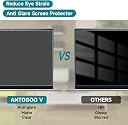
This 2-pack of 12.2-inch screen protectors is engineered specifically for 16:10 resolution laptops like the Samsung Chromebook Plus. Featuring cutting-edge multi-layer blue light filtering technology, 5H hardness for scratch resistance, and a matte anti-glare finish, it reduces eye strain and glare while maintaining screen clarity. The oleophobic coating keeps your display fingerprint-free, and the bubble-free installation design ensures a seamless fit. Ideal for professionals who demand comfort and clarity during extended screen time.


| ASIN | B0BY8N8ZHP |
| Best Sellers Rank | #6,384 in Computers & Accessories ( See Top 100 in Computers & Accessories ) #125 in Laptop Screen Protectors |
| Brand | ANTOGOO V |
| Brand Name | ANTOGOO V |
| Clarity | 7 |
| Color | Transparent |
| Compatible Devices | 12.2'' laptop with 16:10 resolution |
| Compatible Phone Models | 12.2'' laptop with 16:10 resolution |
| Customer Reviews | 4.2 out of 5 stars 1,593 Reviews |
| Finish Type | Matte |
| Included Components | Blue light screen protector x2, Alcohol Paper x2, Micro-Fiber Cleaning Cloth x1, Dust Removal Sticker x2, Installation Guide x1, Squeegee Card x1 |
| Item Dimensions L x W | 9"L x 4"W |
| Item Hardness | 5H |
| Manufacturer | ANTOGOO V |
| Material | PET Plastic |
| Model Name | AL122 |
| Model Number | AL122 |
| Number of Items | 2 |
| Part Number | AL122 |
| Product Dimensions | 9"L x 4"W |
| Screen Size | 12.2 inches |
| Screen Surface Description | Matte |
| Special Features | Anti Glare, Anti-Fingerprint |
| UPC | 768469592244 |
| Unit Count | 2 Count |
| Warranty Description | 5 year manufacturer |
| Water Resistance Level | Waterproof |
G**R
Overall good product for price
Came with two screen protectors and a little kit for cleaning/applying. Very good for the cost. It's great for glare reduction, and the touch screen works perfectly after putting the screen protector on! Sadly, the screen protector is a lot shorter than I thought it would be, it only covers part of the screen. I have an ASUS Zenbook 14, so it probably fits other laptops better. It was very easy to apply on the screen, with clear and concise instructions. The air bubbles are pretty easy to get out (if you have trouble, maybe try to make a big bubble to grab the little ones and pinch the big one to the corner to get rid of it). I will say that it did come damaged, the corner was a bit bent right out of the packaging (both pieces), though that might be a shipping issue. Overall, a pretty decent product, well worth the cost, though it might not cover your full screen. Edit: They gave me a full refund for the damage/fitting. Great service! Thank you!!
S**I
Decent anti-glare matte screen protector
PSA: There's a glossy protective film on the FRONT of the screen protector...which needs removed if you want a matte anti-glare filter! I had so much screen glare for weeks until realizing that there was actually a glossy protection layer that needed removed after installation. Bought this for a Dell 7620 laptop...yes, I had to cut it to size. Sits perfectly flat on the screen with no bubbles anywhere--well, except for the cut edge and the "cutout" around the camera (I used a holepunch!) Can't have it all, I guess, at least not with a somewhat nonstandard screen aspect ratio (16x10)
A**A
Eyes Feeling Better But Bubbles are Present
After feeling so much better with my last purchase associated with anti-blue light blocking screen covers for work, I ventured into the market yet again to find one for my personal HP laptop as I use that for my personal home office. And I must say that the ANTOGOO Anti-Glare Filter / Blue Light Blocking Screen work perfectly for my home office laptop. I spent quite a bit of time cleaning off my screen with a cloth and vacuum cleaner as per their recommended instruction and using the sticky item provided in the instruction. The film itself was easy to put on the screen without too much trouble, especially with the little tool they provided with the package. Sadly, despite all the efforts, there are some small air bubbles on my screen. They have diminished over time, but it is slightly annoying. After the film on my screen, I did notice a slight dilution in color, but my eyes feel so good and aren't as strain as they normally are.
T**A
Fits Acer Predator Helios 300 PH315-53 to within 1mm... WARNING! MY SCREEN BROKE WHEN APPLYING
UPDATE 11-01-20: WARNING: APPLYING THIS CAN BREAK YOUR SCREEN. My initial review for this product is down below, but because a little dust snuck in when I applied the first one of these protectors that came in this two-pack, I decided to remove it and try applying the second screen protector for a better result. Because this product fits to within a hair's breadth (less than 1 mm on all sides) it is extremely difficult to fit properly (as I wrote in my initial review). On one hand, I can't fault the product for fitting tightly, but on the other hand, I'm warning you right now that this #1) makes application extremely difficult, even if nothing gets broken, and #2) the worst case scenario happened tonight, and my screen broke by the mere pressing of bubbles. Tonight, when applying the screen protector, it just barely touched the top-right edge of my laptop screen, and I had to press hard to get the bubbles out, and to get the protector to lay flat. I suddenly heard a slight "pop" noise when pressing (no harder than I've ever pressed before), and I thought nothing of the noise. To my horror, when I finished the whole process, returned to my desk, and turned the laptop on, the screen was completely frazzled, and it looked like broken glass in the upper right-hand corner. Note: I'm no idiot. I was merely pressing bubbles as I have always done when applying screen protectors. I've never had screen damage like this before--never. I just thought I'd come back and warn you that this can happen. Now, here was my initial review below. This review is for 2PC 15.6 in Anti Blue Light Laptop Screen Protector, Anti Glare Filter Film Eye Protection Blue Light Blocking Screen Protector for 15.6" Display 16:9 ANTOGOO (Amazon has a bad problem of mixing reviews up with the wrong product (or wrong size sometimes), and I don't like it. In short, I recommend this product over "Anti Blue Light Glare Screen Protector Keyboard Cover for 15.6" 2020 2019 Acer Nitro 5 Gaming Laptop AN515-43/44/54/55 AN517-51/52 AN715-51/52 & 2020 MUBUY-GOL" mainly because you get 2 screen protectors from ANTOGOO instead of just one from MUBUY (although the latter includes a keyboard protector). This does fit my Acer, as I stated above, but beware that this is an extremely tedious installation / application process--not for the fainthearted. The screen protector fits so tightly that you are almost sure to have to peel it up and reapply it. Also, though I tried my best to keep dust a hundred miles away, it always seems to hunt you down and get in the way. Overall, I'm actually satisfied with the product. I started to peel the wrong side of the protector off because I assumed this product used the same color coding stickers as the MUBUY, but I was wrong, so I found myself peeling off *both* sides of the protector, holding the entire thing in my hands, which though not the recommended approach, actually allowed me to better align it (i.e. place it on the laptop screen). However, the thing fits so narrowly that I still had to pull it up and lay it back down. I didn't bother trying to lay it from one end to the other, removing bubbles as I went; but I still managed (thank God) to remove all the bubbles after about 15-20 minutes of nonstop rubbing and pressing. Not easy! As for the claim that it is a blue light filter, I have nothing to say, because I wouldn't know how to tell. But if the claim is true, it would be a nice feature, I suppose. Ultimately, I advise you to be extremely patient, and mostly to *P*roperly *P*repare to *P*revent *P*oor *P*erformance. That is, find a place with *no dust*, and I recommend laying that laptop flat on its back, with the top of the lid pressed up against a wall, or something to keep it from sliding. I went into our bathroom because it has tile floors instead of carpet (dust), and I literally took all my clothes off (not being TMI here) because I wanted *no chance* of dust creeping in from my clothing. I'm telling you people, Murphy's Law applies to this process. Finally, when it comes to getting the bubbles out, I pressed and rubbed with the force of a mighty man for 15-20 minutes. Some went away easily. Others fought me back, even after 10-20 tries. (And no, it wasn't because there was dust there.) One trick that seemed to help was gently bending or flexing the laptop screen while pressing and rubbing the bubbles. Initially I had tried to keep the back of the laptop flat on the floor, so that I could press with all my force, but after that wasn't producing all the success, I tried gently flexing the screen, and then pressing. Ultimately I ended up with a 99.9% clear application. I tried going in on a "rescue mission" to get one spec of dust out from the lower righthand corner of the screen, and as I feared, other dust slid in nearby. Beware of that too. I hope you have an easier time applying this than me--even if you are my worst enemy.
J**R
Easy application!
Application was really easy! It took me 15 mins. I followed the instruction video and that made it more clear for how to apply. The 1 part of the screen should be facing the screen and the 2 part should be on top facing you (if anyone got confused by that). The air bubbles are really easy to push out. The card that’s included is great and you apply firm pressure. I have a touchscreen HP envy and the touch screen is still useable! The picture resolution looks great and the color is still vivid! One small annoying thing though is when you take off the screen to reapply, particles get stuck to it and you have to try to take it off. Luckily, there’s another screen protector in case I don’t like how I applied the first one. Great product!!
R**N
Does not fit 16in Lenovo Yoga
Does not fit 16in Lenovo Yoga. Attempting to work with Antogoo as instructed and they send me the same size. Does not fit.
C**N
Impossible to get perfect.
This is a great quality product. It provides excellent anti-glare and great color. My only problem was that I could not get it perfect (straight, no air bubbles, no dust particles). Getting it straight was pretty easy, but unless you have access to a dust free lab, you're going to get little bumps from dust particles getting trapped between this and the screen.
A**O
Anti-glare must have
I used this screen protector for my 16inch HP Envy x360 2-in-1 and I love it. It was so hard for me to look for one that A) fit my screen, B) wasn’t thick nor interfere with touch screen & pen performance, and C) was anti glare because the original laptop screen was very reflective (which you can see from the bottom and top areas that aren’t covered) I am happy to say that my display wasn’t altered after the application and I can still watch my show, Rick and Morty, with clear graphics. Application process was smooth because I followed the video for this product and I barely have any air bubbles. (i have like two very small ones that I can’t see with the screen on) I also love that it’s made from a very soft material and my pen stylus can write on it without issues and I’m not scratching my screen anymore. The only con some people may have is that the protector only covers the main screen and not the borders. For me, I don’t care because I’m not actively touching nor seeing those areas. Overall, I’m happy with my purchase and believe that if you have any doubts about its performance then don’t worry!! Just make sure you have the right screen size and follow application instructions :)
F**N
Buena calidad
Bien indicadas las instrucciones para su instalación.
M**D
It works
It works. I am really satisfied.
M**E
Disappointment
money wasted. Nothing worked. It is difficult for an inexperienced person to stick such a large screen on his own (dust, bubbles). Even though I successfully applied the film to my phone myself. For 2 huge screens - only 1 small set of stickers. All 2 - went to the trash.
M**N
screen protect
it is petfect
Trustpilot
1 day ago
1 month ago