We remain fully operational. Our teams are working around the clock to ensure your deliveries continue safely.

DOWNLOAD THE APP


Copyright © 2025 Desertcart Holdings Limited
DOWNLOAD THE APP
Buy anything from 5,000+ international stores. One checkout price. No surprise fees. Join 2M+ shoppers on Desertcart.
Desertcart purchases this item on your behalf and handles shipping, customs, and support to Austria.
⚡ Upgrade your laptop, upgrade your hustle!
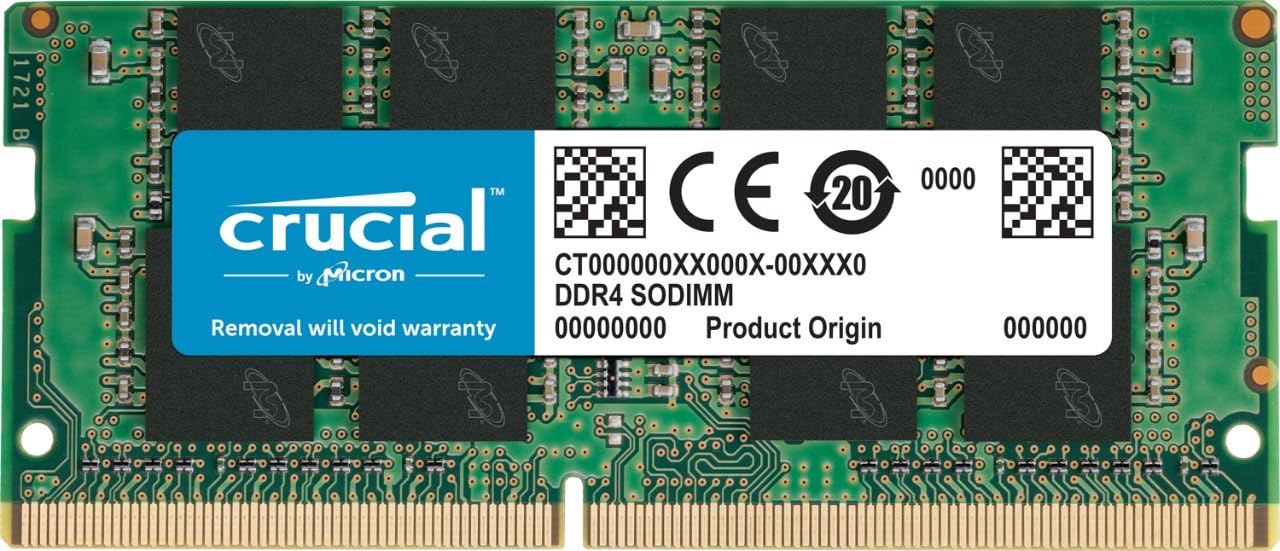
The Crucial CT4G4SFS632A is a 4GB DDR4 SODIMM memory module running at 3200 MT/s with CL22 latency, designed for laptops. It offers up to 30% increased bandwidth and 40% reduced power consumption, ensuring faster data throughput and longer battery life. Compatible with next-generation processors, this lightweight 260-pin RAM module delivers a simple, effective upgrade backed by a limited lifetime warranty.


| ASIN | B07Q3HNXBL |
| Best Sellers Rank | 23,824 in Computers & Accessories ( See Top 100 in Computers & Accessories ) 106 in Computer Memory |
| Brand Name | Crucial |
| Column Address Strobe Latency | CL22 |
| Compatible Devices | Laptop |
| Customer Reviews | 4.7 4.7 out of 5 stars (1,666) |
| Data Transfer Rate | 3200 MHz |
| Form Factor | SO-DIMM |
| Global Trade Identification Number | 00649528790071 |
| Item Weight | 8 Grams |
| Manufacturer | Crucial |
| Manufacturer Part Number | CT4G4SFS632A |
| Memory Form Factor | SODIMM |
| Memory Generation | DDR4 |
| Memory Speed | 3200 MHz |
| Model Name | CT4G4SFS632A |
| Model Number | CT4G4SFS632A |
| Number of Pins | 260 |
| Product Features | Lightweight |
| Product Warranty | Limited Lifetime Warranty |
| RAM Memory Technology | DDR4 |
| RAM Size | 4 GB |
| UPC | 649528790071 |
| Unit Count | 1.0 count |
M**S
simple and effective laptop upgrade.
Upgrading my laptop with these 2x4GB RAM sticks was quick and easy (i ordered 2). The performance boost is substantial, with faster load times and better multitasking. They are highly compatible and offer great value for money. Pros: Easy installation Significant performance boost High compatibility Excellent value Cons: None observed Highly recommended for a simple and effective laptop upgrade.
M**L
Better than ram coming from some manufacturers laptop
Works as expected, no issues found within last couple of weeks. Gives performance boost to certain laptops that utilise cheaper memory
I**N
Very nice.
It was very nice.
G**A
dovevo aggiornare il notebook dei ragazzi e ho preso questa ram passando da 4 a 16 gb a 3200 MT/s montata direttamente da mio figlio e subito operativo, vale la pena per svecchiare un portatile con un processore non proprio veloce come un i5. La spedizione rapidissima arrivato in meno di 24 ore ordinandolo domenica, grazie Amazon
J**B
Todo correcto
ゆ**な
購入してから約3年が経過しましたので、長期使用後の状況を追記します。 結論から言うと、この3年間、メモリ起因のブルースクリーンや動作不安定は一度も発生していません。 【長期使用で見えた専門的メリット】 • 一貫した安定動作: 自作PCや複数台のノートPCアップグレードに携わってきましたが、やはりMicron純正チップの「個体差の少なさ」は群を抜いています。3年経った今でも、MemTest86等の診断ツールでエラーは皆無。経年劣化による挙動の変化を感じさせないのは流石の一言です。 • 熱耐性の高さ: 夏場の過酷な環境や、動画編集などメモリをフルに使う高負荷な作業を繰り返してきましたが、1.2Vの定格動作による低発熱設計が効いているのか、熱による速度低下(サーマルスロットリング)も起きず、常に安定したスループットを維持しています。 • 高い汎用性: 最新のOS(Windows 11)へアップデートした際も、JEDEC準拠の仕様ゆえにドライバやシステムとのコンフリクトは一切なく、スムーズに動作し続けています。
P**N
Parfait
F**E
tl;dr, review title + turn computer off completely and unplug your computer before upgrading your ram b/c some tutorials won't remind you to do that when you install ram into your computer on your own. just closing the computer will not do anything. I got 1 ram card, which came in one of those cheap little plastic packages that everything comes in these days and was mailed in a small parcel. i installed the ram myself, and it works well, as expected from something made by crucial. I own the ROG Zephyrus G14 that comes with 8gb of ram soldered to the motherboard. It has one upgrade slot for an additional 8gb of ram (i believe the 16gb model is the same: 16gb soldered onto motherboard and 1 open slot, but I'm unsure of whether you can put a 16gb ram chip in the slot or if it can only be 8gb). since most highly demanding games can, but barely, run on 8gb, i opted for another 8gb of ram. i've done ram upgrades before, but for those who haven't, there's a lot of good videos out there on youtube that show you how to install a new ram chip into an open slot (or conversely, take a ram stick already in your computer out of a slot, and put in a new ram stick in). some videos won't say as much, but ALWAYS turn your computer completely off and unplug it before performing any kind of upgrade on it. you can fry the whole computer doing that or electrocute yourself.
Trustpilot
1 month ago
1 month ago