🚀 Elevate your productivity, anywhere, anytime!
The iCraze Stand is a multifunctional laptop and tablet stand made from ultra-light aluminum alloy, featuring silent built-in cooling fans and a patented joint locking design for customizable angles. Ideal for home, office, or on-the-go use, it combines functionality with portability.


| ASIN | B00466887G |
| Additional Features | Portable,Adjustable |
| Age Range Description | Adult |
| Brand | ACOODE |
| Brand Name | ACOODE |
| Color | Black |
| Customer Reviews | 4.1 out of 5 stars 2,881 Reviews |
| Finish Type | Polished" or "Smooth |
| Finish Types | Polished" or "Smooth |
| Included Components | Two Cooling Fans USB Plug, Detachable Cushions |
| Item Weight | 3.8 Pounds |
| Manufacturer | iCraze |
| Manufacturer Part Number | T8 |
| Material | Aluminum |
| Material Type | Aluminum |
| Model Number | T8 |
| Product Style | Modern |
| Required Assembly | Yes |
| Special Feature | Portable,Adjustable |
| Style | Modern |
| UPC | 887642223093 846084059011 611720711888 |
M**4
My previous one lasted for 3 years
This is a nice, lightweight and convenient desk/table for a laptop. Works great on a couch or a chair, it even works in bed. The nicest thing is that it helps to keep your computer (and your lap) cool, even if you don't use the fan. With my previous one, the fan started to get a little loud after a short time and problem got progressively worse. Eventually, both fans stopped working. I've had this one a little of three weeks now, and so far, the fans are efficient and quiet. The nice thing is, the fans are just kind of a bonus. Even without them the table does a fine job of keeping your lap and your computer cool. The main reason I use this table is that it raises the keyboard to a convenient and comfortable level. I find a laptop directly on my lap a little to low for extended typing (not to mention, it gets hot). As I said above, my previous folding table (different brand, looks the same) lasted three years before one of the leg joints broke. (The legs are made of aluminum, the joint are plastic.) I expect that this one will last at least as long. I work from home and usually sit on the couch while working, so I use this a lot! Even with all the wear and tear I put on it, it held up well. Overall, this is a very nice product and you can't beat the price.
A**T
Purrfect, even room for my kitten!!
Well, this is a nifty little laptop accessory! After some negative reviews, I wasn't quite sure what to expect out of the carton, so I unwrapped the parts and pieces with one eye open. In the package, you will find the table, a small baggie containing eight screws, a neat little screwdriver, and a nice USB connector cable. There is an instruction sheet, complete with pictures, but a step, or two are missing. My laptop is not a gamer by any means, but I do have a handful that I've purchased. One of those games turns my Toshiba Satellite into a nice little heater. With this particular game, usually about five minutes is tops before my laptop is hot enough to warrant a shut down. This is so annoying; plus, I have a little foundling kitten that loves to curl on my lap, but there isn't room for both laptop and kitten. :( I've owned a couple of these vented laptop tables before. I am a professional Internet researcher, therefore, I spend long, long, long hours on the Internet, broken by short bursts of a game here and there. Posture is important during my workday. When I'm forced to hunch over my laptop, well let's just say that I'm now to the age where I am afraid that my back, neck, and shoulders just might freeze that way! My iCraze arrived this afternoon, 12/16. I eagerly unpacked it because the only way I can keep my laptop from overheating is to position it in a butterfly, meaning in a 'V', where the monitor and the bottom are both open, making the hinges the only part actually in my lap. Uncomfortable! The iCraze was very well wrapped in protective bubble wrap, no parts or pieces were packed together, each had their own little sheath of bubble wrap. It comes with 8 screws and a screwdriver for either phillips or regular use! Cute little thing! The table top had me a bit concerned because it is very slick, so immediately my mind went to working on solutions. I needn't have bothered as my laptop stays right where I put it. In fact, my laptop is on my iCraze now; given that I am a fast typist, the iCraze is not shifting, bouncing, or in any way rearranging itself. Also, my laptop is not moving at all on the iCraze table. All parts are plastic, but the plastic is solid, and not flimsy. The table contains two fans. On the underside of the table, connected to the front of the fans' housing, is an on and off switch...yes! You control when the fans run! Behind the fans' housing is a port in which you connect one end of the USB cable...yes! Supplied, even! The cable is not thin or flimsy, but is of a goodly thickness. In fact, the USB cable is thicker and sturdier than my Toshiba's battery cable! I have used my computer in both modes, as in fans on, fans off. Because the table is so well vented over the location of the fans, my laptop is self-venting just fine, no fans needed. However, when I play my games, I need the fans on, so I just reach under the table to the fan switch, which is very easy and convenient to reach without lifting the table to see the switch. I suggest you learn the switch location so you can easily find it after your computer is on the table. The fans will not create a breeze around you, and if you're a heavy gamer with a computer to match, I'm not certain that the fans will have enough oomph to keep your laptop safely cool. But, for surfing, and light gaming, the fans do an ideal job. It could be that since the table is so well vented, that the addition of the fans just might be enough for a heavy game session. Just in case, you may want to keep a small fan in reserve. The table has a lip that isn't just four, or five inches long, but instead, it runs the entire length of the table. My laptop is 16", and because this lip runs the entire length, my laptop is quite secure; in fact, there is about an inch to spare, making this a safe table for a 17" laptop. There is a slot on either side of the table for mounting the accompanying mouse pad; however, I chose not to mount the pad because my recliner has wide, wooden arms that make a perfect mouse pad. The mouse pad is made of the same material as the table, and according to the directions, can be kept level even when the table is tilted. And, the table does tilt; you'll need to experiment to find your comfort level. Don't get carried away though, because even though this table holds your laptop securely, if you put the table too high, gravity will win, and your laptop will lose! Use common sense. Now, for the legs, there is a set of two. Each one has a port on either side of the table in which you simply push the leg connector into the port until it clicks into place. Pretty easy. Be sure that you face the part of the leg that contain the adjuster buttons to the outside. These buttons. there are three in all, contain markings to help you adjust the legs so both sides are even. The legs are a bit of a challenge to master as the buttons must be pushed in for the legs, or table, to move. This is a good thing because these buttons prevent the legs from collapsing while your laptop is in use, or simply sitting on the table. A word of caution...you can leave your laptop idly sitting on the table, however, be absolutely certain that the table is steady and that the weight of your laptop won't push it over. This unit doesn't really have 'feet', so a word to the wise! After getting the iCraze together, and now that I've used it for about six hours, I can honestly say that there is no strain on my neck, shoulders, or back. I'm not peering at my screen because now my laptop is fully open, and not sitting in a 'V' on my lap. Nor am I freezing because in an effort to keep my laptop cool, I had a stand fan right next to me, blowing over my shoulder onto my computer. I live in an old converted barn, no insulation, and right now the outside temp is under 35. My heater is working overtime, so sitting with a stand fan blowing over my shoulder is definitely not paradise! I am quite comfy, and my kitten is happy and sleeping on my lap. She doesn't seem to mind the fans blowing down on her. The reason I gave this device a four star rating and not a five is because the directions are a bit obscure, and do leave the assembler room to wonder; case in point...I have not yet figured out where the four screws (of which there are eight in the package) are supposed to attach. Overall, discounting the lack of directions, and discounting the learning curve for configuring the legs, for performance, convenience, stability, and an expected durable lifespan, in addition to allowing my kitten to curl up on my lap under this table, I do give the device itself a five star rating. Oh, and because the fans run off your computer's USB port, be sure that you have a multi-device connector for your USB if you plan on using an external mouse, or thumb drive. UPDATE...it is now 11 months later and I have used my iCraze every day since it arrived. I have not been gentle with it by any means. The fans continue to whir and purr, the legs and adjustments are still solid and fully functional. I still use the same laptop that I included in my original review. If you need an item such as this, buy the iCraze!!
A**D
Love it!!! It's a great sitting and standing desk for using a laptop/tablet and for reading.
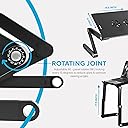
I have used it for over a year now as my laptop stand. In bed, on the desk as a standing desk, and even outdoors. Also, I'm buying a second one for dual use. I love it!!! It's very sturdy (You do have to get used to setting the angles correctly. This is not a big deal, and having the angle degrees on the joints [see pic] helps a lot on this.) The legs slide in to the bottom holder and they can be held down further with the included screws [see pic]. In my case I chose not to use the screws as I have to remove the legs to fit the table in my backpack. Even so, they have never slipped out. In fact its still a bit had to pull the legs out after over a year of use. To the point that I still do it carefully, due to fear of breaking them. After all, they are made of plastic. The dual fan does a great job at pulling hot air away from the laptop, and its very quiet. Sadly, even though the cable connects to a USB port for power, the other end is a regular laptop like power plug. Therefore, it It's hard to replace if damaged, and as you case in the pic mine has started to bend. (Not surprising since I move the table around a lot, as far as carrying it inside a backpack, and sometimes I forget to remove this cable.) Hence, I'd rather it be a micro USB which is easier to replace. As, I said at the start I love this table. I have used it as intended, but also as a writing desk, projector stand, and most recently bed reading stand for both books and tablet. This last use is the main reason I decided to get another. This way I can have a dual setup that is not limited to my desk. Oh, almost forgot. It brings two slide on plastic holders to make the border taller, but my laptop is thin enough that I don't use them. However, I did have to use them once with a different laptop.
Z**1
Works Okay
I like it but it was a little confusing. And not as sturdy as I was expecting. The clicking when I was adjusting the legs was also a little too loud for my taste. There were no instructions in the box. Of course, one would expect that one could just figure out how to adjust the legs and get it into position. Or how to get the little mouse tray attached. I figured it out, but I like having instruction manuals no matter how simple the product is. When adjusting the legs, you have to do them at different times (I guess I should have been expecting that) and it's not always easy to get a look at the angles (which are right there on the adjusting knobs) and you have to look at one and then switch over to the other side and look at that one. Anyhow, I did get it so I could balance it on my bed on top of my wooden lap-top desk and also use my stepper while using my laptop in my bedroom. So worked for that. A little wobbly but since I was just watching instructional videos, it worked great (still need to figure out how to sync my laptop of phone with my TV in the bedroom). I did love when I got my daily steps in, I folded it back down, smaller, and was able to sit on the bed, fairly comfortably, with my laptop in front of me and this is what I really wanted this for. And it was stable in that position. I was able to adjust the legs to the exact degrees needed to make it so it was level and voila, it went well. I was able to work on my bedroom while the family watched TV in the living room. Do not lean (oops) too hard on the mouse table, I accidentally did and it bent a little. Anyhow, it is okay, not the best but if you are looking for something to use in bed to hold your laptop, this will work.
J**L
Great Design - Affordable Convenience and Adjustability.
Specifically wanted to solve how to use a MacBook in-bed while fully recliined. This fits the bill perfectly, and takes much less space than the prior solution of trying to use one of the bedside laptop tables that are floor-based and just have the tilting table on a single riser pole (hospital bed table style). Some quick clarifications - on the vented version of the iCraze, the platform is all metal (actually seems like steel, as you'd find on a music stand) and the legs are the extruded aluminum portion. The mouse/side tray on mine isn't lowered from the level of the platform as pictured, but pivots on the same plane as the main platform. It can be tilted up to 90-deg forward and back, allowing you to use it as a small beverage platform (or even attach a car cup holder for more stability). Didnt find anything resembling a wrist-rest in the box, so I had to presume they referred to the tray lip which does have a beveled edge, but it is only about 1/2 inch higher than the platform, so on thicker laptops, the laptop is higher than the lip anyway. The 2 plastic lip extensions slide onto the bottom of the tray to give stability to larger laptops. Width-wise, my 15-inch laptop still has about 5 inches of extra lateral room on the main platform, so it could handle up to a 17-inch laptop without an issue (wide-screen). This seems to be wider than the non-vented version, as others mention more of a tight fit on theirs. Overall bottom width between the legs feels more like about what you get on a typical modern coach airline seat - pretty narrow, but about 17-inches max. This would fit into most wheelchairs without any issues. Since the legs rotate in both directions at each pivot point, you can use either the open S shape, open G shape, or more of a C shape to configure the legs in a stable configuration. For my heavier MacBook, the open G seems the most stable for a reclined use at about a 75 deg platform tilt. And the cooling fans are really quiet (if you don't want to use them, the USB cable is detachable). Stability-wise, it really didn't matter much to me about the wobble-factor given it's sitting on top of a mattress anyway, which isn't the most stable surface. On the floor with hardwood flooring, it's perfectly stable.
R**L
1.5 stars, Total LETDOWN !!!
While browsing for Bluetooth keyboards on Amazon, I noticed loads of tables and stands dedicated to laptop use. I had previously decided that once I had purchased a keyboard I would need its own little stand, but I was thinking more like a TV tray. Seeing all those choices, I convinced myself buying one in favor of a cheap TV tray was the right, even responsible, decision. Well, it turned out that that wide array of options were all pretty identical - so I went with the model that had a lot of positive reviews, was qualified for Prime shipping, and was decently priced. That would be the product I am reviewing today, the "iCraze Adjustable Vented Laptop Table Laptop Computer Desk Portable Bed Tray Book Stand Multifunctional & Ergonomics Design Dual Layer Tabletop (Black)." <---[First red flag, looking back...] When it arrived, I was thankful that the unit was basically pre-built, and all that I, the customer, needed to do was to attach the small (maybe about 5" squared) mouse pad extension to the table/desk. This was the first "uh-oh moment" - there are NO INSTRUCTIONS for this item. Not a single measly slip of paper, or even a website printed anywhere on the packaging. My shipping slip was the lone paper in the box. Attempting to remain optimistic, I hoped that the lack of literature was indicative of just how easy this would be...attach that little mouse pad and all done...oy. Before committing to anything, I studied the product's Amazon page; looking closely at the pictures and reading the more helpful comments. Many people mentioned the lack of instructions, the lousy mouse pad extension and its enigmatic ways, but I could not find any accurate, tried-and-true procedures. What kept throwing me off was the fact that in EVERY product display picture provided by iCraze, the mouse extension was upside-down, and I was determined to get mine to look like the model... Well, I'm here to tell you that either the picture provided for this product is of a different model or was assembled with different parts, because the effectiveness of their implied method was paramount to using a Lisa Frank sticker and rubbing a good luck charm. Ultimately, the mouse pad rests precariously atop the table's side, using a lip that fits into a groove on the tray top so it won't fall off. If you are super delicate, then you are probably alright. If you move the stand, bump into it, or put too much weight on it, then you will probably not be alright. The next issue to deal with were two small, black, plastic clips that were just randomly provided. Thinking they were included for balancing the wobbly mouse pad, I fiddled some. When that failed, I found myself again at the product's page, close to beginning a return/refund procedure. Then, written in a review that was lost in the middle of the pack, I discovered these plastic chunks were supposedly meant for securing a laptop to the table top. HOW?! These are not your standard two-prong clips, guys: these are small, fat, boxy chunks of plastic with strangely shaped sides and a slot that won't even slide onto the stand's top, let alone with a laptop in between! But I don't use the product for a laptop anyway, just a keyboard & mouse, so no harm. The basic construction design and quality of the iCraze table is my last major gripe, for it is lacking. At the time of purchase, I had judged from the pictures (again, BIG MISTAKE) that it would be perfect for use in a normal chair. Sadly, this is not the case. In my mind, the last of the three sections that make up the legs would fold 90 degrees parallel to the floor, while the other two would be straight upright, thus creating a sturdy and height-appropriate laptop table. Unfortunately, this is achievable only in a seat made for a small child, as the table's top couldn't reach farther than my knees. Conclusion: I have yet to decide the fate of this item, but am totally disappointed and feel misled by this company. Their entire description that they provided should be scrapped. In its place, a write-up of a nifty breakfast-in-bed tray that has a couple crappy fans.
R**D
VERY hesitant but THRILLED with the purchase
RECOMMENDED Flat out, I think it's fantastic. I have several 17" laptops. One is an Elitebook TANK. When you aren't just surfing the web or goofing off and want to get some work done, touch pads and mid keyboard mouse pointers just suck. You need a mouse. Best of luck with almost all lap desks fitting a 17" plus laptop with full keyboard and a mouse on one of them. I've been unfortunate enough to be involved in a lot of car accidents. Drunks hitting me. People texting. One woman was too busy beating her kid to pay attention and just drove in my lane. Needless to say, I've got physical issues because of it. It's always been very difficult to utilize a laptop on anything other than a real desk. With this computer desk, it is night and day for me. Night and day. Sitting in a chair, a bed, extending the unit higher on the floor if I'm in need of its use while I'm doing other chores or what not, you name it. All of those things have been made better for me because of this computer desk. BEATS A TRADITIONAL LAP DESK/NOT A GAMBLE I've bought a couple lap desks of different types to try. I used one and gave the other to my young son. It wasn't cutting it for me and I began looking for something else. That's when I stumbled upon this adjustable desk. In reading the reviews for this, and a few other very similar products, I thought I was really taking quite a gamble. The unit is large enough to accommodate a large laptop, but folds nicely for storage. It's highly adjustable, includes the mouse holder as an attachment so that it is not required, provides good ventilation via included USB powered fans, and it isn't made out of cheap ass plastic. LOOK MA NO CHEAP ASS PLASTIC! From the reviews, I wasn't sure whether it was truly a sturdy construction or not. It is. Those folks complaining about it not being sturdy, or their laptop hitting them on their head, or not being able to figure out how to adjust the legs without any documentation are the same folks that can't name all fifty states and probably got stuck for four hours trying to put a square peg in a round hole as a child. ADJUSTMENT As stated from other reviewers, my unit also did not include instructions. It's not rocket science. If you can dress yourself, you can adjust this table. Having said that, there WILL be a learning curve for adjustment. Even if it included happy Bob Ross pictures for documentation, there are so many ways to adjust the table and your environment and choice of use will dictate what you need to do with it. The only "problem" I felt I had in adjusting it is the fact that my laptops are very heavy and pushing the "release catch" type buttons are tricky if you attempt to do it with your laptop on it. DUH! Would you remove or mess around with a dining room table leg with your Thanksgiving Day spread already set on it? Of course you wouldn't. Same idea here. Getting the angles of adjustment set for the weight and balance of your laptop coupled with the surface you are placing it on will take a little time. If it isn't right, just relax. You didn't make a mistake, just a happy little accident. BUMPED SURFACE/EDGE SUPPORT The desk has small bumps as opposed to a smooth surface to help grip the laptop. It also has a lip to support the laptop at the front so it doesn't slide when the desk is adjusted at various angles. VENTILATION AND FANS My laptops are i7's. i7's make heat. Today's GPU's make heat. LOTS of heat. If you are totally working it, I don't care what you do, at some point you can overheat them all. The issue would be the placement of the fans as it relates to the venting of your laptop. The fans are centered, as depicted. If the majority of your venting on the underneath side of your laptop is way off to the side, then this won't help that much. But it's a feature that's included and it does work. In which case, a complaint that it doesn't cool isn't valid. It'll be no different than you covering the holes of your laptop on your desk or lap with a surface that isn't smooth. If you're a gamer, well, today's GPU's and games just melt laptops. Period. PROS About as adjustable as it gets Sturdy construction Included a mouse holder attachment Built in USB powered fans Folds nicely for storage CONS Simply its adjustment learning curve
T**S
Works well, some minor issues
I got this for extending my keyboard to standing height on my office desk and for using as a laptop table on the couch. For those purposes, it works great. However, some design features are not well thought out/executed, as will be discussed below. Still, I gave this four stars because it wasn't super expensive and functions as it should. PROS: -Folds up compact and is light for easy transportation. -Very adjustable with three rotation points on each side. The three silver buttons on the sides of the three legs depress and let you rotate the legs relative to each other. The buttons have an arrow on them that points to a circle printed on the leg that tells you how many degrees each joint is rotated so that it is very easy to make the two sides symmetrical. I haven't used it for a long time but so far the joints seem to lock pretty solidly. The flat portion can be adjusted to a variety of angles which is nice for typing. -The fans are pretty silent and don't need batteries- they plug into a USB port on your computer and this comes with a cable for that purpose. -The mouse tray can be inserted into a slot on either side, accommodating both right and left handed mouse users. -The desk/tray area has a lip that holds my computer well when the surface is at an angle. CONS: -The legs joints are a type of plastic which feels thin and fairly brittle. I am curious to see how long they will last. For a $40 item I think the materials feel quite cheap. -The mouse tray would be good for a stationary trackball mouse but is a little small for a movable mouse. -The USB fan power cable comes with two plastic clips which I assume are to secure the extra cable to the side of the desk (not sure as this does not come with instructions, although that's not a huge deal since it's pretty intuitive to use) but the cable doesn't fit in them nor do they fit over the edge of the desk, so I'm not really sure what they are. -The fans function and are silent, however they are flush with the desk surface on which your laptop rests. If your laptop is like my mac and rests flat against the surface, this means there is nowhere for the air to go except for backward out through the fans, which works the motors pretty hard and doesn't do anything for cooling. I don't use them because of this, but really don't need to since my laptop doesn't get too hot. All in all this is a pretty good product. There are some issues but nothing that would keep me from recommending this.
S**D
light and easy to use
I actually use the keyboard from my desktop on this table can play games and watch netflixs from the comfort of my adjustable bed but smaller enough and lighter enough to be used just about any where
L**A
Muy recomendable
Fue pedido por un familiar y él la ocupó, muy buena y estable aún la sigue utilizando después de unos años, es muy recomendable
C**K
Leg snapped after 1 year
Product is pretty good but leg snapped after just 1 year of use. Cheap plastic
A**A
Not stable
Returning
D**E
Five Stars
best
Trustpilot
2 months ago
1 month ago