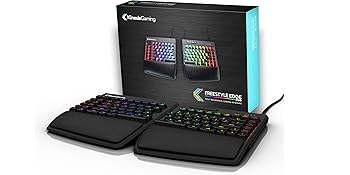
🎮 Elevate Your Game with Style and Comfort!
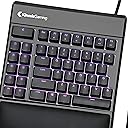
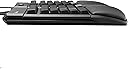
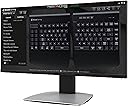
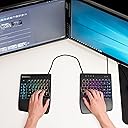
The KINESIS Gaming Freestyle Edge RGB Split Mechanical Keyboard features Cherry MX Linear Red switches for professional-grade performance, an ergonomic split design for enhanced comfort, and fully customizable RGB lighting. With detachable palm support and a powerful SmartSet programming engine, this keyboard is designed for gamers and professionals alike, ensuring maximum efficiency and style.


| ASIN | B07STXYG5T |
| Antenna Location | Gaming |
| Best Sellers Rank | #36,801 in Video Games ( See Top 100 in Video Games ) #867 in Mac Games & Accessories #1,769 in PC Gaming Keyboards |
| Brand | KINESIS |
| Built-In Media | Detachable Cushioned Wrist Rest |
| Button Quantity | 95 |
| Color | RGB MX Red |
| Compatible Devices | PC, Laptop, Game Console |
| Compatible Operating System Family | ChromeOS, Linux, MacOS, Windows |
| Connectivity Technology | USB |
| Customer Reviews | 4.3 out of 5 stars 312 Reviews |
| Global Trade Identification Number | 00607998897522 |
| Hand Orientation | Ambidextrous |
| Item Dimensions L x W x H | 15.5"L x 10.3"W x 1.3"H |
| Item Type Name | split mechanical keyboard |
| Item Weight | 2.8 Pounds |
| Keyboard Backlighting Color Support | RGB |
| Keyboard Description | Gaming |
| Keyboard Layout | QWERTY |
| Manufacturer | Kinesis Gaming |
| Mfr Part Number | KB975-RED |
| Model Name | Freestyle Edge RGB |
| Model Number | KB975-RED |
| Number of Keys | 95 |
| Number of Sections | 95 |
| Power Source | Corded Electric |
| Recommended Uses For Product | Gaming |
| Switch Type | Cherry MX Brown |
| UPC | 607998897522 |
| Warranty Description | 2 Years from Date of Purchase |
O**D
Great keyboard
I bought this to replace a Kinesis Freestyle Edge (non-RGB with blue keys) that met an unfortunate accident. I've been using Kinesis split keyboards for years as they are the most comfortable for my wrists and shoulders. Standard keyboards force my arms to angle inward in a way that is not quite natural, and causes some fatigue. Though you mostly get used to the standard keyboard arrangement, it is always so much better to be in control of the angle as you can when your keyboard is split in half. The older Kinesis split keyboards were membrane keyboards, so I had switched to a standard mechanical once mechanicals were available, as I prefer the feeling. Also, I like backlit keys as I tend to keep my office dark to reduce glar. When Kinesis started offering mechanical, backlit, split keyboards, that was excellent as they combine the three main features I look for in a keyboard. This RGB has a bit different layout to the previous Freestyle, so if you are switching there will be some learning as the ESC key is now small and placed next to the F keys instead of being big at the top of the macro keys (though you can reprogram that top large macro key to be ESC if you want, but you'll have to avoid accidentally hitting the real ESC key when you reach for F1). Also 7 is now moved to the other side. Overall, they are very similar. Some points of interest: -when the keyboard is in FN mode, by default, there are no LEDs. This is normal. You can use the configuration utility to assign LEDS (I recommend a different color scheme so you can easily see if your keyboard is in FN mode or normal mode). -the keys themselves have a slightly dusty coating on top for better traction. My previous Freestyle either didn't have that (or maybe it had but wore off over years of use) -this keyboard comes with a wristrest, so you do not need to buy it separately. It is detachable should you not want to use it or use a different one. This wristrest has cushions built in instead of the flat plastic Kinesis ones. They feel nice, though it took a little adjustment as I switched from my old keyboard due to it raising my hands just a little. -You can turn LED backlighting on/off with a toggle switch -The arrow keys are in proper inverted-T layout and have a raised bump on the up arrow for touch placement. This is a small but nice feature; no keyboards I've used before have had the touch bump on these keys. This keyboard is great not just for gaming but for general computer usage and typing when you want something that is easier on your wrists and shoulders, and has mechanical switches for accuracy.
G**E
A great ergonomic keyboard
This is a great keyboard. It does take time to get used to being split. The lifts, properly installed, works great. If you are having trouble with the keyboard plopping down, you should take the lift off, reverse it, and reinstall it. My arms no longer feel squeezed in like on regular keyboards. The keys have a good feel and gives clicks. It feels solid and, definitely, does not feel cheap. The RGB is ok but I'm not really into rgb. I would recommend this keyboard to everyone.
A**R
Keboard is fantastic, but don't buyt it on Amazon
I paid for a new item and received one obviously from returns. Box opened, seals torn off, plastic film removed. No discount whatsoever. What'll you do? Send it back? Live with it, right? The keyboard, however, is marvellous. Super comfy padding, The freedom of placing it any which way you like. Mechanical key switches. Beats everything I tried so far, incluing Microsoft Sculpt. Only the old, first edition Microsoft Ergonomic Keyboard can compare. If you used a split (ergonomic) keyboard, the learning curve is really short. If you move from a regular one - it may feel awkward at first. Programming options are innumerable, if you are willing to spend some time on it. Firmware updates, downloading app etc. is not exactly plug&play.
T**J
Convenient software features but should come with tenting kit
Been using the keyboard for about a week and was all excited to set it up with custom colors and macros. Took off 2 stars for ergonomics because they require you to purchase the tenting kit separately, which is the accessory that is essential to the "ergonomic" capability of this product. Once the kit was installed, the comfort improved greatly. Very satisfied with the MX red switches. They feel good, are smooth, and provide a little bit of resistance to feel secure about my keypresses. Haven't had issues with any rattling keys. The key caps seem a bit thin to me, and so does the plastic of the keyboard body. I'm surprised that this was $200. Had a couple of glitches with the software when I was first playing with it, but it's pretty intuitive and the bugs went away with a reboot (eject and remount VDRIVE). I'm happy to have the capability of custom lighting per key and all the macros, profiles, and remaps in my control. Overall, a worthy upgrade, and I don't regret spending the $$, but it is overpriced due to low competition.
M**N
I use this for work
I needed a nice, high quality ergonomical keyboard. I'm a lawyer working from home lately. My Microsoft ergo keyboard was ok but some vowel keys fell off ... enter the Kinsis (with the booster kit that should come with it). It's great, snappy, loud, well built and so adjustable. I did have to put my mouse between the two sides of the keyboard to keep it on the desk keyboard try - I may get a different desk with a larger tray to make things more comfortable. But main point is that the keyboard is very well designed if you are worried about your wrists.
O**Y
Worked great, until it didn’t.
Purchased in December 2021. I have carpal tunnel (CT). I’m not a gamer. I purchased strictly for the ergonomic aspect of the keyboard. In that aspect, it was fantastic! I’ve had much less pain/tingling that goes with CT. It also has colorful lights which I really liked. Everything was working great until yesterday. The i key no longer works. I have not even had it for one year. I am so disappointed. And for the price of this keyboard, I figured I’d have it for at least 3-4 years! I need to find the paperwork to see if there is any chance for warranty coverage but if there isn’t, I would have to advise against purchasing this product. Or, purchase and check if the extended warranty covers a replacement in case of key failure. So mad.
S**H
Excellent Keyboard
Though I don't use this keyboard for gaming purposes, it is, by far, one of the best ergonomic keyboards that I have purchased. If you are a typist and will be using this for something other than gaming purposes, I highly recommend ordering the lift set. This allows you to make the keyboard even more ergonomic and steady. I found that without the lifts, the keyboard had a very, very slight wobble on the right side. Once I added the lifts, it is rock steady. Also has a nice feel to it, which is an added bonus if you are touch typist. Of note, the palm pads are also some of the best that I've used! Very nice keyboard!!
N**T
It's a mixed bag that may be worth it
Overall, it's a great unit but it's not without some weird marketing inconsistencies. This is hardwired with no Bluetooth and the cables are not removable, so you're stuck with what you get. The reason I'm giving it 3 stars is if you run into what I could consider a critical layout problem, then it's functionality is completely useless. My son also uses the keyboard for game like Fortnite and Minecraft. My use is mainly for programming, but I bought it for gaming as well. Reaching some keys is difficult outside of the QWERTY area. The size of the board is very large with the additional buttons and its shape. My teenaged son strictly games. First functional issue is that most games that require a number row for quick selections are limited to 1-6. This means you'll either need to completely remap your game with the inherently slower response time due to relearning, or you'll immediately unplug it and use a conventional keyboard. For my son, it's the latter. He has too much time invested to use this keyboard. He'd give this a 1 star. For me, it's more of a nuisance than and a deal breaker. The reach for certain keys like escape. The additional, massive, button next to it seems a bit silly and poorly positioned. I have to feel my pinky fall into the gap between it and the escape to know where I'm at and there's a lot of wrist pivoting being done to get there. Hardly ergo, imo. So, my alternative is remapping the custom buttons on the left just to map an esc key. That's a waste of I'm being honest as it's one of the few that are reachable and it's not being used for a macro (which I meant to use for vim gestures in programming). I'm still forcing myself to use the keyboard but growing frustrated with the reach. Another weirdness is the keyboard split. This is applicable to *all* ergo keyboards. I was conventionally taught to teach the 6 number key with my right index finger. Instead, it feels awkward and a far stretch to reach it with my left index finger. On my right hand, I find myself mistaking the keys. I'll hit 9 instead of 8, - instead of 0, etc. that is another strike for me outside of the QWERTY zone. I'm slowly getting the handle of this revised pivot. It does require more on both wrists, which is a bit strange. I attribute that to the flatness of the keyboard unlike the concaved (advantage 360) or convex (Logitech Ergo) So, let's talk about typing. Without the tenting, it's very good I'm using linear cherries so it's a nice soft press with minimal effort to get response. Far less key press means less wrist aches. If you're not trained on mechanicals, I'd recommend something a bit more tactile so you get the hang of the range needed to activate the keys. You do not need to bottom out the key. That's the benefit of a mechanical switch vs a membrane board. What about fatigue? It's less. Much less. My right wrist throbs from programming. Bear in mind that this requires the use of of symbols. I type on a Dvorak layout and this keyboard greatly compliments it. The problems above are still applicable but the cons do not outweigh the pros. I will keep the programming aspect short, but I just say this isn't that straightforward. I may update this review with more on it once I figure out everything it can do. Not sure if that's entirely necessary. I will say the v-drive mounting and disconnecting alone are a bit frustrating. More on that later. Maybe.
S**E
Je ne m'en passerais plus.
Courbe d'adaptation requises. Bonne qualité.
S**K
Best keyboard so far
So far it's my best keyboard. There is no better on the market. Next one will be DIY. A little noise, it doesn't make click noise, but when you hit button it reaches bottom at some point and that makes noise. Cable between left and right parts is extensible. btw must notice that cover on cable holder is so loosy, if I'm trying to move my keyboard up on table by holding keyboard from top, it's just opens. Functionality is great! rgb is nice, fully customizable, could set it to soft dim light and different colors for FN layer. It doesn't have lifts, unbelievable, so expensive keyboard and I have to buy a separate lifts to adjust angle of the keyboard on the table.
J**N
Would recommend!
Hands down my favourite keyboard so far
M**N
Perfeito
Vale cada centavo. É de um conforto indescritível. Para eu que sofro com tendinite e túnel do carpo foi a melhor aquisição em muito tempo. Amei demais!
L**E
Awesome, but expensive.
I was a fan of their Advantage 2 but that keyboard was not suitable for gaming. Basically, it is impossible to play any FPS on that keyboard. But knowing that Kinesis makes good quality keyboard, I decided to give this one a try, albeit an expensive one. Long story short, I was not disappointed. The layout, the tilt, the separation... all makes for a very comfortable keyboard for gaming. I can have much more comfortable separation between the keyboard hand and the mouse hand and it makes a lot of difference in gaming. Also it makes a sweet setup! The downside? Price, this thing is expensive, really expensive... but hey, this is still cheaper than their Advantage 2, so I still keep both of my kidneys
Trustpilot
4 days ago
2 months ago