Buy anything from 5,000+ international stores. One checkout price. No surprise fees. Join 2M+ shoppers on Desertcart.
Desertcart purchases this item on your behalf and handles shipping, customs, and support to Austria.
💼 Upgrade your storage game with enterprise-grade hot-swap power — because downtime is so last decade.
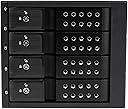
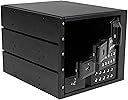
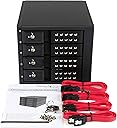
The StarTech.com 4-Bay Mobile Rack Backplane converts three 5.25-inch bays into a trayless, hot-swappable interface for up to four 3.5-inch SATA or SAS hard drives. Supporting SATA I/II/III and SAS I/II with 6 Gbps transfer speeds, it features individual ejection levers, key-lock security, power/activity LEDs, and a vented aluminum enclosure with a speed-controlled fan to maintain optimal drive temperatures. Designed for professional-grade reliability and easy integration, it’s ideal for enterprise and custom multi-drive storage solutions.


| ASIN | B00OUSU8MI |
| Best Sellers Rank | #237 in Enclosures |
| Brand | StarTech.com |
| Color | Black |
| Compatible Devices | Desktop |
| Connectivity Technology | SATA |
| Customer Reviews | 4.1 out of 5 stars 189 Reviews |
| Data Transfer Rate | 750 Megabytes Per Second |
| Enclosure Material | Aluminum |
| Global Trade Identification Number | 00065030859547, 05057454485711, 07426800234200 |
| Hard Disk Form Factor | 5.25 Inches |
| Hardware Interface | SATA 6.0 Gb/s |
| Hardware Platform | Personal Computer |
| Item Weight | 1.28 Kilograms |
| Manufacturer | StarTech.com |
| Material | Aluminum |
| Memory Storage Capacity | 6 GB |
| Mfr Part Number | HSB4SATSASBA |
| Model Number | HSB4SATSASBA |
| Supported Devices Quantity | 4 |
| UPC | 650308595472 650361661282 065030859547 012305135486 |
| Unit Count | 1.0 Count |
| Warranty Description | 2 year warranty |
J**G
Great backplane, perfect for custom builds of multidisk enclosures.
I needed a 4 Disk back plane that didn't use port multiplication for my RAID 10 setup on my server system and this worked perfectly. It is intended to fit inside of the actual PC chassis, but for what I was doing that was not possible. I needed it to be able to connect to 4 WD Red 3TB drives for RAID 10 with hotswap, but needed it to be separate from the actual server computer. I was able to build a custom case for this, and wired up a power supply to go in the bottom of the case to run the enclosure. The enclosure sits in the top of the case, and has 4 SATA plugs coming from my Intel RS2PI008 RAID Card via a Mini SAS to SATA breakout cable. Once I finished with all of the building, I plugged it all up to the server and set up the RAID without a hitch. I like the fact that this backplane has individual LEDs for each drive to monitor activity and will tell you when one of the drives in not functioning. Each drive slot is trayless, and is easy to insert and remove the disks from. All you have to do it open the door on the front for the slot you want to insert the disk in, and slide the disk in partially. Then close the door and the spring in the hinge will do the rest for you, pushing the disk all the way in and making the connection on the PCB. To remove the disk, just open the door, and the disk will partially pop out of the slot allowing you to grab hold of it to install a new one. Each slot has a lock on it, so you can lock the doors to prevent someone from opening the doors and disconnecting the disks. This is nice if the unit is in a place where others are able to access it, just don't lose the keys (It comes with 2). If you are installing it inside of a chassis, there are slots on each side for installing screws to hold the backplane in position. It requires 2 SATA Power connectors from you PSU, and it is recommended to use each from a different rail, especially if you are using the same rails for powering other things. This way you won't over load the rails. There are 2 switches on the back, one for turning on and off the LEDs, and one for setting the fan to either off, low or high. There is also a cut out where you can see 4 pin spots on the PCB that are not filled in. I took the whole thing apart to try and figure out what they are for, and as far as I can tell, they are for a temp sensor. I looked around on the net and there are a few models similar to this one that have a temp sensor installed from the factory. I guess if you wanted to, and you are good at soldering, you could install your own if you have a thermocouple, but without an LCD readout it would be kinda pointless. Overall this is a nice backplane, that is built really well and is ready for the long haul. I forgot to mention, that the 4 drive slots are able to accept either SATA or SAS drives, but the ports on the back are only SATA unfortunately, but it isn't hard to find a SAS to SATA cable adapter or even a SATA to eSATA adapter if needed. The fan that installed in it is a standard 3 pin 80mm fan, and it is really quite as it is with it set to low. If the fan ever fails, or you just want to install a higher grade one, it isn't hard. There are 4 screws on the housing for the fan that need to be removed to gain access to the fan, but the other 12 screws around the outside of the back plate have to be removed to gain access to the PCB so you can unplug the fan. I can't remember right off the top of my head, but I think the plug for the fan is a non-standard 3 pin plug, so you may want to have a de-pinning kit ready so you can swap the plugs out. The PCB for the backplane is not readily available online, I did some searching for it to see, as really for what I wanted to do that was the only part of this I really needed, but I was unable to find one. As long as the temps stay relatively low, and the input voltages don't spike ( I have it connected to a APC 1500 Pro UPS so there shouldn't be any fluctuations in voltage) and blow the circuit it should be fine and not need replacement. If it does, I guess I will have to contact StarTech and see if they can point me in the right direction to procure a replacement. Since this is going to be used for my server to maintain all of my media and backups it will be on 24/7 so I will put time on it quickly and I will post back later on to let you guys know how it holds up. I predict there will not be any issues, but I have been wrong before, just ask my Wife.
G**R
Quick an easy way to add hot swap bays.
I now have two of these units for separate machines, not because of failure. The first one I installed in mid 2021, the second in late 2023. It's now fall of 2025 and both units are going strong fully populated, 24/7. In the multiple years I've had these units I've never experienced a fault that wasn't due to a drive dying. I fell in love with hot swapping hard drives using old server hardware but hated the noise, weight and physical space often required for such machines, and wanted to "downgrade" to more consumer desktop-style cases. Few cases like that are designed for pulling drives without opening the case but these bays solved that problem as long as your case has 3 5.25" bays that open to the outside. Admittedly even THAT is becoming harder to find in cases since fewer people are adding accessory components that need them. If you can install a hard drive then you can install this; although since it's longer than a typical hard drive if your case is small, or otherwise cramped around the back of the 5.25" bays then getting to the power and SATA cables could be a bit difficult when you install it. Fortunately because it's a hot swap bay you shouldn't ever need to access the back of the unit after installation. The unit does require a SATA data cable for each drive, but only needs 2 SATA power cables which makes cable management a bit easier. I've run everything from older 1TB drives to 16TB 7200RPM "Enterprise" drives and they've all been detected no differently than if they were directly connected to the motherboard. This is expected but I'm pointing it out as sometimes there are compatibility issues particularly with larger hard drives. The drives are firmly secured but promptly pop out for removal when you open the each door fully. The door doesn't extract the drive until it's nearly fully open so you don't have to worry about accidentally disconnecting a drive if you open the wrong slot. I don't use the locks on the doors. They exist which is nice, and would slow someone from easily ripping your drives out (such as a curious child) but I wouldn't rely on them for actual security purposes. Other reviews have commented that the fans are loud. Either that was an issue with units older than mine and has since been fixed, or I'm just lucky because both of mine are dead silent. Drive temps are kept well within reasonable levels; checking my logs (monitored with AnalogJ Scrutiny) I peak at 40c on one drive over the last year, with the average being 38c; and neither machine is particularly well ventilated.
T**N
Not durable
Loved this on initial install, and this had so much promise that I almost bought another. Easy to set up/load with hard drives and get it up and going. However, around 60 days after purchase, the plastic ejector on the backplane broke on the bottom bay making very difficult to remove the 4th drive and I question if it will continue to work at all. I tried to figure out if I could return it, but it does not look like it is possible.
W**T
Quality caddyless drive cage for 3.5" HDD
Slip the drive in and close and latch the door. Opening the door removes power from the drive, and when you open it wider partially ejects the drive for easy removal. The model I bought has two sata drive power connectors and four sata data connectors on the back for easy connection internal Motherboard connectors or SAS fanout cable. Mostly metal construction and built in fan draws cooling air across the drive(s) to dissipate heat. No more precariously balanced hard drives tugging on cables. I'd recommend this for easy servicing on you storage or NAS build.
A**R
The best unit I could find and perfect for use in Anidees AI Raider XL full tower case
This bay works great and fits perfectly in Anidees AI Raider XL full tower case or old Antec 1200 case. The design allows for installing in cases that have the supporting tabs between each 5.24in drive bay which is a very important design feature to have for compatibility for non-rackmount cases. The build quality is excellent and easily handles 4 drives keeping heat at a manageable level. The fan however is quite noisy and I would recommend replacing it with a Noctua fan. As with many drive bays of this type the PCB holes designed for air movement are probably too small so air flow across drives probably isn't the best one would hope for. I don't have any connectivity issues between my HBA and this unit any my drives transmit data a full speed with no disconnects.
B**U
New life for my old PC tower case
While my PC tower case holds 5 hard disks, I turned it into a home media server and needed a few more drive slots. While this isn't the cheapest solution, it is perfect. Hot swappable drive bays, cooling fan, cables routed beautifully from the rear. I highly recommend this to add some drive bays to your old PC case.
D**M
This worked really well for me. The build quality is really solid and it fit into my no tools case perfectly.
This worked really well for me. The build quality is really solid and it fit into my no tools case perfectly. I just slid it into 3 empty bays, secured it, connected the cables, and installed 4 terabyte drives. I haven't noticed any additional heat coming out of the box and all 4 drives are working great. There are switches on the back that let you turn the led lights off, and lower the fan speed, which is nice.
H**N
Great drive bay!
This is a very well made Drive bay. I have put it in an old server Tower and I'm making my own NAS array. Solid metal Construction and fit into the tower seamlessly. I am not sure what others are talking about with loud fan noise, but this one seems very quiet. I can mostly just hear the drives spinning.
B**S
loud fan
Well built and sturdy, the only downside is the extremely loud fan. For the price it is It should have been something more silent. I'll probably end u switching the fan later on myself.
K**N
Unraid server
Excellent product. Works as advertised. I am using it for my 15 drive Unraid server. The data connects via my SAS controller. Initially I had 15 drives stacked up in 3x 5 bay enclosures. Sketchy at best but it worked for a few years but it was heavy as hell. Now I have 4x 4 bay enclosures and I have an extra bay if I want to make it a 16 drive array. The heat of the array is better dissipated for starters and it looks a whole lot better. Its definitely more secure and a whole lot less sketchy. The largest drives connected are 10 TB.
M**R
l'extension indispensable pour installer un Raid disque
A peine le temps de compter jusqu'à dix, et c'était installé, les disques s’insèrent sans aucun souci, d'une facilité d'utilisation déconcertante.
V**V
Used product
The product was open with visible scratches and worst of all one of the disk push clips was broken.
P**R
Toller Einschub für HD-Jockeys
Verbaut in einem Thermaltake Tower belegt der StarTech HSB4 drei durchgängige(!) 5.25 Plätze, damit bleibt noch einer für den BluRay-Brenner. Die Montage gestaltete sich einfach, die TT-Einbauschienen können problemlos verwendet werden. Allerdings schließt der Einschub vorne nicht plan mit dem Gehäuse sondern hat einen 3-4mm großen Überstand. Nicht so problemlos die Verkabelung. Aufgrund der Einbaurichtung der SATA-Anschlüsse können KEINE 90°-Stecker (abgewinkelte) sondern nur "Gerade" (im Lieferumfang) verwendet werden, denn der Lüfter ist im Weg. Zum Lüfter ein Satz: Der ist nicht ganz leise, auch nicht im auf der Rückseite auswählbaren Langsambetrieb. Die HotPlug-Funktion ist natürlich vom Controller abhängig. Meine Mainboard-SATA's erlauben dies nicht, der DeLock-Controller hat damit kein Problem. Das Entnehmen der Platten könnte einfacher nicht sein, eine Mechanik über den Deckel drückt die Platte nach vorn. Es ist bei SATA-III kein Geschwindigkeitsverlust erkennbar, das spricht für die Qualität und Verarbeitung der Rückwandplatine. Auch der Energiesparbetrieb von Windows erreicht die Platten nach eingestellter Zeit problemlos. Warum sich der Einschub von einem Tag auf den anderen von 58,- auf über 99,- Euro verteuerte, das wissen nur die Götter und Amazon... Fazit: Für den erstgenannten Preis von 58,- Euro eine gute Investition wenn einem die gehäuseinternen Festplatteneinschübe ausgehen. Für 99,- allerdings ist der Kauf eines externen Gehäuses zu überlegen, die kosten auch nicht viel mehr...
Trustpilot
4 days ago
1 month ago