Buy anything from 5,000+ international stores. One checkout price. No surprise fees. Join 2M+ shoppers on Desertcart.
Desertcart purchases this item on your behalf and handles shipping, customs, and support to Austria.
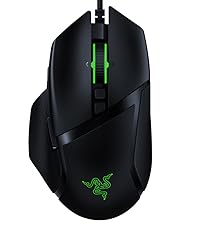
🎮 Elevate your game with wireless freedom and pro-grade precision!
The Razer Basilisk X HyperSpeed is a high-performance wireless gaming mouse featuring Razer's proprietary HyperSpeed technology for 25% faster wireless transmission, dual-mode Bluetooth and HyperSpeed connectivity, a 16,000 DPI optical sensor for pinpoint accuracy, 6 programmable buttons for personalized control, and an industry-leading 450-hour battery life on Bluetooth. Its ergonomic design and durable mechanical switches make it a reliable choice for both intense gaming sessions and professional productivity.


| ASIN | B07YPBQSCK |
| Additional Features | Ergonomic Design, Portable, Programmable Buttons, Wireless |
| Antenna Location | Gaming |
| Are Batteries Included | Yes |
| Are Batteries Required | Yes |
| Battery Average Life | 450 Hours |
| Best Sellers Rank | #40,564 in Video Games ( See Top 100 in Video Games ) #1,277 in PC Gaming Mice |
| Brand | Razer |
| Built-In Media | Razer Basilisk X Hyperspeed Wireless Gaming Mouse, Ultra-Long Battery Life |
| Button Quantity | 6 |
| Color | Black |
| Compatible Devices | Personal Computer |
| Connectivity Technology | Wireless |
| Customer Reviews | 4.5 out of 5 stars 19,927 Reviews |
| Enclosure Material | Plastic |
| Hand Orientation | Right |
| Hardware Platform | PC |
| Item Dimensions L x W | 5.11"L x 2.95"W |
| Item Type Name | Mouse |
| Item Weight | 0.2 Kilograms |
| Manufacturer | Razer |
| Mfr Part Number | RZ01-03150100-R3U1 |
| Model Name | Basilisk X HyperSpeed |
| Model Number | RZ01-03150100-R3U1 |
| Mouse Maximum Sensitivity | 16000 Dots per Inch |
| Movement Detection | Optical |
| Movement Detection Technology | Optical |
| Number of Batteries | 1 AA batteries required. (included) |
| Number of Buttons | 6 |
| Operating System | Windows 11 |
| Pattern | Mouse |
| Power Source | Battery Powered |
| Range | 10.0 meters |
| Special Feature | Ergonomic Design, Portable, Programmable Buttons, Wireless |
| Style Name | Basilisk X HyperSpeed - Wireless |
| Theme | Gaming |
| UPC | 811659035806 |
| Unit Count | 1.0 Count |
| Warranty Description | 2 year manufacturer |
C**R
Great Razer Gaming Mouse with Dual Connectivity
I'm not an Apple fan-boy, but I do love my MacBook Pro 14 M1 Pro...just love it. With that in mind, I wanted to flex the mini-LED screen of my beloved with games like CoD, so of course I needed a decent gaming mouse that would be up to the FPS tasks the game would throw at me. Trouble was I didn't want a USB-A dongle sticking way out of my otherwise puma sleek beauty of a laptop (even more so because in order to use the dongle, I would have to use a USB-A to USB-C adaptor, which would just look ridiculous - COME ON Razer, Logitech, and a host of other manufacturers, why haven't you yet embraced USB-C 2.4 GHz dongles), which really limits me to two just gaming mouse offerings from the two big boys: Razer and Logitech, that have Bluetooth connectivity onboard. I grabbed this mouse on super sale, and so far I'm pretty happy. It's not a flagship Razer mouse; it lacks a rechargeable battery, wireless recharging, and even lacks the snappy looking LED lights found on so many gaming mice, which I personally really like...within reason. But this mouse is a bonafide gaming mouse with a DPI and polling rate to match, and equally importantly, this mouse has excellent ergonomics for right-handed people (left click button is higher and at a different angle than the right click, making it incredibly comfortable to use). Sorry left-handed people...though you are in the minority by quite a bit here. Anyway, if you're looking for an inexpensive, no frills, but effective, dual-connectivity mouse with great ergonomics, I recommend giving this one a go.
M**S
Amazing, perfect for FPS gaming and more.
It’s so hard to find the perfect mice for me and this is as close as I’ve been able to find. I use it primarily for FPS where it has not disappointed. Having used it for nearly two weeks now I can say I’m impressed by many aspects including the aesthetics, build quality, performance and battery life. Aesthetically it’s a pure deep black matte color which I love! It looks slick and beautiful which is something important to me when it comes to peripherals. It’s build quality is solid. The buttons have a very satisfying click to them and I anticipate they’ll last a long while. The textured thumb rest is one of the most important features I look for in a mouse because I don’t like having a significant part of my large hands gliding against anything. My thumb rests perfectly in it and stays still thanks to the textured grip on it. It performs just as you would expect a wired mouse in both intense gaming FPS scenarios and casual computing. Having no latency in gaming is huge for me. And finally, the battery life off of the one included AA battery is surprising me more and more with each day. I haven’t used the USB mode as I’m quite content with the Hyperspeed mode. If you have the money and want a simple but very well built and well-performing gaming mouse I would highly suggest considering this one. It doesn’t have any bells and whistles like lighting but it gives you everything you need if you’re a competitive gamer.
T**S
Great mouse!
4/22/22 The build quality and precision is much better than the comparable Logitech mouses I've been using. I LOVE the ergonomics of this mouse, fits my hand perfectly. I'm hoping the battery that came with it wasn't really new, because after 12-14 hrs of continuous use the battery died... Got a fresh fully recharged 1 in now and so far it's lasted longer than the battery that came with it. Hopefully it will be closer to the 500 hr. claim, I will update this review with more stars if that becomes the case. 4/25/22 Star increase from 3 to 5 Turns out the battery issue was with the included battery, since replacing it with a fresh battery, I've used the mouse for about 36 hours, synapse app shows battery life at 99% and volt meter shows 1.56v. **Protip** The synapse software is garbage, uninstall it, it randomly makes the mouse not unsuable when windows starts. I have a dual boot Linux/Windows workstation, in Linux and Windows it works flawlessly on generic drivers, but Windows + synapse = buggy unreliable garbage experience. Just bought another one since this mouse has zero issues (if synapse app is not installed).
N**E
Good
Configurable multi-stage DPI is switch is good, much better than the old binary switches, connectivity is usually pretty consistent. Tracking is decent. The ergonomics are fantastic. Battery life is decent, about 1-2 months between you need a new AA, but since the only indication of battery life is the LED in the DPI switch, you probably won't know it's dying until it's dead. Razer uses some type of rivets with no threading instead of Phillips screws, set in deep inlays, so I don't think it would be possible to take it apart and put in a new sensor. After a couple months of use, the plastic feet wear off and form jagged edges, which catch on mousepads. Obviously, not ideal. I thought the sensor was broken for the longest time because it wasn't able to hold a click. In reality, this mouse is just very prone to debris getting in the sensor and somehow preventing it from holding. If you're unable to click and drag, just pull the front of the mouse up as much as you safely can and blow any debris out with air. I literally had to rip the left mouse button out of its seat (not off the hinge) to make it operable again. It is able to click and drag relatively consistently once again. Still fails sometimes Now, a few months after writing this review, the scroll wheel button no longer works. Reason unknown. All in all, it's actually a really good mouse for the price, even if it has some annoying idiosyncrasies.
K**1
Overall 10/10 BEST GAME I MEAN MOUSE LOL
Praise part: Basically the perfect gaming mouse, and for the price it cannot be beat. The synapse software is nice and being able to switch DPI on the fly is super handy when switching from game to game rather than messing with your in game settings. Don’t let the rechargeable mouse hype train fool you. Switching out a replaceable battery is way better and faster than having to recharge it once it depletes. It’s also very comfortable, ergonomic, and lightweight. I switched from a very heavy mouse and it took a bit of getting used to. Note: This is sort of “negative” for those who want all the RGB. This mouse does not have RGB, but honestly it doesn’t matter cause your hand would be covering it when in use anyway. Complaints: My only complaint is that occasionally it just stops communicating with its USB receiver. Yes the mouse does have a sleep mode. But it has also happened while actively using the mouse and in order to trouble shoot it, I have to sit there rebooting the mouse until the receiver detects it again. HOWEVER, I believe this is more of a one off issue as my boyfriend bought the same mouse at the same time and he has never any issues with it. Conclusion: If you are looking for a wireless gaming mouse then you should probs get this one unless you want one with RGB. I honestly doubt there’s another mouse that can compete with it.
D**N
Great price for the quality
Firstly, one important thing to address is that this is a review for the Razer Basilisk X mouse, not the Razer Basilisk Ultimate, which is the majorly upgraded version of the mouse. Most reviews, for some reason, are of the Basilisk Ultimate, but with the one picture and the one you order on this page, you will be getting the battery powered Razer Basilisk X. TL;DR: I used this mouse for a month for office use. Great price for what you get. Feels nice in hand using common grips (claw, palm, fingertip), responsive clicking, nice scrolling, glides well across mouse mats, fair for gaming, really good battery life. I have only ever used wired mice. I wanted a wireless mouse for office use because my desk got smaller. I also share a desk now, and wires go everywhere from our headsets, keyboard, desk decorations, etc. To say the least, I wanted something cheap, but something I could still rely on with decent quality for the price. After doing some extensive research, I limited myself down to Logitech or Razer. When I finally laid eyes on the Basilisk X, I liked the look and the features. The more I thought about it, the more I fell in love with it. I was skeptical, as I've never used a wireless mouse. However, below are my thoughts after a month's use regarding the mouse and why I think, for the price, this mouse deserves five stars. To start, the price falls at $59.99 at the time of writing this review. Even in paying full price, I felt that I was receiving a great quality mouse. Below are some more specifications of this. Firstly, when getting the mouse, you get some detailed instructions regarding how to set it up. This is a nice touch, as trying to offhandedly figure out where the battery compartment and the USB stick is can be difficult. The cover lifts up nicely, but is a little hard to put back on. Ultimately, though, it has a nice compartment for the USB stick and for the battery. This mouse takes one AA battery inserted into the mouse. The weight of the mouse is very light and it's easily mobile. The build of the mouse feels decent for the price, and seems durable. The look overall of a matte black with some glossy parts and highlights is personal preference, but I do like its simplistic look with no lights on it. Overall, the feel of this mouse is nice in the hand. I used it in a few different grips to sample how it would feel. I used claw, palm, and fingertip, the most common grips I could think of. When using each grip, each time, I did feel relatively comfortable. The mouse fits rather well in my medium-large hands. I personally use a hybrid palm and claw grip, in the sense that my palm encompasses a large amount of the mouse, but my fingers are raised slightly. It is a little less comfortable for this type of grip, but you can still feel comfort using the mouse. It seems from my usage the mouse is mostly intended for palm grip, but that shouldn't discount other grips at least trying the mouse. It's much better than the mice the office provides me, trust me on that. As for the other parts of the mouse, such as the buttons and scroll wheels, I like the clicky responsiveness of the mouse buttons. Also, my fingers don't hang over the edge, even when using palm grip, which I personally love. I rather like the scroll wheel because It doesn't take too much pressure to move it up or down, but locks into place pretty solidly with ease. It is relatively easy to scroll at fast paces, but not seemingly as easy as a Logitech mouse, which my friend allowed me to use for a moment (more on that later). There are three other buttons to be used, one below the scroll wheel, and two next to the thumb. One complaint I had about some other mice I used, including Steelseries and (in some mice) Corsair, involved me accidentally pressing this sensitivity button below the scroll wheel. Well, I can safely say I've never had an accidental press of the sensitivity button. Since I am clumsy, though, I do accidentally press the two buttons on the side of the mouse every so often. However, whenever I have a mouse that has buttons in those places, I always click them on accident, no matter the mouse, so I cannot fault it for that. The buttons on the side stick out a little more than I usually see on other mice, but they don't get in the way, especially the sensitivity button. It sits flush with the two buttons used to click. Overall, you get pretty easy access to the thumb buttons when using the provided thumb rest as well. I can say it has a more simplistic design, which some will favor over multiple buttons. The cover in the back for the battery and USB holder have never come off accidentally for me, and I haven't had issues otherwise with the build. I'd say if you have medium hands, this would probably be the mouse for you, but with someone like me who has hands that are somewhat large, it works well still. Moving along swiftly, I'll now cover how the mouse performs when moving it around, and then dive into gaming with the mouse. Overall, on a decent quality mouse mat, the mouse glides really smoothly across the surface and calibrates easy. All you have to do to calibrate it to the surface you're on, software or not, is hold down the button just below the scroll wheel for a few seconds, and then it is calibrated and optimized for the surface it's on. It's never caught itself on anything and feels pretty smooth, albeit a little bit speedy. Otherwise, it's very elegant in its dance across a surface. Finally, the point that I've been looking forward to most, which is gaming. This is a gaming mouse so, after all, how does it perform for gaming? Well, after spending a few days gaming with this mouse instead of my regular mouse, a Corsair Nightsword, I can say it isn't too bad. Granted, I will always recommend a wired mouse for certain types of games, but if you want something wireless where delay and response time are not as important, this could be a great mouse for you. I spent time playing Destiny 2, Call of Duty Modern Warfare, and even the rhythm game osu! The delay is a little more noticeable here, but it is still not that bad. It was easy to be precise, though, of course, it was an adjustment. After playing with it a few days, I was able to play at around my normal level, which isn't that good to begin with. Needless to say, it does its job with certain types of games, but for the FPS genre or reaction time sensitive games, you might notice the delay. Granted, you could probably get used to it, but you might get better results from a higher tier mouse or from a wired one. That's not to say that the mouse didn't perform, because it very well did. I'm sure that if I played Dota 2, an RTS, or an MMO, that this mouse would still be viable, but from what I understand, you may want some more keybinds readily accessible if you're going to play an RTS or MMO. To wrap it up, though, it does its job. Lastly, battery life. I went into this with a grain of salt. I saw a review saying it ate batteries in the matter of a week and a half repeatedly, so for Razer to claim up to 285 hours of hyperspeed wireless, I was a bit skeptical. However, I had one Energizer battery that came with the mouse (thanks Razer!) and it lasted a full month. Keep in mind, this was for office use, and I have a desk partner. As soon as she leaves, I am right there to take over her station (she loves the mouse too by the way). She works eight hour shifts five days a week, while I work six hour days, four days a week. I figured calculating out this mouse's approximate battery usage using just these numbers would be inaccurate or possibly a bit skewed, so I'll just leave it at the pure statistics of how often we use it to prove the battery life. Also, only one AA battery. To say the least, you may pay for some batteries, but I really can't complain with the battery life I get from it. So, if you've stuck around this long, I want to thank you for sticking around, and I hope that if you're considering buying this mouse, I have laid out what my experience with this mouse was for a month regarding office usage. Take the gaming section with a small grain of salt as I didn't use it for more than a couple days. And again, this article is mostly opinion, but I tried to keep it open to show some cons, but mostly pros for why I like it. Thanks again!
D**K
My Logtech G305 has finally been replaced.
This is much more comfortable than my old go-to wireless gaming mouse, and weighs even less. I was able to get my G305 down to 80 grams with a lithium AAA battery in a AA adapter (much lighter than normal AAA Alkalines, and lasts far, far longer than even AA Alkalines) and this mouse is basically the same weight with just a normal AA battery. Lag is quite low even through bluetooth, which is great for laptops without that many USB ports available. Razer's HYPERSPEED seems to match Logitech's LIGHTSPEED blow for blow, though I'll have to wait a while to see how long the battery on this thing actually lasts. If it's anything like LIGHTSPEED, which it has been so far, it should be quite a while before I have to replace the AA it came with, and even longer after I stick a AAA lithium in there. (My old mouse lasted well over half a year on its AAA lithiums, so long that I often lost track of how ludicrously long its been since I last changed it.) Also, much like the g305, mice configuration profiles can be saved to the mouse itself, so you can use it without bloated, useless configuration software like Razer Synapse in the background. Just make your configuration in Synapse, save it to the mouse, then uninstall that junk after you're done, and the mouse will do as you tell it to without needing Synapse anymore. The only real problem I have with the mouse is Hypershift. And its not with the ability itself, but the side buttons of the mouse. On any mouse, the side buttons are usually the best to use for Hypershift-like functionality, but if you hold down one of the side buttons, your thumb gets in the way of pressing down the left click button, because there's no plastic separating the Left click from the side buttons. Booooo.....It's not the biggest deal, as normally you'd never need to hold the side buttons and use left click at the same time, but for that pretty much ruins the ability to use those buttons for Hypershift. And I REALLY like Hypershift. But unfortunately, I'm just going to have to forgo that particular feature, something I didn't have to do with my G305. But it really is an upgrade over the G305 in most areas, and even more importantly, its still available, and for a decent price. Definitely worth it, especially for the $40 on sale I got it for. $60 ain't that bad either, frankly.
K**K
Good hardware, terrible software
This is my first razer product, and I've always learned that first impressions matter. Clearly razer does not share that same mentality. What I like about the mouse itself: - Smooth scrolling - Satisfying tactile clicks - Slightly roughed texture (I personally don't like smooth) - DPI Cycle for macro What I don't like about the mouse itself: - Right click is a bit sharp, bugs my ring finger a bit Why I can't recommend this mouse; I like this mouse. My first razer first product and I was shocked at how good it was. I installed the software to change my macro and it turns out the software can't run without an internet connection and a razer account. After doing a bit of research it turns out the software is used as spyware. They previously had their privacy policy set in tune with 'we use a keylogger and look at what sites you visit for advertising purposes'. It hasn't changed much, they still use their software to 'make marketing more relevant'. Instead of making money by selling a good product with a bunch of feature. They make a good product and sell your data to make even more money. Some people I feel won't see this as a huge concern. Well, you should probably know this. Even while completely whitelisted in my firewall, the software still would not work. I suspect it's because it's using an unconventional method of connecting to the internet commonly used by malware. My firewall is provided by Avast, so this theory makes sense, although I would have to contact Avast to confirm. If you're looking for an exceptional mouse, and don't care what the software does it the background. This is for you, just know you're agreeing to selling your data. This trend needs to stop.
Z**.
Best ergonomic mouse on the market.
This is single handedly the best mouse on the market currently. Having 6+ months with this device really showed me the following: ++Responsive side buttons ++Great precision when using mouse ++Incredible mouse battery ++Rubber pad grips +Bluetooth and 2.4 USB connectivity +Razer software (good software for mouses) -Heavy mouse (does not matter to me) -Sharp edges (only near the bottom) --Mediocre magnet for the shell (does not during gaming or work) even though this mouse is relatively heavy this is still a mouse I'd recomend for work and gaming, though if you are looking for a cheaper alternative with a lighter mouse go and check for the razer deathadder essential mouses, those are ones I recomend if you are already into razer. Else go for the Redragon M656, its a decent wireless mouse. 5/5
A**L
Super Teil
Was soll man dazu noch sagen? Eine wirklich tolle Maus! Sie kann sowohl über Bluetooth als auch mit einem Empfänger verwendet werden und ermöglicht die nahtlose Arbeit mit zwei Systemen, ohne dass man umstecken muss. Diese Maus lässt keine Wünsche offen,
K**S
Ok the beginning and then goes bad, pretty bad, insanely bad
First review I wrote in November 2022 couple of months after purchase Energy drains off the battery in couple of hours. Forget months. Even Duracell batteries wouldn't last after using it for couple of months. Not sure if this is specific to this piece or in general. Editing the review based on Dec 2023 The mouse stopped working and there no way to revive it. After spending so much of money and energy, the product turned out to be extremely dissatisfactory. Not sure if Amazon is sending substandard products or Razer is bad. I see 19000 odd reviews with majority advising its good, but the experience is pathetic. Next mouse I'll probably buy at store who are at least ready to answer and certify the authenticity. Happy shopping!
R**S
Avaliação após 1 ano de Uso
O produto chegou dentro do prazo e muito bem embalado. Uso há mais de um ano e até o momento não apresentou nenhuma avaria. Nos primeiros 6 meses era utilizado para jogos, ou seja, fazia uso intenso dos botões, porém é possível notar que o material é resistente e de ótima qualidade. Dispõe de wifi e bluetooth, mas acho melhor usar no wifi. Tem alta capacidade de economia de energia, tanto é que até hoje uso a pilha que veio com ele. Se vc tá precisando de um mouse sem fio de boa qualidade e preço bom, esta é a melhor indicação. Recomendo a compra com empenho!!!
W**T
المنتج على usb 3.0 يقطع على كلام الناس بس انا ما جاتني المشكلة
المنتج اصلي و كويس و يشبك على البرنامج اصلي ١٠٠ من ١٠٠ وصل قبل الميعاد المتوقع و في ناس يقولو انه بعد فتره من الاستخدام يعلق على usb3.0 الحل انك تشبك الماوس بلوتوث او تحطه usb 0.2 و استهلاك البطارية على بلوتوث يطول اما ال usb مدة التشغيل اقل تكون بس انصح بعد ما تخلص البطارية الي تيجي مع الماوس تستخدم دورسيل تعطيك وقت اكثر من البطارية الي تيجي مع الماوس
Trustpilot
1 month ago
2 weeks ago