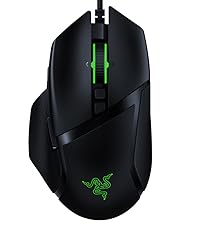
🎮 Own the game with lightning-fast precision and unstoppable endurance!
The Razer Basilisk X HyperSpeed is a wireless gaming mouse featuring cutting-edge HyperSpeed technology for 25% faster wireless performance, dual-mode Bluetooth and wireless connectivity, a high-precision 16,000 DPI optical sensor, 6 programmable buttons for personalized control, and an ultra-long 450-hour battery life. Designed ergonomically for right-handed users, it combines durability with professional-grade performance, making it a top choice for serious gamers and productivity pros alike.


| ASIN | B07YPBQSCK |
| Additional Features | Ergonomic Design, Portable, Programmable Buttons, Wireless |
| Antenna Location | Gaming |
| Battery Average Life | 450 hours |
| Best Sellers Rank | #34,904 in Video Games ( See Top 100 in Video Games ) #1,141 in PC Gaming Mice |
| Brand | Razer |
| Button Quantity | 6 |
| Color | Black |
| Compatible Devices | Personal Computer |
| Connectivity Technology | Wireless |
| Customer Reviews | 4.5 out of 5 stars 19,940 Reviews |
| Enclosure Material | Plastic |
| Hand Orientation | Right |
| Hardware Platform | PC |
| Included Components | Razer Basilisk X Hyperspeed Wireless Gaming Mouse, Ultra-Long Battery Life |
| Item Dimensions L x W | 5.11"L x 2.95"W |
| Item Type Name | Mouse |
| Item Weight | 0.2 kg |
| Manufacturer | Razer |
| Mfr Part Number | RZ01-03150100-R3U1 |
| Model Name | Basilisk X HyperSpeed |
| Model Number | RZ01-03150100-R3U1 |
| Mouse Maximum Sensitivity | 16000 dots_per_inch |
| Movement Detection | Optical |
| Movement Detection Technology | Optical |
| Number of Batteries | 1 AA batteries required. (included) |
| Number of Buttons | 6 |
| Operating System | Windows 11 |
| Pattern | Mouse |
| Power Source | Battery Powered |
| Range | 10.0 meters |
| Special Feature | Ergonomic Design, Portable, Programmable Buttons, Wireless |
| Style Name | Basilisk X HyperSpeed - Wireless |
| Theme | Gaming |
| UPC | 811659035806 |
| Unit Count | 1 Count |
| Warranty Description | 2 year manufacturer |
D**N
Great price for the quality
Firstly, one important thing to address is that this is a review for the Razer Basilisk X mouse, not the Razer Basilisk Ultimate, which is the majorly upgraded version of the mouse. Most reviews, for some reason, are of the Basilisk Ultimate, but with the one picture and the one you order on this page, you will be getting the battery powered Razer Basilisk X. TL;DR: I used this mouse for a month for office use. Great price for what you get. Feels nice in hand using common grips (claw, palm, fingertip), responsive clicking, nice scrolling, glides well across mouse mats, fair for gaming, really good battery life. I have only ever used wired mice. I wanted a wireless mouse for office use because my desk got smaller. I also share a desk now, and wires go everywhere from our headsets, keyboard, desk decorations, etc. To say the least, I wanted something cheap, but something I could still rely on with decent quality for the price. After doing some extensive research, I limited myself down to Logitech or Razer. When I finally laid eyes on the Basilisk X, I liked the look and the features. The more I thought about it, the more I fell in love with it. I was skeptical, as I've never used a wireless mouse. However, below are my thoughts after a month's use regarding the mouse and why I think, for the price, this mouse deserves five stars. To start, the price falls at $59.99 at the time of writing this review. Even in paying full price, I felt that I was receiving a great quality mouse. Below are some more specifications of this. Firstly, when getting the mouse, you get some detailed instructions regarding how to set it up. This is a nice touch, as trying to offhandedly figure out where the battery compartment and the USB stick is can be difficult. The cover lifts up nicely, but is a little hard to put back on. Ultimately, though, it has a nice compartment for the USB stick and for the battery. This mouse takes one AA battery inserted into the mouse. The weight of the mouse is very light and it's easily mobile. The build of the mouse feels decent for the price, and seems durable. The look overall of a matte black with some glossy parts and highlights is personal preference, but I do like its simplistic look with no lights on it. Overall, the feel of this mouse is nice in the hand. I used it in a few different grips to sample how it would feel. I used claw, palm, and fingertip, the most common grips I could think of. When using each grip, each time, I did feel relatively comfortable. The mouse fits rather well in my medium-large hands. I personally use a hybrid palm and claw grip, in the sense that my palm encompasses a large amount of the mouse, but my fingers are raised slightly. It is a little less comfortable for this type of grip, but you can still feel comfort using the mouse. It seems from my usage the mouse is mostly intended for palm grip, but that shouldn't discount other grips at least trying the mouse. It's much better than the mice the office provides me, trust me on that. As for the other parts of the mouse, such as the buttons and scroll wheels, I like the clicky responsiveness of the mouse buttons. Also, my fingers don't hang over the edge, even when using palm grip, which I personally love. I rather like the scroll wheel because It doesn't take too much pressure to move it up or down, but locks into place pretty solidly with ease. It is relatively easy to scroll at fast paces, but not seemingly as easy as a Logitech mouse, which my friend allowed me to use for a moment (more on that later). There are three other buttons to be used, one below the scroll wheel, and two next to the thumb. One complaint I had about some other mice I used, including Steelseries and (in some mice) Corsair, involved me accidentally pressing this sensitivity button below the scroll wheel. Well, I can safely say I've never had an accidental press of the sensitivity button. Since I am clumsy, though, I do accidentally press the two buttons on the side of the mouse every so often. However, whenever I have a mouse that has buttons in those places, I always click them on accident, no matter the mouse, so I cannot fault it for that. The buttons on the side stick out a little more than I usually see on other mice, but they don't get in the way, especially the sensitivity button. It sits flush with the two buttons used to click. Overall, you get pretty easy access to the thumb buttons when using the provided thumb rest as well. I can say it has a more simplistic design, which some will favor over multiple buttons. The cover in the back for the battery and USB holder have never come off accidentally for me, and I haven't had issues otherwise with the build. I'd say if you have medium hands, this would probably be the mouse for you, but with someone like me who has hands that are somewhat large, it works well still. Moving along swiftly, I'll now cover how the mouse performs when moving it around, and then dive into gaming with the mouse. Overall, on a decent quality mouse mat, the mouse glides really smoothly across the surface and calibrates easy. All you have to do to calibrate it to the surface you're on, software or not, is hold down the button just below the scroll wheel for a few seconds, and then it is calibrated and optimized for the surface it's on. It's never caught itself on anything and feels pretty smooth, albeit a little bit speedy. Otherwise, it's very elegant in its dance across a surface. Finally, the point that I've been looking forward to most, which is gaming. This is a gaming mouse so, after all, how does it perform for gaming? Well, after spending a few days gaming with this mouse instead of my regular mouse, a Corsair Nightsword, I can say it isn't too bad. Granted, I will always recommend a wired mouse for certain types of games, but if you want something wireless where delay and response time are not as important, this could be a great mouse for you. I spent time playing Destiny 2, Call of Duty Modern Warfare, and even the rhythm game osu! The delay is a little more noticeable here, but it is still not that bad. It was easy to be precise, though, of course, it was an adjustment. After playing with it a few days, I was able to play at around my normal level, which isn't that good to begin with. Needless to say, it does its job with certain types of games, but for the FPS genre or reaction time sensitive games, you might notice the delay. Granted, you could probably get used to it, but you might get better results from a higher tier mouse or from a wired one. That's not to say that the mouse didn't perform, because it very well did. I'm sure that if I played Dota 2, an RTS, or an MMO, that this mouse would still be viable, but from what I understand, you may want some more keybinds readily accessible if you're going to play an RTS or MMO. To wrap it up, though, it does its job. Lastly, battery life. I went into this with a grain of salt. I saw a review saying it ate batteries in the matter of a week and a half repeatedly, so for Razer to claim up to 285 hours of hyperspeed wireless, I was a bit skeptical. However, I had one Energizer battery that came with the mouse (thanks Razer!) and it lasted a full month. Keep in mind, this was for office use, and I have a desk partner. As soon as she leaves, I am right there to take over her station (she loves the mouse too by the way). She works eight hour shifts five days a week, while I work six hour days, four days a week. I figured calculating out this mouse's approximate battery usage using just these numbers would be inaccurate or possibly a bit skewed, so I'll just leave it at the pure statistics of how often we use it to prove the battery life. Also, only one AA battery. To say the least, you may pay for some batteries, but I really can't complain with the battery life I get from it. So, if you've stuck around this long, I want to thank you for sticking around, and I hope that if you're considering buying this mouse, I have laid out what my experience with this mouse was for a month regarding office usage. Take the gaming section with a small grain of salt as I didn't use it for more than a couple days. And again, this article is mostly opinion, but I tried to keep it open to show some cons, but mostly pros for why I like it. Thanks again!
B**Y
Great wireless mouse - Configurations are a huge benefit
I needed to buy a wireless mouse for my secondary computer (an Alienware laptop) that would be good for traveling, as well as gaming. On my gaming desktop, I use the SteelSeries Rival500, which, in my opinion, is the best gaming mouse out there. The button configuration is second to none. Perfect amount of buttons for an MMO, but also placed in the best positioning on the market. If a wireless model of the Rival500 existed, I'd be so there, but unfortunately, when I began my search, I could find nothing comparable. Because of this, I set out to find a wireless mouse with 6 or more programmable buttons, without breaking the bank. I'm not a fan of buttons that look like a keypad on the side of the mouse, so after whittling down my options, I decided to give the Razer Basilisk a try. It's a great mouse. I thought my life would be limited with only two buttons on the thumb-side of the mouse, but with Razer's ability to configure profiles depending on what you're doing, I find that I'm not really at a big loss. For my MMO playing (Elder Scrolls Online) I selected the two keyboard buttons I most used and mapped them to my mouse, and it really gives me what I need. I'm not doing intense gaming when traveling with my laptop, so the Razer mouse delivered. Then, the profile switches automatically when I'm outside of the game (very cool) and I can map the buttons to do Windows commands such as copy, paste, cut, etc. Things that I'd normally click more than two keys for, I can do with one press of a button. The mouse feels great, and so far, I have no issues with connectivity or battery life and I've been using it for more than a month. If you're in the market for a gaming mouse that doesn't break the bank, Razer delivers.
C**R
Great Razer Gaming Mouse with Dual Connectivity
I'm not an Apple fan-boy, but I do love my MacBook Pro 14 M1 Pro...just love it. With that in mind, I wanted to flex the mini-LED screen of my beloved with games like CoD, so of course I needed a decent gaming mouse that would be up to the FPS tasks the game would throw at me. Trouble was I didn't want a USB-A dongle sticking way out of my otherwise puma sleek beauty of a laptop (even more so because in order to use the dongle, I would have to use a USB-A to USB-C adaptor, which would just look ridiculous - COME ON Razer, Logitech, and a host of other manufacturers, why haven't you yet embraced USB-C 2.4 GHz dongles), which really limits me to two just gaming mouse offerings from the two big boys: Razer and Logitech, that have Bluetooth connectivity onboard. I grabbed this mouse on super sale, and so far I'm pretty happy. It's not a flagship Razer mouse; it lacks a rechargeable battery, wireless recharging, and even lacks the snappy looking LED lights found on so many gaming mice, which I personally really like...within reason. But this mouse is a bonafide gaming mouse with a DPI and polling rate to match, and equally importantly, this mouse has excellent ergonomics for right-handed people (left click button is higher and at a different angle than the right click, making it incredibly comfortable to use). Sorry left-handed people...though you are in the minority by quite a bit here. Anyway, if you're looking for an inexpensive, no frills, but effective, dual-connectivity mouse with great ergonomics, I recommend giving this one a go.
N**E
Good
Configurable multi-stage DPI is switch is good, much better than the old binary switches, connectivity is usually pretty consistent. Tracking is decent. The ergonomics are fantastic. Battery life is decent, about 1-2 months between you need a new AA, but since the only indication of battery life is the LED in the DPI switch, you probably won't know it's dying until it's dead. Razer uses some type of rivets with no threading instead of Phillips screws, set in deep inlays, so I don't think it would be possible to take it apart and put in a new sensor. After a couple months of use, the plastic feet wear off and form jagged edges, which catch on mousepads. Obviously, not ideal. I thought the sensor was broken for the longest time because it wasn't able to hold a click. In reality, this mouse is just very prone to debris getting in the sensor and somehow preventing it from holding. If you're unable to click and drag, just pull the front of the mouse up as much as you safely can and blow any debris out with air. I literally had to rip the left mouse button out of its seat (not off the hinge) to make it operable again. It is able to click and drag relatively consistently once again. Still fails sometimes Now, a few months after writing this review, the scroll wheel button no longer works. Reason unknown. All in all, it's actually a really good mouse for the price, even if it has some annoying idiosyncrasies.
T**S
Great mouse!
4/22/22 The build quality and precision is much better than the comparable Logitech mouses I've been using. I LOVE the ergonomics of this mouse, fits my hand perfectly. I'm hoping the battery that came with it wasn't really new, because after 12-14 hrs of continuous use the battery died... Got a fresh fully recharged 1 in now and so far it's lasted longer than the battery that came with it. Hopefully it will be closer to the 500 hr. claim, I will update this review with more stars if that becomes the case. 4/25/22 Star increase from 3 to 5 Turns out the battery issue was with the included battery, since replacing it with a fresh battery, I've used the mouse for about 36 hours, synapse app shows battery life at 99% and volt meter shows 1.56v. **Protip** The synapse software is garbage, uninstall it, it randomly makes the mouse not unsuable when windows starts. I have a dual boot Linux/Windows workstation, in Linux and Windows it works flawlessly on generic drivers, but Windows + synapse = buggy unreliable garbage experience. Just bought another one since this mouse has zero issues (if synapse app is not installed).
T**E
Perfect when on sale!
Needed a new mouse for my brand new laptop since my older wireless mouse was having issues, buying this mouse was totally worth it on Prime day. Especially with the one-day shipping, ordered it last night and it just came in. Totally brand new with the wrapper seal. Really hoped that razer mouses won't disappoint and it didn't size perfect, set up perfect, and especially hoe razer would automatically download their engine to start the whole setup. This wireless mouse might actually make me convert from my SteelSeries mouse to Razer. Update: Mouse has issues with Bluetooth connection and it doesn't really last long, a month later it just died on me out of nowhere. So best to keep it off when not in use, sad I thought that there would at least be sleep mode for the mouse to save energy since it is battery powered. So best to keep it off when not in use and carry around a few batteries whenever you're out or not at home. I should've done a bit more research, disappointing as I should've invested in something more reliable since my Logitech mouse was able to last longer than this razer mouse.
M**S
Amazing, perfect for FPS gaming and more.
It’s so hard to find the perfect mice for me and this is as close as I’ve been able to find. I use it primarily for FPS where it has not disappointed. Having used it for nearly two weeks now I can say I’m impressed by many aspects including the aesthetics, build quality, performance and battery life. Aesthetically it’s a pure deep black matte color which I love! It looks slick and beautiful which is something important to me when it comes to peripherals. It’s build quality is solid. The buttons have a very satisfying click to them and I anticipate they’ll last a long while. The textured thumb rest is one of the most important features I look for in a mouse because I don’t like having a significant part of my large hands gliding against anything. My thumb rests perfectly in it and stays still thanks to the textured grip on it. It performs just as you would expect a wired mouse in both intense gaming FPS scenarios and casual computing. Having no latency in gaming is huge for me. And finally, the battery life off of the one included AA battery is surprising me more and more with each day. I haven’t used the USB mode as I’m quite content with the Hyperspeed mode. If you have the money and want a simple but very well built and well-performing gaming mouse I would highly suggest considering this one. It doesn’t have any bells and whistles like lighting but it gives you everything you need if you’re a competitive gamer.
D**R
Long term review. Great gaming mouse. Terrible, intrusive software. Devours batteries.
I've owned this mouse for a little over a year, so this is a long term review. On the positive side, this mouse is very responsive and ergonomic. The speed is great and it's a solid experience. When it's working, it's a dream. But then there's the software. You have to install it or else the mouse will bug you all the time to install it. And when you do install it, it's intrusive and settings seem not to stick. It will randomly change speeds, or you'll accidentally bump the speed change button and change speeds. The speed button is a stupid gimmick that gets in the way more than it comes in handy, I'd rather it wasn't there and change the cursor speed in settings instead of on the fly. The software also asks you to create an account and sign in. When connected online, it somehow causes all kind of problems like disconnects and going to sleep randomly. The battery needs to be removed and re-inserted to get it to wake up from whatever random coma it went into. All these problems can be avoided if you don't create an account and sign in, or if you don't install software. Finally, the battery life is hilariously terrible, although It's only funny because I use rechargeable NiMH batteries. This mouse chews thru them like nothing i've seen. If I'm using it as my main mouse, it will eat a full (rechargeable) battery in as little as one day. My generic $20 logitech mouse I use for work will last a good 6 months on the exact same battery. You can use alkaline batteries, but at most you'll get 5 days out of each one and you'll pay the cost of the mouse again in batteries in very short order. I wouldn't buy this again. 2.5 out of 5
A**L
Super Teil
Was soll man dazu noch sagen? Eine wirklich tolle Maus! Sie kann sowohl über Bluetooth als auch mit einem Empfänger verwendet werden und ermöglicht die nahtlose Arbeit mit zwei Systemen, ohne dass man umstecken muss. Diese Maus lässt keine Wünsche offen,
K**S
Ok the beginning and then goes bad, pretty bad, insanely bad
First review I wrote in November 2022 couple of months after purchase Energy drains off the battery in couple of hours. Forget months. Even Duracell batteries wouldn't last after using it for couple of months. Not sure if this is specific to this piece or in general. Editing the review based on Dec 2023 The mouse stopped working and there no way to revive it. After spending so much of money and energy, the product turned out to be extremely dissatisfactory. Not sure if Amazon is sending substandard products or Razer is bad. I see 19000 odd reviews with majority advising its good, but the experience is pathetic. Next mouse I'll probably buy at store who are at least ready to answer and certify the authenticity. Happy shopping!
V**S
Excelente calidad
Mouse excelente, calidad y durabilidad garantizado
R**S
Avaliação após 1 ano de Uso
O produto chegou dentro do prazo e muito bem embalado. Uso há mais de um ano e até o momento não apresentou nenhuma avaria. Nos primeiros 6 meses era utilizado para jogos, ou seja, fazia uso intenso dos botões, porém é possível notar que o material é resistente e de ótima qualidade. Dispõe de wifi e bluetooth, mas acho melhor usar no wifi. Tem alta capacidade de economia de energia, tanto é que até hoje uso a pilha que veio com ele. Se vc tá precisando de um mouse sem fio de boa qualidade e preço bom, esta é a melhor indicação. Recomendo a compra com empenho!!!
W**T
المنتج على usb 3.0 يقطع على كلام الناس بس انا ما جاتني المشكلة
المنتج اصلي و كويس و يشبك على البرنامج اصلي ١٠٠ من ١٠٠ وصل قبل الميعاد المتوقع و في ناس يقولو انه بعد فتره من الاستخدام يعلق على usb3.0 الحل انك تشبك الماوس بلوتوث او تحطه usb 0.2 و استهلاك البطارية على بلوتوث يطول اما ال usb مدة التشغيل اقل تكون بس انصح بعد ما تخلص البطارية الي تيجي مع الماوس تستخدم دورسيل تعطيك وقت اكثر من البطارية الي تيجي مع الماوس
Trustpilot
3 days ago
1 week ago