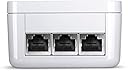
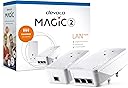
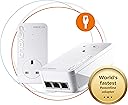
Desertcart purchases this item on your behalf and handles shipping, customs, and support to Austria.
⚡ Power your home with speed and stability — no WiFi drama, just pure connection magic!
The devolo Magic 2-2400 LAN Triple Starter Kit delivers up to 2400 Mbps over your home’s electrical wiring, featuring three Gigabit LAN ports for multiple wired connections. Designed for gamers, streamers, and remote professionals, it ensures a stable, high-speed internet connection in any room without relying on WiFi. Compatible only with devolo Magic adapters, it’s easy to set up and expand, backed by a 3-year warranty for peace of mind.


| ASIN | B07ZZDWVGN |
| Best Sellers Rank | 2,745 in Computers & Accessories ( See Top 100 in Computers & Accessories ) 16 in Powerline Network Adapters |
| Box Contents | Starter Kit : 1 x Magic 2 Lan Adapter , 1 x Magic 2 Lan Triple Adapter, 1 x 2 m Ethernet cable, 1 installation guide |
| Brand | devolo |
| Brand Name | devolo |
| Color | White |
| Colour | White |
| Compatible Devices | Compatible with all wi-fi routers, devolo MAGIC and G.hn adapters and wi-fi-capable devices |
| Compatible Operating System Family | Android, Windows |
| Compatible devices | Compatible with all wi-fi routers, devolo MAGIC and G.hn adapters and wi-fi-capable devices |
| Customer Reviews | 4.0 out of 5 stars 1,892 Reviews |
| Data Link Protocol | Gigabit Ethernet |
| Data Transfer Rate | 2400 Megabits Per Second |
| Data link protocol | Gigabit Ethernet |
| Data transfer rate | 2400 Megabits Per Second |
| Hardware Interface | Ethernet |
| Hardware interface | Ethernet |
| Item Weight | 0.86 Kilograms |
| Manufacturer | Devolo |
| Manufacturer Part Number | 8512 |
| Minimum Required Operating System Version | Android 5.0 Lollipop |
| Model Number | 8512 |
| Product Warranty | 3 Year Manufacturer |
| Unit Count | 1.00 count |
D**F
Superior connectivity over cable and WiFi, but setup not easy
I had been using TP Link devices, to get cable bandwidth over my mains sockets at the other end of my house to where the router is located. However, I started to get low signal strength and disconnecting, which rendered them useless. Having done some research, I decided to take the plunge, and try these powerline devices. Initial setup failed completely, so I decided to follow the manual process for pairing the devices, which worked perfectly. I did notice you must have them not all on the same circuit, especially if there are lots of other mains devices connected, as it will cause a weak signal warning over the cables. I placed the 2 Wi-Fi/LAN devices in the same sockets where my TP-Link devices were, and they both connected to the device at the router end perfectly. To configure the Wi-Fi on them, I strongly recommend you download the app 'Devolo Cockpit' onto your mobile first. It will automatically detect the Wi-Fi and allow you to configure and make changes to SSID and password, so you will not need the key from the back of the devices. It is a brilliant app, and easy to use, but sometimes you need to keep re-connecting until it recognises the devices, so be patient. I get nearly 100MB on Wi-Fi, and full bandwidth of 200MB over the cables. Expensive, but well worth the money, as you are paying for superior performance and signal quality.
J**N
Better than AV2 600
So nearly decade later and AV2 Homeplug Powerline has moved over for the ITU G.hn standard. I decided to buy the wired version (too many reviews of pain with the WiFi) and give them a go. They worked out of the box, and I had no issues during set-up. They did require a firmware update, but that was about it. To be clear, I bought a Devolo Magic2 LAN Triple. This contains ONE triple port, and ONE single port adapter. I think the box art on this is very deceptive. The triple port adapter is slightly bigger than the single port, both are bigger than AV2 and both run much hotter - for better or worse. Also, I ordered an Amazon Warehouse deal, and the first one Amazon sent didn't actually have any triple port Magic2 in the box (just two single port ones) , so I had to return and re-order. I've discovered they're happy to run in parallel to AV2 adapters without any noticeable loss, and bizarrely the Devolo Cockpit software even spots AV2 and Magic2 adapters. There's also web-page access to the adapters via their ip address, and the ability a set password if you don't trust people on your network. The iPhone Home Network app is okay - but it doesn't display any link speed information despite telling you it will. In tests at range I discovered a few surprises. AV2 is in the same location for reference, tests using iperf3: - TP-Link AV2 600 Two-Port ~16Mb/s (appears to split bandwidth across both ports rather than share it) - TP-Link AV2 600 Single-Port ~32Mb/s - Magic2 Single and Triple Port ~80Mb/s If range is reduced, speeds jump quite quickly up to 200Mb/s and then on to about 350Mb/s if distances are close. As a rule, expect 150 to 200Mb/s in a new-build four bedroom, but be prepared for slower. You'll still beat an AV2, but it might only be on range, or a factor of two. And in some cases, I suspect AV2 1300 will beat the Magic2, but not necessarily if you have older AV2 kit mixed with new stuff, which is why I was testing the Magic2. Will I keep them? Well that depends on whether they're stable. They solved my problem and increased my setup by speeds by about 7 or 8 times. I'm concerned about the temperature they run at (50C on the back, 35C on the front, 0.3A@240V = 7W), but they do have a three year warranty in case they melt down though. Note - if you're looking for adding WiFi Access Points to parts of your house, I wouldn't recommend the Magic2, simply because you'll be crippling any broadband gains you may be looking for, go for WiFi Mesh and Access Points with a dedicated third back-channel, or run Cat6 cabling (budget vs effort). The Magic2 is about easy of use, and getting the best out of something while doing very little. It does achieve this very well. Better than AV2 600 for sure, but it's not a "magic" bullet (sorry - groan now).
J**N
Good, Solid, Quick.... expensive
I bought these to replace some Netgear 1200 poweplugs that were driving me up the wall. Namely the Netgear models would occasionally drop connection and "go to sleep" now and then. An issue which I just couldn't fix as they didn't have the function to turn of this power saving feature. Anyway concerning the Devolo Magic 2-4000. What can I say... a bit like a well oiled machine they've not missed a beat in 2 months (and counting). The install software wasn't "Apple level" friendly but after a few clicks and attempts I managed to set them up to my preferences with no issue (turned off power saver mode), and once done you don't need to ever really go back. So solid stable connection.. tick! Speed wise in fairness they're not much quicker than the old Netgear 1200 models. I am getting about 140-150MB so quicker yes than the Netgear which did actually give me 120MB. However the Devolo connection is solid and stable so I'm as pleased as punch. So speed... tick! Additionally this model has three outputs on the "output" plug which is incredibly useful in this new age of home working as it means I can have multiple devises plugged in at once without having to resort to the dreaded Wi-Fi or having to purchase additional expansion units. Perfect for a small home office! So in conclusion if you are after a solid stable powerplug solution then they come really recommended, night and day compared to the old Netgear ones I had. No they probably wont give you a 240MB connection and yes they are a tad expensive but I guess you get what you pay for.
A**N
Don't buy
TLDR: Super expensive. Terrible instructions. Terrible UI. Didn't work properly at all. The automatic pairing nature and designating a LAN/Master was a shambles. Do not buy. So lets acknowledge something quickly. I am not complaining that the speeds weren't fast enough or that powerline adaptors aren't good. I'm complaining about these ones specifically. My parents have always had issues with internet (big house thick walls, lucky them) so I splashed out on what I thought would be high end adaptors after the tp-links they were using were ok, but not really cutting it. I lost a day trying to get these to pair correctly. The instructions are bad. They say things like "Connect all your devices" and then in the next sentence "Connect your LAN". I tried both methods. Or wanting you to connect your devices. and then plug your router into one of the devices. But then this messes up the network meshing, due to unplugging your router, during setup in my experience. And a few other contradictory instructions. Even when you follow them correctly the network loves incorrectly designating the wrong device as being connected to your router (as the LAN/master adaptor). So you have one of your satellites acting as the signal source and trying to talk to your router through the wifi, and then sharing the signals with your other satellite adaptors. Meanwhile your LAN adaptor's sitting ether-netted up twiddling its thumbs. You have no way to manually assign the correct one. It can also constantly jump between adaptors as the LAN/master. And whilst its doing this you're dropping your whole powerline/network. And if you do try troubleshoot it you end up with them just cloning networks and a huge mess in the app screen. I think i had every possible combination of a LAN and 3 satellites at one point. And none worked. I Tried setting them up at their eventual final designated sockets. Or sockets all next to each other and moving them. Neither worked correctly. For the price this is just absolute garbage.
D**N
Experiment with the configuration
I have 6 x Mesh WI-Fi and 3 x LAN Magic 2 adapters on a single encrypted powerline network. They all run at LAN speeds above 100Mps (Up and Down), the ones nearest the router at over 1200Mbps, and are proving very stable and reliable. These are excellent adapters, but be aware that they use the G.hn network standard and are not compatable with dLAN® Powerline adapters and other HomePlug AV products. If a network of these adapters is used on the same power circuit as a network of adapters running the dLAN standard, they interfere with each other. Both networks will run slower and all adapters will need regular resetting. However, the G.hn standard easily supports 8 compatible adapters on a single network, rather than the dLAN standard which only work reliably with 5 adapters. My house has 0.5m thick stone walls, so I need a large number of wi-fi transmitters to get good coverage. Now, for the first time and after 15 years of trying different products and network configurations, I have a single network of the Magic 2 adapters with a powerline backbone that provides excellent WI-Fi, as well as LAN, coverage thoughout. In addition, to reduce local electrical equippment interference, I followed the installation advice and use the interference filtering in the passthrough socket, if necessary with an extension lead, to connect all other electrical devices plugged into the same socket outlet block and I no longer plug anything into immediately adjacent power socket outlets. This has significantly boosted the powerline LAN network speeds. I had the significant expense of replacing all my top of the range dLAN adapters, but now, my entire LAN network runs more than 10 times faster, I hardly ever have to reset the adapters or router, and I finally have full Mesh Wi-Fi coverage throughout my house.
D**N
Great when they work...
"Magic WiFi" - it is when it works, but it's flaky. This generation is easier to set up than previous versions, but generally doesn't reset itself when the router drops the signal (rural Somerset, so not an uncommon occurence) - have to go through the whole setup procedure again each time. A pain. Adaptors also get very hot, which can't be good for them. I have a "master + 3 slave" setup to cope with a sprawling area. I bought the new set in September - but in December the master died and it took 3 attempts for Devolo's (usually excellent) tech support to diagnose the problem . The printed material doesn't have a usable trouble-shooting guide, and the online one (like having the instructions for opening the box sealed in the box!) isn't much better. Amazon, as usual were excellent & replaced the set promptly. Today (1 Feb) it went down again - tech support have again got it working but ..... When it's working the Devolo kit works seamlessly - but if I could find a reliable way of doing the same job, I'd dump the Devolo kit in a heartbeat. Edit 22 Feb 2023: Devolo tech support must be getting VERY fed up with me. They got it all working again yesterday - same issue - router dropped the signal and the 2 of the 3 slaves didn't come back on line, Although all the LEDs lit as advertised, I couldn't connect any devices to either one. Investigation of the network showed that both were broadcasting (on both 2.4 & 5 GHz bands) but hadn't picked up the password from the router. Weirdly, the default set up is for each of the extender boxes to have its own password. There's an extra set of hoops you have to go through at (re) installation to have each extender broadcasting as a clone of the router so that a wandering device seamlessly picks up whichever extender is closest. Irritating. (Note to Devolo: All the trouble-shooting instructions - such as they are - are written and illustrated for the German version (with a 2 pin Schuko socket, instead of the UK version with a UK 3 pin plug - which has to mount theother way up to the German version. that means that the diagrams that say "press button 1" - showing the left hand button - actually mean the right hand button - labelled as "Button 2". Ah - zese inscrutable Chermans! Ve haff vays of confusing you!)
F**S
5 stars for performance but 3 stars for design and instructions
An essential add-on to the Magic 2 LAN system of powerline adapters. Very easy to setup despite some people having difficulty. The pictorial instructions are probably responsible for frustrations that can occur but to add the adapter to the rest of the network plug the new adapter in your desired power socket and turn on - wait half a minute. Firstly, you must press the side button of one of the EXISTING network adaptors for AT LEAST 2 seconds but no more than 5 which starts the process; then on your new adapter press the side button for AT LEAST 2 seconds but no more than 5 then wait for half a minute. I have the devolo Cockpit app installed on my desktop Mac desktop and after a short time saw a live graphic of the new adapter appear showing that it is now integrated into the network. My only gripe with the design of the adapters is Devolo's insistence of putting the ethernet ports on the top side rather than the bottom. This design results in an ugly looking plug and having the wires on the top is totally unnecessary considering that building regulations site plug sockets well above floor level. Five stars for performance but three stars for design and lack of clarity with installation instructions.
G**S
Great Product but expensive and Install instructions are poor
I ordered from AMAZON on Saturday 20th Feb , delivered to Northern Ireland on Monday 22nd Feb, great service. Currys’ delivery quoted 3-5 working days. Working & Schooling from home has a 4 laptops, 4 mobiles & printer in one room so I upgraded from Devolo 500 to Magic 2 WiFi home kit. Thankfully I read previous comments warning of enclosed instructions and to down load instructions from Devolo support UK. but I found I had to read both and fill in the gaps. If Devolo had explained the correct sequence and Mesh/Cloning features much clearer! it would be 5Stars!!! The supplied instructions start with plugging in both WiFi Adapters , then LAN Adapter connected to Router. Conversely the downloaded instructions start (3.3.1) with Plugging in and connecting LAN adapter to router then both WiFi Adapters. Both instructions explain the system will automatically link & setup. This I suspect would leave you with 2 separate WiFi networks, one for your original WiFi Router and one for the Devolo WiFi adapters, each with their own passwords/Keys. The downloaded instruction then go on to explain (3.3.2) Expanding an existing Magic 2 network. Then the supplied instructions introduce Mesh Technology, whereas the down loaded instructions refer to the WiFi Clone function at (3.3.4) under ‘Integrate the WiFi Adapter into an existing WiFi network’. At this point ONLY the Supplied instructions state ‘Only Connect one Magic WiFi Adapter for the initial setup process’. Reading between the lines, I proceeded as follows:- As per connect sequence of downloaded instructions, I powered up and linked a LAN & a single WiFi adapter. I checked and had a Devolo named WiFi which I could connect to using the Wifi Key of the Devolo adapter. I then pressed the PLC button on the WiFi Adapter and then the WPS button on my existing WiFi enabled router. Letting the adapters & router stabilise, I found I now had only one WIFI network name which was that of my original router and password of the same. I then went on to add the 2nd WiFi Adapter, noting when I plugged it in, it had its own Devolo Wifi signal. I then followed the down loaded instructions (3.3.2) ‘Expanding an existing PLC network by adding another Magic 2 WiFi Adapter’, which was to press the PLC button on the first WiFi adapter I had twinned with the LAN adapter. Presto – the 2nd Wifi Adapter linked, all devices stabilised and had a single common WiFi signal name with password of my original WiFi Router. I can now move around the house with a network from three WiFi devices but with a single common Name & password. Getting excellent performance, happy with 3year guarantee. It is expensive but YGWYPF!!!!!
A**R
تردد المنتج 50Hz لا يتوافق مع مصدر الطاقة في المملكة 60Hz
المنتج جيد لكن ترد. المنتج 50Hz لا يتوافق مع تردد مصدر الطاقة في المملكة العربية السعودية 60Hz
F**S
Junk: 3.5-25% of advertised LAN speed
Devolo claims "up to 1000Mbps LAN speed". I've tested multiple combinations of power sockets across rooms, real world speeds I got: - 35 Mbps - 58 Mbps - 98 Mbps - 115 Mbps - 237 Mbps - 289 Mbps Even when connecting both devices at neighbour outlets, the "best" it can give is ~500Mbps. This is at best, false advertisement, at worst, malice. If they were upfront saying "real life speeds between 35-250Mpbs", I'd never have bought it. Glad to have used Amazon, returning it.
J**5
Nur für den Gebrauch in UK geeignet
Achtung - Gerät ist aufgrund UK Steckdosenanschluss nur für den Gebrauch in UK geeignet - das geht nicht unmittelbar aus der (deutschen) Beschreibung auf dieser Seite hervor.. Der Irrtum kostet einen dann in der Rücksendung 30 EUR
Trustpilot
1 month ago
2 weeks ago