


Desertcart purchases this item on your behalf and handles shipping, customs, and support to Austria.
📡 Master your IR universe with a tap — never miss a beat in your smart home!
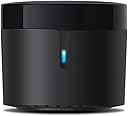
The BroadLink RM4 Mini is a compact Wi-Fi infrared blaster that supports over 50,000 IR devices, enabling universal remote control for TVs, ACs, and more. Compatible with Alexa, Google Home, and IFTTT, it offers customizable control through a vast remote library and manual learning. With an 8-meter IR range and 2.4 GHz Wi-Fi connectivity, it delivers fast, reliable smart home automation backed by a one-year warranty and 24/7 tech support.


| ASIN | B07ZSF46BX |
| Additional Features | Communication Mode: Wi-Fi 802.11b/g/n(2.4GHz) |
| Battery Type | No Battery |
| Best Sellers Rank | #16,839 in Tools & Home Improvement ( See Top 100 in Tools & Home Improvement ) #25 in Home Automation Hubs & Controllers |
| Brand | Broadlink |
| Built-In Media | RF Hub |
| Button Quantity | 5 |
| Color | Black |
| Compatible Devices | Infrared 38KHz |
| Connectivity Technology | Infrared , Wi-Fi |
| Controller Type | Amazon Alexa, Google Assistant, IFTTT |
| Customer Reviews | 4.2 out of 5 stars 3,234 Reviews |
| Item Dimensions L x W x H | 1.89"L x 1.89"W x 1.69"H |
| Item Weight | 0.1 kg |
| Manufacturer | Hangzhou BroadLink Technology Co., Ltd. |
| Max Number of Supported Devices | 12 |
| Maximum Number of Supported Devices | 12 |
| Maximum Range | 8 meters |
| Mfr Part Number | 6924826702990 |
| Model Name | Broadlink RM4-Mini |
| Model Number | RM4 MINI |
| Special Feature | Communication Mode: Wi-Fi 802.11b/g/n(2.4GHz) |
| Unit Count | 1 Count |
| Warranty Description | 1 year warranty |
S**I
Excellent smart home controller
This device is a fantastic addition to my smart home setup. It was easy to set up and works perfectly for controlling all my IR devices. It has made managing my electronics so much more convenient. Highly recommend if you want to modernize your home control!
I**S
Fast and Reliable
I hesitated to get this one since it requires a cloud server but it’s super reliable and connects instantly when plugging in. Responds to home assistant commands instantly also. Also the IR emission is super wide and powerful and it reaches appliances I thought it never could where I positioned it
D**C
Remote learning had some hiccups, overall works for our purpose
I bought this remote to turn a pellet stove on and off when we are away from home. The "weekly schedule" feature of the stove is cumbersome, and doesn't allow for heat setting controls, only temperature settings. A simple smart switch unfortunately wouldn't work because pellet stoves have a cool down period where the stove is still on, so a basic switch would just cut power entirely to the stove. I read several reviews and many people suggested the Broadlink Mini. The instructions for setting it up were 6/10, but once you get into the app it makes it easier. A few errors arose during setup: -initially wouldn't allow icons for remote functions learned from an IR remote (closed the app, opened it later and it worked fine) -would not learn all of the remote functions. It's like it didn't recognize a signal for "Temperature up" and "Temperature down" so it was only able to learn on and off. With the on and off buttons learned only, it has seemed to work great. It has a vibrate function so when a signal is sent it vibrates letting you know. Overall it works for what we needed it for at a fraction of the cost of a Wifi receiver for the stove (~$300). Make sure you maintain line of sight from the Broadlink to the IR receiver on the device!
A**R
Worked well for an LG split
I have an LG split in my garage/shop, and wanted to be able to pre-heat the space as it's been very cold lately. This unit was incredibly easy to set up, and at least the main functions of the split can be controlled remotely now so I can warm up the shop ahead of using it. Mostly, I needed just on/off. This unit is tiny, and includes a wall-mount plate, so can be tucked-in most anywhere. It does not include a power adapter, but does include a USB-A to micro-USB cable, and can be plugged-in to any adapter you might have lying around. I used an old Amazon Fire charger. Update: I still like this unit, but did find one annoying oddity. If I turn the split on via the app, and then turn it off via the real remote, eventually the split will be turned back on uncommanded. I'm not sure when this happens, but basically the rule is, don't mix use of remotes if you want the state of the split to be known.
R**E
Works great for me
I own a Castle Serenity pellet stove which does not have a thermostat that turns it on and off. Some research led me to this product, and with a little configuration I set up the routines and my house stays within perfect temp range! 1. This is RM-4 Mini. Choose this when setting up the device. 2. It only works on wifi bandwidth of 2.4 ghz (what my company rep called "4G"). It will NOT work on 5 ghz "5g" wifi. Our router has both. 3. Follow the directions exactly when setting up the device. If your phone can't find the Broadlink network, press and hold the reset button on the device until the light is doing quick flashes again - it exits config mode quickly. 4. Follow the directions exactly to teach it the commands of your pellet stove remote, fan remote, tv, whatever. Then set up your routine and you're good to go! Update November 2025- I upgraded my router this summer to a top of the line Spectrum Wifi 7 which does not generate separate wifi networks for 2.4 and 5 GHz. I was a little concerned that the Broadlink would not be able to connect come fall but nope! Apparently the newer routers choose the best frequency for the device and set it automatically. No issues at all.
B**G
worthless
I've been using an RM mini 3 for years, and purchased an RM mini 4 for another room. Aside from all the awful things the new app does (including collect all kinds of information about you and your network and transmit it to a cloud server) the latest firmware versions have BLOCK THE USE OF THIRD PARTY APPS. I purchased a second one - first one I got - directly from Broadlink's Amazon store was USED. Came in a clear plastic baggie with no packaging or instructions and obviously used. So I returned it and got a second one. My intention was to use this RM mini 4 with AnyMote but it will not work. I did some digging on the Interwebz and it looks like Broadlink is starting to block third party apps from being able to use these devices on newer firmware to force users to use only the Broadlink app.....which is terrible and spies on you. The older RM mini 3 works just fine with anymote so if that's your intent, get an RM mini3 while you can because the new mini 4 on the latest firmware only appears to work with the terrible Chinese-made app loaded with spyware that sends data to a cloud server. What possible reason an app for an IR blaster to constantly send data to a cloud server is beyond me. Returning this garbage! Update: I game the RM4 Pro a shot after finding some info on the interwebz for using these things with Home Assistant and setting it up for local control without Chinese cloud servers. It works but it’s pretty a pretty hacky process and I definitely wouldn’t recommend it to a novice. Even then getting it to learn new codes requires a Linux server and some comfort using command-line tools. It CAN be made to work as a locally controlled device but it’s a lot of work so unless you enjoy that sort of thing I still wouldn’t recommend it even though it ultimately is working for me.
K**I
Some mixed feelings about this product
So...I've been watching lots of videos of most Youtubers and people who explain features about smart houses and appliances, and almost everyone tend to use this universal IR control. I decided to buy it. In the last 3 days I could say these pros and cons: Pros: -Pretty small, you can put it everywhere you want (as long as you have an outlet close to it, obviously). -It was easy to set up, actually. Once the app detected the control, the setup for my TV, AC and ST box were pretty quick. -The default remotes that appear in the app work pretty well and with the first option you should have it working (except the ST box, who took me up to the 3rd default option to work, but at least I didn't have to set up all the buttons one by one). -They were rapidly discovered by my Alexa app, and at the beginning they were working great with the on/off commands, volume for the TV, etc. -The voice commands respond almost in no time. I could tell Alexa to turn off my TV and, before she answers "okay", the TV is already off. Cons: -Channel management is not the "magical solution" if you want to be able to change channels with voice commands (which is what I was hoping for). To do that, I would have to create individual scenes for each channel, then sync them with Alexa and then create routines to change them with voice commands (in my case I only tend to watch around 10-12 channels, but for those who like to watch more than that, it will be kinda annoying to do, and apart from mentioning that Alexa only lets you have 99 routines, so if you would need to have that amount of routines, these ones would bulk you up some space). -In my particular case with the channels, the ST box has the HD channels starting from channel 1002 and further. When I added my favorite channels to the list and tried to test them out with the app remote, it seems the app dials the numbers so quick that some numbers even repeat themselves and you end up getting a different channel than expected. What I had to do was to set up "channels" which were only every single digit from 0 to 9, and I created scenes for each channel with 4 different commands (each corresponding digit), to kinda add up a little delay in the channel dialing. This took me around 20 mins for 12 channels...a little bit awkward. -Could happen that sometimes your Alexa routines would trigger, but the actions regarding the remotes you want to control won't do what you expect them to do. I wanted to be able to change my TV inputs with certain triggers. At the beginning they started working very well, but last night they weren't responding at all. I added up some Alexa confirmation phrases to check if it was the routine itself or simply the actions regarding the IR remote and indeed, the IR remote wouldn't do the actions. I unlinked the skill, signed out of the app, tried to link everything once again and for some reason it was glitchy and it wouldn't let me sign in and link my account again for around 25 mins (have no idea why) until it decided to work again, and after that the routines were working perfectly...but I'm hoping I don't have to go over all that process every 2-3 days. -FAQ section is not helpful at all. It doesn't have a lot of questions and most questions there are about set up stuff (which ironically was my easiest step to do). Overall, I wouldn't say this thing doesn't work at all...it does respond, it can be integrated, but it could take some time to set it up as you would like it to work, just like it happened to me. If you want something to just automate your devices' on/off status or maybe timers, this will work nicely for the price you're paying. If you would like it to do more complex stuff (especially a bulky channel list), maybe you could save a little more and buy a more reliable one.
A**R
Perfect for AC in Home Assistant
Hooked it up to Home Assistant and was able to control the Whynter ARC-102CS portable AC unit. Cool, fan, dehumidifier along with temperature control all worked perfectly in the Home Assistant dashboard created by Claude.
V**K
The better option for AC control if you're ok with some technical legwork
We bought a sensibo and one of these to compare. The out-of-box experience with the Sensibo was MUCH better. But after a month of use, these BroadLink devices are far more useful in a so-called "smart home" environment. We were able to leverage HomeBridge, to make our multi-head mini-split heat pumps (three pumps, 6 heads) work as a single unit (or as zoned units) to heat and cool our home. "Siri cool upstairs" or "Siri warm upstairs" and all the units just work. It does take some time to feed the remote settings into the RM4 mini, and it requires a bunch of JSON configuration parameters (so not for the less-technical), but it works and it works well. Also, when you compare the price of other units, I'll take the $35 and the ability to use a local-only connection thank you.
A**O
Great subsitute for a Lost or Broken AC Remote. Good value for what it offers.
Model: Broadlink RM4 Mini Bought this to replace the function of a remote control. This review is based on the product being used just as a remote control via the App on the phone. (for smart home functions please look at other reviews) For those wondering this is a little USB powered device which works as following: Phone>App>WiFi>Broadlink>Air conditioner. When on sale for $29.99 this is fantastic value. The box it came in was smaller than expected, the entire product was smaller than I thought but I guess it only needs space for just a WiFi antenna and a IR transmitter. Product includes a decently long flat USB cable which is good quality. NO USB power adapter is included, I just use a 5V 1amp Apple USB phone charger and it works fine. It was quite simple to setup following the instructions. Had to go through a process of holding down the reset button on the product for a specific length of time with a toothpick to put the Broadlink RM4 Mini into the correct mode. All of this was quite simple as you go back and forth between the App instructions and included printed instructions. Once up and running it was a easy process to add the Samsung Air Conditioner to the remote App. There were 3 most common options and you can test each before proceeding. AC fully functioned with the 1st option. I set it up across the room initially, but had issues sometimes when you stand between the Broadlink and the AC unit blocking the IR signal. After I moved the Broadlink to below the AC unit on a cabinet and now it works all the time. Also remember to remove the clear plastic which is on the unit as it can also cause issues with the IR signal. App is simple and easy to use. Open the App then tap on the Airconditioner. All the functions are there, more functions are hidden in the "more" section but the most commonly used settings are on the first page and easy to access. It works flawlessly and there is absolutely no delay between tapping the touch screen on your phone and the Airconditioner responding. Works just as well as the original Samsung remote, and even better since you don’t have to point the phone at the AC. It is connected with WiFi so it even works from the next room. Very satisfied with the product. It is small, simple in design and just works. I have read some other reviews saying the process of adding it to a Smart Assistant is a bit more complicated, but I have no experience in that part of the setup. As a simple device which turns your Phone into a AC Remote this product is great. USB powered so consumes very little energy, and probably cheaper in cost than a replacement remote for a Airconditioner. Also never have to worry about changing flat remote batteries thanks to USB power. Extra info: The "Mini" model is IR (Infra-red) only. The "Pro" model is IR and RF (Radio Frequency). RM3 is the older model, and RM4 is the newer model. I think all models have a alternate version which includes a “Temperature & Humidity sensor”. This alternate version may be preferred by some for automatic "Smart Home" function. Our Airconditioner used IR remote so we only needed the "Mini" model. You can tell if your remote is IR by the LED on the top of the remote. If you block the LED with your finger and try turning the AC on the remote should not work.
G**G
Crap
Crap. Cant connect. Cant reset. Inconsistent. Stay far away. Please take it back
J**S
Works well
It works very well, it wasn't easy to install
E**E
Muy bueno y funcional
Trustpilot
3 weeks ago
2 weeks ago