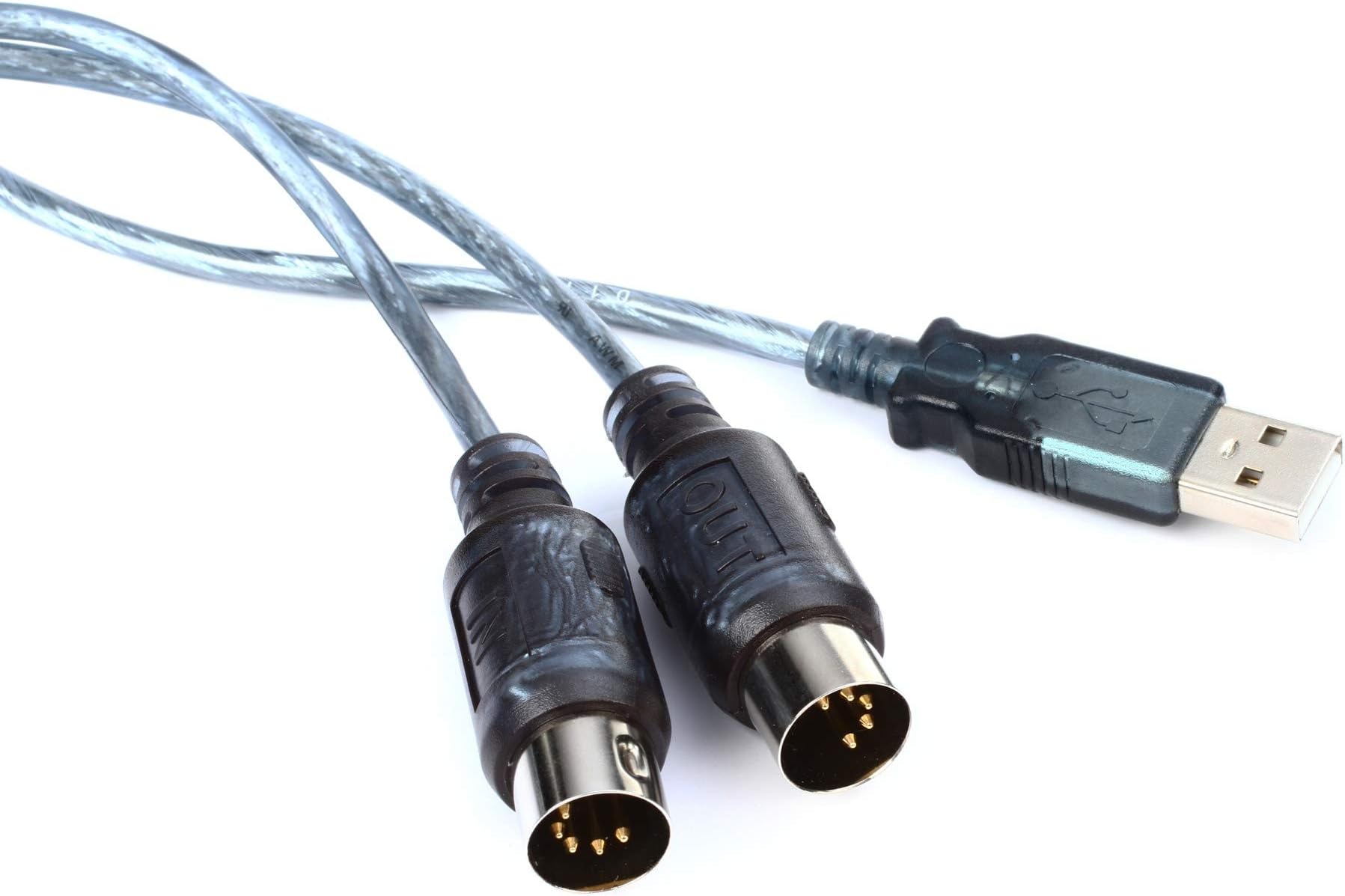
Yamaha UX16 Midi Interface
Product ID: 1723568
Details
- BrandYAMAHA
- Compatible DevicesLaptop
- Connectivity TechnologyUSB
- Number of Channels16
- Item Weight0.4 Pounds
🎹Compatible with MIDI keyboards
📏4' MIDI cable length
🔌Easy USB connection
🎶 Connect, Create, Conquer!
The Yamaha UX16 Midi Interface is a user-friendly device that allows musicians to easily connect their MIDI keyboards to their computers. With a 4-foot MIDI cable and included drivers, it ensures a seamless setup for both novice and professional musicians.
| ASIN | B0002E2S1I |
| Audio Input | USB |
| Brand | Yamaha |
| Brand Name | Yamaha |
| Compatible Devices | Laptop |
| Connectivity Technology | USB |
| Customer Reviews | 4.2 out of 5 stars 221 Reviews |
| Global Trade Identification Number | 00086792640532, 04957812003841 |
| Item Type Name | Stage or Studio Cable |
| Item Weight | 0.4 Pounds |
| Manufacturer | Yamaha |
| Manufacturer Part Number | UX-16 |
| Model Number | UX16 |
| Number of Channels | 16 |
| Operating System | Windows, macOS |
| UPC | 086792640532 867926405322 639476317772 763616014518 |
| Unit Count | 1 Count |
| Warranty Description | 1 year. |
R**.
Worked PERFECTLY For Loading Patches onto Yamaha DX7 1st Generation Synth!
I had a LOT of trouble getting patches loaded from my Windows PC onto my 1st Generation (brown) Yamaha DX7. After much troubleshooting, I found that the problem was I had bought a cheap USB MIDI interface. This thing cost a bit, but it is very well made (in Japan, where they still take some pride in their workmanship), heavy gauge wire with thick insulation, and solidly built connectors. Driver must be loaded from Yamaha website. This is pretty easy, but read the (small) print in instructions carefully and note that the device must be plugged into USB port on PC BEFORE installing the driver. Also, if you have never used one of these before, remember that the OUT lead must be plugged into the IN port and the IN lead must be plugged into the OUT port on synth.
G**L
Does NOT work with Mac.
I didn't get the chance to use it since it doesn't work with Mac. I guess the cable works ok, but there isn't a driver for Mac for many Yamaha models.
T**D
Perfect cable for my Yamaha P35B piano
It works great with my Yamaha P35 digital piano and the driver works on Windows 10 Insider Preview. I am using the Windows 10 (64 bit version) As which software to use with it, most people say Sibelius First, Finale, but in my humble opinion the most accurate recording and notation software is Forte 6. Here is the Amazon's link http://www.amazon.com/Forte-Home-Music-Composition-Software/dp/B00L48QI9Y/ref=sr_1_2?ie=UTF8&qid=1433216968&sr=8-2&keywords=Forte+6 This will record your live performance and will create your music score as close as the real thing. Very accurate Playing any MIDI song from Windows Media Player, plays incredibly nice on the piano itself. Be sure to connect the cables correctly. The MIDI OUT of the piano, connects with the MIDI IN (UX16 cable) that goes to the computer and the MIDI IN (piano) with MIDI OUT (UX16 cable). It will create a small icon on your Windows Control Panel, where you have an option to send a note to the piano to test it. Thanks and enjoy your music
K**M
Technically Good; Documentation Sucks
This product is solidly built. The combined USB cable, interface box in the middle and midi connections are approximately 6 1/2 feet long and it works great...once you discover HOW to make it work. I must have missed the memo that you plug the OUT connector of the interface into the IN connector of your device (electronic drum kit for me), similarly, the IN connector of the interface connects to OUT of the device...what design GENIUS from the Barbizon School of Modeling thought up this reversed plug labeling and circuit function nonsense? The documents for the device don't help with this but a Google search helped sort it out...I suppose this isn't just a Yamaha convention but a general midi interface specification. The next confusing step required me to go into control panel and call up the Yamaha midi driver and uncheck a passthrough radio button. The interface is close to plug and play. As close as a double bogey is to par. Plus each time I connect my instrument and want to transfer a song to it, I have to repeat the step with the midi driver for some reason. But don't let these negatives put you off. The frustration is maddening the first time and after that, the thing works so well you forget any issues that preceded it. The device comes with a CD to install the drivers although the install program immediately defaulted to searching Yamaha's site for the latest release. The CD contains a users manual in various languages. Whatever your native language is, I recommend you read the manual in one of the alternative languages so that the confusion produced by reading the manual will be justified. The above relates to a PC installation. I have an iMac as well and might try the install on it to see if it is less "rough".
C**G
Yamaha UX16 Midi cable
I needed a midi cable to take some online piano theory classes and to capture keys played from my digital piano. I have Amazon Prime which provides for 2 day shipping. I ordered this on a Monday and had it on Tuesday. Amazon is amazing when they ship from their own distribution center. The cable worked just as advertised. Like many others have said, you probably will have to go to the Yamaha website to get the current driver for your PC, but for those who aren't all that computer savvy, they have a link in their install disk that takes you where you need to go. There seems to be confusion on the part of a lot of people as to the midi connection to the piano. It seems logical to me to plug an input port to an output port but I can see where folks might be a little confused. The computer generates output and so does the piano. Just make sure that the output ports connect to an input port. Simple. No worries with this product. I'm completely happy with the product and the service.
B**A
Excellent shipping, amazing quality.
This product has earned a well-deserved five stars. I always wait a few weeks after I receive a product to review it. I have no doubt in my mind that my money was well-spent. It worked out of the box with my yamaha dgx-500 and acer (windows 7) computer. READ THE INSTRUCTIONS/NOTICE PAPER. I plugged the "out" connector into the "out" port on my piano and was confused as to why the piano input was not showing up on Cakewalk Music Creator. After a quick look at the provided papers, I realized that the "out" connector should be paired with the "in" port, and vice-versa with the "in" connector. Cord is high-quality, and sends midi-input data accurately and quickly. Overall a great product! I guarantee the superior quality of this product over similar, cheaper versions of this cord. But as always, the choice is yours.
G**E
Buyer beware - test yours in time to return/replace if you get a lemon like we did.
The product doesn’t work. We have 2 keyboards and 2 laptops that we tried to connect with the Yamaha MIDI cord and it doesn’t work on anything. Unfortunately there is a window for returning it and we have passed the window by a little over 1 month. That is quite expensive for a product that doesn’t work at all. Pity, we were going to work on composing and this tool/product is broken and useless and there seems to be no way to exchange it for one that works or get our money back.
D**L
Yamaha UX16 Midi interface
I comes with no instructions. You have to be familiar with the instruction booklet of the instrument you bought it for. It seems to work okay.
L**R
UX-16 pour clavier arrangeur Yamaha
Bonjour, Un produit, qui me permets d'avoir mon arrangeur de branché sur mon ordinateur, facile d'installation, et rempli très bien son rôle d'interface aussi bien quand émission et réception des données. Si vous possédez un clavier arrangeur de chez Yamaha et que vous souhaitez faire votre propres styles avec un logiciel séquenceur; Je vous recommande ce produit.
M**O
cavetto interfaccia
ok soddisfatto100% consiglio a chi deve importare brani su tastiera il costo e contenuto e svolge pienamente il suo lavoro
G**.
gute verarbebeitung und alle funktionen einwandfrei
funtioniert im vollen fuktionsumfang im gegensatz zu billigen midi usb adaptern gibt es hier designierte treiber für alle aktuelen windows versionen. heisst es funktioniert neben midi ein und ausgabe bei sondmix programmen sonder es funktioniert auch um datenpakete zu keybord usw. ind die jeweiligen flash speicher zu senden oder um eben gespeicherte daten zu sichern
A**R
Download the drivers for the UX-16 USB-MIDI cable on the Yamaha Web page
Expensive but worth the buy and compatible for an old Yamaha keyboard i'm using. I looked at cheaper MIDI cables, and tempted to purchase one, but thought not worth the hassle if the cheap cable does not work for what i'm using the keyboard for. Before the cable arrived i'd already found the drivers on the Yamaha web page for Yamaha UX-16 USB-MIDI cable to work. So this was relatively easy once the cable arrived, and the keyboard works perfectly
N**E
Five Stars
works great
Trustpilot
2 months ago
2 months ago