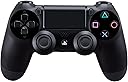


🎮 Own the game, share the glory, and never miss a beat!
The DualShock 4 Wireless Controller for PlayStation 4 combines precision-engineered analog sticks and triggers with innovative features like a touchpad, integrated light bar, and built-in speaker. Its dedicated Share button enables effortless streaming and capturing of gameplay moments. Rechargeable via USB and compatible wirelessly with PS4 and Windows 8.1+ PCs, it’s the ultimate gamepad for immersive, versatile gaming.


| ASIN | B00BGA9X9W |
| Additional Features | Wireless |
| Best Sellers Rank | #14,896 in Video Games ( See Top 100 in Video Games ) #91 in PlayStation 4 Gamepads & Standard Controllers |
| Brand Name | PlayStation |
| Button Quantity | 13 |
| Color | Black |
| Compatible Devices | Playstation 4 |
| Compatible Video Game Console Models | Sony PlayStation 4 |
| Connectivity Technology | wireless |
| Controller Type | Gamepad |
| Customer Reviews | 4.6 4.6 out of 5 stars (6,825) |
| Global Trade Identification Number | 00711719100379, 20711719100342 |
| Hardware Platform | PlayStation 4 |
| Item Dimensions | 2.5 x 6.75 x 7.25 inches |
| Item Dimensions D x W x H | 2.5"D x 6.75"W x 2.5"H |
| Item Weight | 11.84 ounces |
| Manufacturer | Sony PlayStation |
| Manufacturer Part Number | CUH-ZCT2 |
| Model Name | DualShock 4 Wireless Controller |
| Model Number | 10037 |
| Package Quantity | 1 |
| Power Source | Battery Powered |
| UPC | 714520304271 012301019216 711719100379 798762692358 |
M**R
This Will WORK WIRELESS on DESKTOP PCs Running WINDOWS 8.1 (64-Bit)
This is the best playing and best feeling gaming controller on the market, and yes, you can use it wirelessly (via Bluetooth) on a desktop PC running Windows 8.1. There are many tutorials on the internet that explain how to do this, but 4/5 methods I found and used completely failed. Most were intended for Windows 7 users. My rating for this controller is 5 stars because it is an outstanding contoller. The remainder of my review will be a quick tutorial on how to get it working quickly and easily any time you want to use it, without messing with your computer's settings or opening up the command prompt- so read on only if you want to know how to get it working on Windows 8.1 64-bit. If you have a somewhat newer laptop, you almost certainly have Bluetooth. If you have a desktop, there's a good chance you don't. Either way, open the control panel. Everything should be alphabetical, if you don't see a Bluetooth setting, you need a dongle to use the controller wirelessly. They're pretty cheap, but many aren't compatible with Windows 8+. This one worked for me and arrived in 2 days to Southern California, (with the "standard shipping" option), shipped in the same box as the controller I had purchased simultaneously: http://www.amazon.com/gp/product/B00EW3WS9M/ref=oh_aui_detailpage_o00_s00?ie=UTF8&psc=1 Install the Bluetooth software with the USB dongle plugged in. (I disabled most of the startup entries associated with the aftermarket Bluetooth and had no issues with it working properly afterwards). Bluetooth: Check. Next you need to download the latest XBox 360 device drivers for Windows. Microsoft will tell you that no further software is needed for Windows 8.1. Disregard and download the XBox 360 drivers for Windows 7 64-Bit and install. (You're free to disable the Xboxstat.exe startup entry). If you've researched this at all, you've probably heard that you need DS4Windows, (now know as "Inputmapper"), to get this to work. You don't. So don't download that program and don't donate money to make their ads go away. It's unnecessary and doesn't work, (in my experience), when the remote is wireless on 8.1. However, you DO need to download special software. Download the files needed here: [...] Open the zip folder and extract the entire "ScpServer" subfolder to C:\Program Files (x86). Plug in the Dualshock 4 controller via USB to Micro USB cable. (The same one you charge Android, and some Blackberry, phones with). Order one of those as well if you don't have one. Watch this video and follow all the steps up to 4:55 (STOP there as he makes the process overly complicated): [...] If you followed the aforementioned steps carefully, then all you should have to do to connect the Dualshock 4 to your Windows Bluetooth is hold down the Playstation button for a few seconds. It will blink a once or twice before Windows recognizes it. When the main light on the Dualshock 4 lights up red, your device is connected and should be recognized by your games. The downside to following this method is that your Bluetooth device will ONLY work for the Dualshock 4 controller, (it will no longer work for Bluetooth headphones, etc.). Also, games will think that you are using an X-Box controller, so when controller buttons are shown on screen, they will appear as X/Y/B/A instead of ⬛/🔺/X/🌑, and the main LED light will not change colors based on the game as they do when connected to a PS4.
C**S
Perfect for emulators on PCs
With DS4Tool this controller beats anything else for emulating classic consoles that use a D-pad. The face buttons, triggers and analog sticks work well and DS4Tool will also let you emulate a trackpad on the touch pad. The shape and feel of the controller is excellent, I couldn't ask for it to be made any more ergonomically. As of the time I'm writing this almost all buttons on the controller emulate well without any fuss and map properly in games as if it's a 360 controller. The L2 and R2 triggers may not work in all emulators because they're analog rather than digital. It doesn't seem to be possible to map anything to the PS button between the analog sticks yet. It seems the rumble will emulate but I haven't played a game that takes advantage of it to know just yet. DS4Tool will let you control the light bar with settings for the red, blue and green lights everywhere between 0-255 levels of intensity, or you can use it to display battery life and there's a check box to make it flash when the battery is low. Lastly, it doesn't seem to be possible yet to assign anything to clicking the touchpad. DS4Tool does currently let you use L1 for left click and R1 for right click and change the sensitivity of the touch pad, but even with a low sensitivity it's obvious the pad doesn't have much sensitivity as it will frequently jump around a few pixels if you move it just a small amount. It's much better if you're moving the mouse longer distances, this action is smooth but still not precise. I suggest using it with a sensitivity of 50 or less to make it less prominent. Overall there's an impressive degree of control over this controller on PCs already for such a new product (Windows 7 x64 via USB/bluetooth here). Highly recommended if you want a top notch quality controller for emulating D-pad heavy games or if you just prefer the layout of this controller more than the xbox's. I can say the quality is in every aspect much better than a generic logitech PC controller. It's been a long time since I tried either a dualshock 3 or 360 controller but I can say it's a big improvement over the dualshock 2 and definitely my favorite controller ever.
T**Y
Possibly the best controller I've ever used.
I touched on the DS4 in my PS4 review, but I think it's fair that I reiterate my favorite features here, since I purchased a 2nd controller, and my favorite feature really shows itself when you have more than one. it is a remarkable improvement to the PlayStation controller line. My fiance is incredibly impressed by how comfortable it is, and the fact that we both agree - even me with my large mitts - shows how much effort was put into the ergonomics of the controller. The weight and size feels perfect, and really does the system as a whole justice. One really neat feature, that gets glanced over in some reviews, is the ability to plug any standard headphones into the controller and pump all of the system audio through the controller, wirelessly. No delay, either. I've been using my iPhone earpods (later version), and the quality is great. Microphone works well too. When not using the headphones, the speaker on the controller adds a layer of depth to games like Knack and Resogun that is a real treat. One really awesome feature that we didn't realize from all of the pre-release reviews is that each controller can be assigned to a user, and that user can be connected to a PSN account. Whenever you turn on a controller, it asks "who's using this controller?". Which ever account you pick, that person will log in. In a game like Knack, both me and my roommate have our own PSN accounts and are both logged in. Depending on which controller is used to launch the game, that user is the primary player and is playing to earn trophies on their profile. Each user, though, has their own "home screen", meaning at any time I can press the PS button on the controller and go to MY home screen, see my friends, change my settings, etc. During this time my roommate can't interact with the screen - it's my home screen after all. We can hop back into the game quickly, or he can press the PS button on his controller and go into his homescreen, where he gets to interact with his friends, change his settings, etc. Because we're both logged in, the status of both of our accounts is "Playing Knack". It's a fantastic way to utilize the account system and tie it directly with a controller. If we're playing with his game save, and he is earning trophies for his account, as soon as he wants to stop, he can end the game and put his controller down and I can go to my homescreen with the PS button and launch a new game. I am instantly using my account and earning trophies for me, now, without having to log out of the system first or changing which controller is "Controller 1". It is one of the stand out features of the system for us. Having used several controllers over the past 20+ years, the DS4 is my favorite. It's obvious why as soon as you hold it in your hands. And having an extra one for your console really shows of Sony's attention to detail with the PS4.
A**N
Controls the Future? The Future of Controls
I've owned a Playstation Four for a while now, but I've used the provided controller to the point where I've worn down the analog stick covers, degraded the vibration rotors, and rendered the R2 button unresponsive. However, let the status of the controller stand as testament to my dedication to the PS4 dualshock controller. The thing is extraordinarily comfortable. Before I actually got the PS4, I seriously wondered if the changes to the Playstation system altogether would be worth investment. I was afraid I would be paying more money for more of the same. Fortunately, I made a great investment in the new-gen system, and the controller is a definite improvement over the former controller. The analog sticks aren't as close together as they were for the PS3 controller, and the addition of the touchpad certainly was, at first, the subject of amusement and speculation given its early limited uses. However, it has been a useful feature for games and other non-game related features. The addition of the headphone input was, at first, not very useful to me given I didn't have any games where I needed headphones, but that has changed over time. The alteration of the select/start button setup to the share/options configuration isn't anything I consider worth mentioning since the option button is sort of designated as an all-in-one feature of the PS3's start/select, but the change may be confusing to anyone who is not familiar with the new controller layout. I play Battlefield Four, and at first I was confused how to "spot" an enemy without the select button, but a different button is designated with this task, and it's really easy to learn the controls for games even with the start/select change. The new controller also has a large blue light strip along the front. It doesn't really have many functions other than to look cool, but it does serve some various offhand functions for the Playroom "game". This is usable only for people who own the Playstation Eye, though. The light does change color based on different functions/uses of the controller. Everything else is, for the most part, similar if not the same as the PS3 controller. You'll have the classic Playstation direction keys and shape buttons associated with all the previous Playstation controllers. Despite the early odd experience with the controller, I really noticed the difference between the PS4 and PS3 controllers. I have used the PS3 more sparingly given the handles are a little larger yet "roomy" (spaced apart) than the PS3's controller. The controller is very comfortable and is also somehow lighter feeling than the PS3 controller, for all of its added mass. The controller is altogether vastly better than its predecessor and certainly merits more praise than I thought was possible, but I'll try to be concise. The share button deserves its own discussion, though, so I apologize for this rather lengthy review. The share option is nothing short of awesome. I had always wanted to record gameplay from the PS3, but the money necessary to buy a decent game capturing device simply drove me away from making the investment. Now, however, I can simply plug in a USB drive into the PS4 and export my gameplay files to the USB and then transfer and edit the files to my liking. Admittedly, the quality of the videos I make aren't as great when compared to a person who uses a good game capturing device, but the tradeoff is simply the fact that I'm not looking to be a frontman for a particular game title or company. The system works well enough without spending a crapload of money on really expensive gaming equipment. The PS4 and its controller really help amateur gamers like me feel comfortable and happy playing games without much further investment in other equipment. This may not be the same for every person looking to have a good time playing on the PS4, but the new features to the system and, for that matter, to the controller make gaming so much better than it ever has been.
J**7
The best designed controller today! Even on PC
Personally, I've always preferred the symmetrical design of Sony's controllers, and have preferred Sony's DS3 (DualShock 3) controller over the Xbox 360's; while the offset position of the analog sticks of the 360 controller is advantageous in shooters, I play more racing and sports games, so the symmetrical design of Sony's controllers suites me much better. When I got Sony's DS4 controller, it made me realize how much the DS3 was missing The ergonomics of this controller are unbeatable. The analog sticks are grippy with a design that encourages a precise "pulling" motion. The triggers are a huge improvement, and now they actually feel like actual triggers instead of a tacky afterthought (DS3...). The rest of the buttons are more firm and responsive, and the controller shape itself just fits in the hands perfectly. The only grip I have are the share and options buttons which are way too stiff and out of the way, so they are inconvenient as Start/Select buttons I do have mixed feelings about the touchpad, and I feel it's underutilized and little underbuilt. I also can't stand the decision for Sony to use micro USB. There is nothing wrong with Mini USB, and many of the PS3 owners (myself included) already have those cables handy, but for some reason that eludes me, Sony opted to use the way more fragile micro USB connector, and, to top it off, do NOT include a cable. It's not a huge deal as both USB connectors are standard, available, and dirt cheap, but the decision is inconvenient and puzzling at best. One thing to note is that I DO NOT OWN A PS4 - I got the DS4 controller for PC gaming, and while the community developed XInput wrapper is still a work in progress (needed to mimic the Xbox 360 controller), I'm still having an absolute blast with this controller. It has really enhanced the gaming experience on my PC, and I can honestly say I can never go back to the 360 or DS3 controller again. I haven't tried the XBOne Controller yet, but I highly doubt I will be switching over anytime soon. I think Sony has a potential market if they released a "Hardcore Gamer' version of the controller, which features a Mini-USB controller, a larger battery, and no touchpad, speakers, and refined options/share buttons (maybe relabeled too), but as it is, this controller is excellent, and I'd highly recommend it for PC gamers
A**N
Better than I expected
As someone who has owned an Xbox, and Xbox 360, onw of my biggest concerns switching to PS4 was the controller. I hated the dualshock 3, thought it felt completely unnatural in the hand, like they were clinging too much to the legacy feel rather than updating the ergonomics. I have to say, I am quite pleased with the Dualshock 4. In some ways I am still adjusting, but overall the experience coming from the 360 controller is not that painful. The more widely spaced sticks are a godsend for those of us with larger hands, the new lips on the thumbsticks and triggers bring parity to the grippy comfort of the 360 controller, and the face buttons and D-pad feel smoothly clicky. Everything has a nice, premium feel to it. The things I'm still not adjusted to are the new locations of the Options (i.e. start) and share buttons. Because they are so recessed it can take a bit of fumbling for me to find and hit them. The idea behind having them so recessed is so that you won't hit them by accident, but at the moment they are a bit fiddly to find. Most likely once their location is more in muscle memory that will go away. I also am not yet sold on the touchpad. I keep hitting DPad buttons to command the OWL in Killzone rather than swiping the direction on the touchpad like I'm supposed to. The two most common negative points from other reviews are: The battery life: really this is not a problem, as long as you remember to plug them in after every couple play sessions. While its not ideal, its not as big a deal as people make it. Just form the habit; it takes 30 seconds, and the rechargeable solution is much better than having your controller suddenly disconnect and having to hunt around the house for spare AA's so you can back to playing (360 controller) The LED: It's not as annoying as people make it. It lends a nice, futuristic vibe and I don't find it to be very obtrusive. I do agree that Sony ought to make a software update that allows the LED to be disabled from settings, which would also save battery. Enough people have made this suggestion that I expect Sony will get around to implementing this by the end of the year.
R**S
A great controller, but protect the thumbsticks!
This controller is definitely an improvement over all previous Playstation controllers. This is the first generation where I would say I prefer the Playstation controller over the Xbox. It's not too big, and the thumbsticks have been reworked to be more user friendly. The only downside is in these thumbsticks - they do wear down rather quick. Some say that it was just a bad batch early on, but I would recommend getting covers for them (only ~$2 per controller). They protect the controller, and prevent you from needing to replace it (or open it up to replace the thumbsticks). The touch-pad is a very cool idea, though not a whole lot of games put it to good use. Infamous Second Son and Killzone both make good use of it, but a lot of games just use it as a button, or a means to scroll through a map. When more Playstation exclusives come out you can bet it's going to give this controller an edge. Pros: -Redesigned, and more comfortable than previous Playstation controllers -Touchpad is a very cool feature when used properly by developers. Makes games more interactive, or functions as 4 seperate buttons in some games. -Light bar on back is also well utilized by some developers. Some games have it get brighter when you are out in the light, some color it based on your standing in the game (red for evil, blue for good). -Triggers seem much more responsive than old PS controllers Cons: -Some developers aren't utilizing the touch screen as well as they could -Rubber on thumbsticks wears off on some controllers (I recommend Grip-iT Analog Stick Covers, Set of 4 to prevent this). Overall, I'm very happy with the DS4!
Z**R
New favorite controller, works great for PC gaming after initial driver setup
I've always liked the way xbox 360 controllers fit comfortably in your palms, unlike the way the Dualshock 3 controllers have to be held further away in the fingers, but I like most everything about Dualshock controllers better, not least the symmetrical sticks and the separate d-pad buttons. This Dualshock 4 controller is the best of both worlds for me. It fits in the palms in the way that I like, and it fixes the few problems I had with the Dualshock 3. The rim on the sticks and the lip on the triggers prevents my thumbs and fingers respectively from sliding off when they get sweaty, the buttons feel just the right balance of clicky and squishy and easy to press, and the triggers and bumpers have just the right amount of resistance. I am mainly a PC gamer, and to use this controller with my PC all I had to do was install the DS4Windows driver to make it look like a xbox360 controller to games (for those not familiar with controllers and PC gaming, most games that support controllers assume xbox360 as the standard and don't support others very well without a workaround like this). Since the initial setup, I almost never have to mess with it, games just see it as an xbox360 controller (even the default button configuration is usually fine). It does mean that I get the xbox360 button prompts, but once you've memorized the layout you don't even look at the buttons and it's not a problem at all. Rumble works perfectly, as well. Also, with DS4Windows you can change the color, brightness, and behavior of the light on the controller. You can turn it off entirely, have it on just when charging (I just use mine wired, but I'm pretty sure you can use wireless if you have a compatible bluetooth dongle), have it flash when low on battery, have it change colors depending on battery, or whatever else you prefer. The touchpad mouse also works on PC (with the DS4Windows driver, and possibly without (can't quite remember)), and although I've had a little trouble setting up the sensitivity in a way that I like (right now I have it set up to touchy, but I'm confident I just need to get around to fiddling with the setting) it is really nice to have, both for regular situations and for emulators and oddball games that support controllers during actual gameplay but not, for whatever reason, in the menus.
O**A
Mando muy cómodo y bien construido
Lo he comprado principalmente para jugar en PC, basicamente puedo jugar a cualquier juego que sea compatible con el 360 gracias a un software de tecereros, muy facil de instalar y usar. La verdad que siempre he sido de Playstation, cuando jugaba en consola tuve todas las Playstation, descontanto la PS4. y ahora que he usado a PC como plataforma principal para jugar, vi la necesidad de tener un mando para algunos tipos de juego como Lucha, sandox en tercera persona, entre otros. Y parte de que he sido de PS toda mi vida, me hizo hacer totalmente a un lado al mando de Xbox One. Bueno, el DS4 esta muy bien construido, veo totalmente positiva la evolucion del DS3 al DS4, no es que tenga manos enormes, pero el DS3 me parece un poco pequeño, cosa que en el DS4 arreglan, la sensacion de los gatillos laterales es muy buena, como un gatillo se deberia de sentir. Los joysticks son sensacionales, amo la forma en la que están posicionados, cabe destacar que en PC puedes cambiar el color del LED posterior a tu gusto, me pareció excelente para poder hacer que combine con mi teclado y mouse. y lo mejor de todo es que te sirve para jugar con el PS3, lo unico malo es que el boton de PS no sirve en PS3 :/ Para conectarlo al PC cualquier cable tipo micro usb te servira, pero recuerda que el cable tiene que tener la capacidad de enviar y recibir datos. Tambien lo puedes conectar inalambricamente via bluetooth, si tu PC no tiene bluetooth puedes comprar un dongle bluetooth, los cuales no son muy costosos y te servira bien con eso. Creo que no me queda nada mas que decir por parte del mando, solo hablare del servicio de Amazon, lo pedi por amazon via importacion. con envió gratis y todo salio muy bien, llego antes de lo esperado, muy buen servicio. Ya habia ordenado un SSD en el pasado de la misma forma y también, todo excelente.
G**T
OG
Good product🤘
E**A
Pari al nuovo
Ottimo veramente
A**E
Controller
Neu, absolut empfehlenswert, robust und sehr zufrieden. Wurde schnell geliefert, so das wir auch schnell zocken konnten, top.
V**A
Don't buy
It said free delivery but there is actually a fee which wasn't on the information
Trustpilot
1 month ago
3 weeks ago