🎥 Elevate Your Conference Experience!
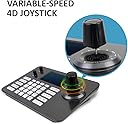
The LEFTEK Video Conference PTZ Controller is a state-of-the-art device designed for seamless control of speed dome cameras in professional settings. With a 5-inch LCD screen, 4D joystick functionality, and support for up to 999 devices, this controller ensures high-definition video decoding and robust compatibility with various IP PTZ cameras. Its durable aluminum alloy construction guarantees longevity, making it an essential tool for any serious conference venue.
| ASIN | B083TXYGSH |
| Antenna Location | Security |
| Brand | LEFTEK |
| Compatible Devices | camera |
| Connectivity Protocol | IP |
| Connectivity Technology | Infrared |
| Controller Type | IP |
| Customer Reviews | 3.8 out of 5 stars 116 Reviews |
| Effective Video Resolution | 1080 pixels |
| Enclosure Material | Aluminum |
| Indoor Outdoor Usage | Indoor, Outdoor |
| Indoor/Outdoor Usage | Indoor, Outdoor |
| Item Dimensions | 9.84 x 5.91 x 3.15 inches |
| Manufacturer | LEFTEK |
| Mfr Part Number | S3 |
| Model Number | S3 |
| Mount Type | Wall Mount |
| Night Vision | Night Color |
| Number of Channels | 1 |
| Number of Items | 1 |
| Other Special Features of the Product | Ergonomic |
| Power Source | Corded Electric |
| Recommended Uses For Product | Security |
| Room Type | Classroom, Kitchen, Living Room, Office |
| Screen Size | 5 inches |
| Special Feature | Ergonomic |
| UPC | 655746713884 |
| Unit Count | 1 Count |
| Video Capture Format | MP4 |
| Video Capture Resolution | 1080p, 480p |
| Voltage | 12 volts |
| Waterproof Rating | IP67 |
| Wattage | 5 watts |
| Wireless Technology | Wi-Fi |
| Zoom Type | Optical Zoom |
N**R
Solid So Far...
I just received the LEFTEK yesterday. At first, I thought that it wasn't working because I had it plugged into a switch that provides POE. Later, I figured out that it actually needs POE+. If you've ever configured a network device before, you can easily configure this. The default network settings look for an IP address in the 192.168.0.x subnet. If you are using something different (like 192.168.1.x), you have to change the network settings for the IP address and the gateway to reflect the subnet you have configured for your network. Once that was done, it connected quickly. I'm using Amcrest IP2M-866EW and IP2M-853W cameras. The LEFTEK found both of them through it's search function. Changing cameras takes 3 button pushes [CAM, # of camera, & Enter]. The display is crisp, but does wash out if looking at it at an extreme angle. It should be fine for normal usage. There is a little clear sticker in the top right corner of my display. It's stuck on there pretty well. It doesn't bother the usage, but bothers me a bit that it is there. The joystick feels solid and so do the buttons. It is easy to slightly twist the zoom on the joystick, which stops the pan and tilt. Overall, I think this is a good purchase and well worth the money for my needs.
J**F
The power switch ignores POE power so can't turn it off without unplugging ethernet cable.
It is a good ONVIF ptz kbd. I expected to be dissapointed with a PTZ kbd with a small monitor but I had no issues. The video quality is good IMneverHO. Reminder to others, most all ONVIF PTZ kbds can be a challenge to pan and tilt with. If I seek to preset locations it works perfectly. That is a shortcoming of most all ONVIF as it applies to fast panning cameras. I DID expect a device with a power switch to turn off when power switch is toggled and that is where this missed the mark. I'll fish around inside and rewire the switch on mine but the average user prolly cares about things like warranty, LOL. I did not test but I assume the power switch works if you use the supplied ACtoDC adapter instead of POE. Warts and all it's a fine bit of kit, decent value. I'd buy again if I 'need' another.
T**P
This is a good quality product with a lot of features packed in
I had ordered this for a very basic camera application and I was concerned when I read some of the reviews. Once I received it, I realized that the people who left negative reviews about how hard it was to set up, were probably people unfamiliar with the industry or the technology. It was very easy and intuitive to set this up to control the cameras, and the tactile feel of the buttons and the JS control are excellent. I will buy this again in the future. I would love to see a better price point, but, in their market, they are reasonable.
C**L
Avoid like the plague
The instructions are worthless as is support. We had a network change and the keyboard would not stop looking for the old IP address even after removing from the keyboard. We have been unable to get it reconnect again after a full week of attempts. In a Hail Mary attempt, we did a factory reset to the keyboard...yeah don’t do that because it factory resets the entire thing to either Mandarin or Cantonese. It’s completely worthless at this point because we can’t control nor now even read what the menus are. Bee VERY aware that the manufacturer is a fly by night cheap knock of piece of crap. If you need basic instructions of how to set this up, avoid like the plague. We are still unsure of how it began working in the first place as it wouldn’t connect at all and sudden did on it own.
C**S
Good product
As it turned out I did not use this I do have it still but we went in a different direction no fault of the product it worked flawlessly
T**L
Solid
Out of the box the unit was able to find my network cameras and I easily added them. The display is decent. The buttons are solid and the joystick is smooth. I have not used it enough to comment on all the features but will return to update once I do. Honestly we are using it for production streaming and for the cost it fits our needs nicely. The only early issue I have seen is that for my cameras the zoom speed control is not working. Minrray 20x.
J**N
I'm tempted to get one for each camera! Just wish they had been designed by a camera operator...
Once I enabled ONVIF on my ptz cameras web menus, the automatic "find cameras" just worked, and the on-screen image from the camera is close enough to real time / minimal latency that manual pan/tilt/zoom/focus adjustments feel natural and precise. The only downside is usability - whoever decided that multi-key sequences and an awkward keyboard layout were optimal for reliable camera control during a show has never run a show. Our workflow is to follow cues in a script/service bulletin/program, recalling presets for each camera into PREVIEW as prompted by cues in a script. With this device, the operator needs to type [cam][1][enter] ... wait for cue ... [call][3][enter] [cam][2][enter] ... wait for cue ... [call][4][enter] [cam][1][enter] ... wait for cue ... [call][5][enter] Experience shows that typing mistakes happen frequently and that the crew doesn't like using the unit for preset recall. Instead, we use a StreamDeck to recall each camera's presets, and the Leftek to set them - and sometimes to fine tune a preset's composition and follow movement during the production.
9**7
Well worth it for the money, very good controller.
We bought this controller about 18 months ago. We use it every week in our streaming process. We control four NDI cameras from 2 different manufacturers and have absolutely no problems with them. Setup was fairly simple. While the manual leaves much to be desired (Leftek needs to hire English speaking writers), the interface was very intuitive and the manual was not rally needed. One drawback is that the RS232 interface does not work. We are still looking for a solution to control our Leftek USB PTZ camera.
Trustpilot
3 weeks ago
1 month ago