

Desertcart purchases this item on your behalf and handles shipping, customs, and support to Austria.
๐ Switch Smarter, Work Faster โ Own the Desk, Own the Day!
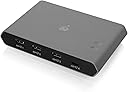
The IOGEAR USB-C 2 Port Switch (GUS4C2) is a professional-grade KVM switch designed for seamless sharing of USB peripherals and file transfers between two USB-C enabled computers, including Mac and PC. Featuring 3 USB-A ports, 1 USB-C port with 85W power pass-through, and multiple switching methods (remote, mouse, hotkey), it streamlines your workspace while providing LED indicators for active host status. Ideal for multitasking managers and tech-savvy professionals, it comes with a 3-year warranty and lifetime support.


| ASIN | B07W4FT5QC |
| Best Sellers Rank | #693 in KVM Switches |
| Brand | IOGEAR |
| Built-In Media | Item |
| Color | Black |
| Compatible Devices | Laptop |
| Connector Type | USB Type C, USB Type A |
| Customer Reviews | 3.3 out of 5 stars 89 Reviews |
| Global Trade Identification Number | 00881317518989 |
| Item Dimensions | 5.6 x 3.54 x 0.9 inches |
| Item Weight | 10.4 ounces |
| Item dimensions L x W x H | 5.6 x 3.54 x 0.9 inches |
| Manufacturer | IOGEAR |
| Mfr Part Number | GUS4C2 |
| Model Number | GUS4C2 |
| Number of Items | 1 |
| Number of Ports | 2 |
| Package Quantity | 1 |
| UPC | 881317518989 |
| Unit Count | 1 Count |
R**E
Switch between PC tower / MacBook. Great upgrade
Decided to do a review in regards of liking the product. First receiving, I did have difficulties in getting the peripherals to switch between the two PCs with this box. It would not switch automatically at first if the other PC went to sleep. Before actually buying, S/O unknownsoloโs review. I did the same exact thing in knowing this problem might occur. (Review Keysearch: sleep , sleeping) It now works flawlessly, love the hot keys as well. The RIGHT shift key double click makes it easier to lock the left shift from switching the KVM. So in times you want to game, you can lock it and just game. Although sometimes forgetting will get annoying, but I love the USB-C mechanics. I had upgraded from a basic button only USB KVM switch, so it was a stretch to reach behind my organized desktop. The button that comes along with this too is attached with a sticky strip near the back-bottom of my monitor like a back button, another easy button to switch for the peripherals. Awesome product if you know what youโre doing! ALSO: Since they gave option to rate the CAMERA quality. I had actually plugged in my Logitech camera to this switch. Works fine and perfect, the with the Logitech StreamCam Plus Webcam. If you are switching between PCS with a camera on the KVM box, make sure you update or check to see if your camera is live and not paused! In recordings, not checking your camera means it could freeze. So just quick checks if you were to be on call or live recording for something.
T**S
Unreliable
I bought this switch to make it easier to switch a keyboard, mouse, and camera between a PC and a MacBook. The external switch button was ideal because it allowed me to use nano-tape to mount the switch and button under the desk (with the button positioned right next to the desk controls). Being USB-C native was also a big help, since other (less expensive) switches have not worked properly with my MacBook. Unfortunately, this switch also has a major problem - it expects both computers to be powered on or it will not switch inputs. So if I turn off one computer and try to use the other the next morning without turning them BOTH on first, I am unable to switch the inputs. I also have a dedicated power cable (which is micro-usb for some reason) running to the switch and the light is clearly on... but the input-switching button itself does not actually work unless both computers are turned on. Unfortunately, I don't know of any better options out there. Unless you want to get a regular USB hub and manually swap USB cables to switch inputs, this switch is probably as good as it's going to get. It's just a shame that it's so poorly engineered that it requires both inputs to be live in order for the input-switching to work. It's like... IOGEAR: your switch had ONE JOB. And you failed at that. AND you charge 5x more than any other switch to boot. That's not acceptable.
M**X
Worked great for about a month, and now won't connect to my desktop
I use this to switch between a mac laptop and a windows desktop computer. It seemed to work fine for the first month, but recently it just stopped connecting to my desktop, and would only let my use my accessories with my laptop. Today it just stopped working altogether, and none of my accessories are being connected to either computer, and the switch button doesn't seem to do anything (the light for which computer it's connected to isn't changing anymore). Very disappointing for such an expensive product.
A**R
Easily switch between two computers that have USBC.
This device is perfect. With only USBC power delivery from the primary or secondary PC it's easy to share a Corsair dual USB plug keyboard between PC's. (edit) After several years of use I started to have issues switching between computers. Sometimes the keyboard won't power on or the motherboard USB stops functioning on one of the 2 connected PC's.
G**L
Works as expected. No issues so far,. DISABLE USB Selective Suspend Settings!
*** MAKE SURE YOU CONNECT A POWER SUPPLY *** *** MAKE SURE YOU DISABLE USB Selective Suspend Settings **** I am connecting the switcher to a Lenovo p1 laptop and a gaming desktop (ASUS motherboard) Connection cables: - I am using 2x Apple MacBook pro 2 meter type-c to type-c cables Power supply: - The provided type-c cable - Apple Type-c charger Keyboard and mouse: Both are Logitech devices RGB First time initialization: it took several seconds the first time for the device to recognize the devices I connected when everything was booted up in the operating system I have let the Operating system Recognize everything Disconnecting and Switching between computers: I can disconnect and reconnect the cables from the switch when the computer are on or off without issues. Switching takes a regular time for the operating system to recognize the keyboard and mouse witch can take a couple of seconds, time will depend on the computer speed. CONS: The BIG cons is the lack of power supply and connection cables !!!!! I suspect you need an efficient power supply and reliable connection cables. I am unsure of the power need for it to work properly, so I went with Apple power supply and connection cables. Conclusion i am very happy with the product and didn't see any problems so far The remote control is a BIG PLUS, just lack of feedback on what computer it's connected to. As a work around, I have two different RGB settings between the two computers So my keyboard is not illuminated the same. Love the product.
E**C
Has problems when reconnecting
This product works great most of the time, but like many modern accessories it tries to be too smart for its own good. My setup includes my personal desktop and my work laptop, and I use this product to switch between them. It has a feature that automatically switches away from inputs that have been disconnected, and that feature tends to get tripped up when I'm plugging my laptop back in. This means that when I add my laptop back into the mix, I often have to unplug all cables providing power to the device (both connections to computers and the usb-c power adapter I have plugged in) and then reconnect them all in order to get it to properly communicate with my laptop. It's super annoying. Once everything's connected though, it works fine.
S**I
Sort ofworks, but not well for the price
The set of features are fairly nice, including the control for switching inputs is nice for hiding the switch itself as well all of the cables away. However, while all of the features generally work, I have run into a few issues with the product. In some situations when connected to my MacBook Pro, the product just stops working randomly. I found that I need to unplug and replug the power charger pass through before it works again. Since I have tucked away the switch and am using the remote to switch, this is annoying. Since this can happen in the middle of a meeting, I wouldn't recommend using this configuration for work. You could not use the power adapter functionality, but then a different product likely makes more sense. Additionally, I have run into issues when connected to a Windows PC (on the non-charging port), where the switch will stop working for 5 seconds or so before allowing keyboard/mouse through again. As a result, I wouldn't recommend this product for gaming either. While the core functionality and the form factor of the device are nice, the issues I encountered coupled with the price point don't seem to make sense to me.
N**E
It works well
It works well, I've been waiting for a USB-C based peripheral switch for some time and I'm happy to see this one. I'm happy with the ports and I wish it had come with an external USB-C power supply (Needed) but overall, it does its job and there isn't much out there that's cheaper right now. I wish it had at least one more USB 3 port and I wish the remote had some indication of which computer it was connected to right then. Also, the mouse movement is "stuttery" when you're first logging in on a mac for some reason. I use a MacBook and just use the builtin keyboard and mouse for that first login. Not sure if that's an IOGear problem or a Mac problem but I can't think of anything else wrong with this thing. I'm happy with the purchase.
S**N
Software not signed and AV issues.
I bought the GUS4C2. I've installed it on my home PC. I got a security warning from SmartScreen that says Publisher is not defined. I couldn't installed it on my work PC, because Symantec AV didn't let me. Without the software, transition is not seamless and required the switch button. With the switch there is a delay when moving back and forth a computer. For my need I had to use other cable then the 2 that came with i. Both are USB-C to USB-C. I had to find a USB-C to USB-A in order to plug my home PC.
Trustpilot
1 week ago
2 months ago