Buy anything from 5,000+ international stores. One checkout price. No surprise fees. Join 2M+ shoppers on Desertcart.
Desertcart purchases this item on your behalf and handles shipping, customs, and support to Austria.
⌨️ Elevate your workflow with the keyboard that bends to your will.
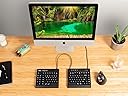
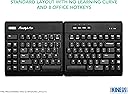
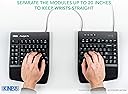
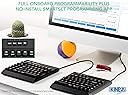
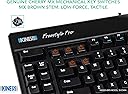
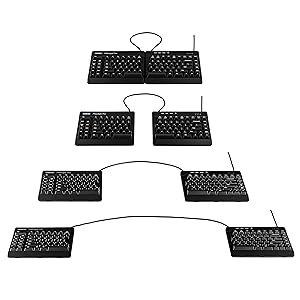
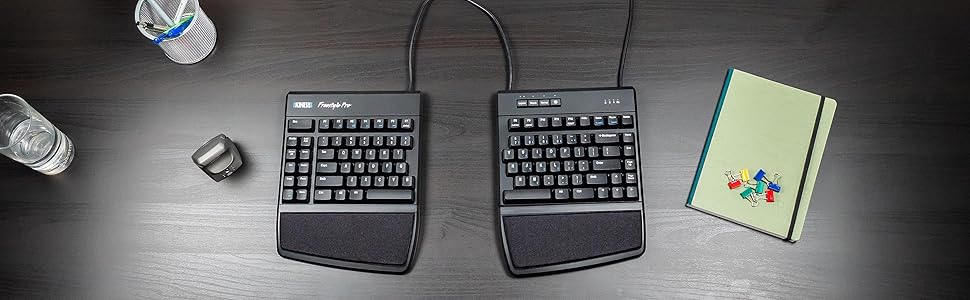
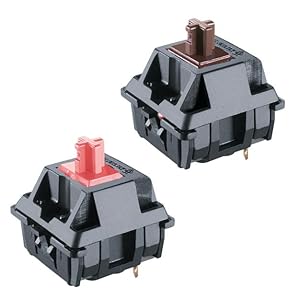
The KINESIS Freestyle Pro is a premium ergonomic mechanical keyboard featuring tactile Cherry MX Brown switches, an award-winning adjustable split design with up to 20 inches separation, and fully programmable on-board SmartSet technology. Compatible across major operating systems, it enhances comfort, posture, and productivity for professionals seeking a customizable typing experience.


| ASIN | B07CX9KQRQ |
| Antenna Location | Office |
| Box Contents | USB Cable |
| Brand | KINESIS |
| Brand Name | KINESIS |
| Colour | Cherry Mx Brown |
| Compatible Devices | PC |
| Compatible Operating System Family | Linux, Windows |
| Connectivity Technology | USB, Wi-Fi |
| Country of Origin | USA |
| Customer Reviews | 4.3 out of 5 stars 264 Reviews |
| Enclosure Material | Plastic or polymer |
| Global Trade Identification Number | 00607998890004 |
| Hand Orientation | Ambidextrous |
| Item Dimensions L x W x H | 18.4L x 39.4W x 3.2H Centimeters |
| Item Type Name | keyboard |
| Item Weight Unit of Measure | 1.18 kg |
| Keyboard Backlighting Color Support | Single Color |
| Keyboard Description | Ergonomic |
| Keyboard Layout | Dvorak |
| Manufacturer | KINESIS |
| Manufacturer Part Number | KB900-brn |
| Mechanical Keyboard Switch Model | Cherry MX Brown |
| Minimum Required Operating System Version | ChromeOS 137, ChromeOs 134 |
| Model Name | Freestyle Pro |
| Model Number | KB900-brn |
| Number of Keys | 94 |
| Number of Sections | 1 |
| Power Source | Corded Electric |
| Product Features | Ergonomic |
| Recommended Uses For Product | Office |
| Series Number | 900 |
| Special Feature | Ergonomic |
| Style Name | Tactile Brown Switches |
| Switch Type | Tactile |
| UPC | 607998890004 |
K**L
Encourages good posture, comfort, and efficiency
Purchased in April 2021 as my first split mechanical keyboard, this ergonomic keyboard has provided a fantastic typing experience that encourages good posture and supports healthy typing habits.
C**Y
Bought for work, works great.
I work in an office where I am tasked with inputting lots of different spec sheets, some are the same and other have aspects which are the same. I bought this keyboard as the macro functions seemed to be something I could use. This keyboard has improved my productivity greatly, it has also relieved the mental stress of having to type the same data over and over again. The macros are recorded at whatever speed I type but played back at a much faster rate (which you can choose through the settings). All of this is done with no software on the company's computer, which they will not allow. It did take a while to get to grips with the keyboard but after a few weeks I can say my fingers have got used to the no. 6 being on the "wrong" side for me, also the American layout of the enter key. I do not suffer with any sort of RSI so I cannot vouch for it's ability to alleviate your pain. I do find though that it is very hard to use flat, so I have it propped up about 15mm by a small shelf which gives me the right angle. You can buy the stand but I haven't really seen the need yet. All in all after 6 months of use I can recommend it if you need the macros.
A**R
Worth Every Penny
I purchased the keyboard along with the extra tenting accessory and the 10-digit keypad. Just over 24 hours with the new setup and I can already say this is the best keyboard I've ever used. Typos are almost a thing of the past (no more cramping your hands in unnatural positions to hit certain keys), and the comfort level is phenomenal. Cherry switches so the typing feels wonderful, and while it takes some getting used to the layout of certain keys, the split design and elevated angles completely eliminate fatigue and strain. Pricey for a keyboard setup, especially if you're used to spending under $100 for a traditional membrane, but as the title says...
A**R
Bad price, good keyboard, need accessories
The keyboard itself is amazing. Ive been wanting to purchase the edge tho considering its has rgb at the same price. Now the problem is the price. Unless you live in a country like me (sweden) go ahead and purchase something else, there are lots of better alternatives. Paying over 100€ for wrist pads and lifting the keyboard is insane. Now lifting the keyboard should come with the keyboard otherwise its useless. The wrist pads, i dont understand why they cost half the price of the keyboard?
S**S
Überteuert, aber gut
Erstmal diese Information: Die Kinesis Freestyle Pro ist eine sehr gute ergonomische Tastatur und eine durchschnittlich gute mechanische Tastatur. Sie ist nur leider sehr teuer. Das liegt vor allem daran, dass sie einen Nischenmarkt bedient. Andere ergonomische mechanische Tastaturen sind vergleichbar teuer und noch dazu in Deutschland schwer zu beziehen. Die Tastatur alleine ist eine Katastrophe, man sollte sie ausschließlich mit Handballenauflage und Tenting Kit benutzen. Dafür gibt man aber nochmal gut 100 Euro aus. Ich empfehle hier ausdrücklich, nicht die Kombivariante Tenting-Kit + Auflage, sondern stattdessen das Premim Palm Pad mit Gelfüllung zu kaufen. Leider ist dieses allerdings nur über Amazon.com aus den USA zu beziehen, wo zum Preis von knapp 30 Euro nochmal 20 Euro Versand dazu kommen. Bei dem ohnehin schon stattlichen Gesamtpreis war mir diese Mehrausgabe es aber wert. Die normale Handballenablage ist okay, aber nicht herausragend (zudem empfinde ich die Premium-Pads nicht nur als deutlich angenehmer, sondern ich erreiche mit diesen auch leichter höhere Tippgeschwindigkeiten). Ich hatte befürchtet, ein QWERTZ-Layout zu bekommen, die Deklaration war nicht ganz eindeutig. Ich bin aber glücklich, ein US QWERTY-Layout bekommen zu haben. Als Programmierer hat das einfach Mehrwert. UK Layout wäre mir lieber gewesen, weil man mit dem US Layout das Problem hat, dass man eine Taste zu wenig hat und somit bei im Betriebssystem eingestelltem deutschen Layout die <>-Taste nicht mehr erreichen kann. Bisher hat mich das noch nicht so sehr gestört (man kann halt dann schnell zwischen den Tastaturlayouts wechseln für das eine Zeichen; ich schreibe ohnehin nicht so viel auf Deutsch). Aber in Zukunft werde ich dafür wahrscheinlich trotzdem ein Makro einführen. Apropos: Die Remap- und Makro-Funktionen sind für mich hinreichend einfach verwendbar (ich habe bisher allerdings lediglich die Caps-Lock-Taste als zweite Shift-Taste umfunktioniert und die Caps Lock-Funktion auf die rechte Ctrl-Taste gelegt, das ging aber ohne Probleme). Die Position der Pfeiltasten ist etwas unergonomisch. Allerdings habe ich mit AutoHotKey Ctrl + JKLI als Pfeiltasten umprogrammiert, womit ich gut zurechtkomme. Dass die Switches nicht auf einer Metallplatte angebracht sind, wird Enthusiasten vermutlich enttäuschen. Für mich hat das den erfreulichen Nebeneffekt, dass der Geräuschpegel insbesondere in Kombination mit dem Tenting Kit erträglich ist (mit den MX Brown Switches und mit einer Lage O-Ringen). Noch dazu sollte man sich angewöhnen, die Tasten nicht ganz runter zu drücken, was man aber auch aus anderen Gründen (Geschwindigkeit, Gesundheit) nicht tun sollte. Ich habe mir überlegt, ob man eventuell zwischen den beiden Hälften eine Maus unterbringen kann. Leider hat sich diese Lösung für mich nicht als praktikabel erwiesen. Ich denke noch darüber nach, eventuell ein kleines Trackpad oder einen Trackball dazwischen zu stellen. Zu guter Letzt möchte ich den numerischen Block erwähnen: Über die Fn-Belegung kann man auf die JKL/UIO/789 Tasten einen numerischen Block legen. Dieser ist etwas gewöhnungsbedürftig, aber nach etwas Eingewöhnungszeit komme ich mit ihm gut zurecht.
Trustpilot
2 weeks ago
1 month ago