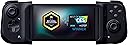
🎯 Own the mobile gaming arena with zero lag and pro precision!
The Razer Kishi is a USB-C mobile game controller designed for Android phones, delivering console-grade control with 18 buttons, clickable analog sticks, and a D-pad. It supports major cloud gaming platforms like Xbox Game Pass Ultimate and Stadia, offering zero-latency gameplay via direct USB-C connection and pass-through charging for uninterrupted sessions. Its ergonomic, flexible design fits most phones securely and folds compactly for on-the-go gaming.


| ASIN | B08D5DRBXQ |
| Additional Features | Ergonomic |
| Best Sellers Rank | #14,546 in Video Games ( See Top 100 in Video Games ) #328 in GEM Box Microconsole |
| Brand Name | Razer |
| Button Quantity | 18 |
| Color | Black |
| Compatible Devices | Andriod, Xbox |
| Connectivity Technology | USB C |
| Controller Type | Gamepad |
| Customer Reviews | 4.1 4.1 out of 5 stars (20,458) |
| Hardware Platform | android |
| Included Components | Product Instruction |
| Item Dimensions | 5.28 x 3.7 x 1.46 inches |
| Item Type Name | Game Controller |
| Item Weight | 5.6 ounces |
| Manufacturer | Razer |
| Manufacturer Part Number | RZ06-02900200-R3U1 |
| Model Name | Mobile Game Controller |
| Model Number | RZ06-02900200-R3U1 |
| Package Quantity | 1 |
| Power Source | Corded Electric |
| UPC | 811659038692 |
| Warranty Description | Limited Warranty |
E**C
It's not perfect but I like it.
I love this controller. It connects as an X-Input device to your android phone, meaning it has good compatibility with modern android games that can use controllers. It works well with retroarch. It works great with Steam link, and is made for use with Xbox Game Pass. The buttons feel great, the D-Pad feels accurate and passes my Tetris test. The joysticks feel nice and accurate and have a decent throw. The shoulder buttons feel comfortable. The triggers are analog, and have a good pull to them. It connects to the phone using USB-C so there's no input lag, and has charge pass-through, so you can have uninterrupted gaming. And when you're not using it, it collapses down to a small enough size, that you may be able to put it in your pocket, or stash it in a bag or backpack and not take up much room. The Razer Nexus app is alright, but I don't really use it. It can act as a launcher for your games. It can set up and livestream to Facebook and YouTube. And can game stream from your PC if you install the streaming app on your PC. And it looks to integrate pretty decently with XBox Game pass. And now for a few cons: The face buttons feel a little mushy. You don't get much of a tactile feel from them. The controller may not be compatible with your phone's case if you're using one. I have a phone case that ads only about 2mm of thickness to the phone, and I have to remove it from the case to play. You really have to jam your phone in there until you feel the connector click into place, otherwise it wont work. For reference I'm using a Moto Power 5g 2023. I would have liked to see in the Nexus software the ability to map the controller buttons and sticks to various areas on screen for non-controller games. I still give it 5 stars, because it works perfectly for my use case, and I knew what I was getting before I ordered it.
B**L
Great Gaming Device for Samsung Galaxy Note 20 Ultra 5G!!!
I been using an Xbox Controller with either Jovitec or Moga clip-on for a while. While it does its job, my wrists feels quite a bit of pain from carpal tunnel due to the uneven weight distribution. I needed something with more even weight distribution and this Razer Kishi has been amazing so far. It's extremely lightweight and provides a very comfortable gaming experience. I have a Samsung Galaxy Note 20 Ultra 5G and the Kishi barely fits. It takes a little bit of stretching in order to get the phone to fit. It works but Razer could make sure their future iterations have a bit of lead way for phones the size of a Note 20. Be careful because if you use too much force you could break your phone or controller. If you angle the phone carefully you can slot it in place very easily without putting too much stress on the phone or controller. Always seat the phone first into the USB Type C side then angle the other controller half carefully to lock the phone in place to prevent any damage. In order to get the Note 20 Ultra to fit I removed the Kishi protective silicone bumper from the USB Type C side. This ensures the Note 20 Ultra fits properly and has made contact with the Type C connection. You will know when you see a white light activate. I left the protective silicone bumper in place on the left side to ensure it locks the phone topside in nice and snuggly. I purchased the Kishi Xbox edition because I had a feeling it would work right out the box without the need of any special apps. Sure enough as soon as you plug it in Android recognizes it and you can immediately use it to scroll through your Android apps. Any game that has Xbox controller support should work right out of the box. For emulators you will need to manually configure the buttons individually. I highly recommend the Kishi XBox Edition over the Android Edition since Xbox controller has become in fact the standard for gaming API. It may cost a little more but well worth it for compatibility. Only one issue I have is layout of Xbox Menu button on the right controller. It should be placed above the thumbstick just northwest of the thumbstick for quick access as your right thumb will mostly be in close proximity of the main buttons. Hope this helps everyone deciding whether this device is for them or not. I'm pretty happy with my purchase and enjoying a really comfortable gaming experience.
J**N
Xcellent for Xcloud
In a nutshell: I was pleasantly surprised with this controller and it exceeded my expectations. While certainly not flawless, I found it to be the best way to experience Xcloud given the opportunity on the market. Pros: Compact and portable No lag/delay Decently good quality An appealing alternative to the bulk of the controller/phone clip options Good balance in size between portability and functionality (the middle ground between Nintendo Switch Joy cons and an Xbox controller, for example) Pass through charging No software to install Instant plug and play Option for version that has dedicated Xbox buttons Fits a wide variety of phones Makes for a surprisingly solid fit Cons: Dpad feels mushy Not very ergonomic Expensive No Bluetooth No pass through audio plug Can't play in compact mode, only when attached around phone Dead zone in sticks is too large You must remove your phone case The verdict: The Razer Kishi stands out as the best option to make your phone feel like a true portable gaming system much like a Nintendo switch. Similar to the Nintendo switch, with portability comes compromise. While controller is larger than the joycons, it still can be a struggle ergonomics at times. It is all so hard to justify $100 for a controller like this, particularly one that is not wireless (no Bluetooth). Even so, there is something very appealing about being able to turn your phone into a true gaming device. Who should buy this: Someone who play Xcloud or other compatible games/services and doesn't want to use a standard controller and phone clip. Also, someone who is willing to shell out a lot more money than by using one of their existing controllers and a phone clip.
K**.
Kind of worked
Well unless I did the set up process wrong. It didn't work for my Android phone fully. This was only while trying to the play the Call Of Duty Mobile App. It would work on the main screen, while being able to toggle through the app selector and click into the apps. It then wasn't compatible with the controller any longer in the Call of Duty mobile App. But, I could play other games I wasn't interested in at all. Other than all that. The size is great in your hands, the joysticks work great and the triggers were very nice. Kind of a strange phone adapter set up, but it's tight when it's on. So it's good for the price. Just be aware, about the games your able to play and the phone you have.
D**M
Totally RAD!!!
I use this android game pad for vintage video game system emuulators on android, and als the xbox app which allows you to connect to your XBOX series X or S which is at home while you are on the go and out on the move. It is great,, i can play xbox everywhere i go without lugging the larger and battery hungry xbox series controller. This kishi i ordered is the xbox specific one so be sure to get the $10 upgrade when ordering if this is important to you. As for the emulators it is totally awesome. you can assign buttons in most emulators so you can setup contol however you would like it is a really cool product and works great with Samsung Note 9 and S22 ultra ... i really have no complaints. it has usb-c connector and uses phone battery, has insterts to fight smaller phone and remove them to fit slightly larger phones. it even works on my cheap-o cubot note 20 smartphone. its great. when installed the whole rig is very wide, its misleading in photos, its very very wide. totally awesome grab one!
B**N
Initial impressions are great; basically turns my phone into a Switch and I love it
I received my Kishi (Android Xbox version) just under a week ago and have been using it extensively since then with my Galaxy Note 9. I found some helpful lists online of games in the Google Play Store that are compatible with a controller and grabbed a few (and had some already), like Minecraft, Fortnite, Sonic the Hedgehog (1 & 2), Dead Cells, Dandara, and others. I also have been using it with Xbox Game Pass and Google Stadia. I would imagine this would also work great with console emulators. Anyway, I freaking love this thing! So far, I can't think of any major reasonable complaint. It feels just like a regular Xbox controller, and I can play all these games without any trouble. In Fortnite, I can even turn on the gyro controls and it's just like I'm playing on the Nintendo Switch! It's fantastic. Also, being able to charge while I play is super helpful; 3D games like Fortnite can really burn through the battery. My only complaints are EXTREMELY minimal: 1) Currently, hitting the Xbox button takes you to the Game Pass app, no matter what the context is. But this problem is not unique to the Kishi (it happens with any Xbox controller), and from what I read it may be an issue with Samsung devices specifically (and supposedly it is slated to be fixed). So depending on your device you might not even experience this. 2) As I think some other reviewers have said, the D-pad can be a little finicky sometimes and might put out a diagonal input when I did not mean for one. But so far I'm willing to chalk that up to me simply not having fully adjusted to this D-pad yet (as it is a little different from others I have used). All in all I have zero regrets over having purchased this. Just make sure you have a few games lined up to play first; not all games are controller compatible and unfortunately there is (as of this writing) still no easy way to know whether a game in the Play Store is controller compatible or not, so you'll have to do some searching online. Hope this helps you. Have fun!
F**K
I really want to like this controller but...
The Kishi seems like it'd be great, and the joysticks and buttons do feel great, but it has a huge flaw. If your phone is too small then it will constantly fall out and it makes this controller unusable. I have a Pixel 3 which is on the smaller side for phones these days, and even when it's not falling out (which is frequently) the left side which doesn't have the USB-C connector is constantly wobbling around and it's unbearable. There are controllers a third of this price that work better with my phone. I tried without a case and also with 3 different sized cases and none of them solved the problem. It was either too small a fit and wobbly, or too big to fit inside the rubber grips that hold the phone. I think the only way to fix it would be to have smaller and tighter rubber grips that fit inside the controller. I've searched high and low on the internet and apparently Razer used to offer different sized rubber grips with this controller for exactly this problem (or the reverse problem if your phone was too big), but apparently they no longer offer that option. At the very least, mine only came with the one set grips and after looking everywhere online I can't find anywhere that sells smaller replacement grips. Anyways, do yourself a huge favor and stay far away from this controller. It's such a shame that I have to say this because it's just one issue that should be easy to solve, but it completely ruins the Kishi's usability. There are controllers for 1/3rd if the Kishi's price that don't feel as nice but are at least usable, and there are controller slightly more expensive than the Kishi that don't have any such issues at all. Unfortunately, I'll probably have to return my Kishi and get one of those controllers if I can't find some smaller replacement rubber grips.
G**E
Its the perfect mobile controler
Im super happy, its been around a month since i have owned this baby and i cant say nothing bad about it, at first i had trouble connecting it because my phone charging port was rusty and really dirty but after I clean it and connect it I been in love with it, I take it everywhere and play every time I have a break it fits perfect on your pocket. It responses instantly if you're playing a game that is installed on your phone including emulators, i have a Ps2 emulator and I'm able to play any game at max resolution and refresh rate and the controler makes it even better. if you play on cloud the response will depend on your internet connection, when I connect it to my wifi you can't even tell there's a Lag unless you're playing a FPS, but the lag it have its nothing compared to when you connect a Bluetooth controller. This is a plug and play device but you can download the kashi app and you can do updates to the controler and download optimized games for your phone or tablet.
B**5
Produto veio funcionando perfeitamente
Possuo um S23ultra e coube com certa pressão, mas o produto funciona perfeitamente e não tenho reclamações. Ele funciona em todos os lugares, até mesmo na One UI do dispositivo.
B**.
Faulty product
Left controller stopped working in just less than 5 months.
"**"
Excellent bit of kit
Works perfectly. Sticks and buttons have a great feel. Easy to set up and pack away. Works with steam link, xcloud, game pass, Xbox remote streaming and local games. Turns your phone into a handheld gaming console.
R**.
Calidad-precio
Lo compre por algo asi como 750 pesos. Me parece bien por el precio. Había escuchado muchas reseñas al respecto de este control. Lo llegue a ver cuando su precio era casi el triple a lo que lo obtuve. Por el precio, está muy bien. Sólo algunas cosas a considerar. 1. No tienen bluetooth, se conecta por la usb-c del teléfono. 2. Mi teléfono es mediano y encaja bien, no tiene movimientos raros ni extraños 3. Los gatillos se sienten un poco extraños pero cumplen bien su función. Los demás botones me parece que tienen excelente calidad. 4. La cruceta me parece bien. Había muchas quejas al respecto de la cruceta de este control y yo la utilice en emuladores de SNES y se me hace que iba perfecto, no tuve ningún problema. 5. Jugué en gamepass, con los emuladores de andorid, lemuroid y el de Nintendo 64 y en las tres plataformas reconoció bien el control. Al principio parece que los L y R y los gatillos quedan un poco alejados, pero se acostumbra uno rápido al grado que no se me hace incomodo usarlos. Es cuestión sólo de acostumbrarse. No tuve dolores ni en las manos ni en los hombros derivados de la ergonomía del control. Me hubiera gustado poder usarlo vía bluetooth con la Tablet o con una consola., tipo los controles del switch, pero está versión sólo tiene para entrada USB-c, y no tienen salida para audífonos. Solo tiene una entrada para cargarse. Mi recomendación para Kizhi es que hicieran un producto igual pero con conexión bluetooth y entrada de audífonos. Sería entonces un control quasi-perfecto. Pues lo podrías usar en los celulares con entrada usb-c sin problemas de Lag, y además, usarlo como el control del switch para la Tablet, para el mismo celular, o incluso vincularlo con alguna nueva consola de nueva generación. Un control multiusos vaya. Pero así como está cumple lo prometido. Si lo pueden conseguir por debajo de 800 pesos, cómprenlo sin dudarlo. Arriba de eso, ni se molesten. No porque no lo valga, sino porque por ese precio es una ganga.
B**S
Fits a Pixel 6a larger than advertised with a case
I tested it out on Xbox Ultimate Pass online and it worked just great in multiple games. Much better than another controller I had for mobile gaming. There are 2 rubber slips (one on each side left and right) that hold phones without cases that are within the dimension sizes. I was worried as my Pixel 6a is 8.9MM thick and the dimensions specify that it is up to 8.8MM that it wouldn't fit. No worries thought as by removing the rubber slips not only is the whole phone fitting in, but I can leave it in its case as is seen in the video. So larger phones fit too. If you want to use it without a case it can fit into the rubber slips (or is supposed to). Apparently the only thing negative about it is the D-PAD on the left, but I have no D-PAD intensive games so I can't comment on that. It's worked fine for me. I've heard they updated that in the Kishi V2 (twice the price) but for me this is just fine. It's very lightweight overall and nice to handle. It doesn't feel too cheap or anything and the price is great ($59.99 CAD when I bought it). Highly recommended. Take care
Trustpilot
1 month ago
2 weeks ago