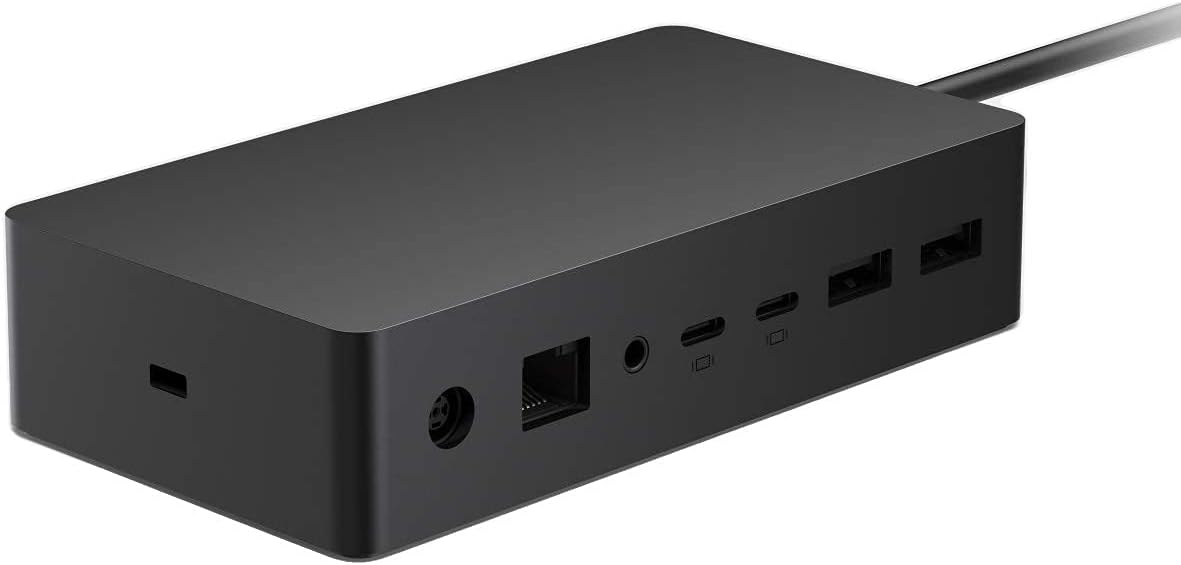
Microsoft Surface Dock 2
Product ID: 222321418
⚡10 Gbps data transfer
🔌6 versatile ports
🖥️Dual 4K monitor support
Desertcart purchases this item on your behalf and handles shipping, customs, and support to Austria.
⚡ Power your productivity with the Surface Dock 2 — where your workspace meets next-gen connectivity.
The Microsoft Surface Dock 2 is a premium docking station designed exclusively for Surface devices, featuring 6 high-speed USB ports, support for dual 4K external monitors, and a proprietary Surface Connect cable that delivers both power and data. It transforms your Surface into a desktop powerhouse with plug-and-play ease, ensuring seamless connectivity and reliable performance for professionals demanding maximum productivity.
| ASIN | B08DG5RYXB |
| Additional Features | Plug and Play |
| Best Sellers Rank | #4,227 in Computers & Accessories ( See Top 100 in Computers & Accessories ) #348 in Laptop Docking Stations |
| Brand | Microsoft |
| Color | black |
| Compatible Devices | Book 2 (13.5" and 15"), Book 3 (13.5" and 15"), Go, Go 2, Laptop (1st Gen), Laptop 2, Laptop 3, Laptop 3 (13.5" and 15"), Notebook/Desktop PC/Smartphone/Monitor/Keyboard/Mouse, Pro (5th Gen), Pro (Mid 2017), Pro 6, Pro 7, Pro X, Studio 2 |
| Customer Reviews | 4.2 4.2 out of 5 stars (448) |
| Data Transfer Rate | 10 Gigabits Per Second |
| Enclosure Material | Information Not Available |
| Hardware Interface | Ethernet, USB, USB Type C |
| Item Dimensions L x W x H | 2.75"L x 5.12"W x 1.18"H |
| Item Weight | 1.13 Pounds |
| Manufacturer | Microsoft Corporation |
| Mfr Part Number | 1GK-00001 |
| Minimum Required Operating System Version | Windows 10 |
| Model Number | 1GK-00001 |
| Number of Ports | 6 |
| Operating System | Windows |
| Total Usb Ports | 6 |
| UPC | 889842636444 |
| Unit Count | 1 Count |
| Warranty Description | 1 year Manufacturer |
G**E
Works far better with Surface Book 4 than third party docks
I initially tried to use less expensive third party docks connecting to a Surface Book 4 through the USB-C port. I needed to support two external 4K televisions (LG and Sony) as external monitors. None of the third party docks supported this adequately despite listing dual-4K support (two introduced noise when second monitor added, while a third overheated and shut down). The Microsoft dock works flawlessly, both directly to the monitors and through a dual-monitor KVM switch. I did have to add USB-C to HDMI adapters, for which I am able to use very inexpensive Walmart house brand adapters, which to me indicates that the dock is supplying a solid signal. The other ports (USB-A, Ethernet, and the non-video USB-C ports) also work flawlessly. My adobo e is to not waste your time with third-party docks, just get the MS dock and get the functionality you want. Note, this dock does replace the MS-Surface power adapter. It plugs to AC, and supplies power/charging to the Surface unit. This also leaves existing ports (USB-A, USB-C, etc.) on the Surface device available. I have also tested that you can then attach an additional third-party dock via USB-C or an additional USB-C to HDMI adapter to support a third external monitor. I have not yet tested support for a fourth external monitor. Note to non-MS-Surface users, this dock connects to the PC through Microsoft’s proprietary power-data connector, not through USB-A or USB-C, so you cannot use this dock with machines from other manufacturers.
A**.
Life saver!
Edit - 9/22/24 It will constantly disconnect. Be prepared to have problems with the charger cord not being recognized by the computer. EXTREMELY disappointing. ----------- I've been through 2 dongles prior to this and almost gave up being able to use my USB keyboard and mouse! I have this for my setup in my classroom and absolutely love it now! It makes using my computer and charging it, so much easier!!
T**D
Surface Dock 2: The Perfect Companion for My Surface Laptop 7
As a recent Surface Laptop 7 owner, I was eager to find a docking station that would seamlessly integrate with my new device and expand its capabilities. The Surface Dock 2 has exceeded my expectations! Here's what I love: Effortless Setup: Plugging in the Surface Connect cable was all it took. My laptop instantly recognized the dock and started charging, with no fiddling with drivers or settings. Powerful Connectivity: I now have a full desktop setup with dual external monitors (running beautifully at 4K resolution), a wired keyboard and mouse, and an ethernet connection for stable internet access. While it doesn't have Thunderbolt, I haven't found that to be an issue. My workflow relies primarily on USB accessories and external displays, which the dock handles flawlessly. Clean and Minimalist: The dock itself has a sleek, modern design that complements my Surface Laptop perfectly. It keeps my workspace organized and clutter-free. Fast Charging: The dock charges my laptop quickly and efficiently, even while powering multiple peripherals. Built for Surface: It's clear that this dock was designed specifically for Surface devices. The integration is flawless, and it enhances the overall Surface experience. I highly recommend the Surface Dock 2 to anyone with a compatible Surface device. It's a worthwhile investment that transforms your laptop into a powerful workstation.
A**R
No noticeable improvements over the edition 1 version.
I ordered this item because I have a port edition 1 - I was hoping this dock might offer a better feature set than the edition 1. That doesn’t appear to be the case. I would say that it is worth the price but may not expand your capabilities. It did stove on time, well packed in excellent condition
1**T
So much better than V 1.0
I had so much h trouble with the first dock. Even sent it in and got a replacement. Still no luck. It kept dropping monitors after 30 seconds. Never ended up using it. Now with my Surface Book 3, this Dock 2 is everything the original promised. Now if only Microsoft wouldn't have to make me pay 250 for a new dock when the first one should have worked >:(
J**M
Crapped out like the first two exact docking stations
Works fantastic until it doesn’t. When these start to fail it will make your screens flicker on and off and it only gets worse. They seem to fail every 12-14 months and I’m on my 3rd one. Love the notebook but the docking station suck because I’d the short life
J**N
It's perfect for its constrained purpose
It does everything it promises to do - as it better, given the price. I think it's worth warning people thinking of buying this though is that it sort of builds up vendor lock-in. If the time comes that you start considering a new device that isn't Surface, that isn't compatible with the super constrained line-up of devices Microsoft has fine-tuned it for, then you'll think about the money you spent on this device. In that context, I might recommend a more general solution compatible with a broader range of devices. But yeah, A+ device.
M**N
Beef up your surface pro
Helps make my surface pro more functional with large monitor options.
S**Y
Good Upgrade
Larger power supply than Dock 1 for my laptop studio 2, low charging caution gone now
M**R
Other alternatives are simply fakes.
Don't risk cheaper alternatives/ I did and: - 1, it didn't have enough power to run my Surface Book 3. 2, Took ages to charge. 3, Would on work fully in one position. So to avoid all the above, choose genuine Microsoft only.
M**B
Recommended
It unleashes the power of the Surface device.
A**D
The best
I bought a Dell dock which is the worst. It won't charge my dell computer. I bought surface dock 2 for my surface pro 8. I transfer info by use b often. This is ruin my port. This dock has a loose magnetic connection. I will never be ruined. Now I put this dock under my table with a long usb extension cord. I just has to connect the loose magnetic port. I can charge, often use usb to transfer info without plug in the tight usb c in the computer itself.
V**N
--
--
Trustpilot
1 month ago
2 weeks ago