


🚀 Unlock lightning-fast internet and save big—because buffering is so last decade!
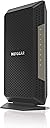
The NETGEAR Nighthawk CM1200 is a high-performance DOCSIS 3.1 cable modem designed for cable internet plans up to 2 Gbps. Compatible with major providers like Xfinity, Cox, and Spectrum, it features 4 gigabit Ethernet ports and advanced 32x8 channel bonding technology. This renewed model helps you avoid rental fees while delivering reliable, multi-gigabit wired connections for all your devices.


| ASIN | B08HY7KRPT |
| Best Sellers Rank | #5,076 in Amazon Renewed ( See Top 100 in Amazon Renewed ) #70 in Computer Networking Modems #1,611 in Renewed Computers & Accessories |
| Brand | NETGEAR |
| Built-In Media | Nighthawk Multi-Gig Speed Cable Modem—DOCSIS 3.1 (CM1200); Ethernet cable; Quick install guide; Power adapter |
| Color | Black |
| Compatible Devices | Personal Computer |
| Connectivity Technology | Ethernet |
| Customer Reviews | 4.2 out of 5 stars 1,169 Reviews |
| Data Transfer Rate | 2 gigabits_per_second |
| Internet Service Provider | Xfinity from Comcast, Cox Communications, Spectrum |
| Internet service provider | Xfinity from Comcast, Cox Communications, Spectrum |
| Item Weight | 1.2 pounds |
| Manufacturer | Netgear |
| Maximum Downstream Data Transfer Rate | 2000 megabits_per_second |
| Mfr Part Number | CM1200-100NAS-cr |
| Modem Type | DSL |
| Number of Ethernet Ports | 4 |
| Number of Items | 1 |
| Number of Ports | 4 |
| UPC | 649661154228 |
| Unit Count | 1 Count |
| Warranty Description | 90 days limited warranty |
K**S
Using the Altice modem? Get this instead!
This is the kind of modem cable providers should be providing! Had nothing but problems with Optimum's Altice modem/router combo. Since I have my own Wifi router I never needed to use the built in wifi that the Altice modem came with. No issues at all with this one out of the box. Simply just plugged it in (Cable, Ethernet, Power) and then called Optimum to get the modem provisioned. 100% recommend this for anyone looking to switch off the ISP provided modem and get their own they can keep using.
A**Z
Easy setup.
Works fine and easy setup.
Z**S
Great item so far
I love the nighthawk brand and me moving from a Motorola arris surfboard 3.0 to this was because it was the 3.1 and I just upgraded my nighthawk router to the mesh WiFi by nighthawk. Now my internet plan is 1gb and after research the arris modem only handles speeds up to 1gb but this modem handles up to 10gb speeds so I’m basically future proofing my home if my provider ever gets fiber optic or increase the plan past 1gb, this offers no WiFi but that is what I wanted since I have a WiFi mesh system to run the cable from the modem. There are newer models than this that offer WiFi 7 in the modem but for me this was the right fit and price range for a brand I love
M**L
Refurbished and working very good; but not for household use unless you have two ip addresses.
I purchased this as it has 4 WAN Ethernet connections; but you are not able to use more than one, unless you purchase another ip address from your internet provider. I would not have purchased this if I knew this is more for a business application with multiple ip addresses. Otherwise the cable modem works great. I connect to our router which has 4 ethernet cables in use plus the wifi from the router and most everything works really well. We usually have 9 devices receiving signal most of the afternoon and evening. Sometimes a couple more. Downloads are speedy; no buffering on our Roku; almost always a strong signal from the router. Hard wire downloads to my pc are at our max speed from our ISP. NetGear makes quality products. I am happy. I have used 3 or 4 NetGear modem router setups over the years and always been satisfied with the performance.
E**N
Router was defective
I was very disappointed, I did a self installation, when registering the NAC address Astound couldn’t connect to the router. I had to schedule a service tech, unfortunately I had to wait several days for a tech on the day of the appointment they were running 3 hours behind wasting my entire day in an empty house. After the tech spent an hour trying to troubleshoot it was determined the router was bad. I ended up with a rental unit that seems to work fine. I will get a replacement hoping for a more positive experience.
B**E
Easy setup through XFinity App - took 5 minutes
Xfinity sent me an email saying they upgraded my internet speed (from 200 mbps to 500+ mbps) at no charge but my current docsis 3.0 modem couldn’t handle that speed. I have a netgear router that can handle that speed and a netgear extender for the back of the house that can also handle that speed. This refurbished router is more than 50% cheaper than new and so I decided to give it a try. Once received, 1) I disconnected old modem (coax cable, power plug, Ethernet cable to router) and connected this one and the same manner. 2) on Xfinity app, I chose activate Xfinity gateway or modem, then clicked own modem. 3) I put the MAC address at the bottom of the modem. 4) took about 5 minutes for Xfinity to activate it. I then restarted the modem and router. Presto. Tested the speed and download is consistently over 560 mbps. Great deal and easy to install and activate!
B**E
Very happy
Ok so I decided I didn't want to rent my modem anymore I'm sick of paying cable $15 a month so I purchased a high speed hitron modem and it kept glitching so I order this cm1200 to with my netgear mesh routers because I figured they would play well with each other and i was right. I gained about 50mbs and dropped my ping to a 5 which is very impressive the hitron worked just not as well as this one. I pay for 1g service and get pretty close to that speed now I couldn't be happier with this modem I highly recommend
J**.
Xfinity - slowness after a few months
I am writing this review to help anyone that has experienced slowness on Xfinity after a few months. I previously had a modem that was giving me issues. I was paying for 800 megs, but wasn't only getting 5-40 depending on the day. I tried different methods of troubleshooting, and determined it was from the modem. I then purchased this modem renewed which worked flawlessly for a few months. It was also time for an upgrade, so I figured why not. After a few months, I started experiencing the same issues as my last modem... Slow speeds with nothing really helping. The speeds would be normal right after a reboot, but then dip low after a few minutes. I noticed this time that it happened after an outage, and thinking back that's when my previous one started becoming slow. I thought what the heck this must be an Xfinity issue, so I called Xfinity to remove this CM1200 from my account. I then re-added and... BAM. Everything back to normal. It has been working fine since. I'm hoping this helps someone who is experiencing the same issues with Xfinity. TLDR If you're having issues with performance (speed) and have Xfinity, try removing the device and re-activating the modem again.
Trustpilot
2 weeks ago
4 days ago