Desertcart purchases this item on your behalf and handles shipping, customs, and support to Austria.
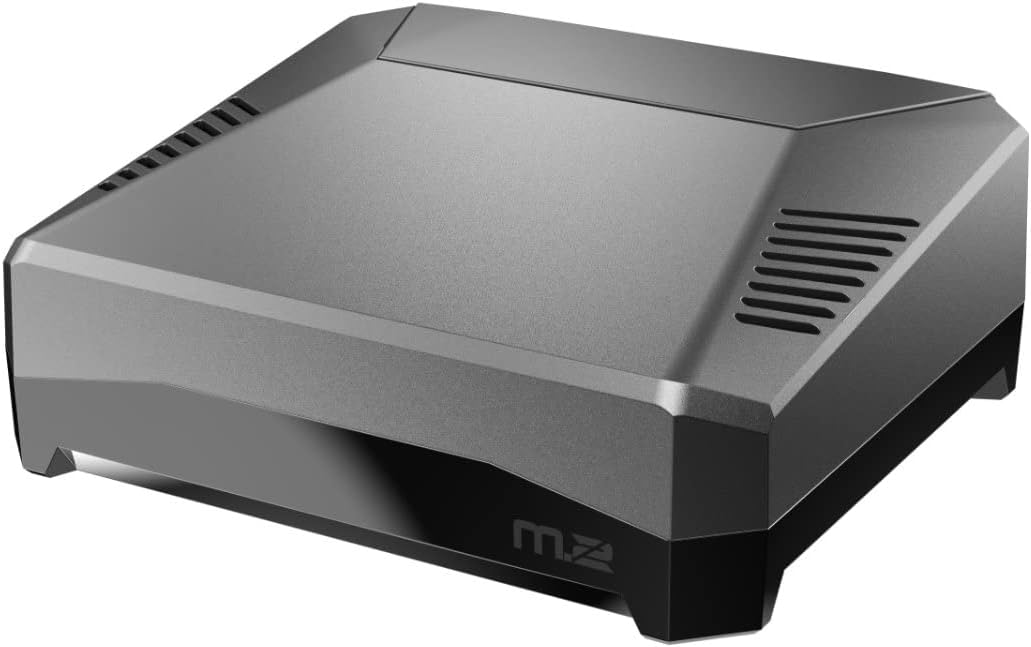
🚀 Elevate your Raspberry Pi 4 game with power, speed, and style!
The Argon ONE M.2 Aluminum Case transforms your Raspberry Pi 4 into a high-performance powerhouse by supporting M.2 SATA SSDs (B-Key & B+M Key), combining passive aluminum cooling with an active 30mm fan, and featuring a one-push safe shutdown power button. It offers dual full-sized HDMI ports, open GPIO access, and integrated IR receiver support, all designed to enhance durability, efficiency, and user control for professional and enthusiast users alike.


| ASIN | B08MJ3CSW7 |
| Antenna Location | Single Board Computer |
| Best Sellers Rank | #152 in Computer Cases #252 in Computer Hard Drive Accessories #292 in Single Board Computers (Computers & Accessories) |
| Brand | Argon Forty |
| Case Type | Tower |
| Color | M.2 CASE |
| Compatible Devices | Raspberry Pi 4 |
| Cooling Method | Air |
| Customer Reviews | 4.5 out of 5 stars 2,083 Reviews |
| Enclosure Material | Metal Plastic |
| Hard Disk Form Factor | 3.5 inches |
| Internal Bays Quantity | 1 |
| Item Dimensions D x W x H | 3.15"D x 3.15"W x 1.18"H |
| Item Weight | 150 g |
| Manufacturer | Argon Forty |
| Material | Metal Plastic |
| Mfr Part Number | RB-ARGONONE-M2 |
| Model Name | 522795 |
| Model Number | A20-002 AR-MDT |
| Motherboard Compatability | Mini ITX |
| Number of Fans | 1 |
| Number of Items | 1 |
| Other Special Features of the Product | M.2 SATA SSD Compatibility, UASP Support, Two Full-Sized HDMI Ports, Power Management Modes, Built-in IR Support, Efficient Cooling |
| Power Supply Mounting Type | Integrated |
| Recommended Uses For Product | Single Board Computer |
| Supported Motherboard | Mini ITX |
| Total USB 2.0 Ports | 2 |
| Total USB 3.0 Ports | 2 |
| Total Usb Ports | 2 |
| UPC | 670924947042 |
| Unit Count | 1 count |
| Warranty Description | 1 month |
T**.
Awesome case with great customer service to match!
The Product: This is really a great little case with a solid feel; the upper body is metal, which serves as a passive heat sink though there is also an included fan (which I have found to be fairly quiet) for active cooling. The instructions for adding support for the safe-shutdown features of the power circuit are easy enough to follow. The bottom is dark smokey but translucent plastic so that the included internal IR receiver can work. Probably helps with the WiFi, which I have not had a problem with. And you can see the Pi's LEDs, which is a plus. I really like how all the I/O ports are moved to the rear on this case. Less clutter and a cleaner installation overall. Use Case: I got this case to use in a general-purpose "desktop" Pi setup for tinkering and development of Pi, Arduino, NodeMCU (ESP-8266), ESP-32, and similar projects. I really appreciate the magnetic cover and convenient labeling of the GPIO header pins. When I'm not tinkering with electronics, it covers up snugly and has a nice look. But it comes off easily and has easy to read labels for when I want to stick a DuPont wire in there and connect it to some project on the breadboard. I also use this Pi for occasional retro gaming and media consumption. Though that is not my primary use case, it is a great choice for such a setup. Caveats: For my use case, I occasionally need to boot off of different SD cards and you have to open the case to access this. You can set it to boot from a SATA M.2 SSD, which is an awesome feature. But there too you still have to open the case to change the boot media if your use demands it. They could have designed it to allow SD card access, but it would have affected the clean front-facing aesthetic. Especially since the RPi's SD card slot is not spring loaded. So more than a simple recessed slot, you need enough access for your thumbnail to remove them. As this makes a great case for a media-center, retro-gaming, or Pi desktop which would typically just be set to boot from the SSD and left alone, I understand why they chose form over function here. It's a hassle I can cope with. Fortunately the bottom screws mount through to threaded metal rather than plastic, which is a huge win for re-opening and closing frequently. EXTRA CREDIT: I had an outstanding customer service experience with Argon40. For some unfathomable reason, the I/O extender printed circuit board that came with the kit was not working. It is meant to relocate the A/V audio and HDMI ports from the side of the RPi to the bask of the case. I was unable to get video to work on either port. I tested everything and even used a brand new HDMI cable until I was sure that the PCB was the problem. The customer service was quick and courteous, shipping out to me a replacement part which arrived very quickly. A matter of a few days all the way from Hong Kong. The whole experience was very low friction; no resistance to providing a replacement. They took time to read and contemplate my problem description, offering suggestions and showing interest in understanding why it failed. Normally I would have to chop a star for getting a bad part. But the friendly and prompt customer service more than makes up for it. They were even kind enough to send replacement silicone pads to mate with the heat sinks as my many removals and re-installs of the Pi and the AV board had taken it's toll on the original included thermal pads. I should say that outside of the bum PCB, the build quality is really top notch. Conclusion: I am a happy customer, pleased with the product and *especially* pleased to know the company will stand behind their product and gives attentive support. That matters a lot. I am sure I will be a repeat customer in the future.
I**E
Great design, functional, but...
For starters, the product is amazing. I will give a few criticisms here. Don't take those as reasons not to buy this product, buy it anyway because it is the best case I've seen for the Pi. I am listing these downsides constructively and as a heads up to potential buyers so that you will know to mitigate these. Aside from these couple of things this product case is awesome, and even these couple of things are not a big deal at all. First, and probably the worst (though it's not that bad) is the connection for the power supply. I've been using this case for weeks now, and I move it around a fair amount. That means plugging/unplugging the power supply. I've noticed it has some movement when I connect it. It will kind of wiggle up/down after being connected. It comes from the piece that is on the inside of the case to which the USB-C power supply cord connects (not the cord itself, which is the Argon power supply, also highly recommended). I can foresee that failing, so I am very careful with it. It's possible that it will last a very long time. The movement doesn't necessarily mean it will fail, but it makes me nervous. I imagine they could make a slight change to that part to make it more sturdy. Maybe give it a slight recess or something so that any tension from moving it around would be between the USB-C cord itself and the body of the case, rather than on the little connection components themselves. Again, might last forever, but to my mind that will be the first point of failure for this product. If you move it around a lot, be careful with that part when plugging/unplugging especially. If you intend to leave it in the same place mostly and won't be unplugging it much, then this won't affect you at all. The second thing is heavily dependent on personal preference and use case, but to me the shape of it is somewhat awkward. It's not bad per se, it actually even looks nice, but the shape is not the most functional. It sits very stable and looks good, but it has that slope to it that would prevent you from sitting anything on it in a stable way and you wouldn't really be able to do things like sitting it on its side or upside down, etc. Not a huge drawback, but I can easily see reasons that you would want to position it differently. So while it looks great, being more squared would make it more functional. Related to this is that the GPIO is located on the top where you would very naturally want to sit something, but because of the slope anything attached to the GPIO and sitting on the top of the case would lean, thus putting pressure on the GPIO and maybe bending them or causing a disconnect or something. The third thing is super minor - the cover for the GPIO compartment is great but a little bit tricky to get off. That's a double edged sword, though. You want the thing to be very secure - and it is. But when you want to take it off, you have to fumble with it a bit, or at least I do. There's no notch, tab, etc. where you can easily get a grip to open it. Mine had a problem with one of the magnets that keeps that bit attached. The first time I opened it, one of the magnets that holds it in place stayed on the case rather than coming off with the lid. In other words, the magnet on the lid is supposed to stay attached inside the lid but it wasn't glued in there well. It still does it's job fine, I haven't even glued it on. The entire thing is metal (at least, all of it except the bottom part that houses the SSD), so the magnet clings to the case and the lid regardless of whether it is glued or not. I could see losing it when it stays stuck to the case when you take the lid off. Depending on what you're doing with it, you might knock it off the case, forget about it, etc. Then the lid wouldn't attach to the lid correctly without it there. I could glue it if I wanted, I suppose. So minor of an issue I haven't even bothered to do even that simple of a fix... Long story short - best case around for the Pi, great price, great construction, does exactly what you want it to do, only downsides are super minor, very picky things. Buy it.
C**I
Excellent investment. Quality product. Great performance and efficiency!
A Raspberry Pi is a micro, single-board computer about the size of a credit card. You can connect the keyboard, mouse, monitor, and internet cables (or use Wi-Fi) to it without the need for it to be enclosed in a case. In general, as the CPU (central processing unit) on any computer is used, it generates heat as a byproduct. Not having a case for the Pi means it can vent that heat into the air freely, but at the risk of dust and dirt accumulating on the board as well as damage from accidental static electricity shock to protect the exposed circuitry and processing units. As such, having a good case to put the Pi into is a smart and crucial decision. After researching the many methods of cooling the CPU, either by attaching an external mini-fan or by function of a case, I finally landed and decided on this Argon ONE M.2 Aluminum Case as my standout choice because of its quality, compatibility, performance, and efficiency. It is high-quality aluminum with a brushed finish to it that makes it look cool and premium. The top is magnetic for easy access to the Pi board and components. It is specifically designed for the Raspberry Pi 4 (the model I have) to be sleek and sturdy for reliable high performance for extended periods of time (meaning it’s ok for the CPU to get hot when you game or stream media) because the case incorporates an active-cooling fan that is really quiet (so you probably won’t notice that it’s running), with controllable speed and is made from aluminum with integrated heat-sink which means it passively draws the heat from the CPU and disburses it into the air safely and effectively. The air is cooled and circulated well to keep all components running smoothly. That is its main function, but this version of the case also adds a power button (where the Pi has none, only its plug) for quick and safe power on and shutdown (to protect data and the SD memory card and Pi board and circuitry against unexpected power interruptions like surges and outages). It is compact and doesn’t clutter a desktop or workspace. Its design offers 2 full-sized HDMI display ports for connecting to computer monitors. It also has neat cable management with all connections being on the back of the case (whereas the Raspberry Pi itself has connections on different sides). The M.2 NVMe SSD slot is on the bottom and really easy to install and remove an SSD card. It benefits from the circulated air cooling that the fan provides to keep it running smoothly and efficiently. So of course you want to protect and augment your Pi and this is definitely the way to do it! You got a passive cooling aluminum with heat-sink case, active cooling fan, a power button, 2 full-size HDMI ports, and great cable management at the back. You want this. You need this. I totally and highly recommend it for any proud Raspberry Pi 4 owner!
A**S
Pretty great, but needs slight improvements
I bought this because I wanted a non-dongle way to connect an SSD to my Pi. This is a great solution for that. The rerouting of the connections is pretty nice too, otherwise the Pi looks like some kind of tentacled electronic creature. Only two complaints really. The fan is terrible. Even at 25% you can hear it whine. I disabled the fan and am using an AC Infinity 120mm "hat". I'd prefer they remove the fan and cut $5 from the price. Or use a better fan. No access to the SD card. Shouldn't be needed if you're using the SSD as boot, but if you aren't then having to disassemble to get to the SD is a bit annoying. Paying half the cost of the Pi for a case seems a bit ridiculous, but it's not your typical hollow box. Actual engineering had to go into making this thing, so all in all I'd recommend. I bought 2. One last thing. How to set it up. Too many people making this way too hard. 1) Insert SSD into base 2) Attach supplied board to Pi 3) Put Pi into top of case 4) Put case together without screws 5) Insert supplied USB adapter 6) Push power button on back to turn on 7) RDP into Pi or attach peripherals 8) app menu > Accessories > SD Card Copier to copy from microSD to SSD 9) sudo raspi-config Advanced Options to set boot order you'd like 10) Power down 11) Open case and remove microSD 12) Screw down boards inside case with the little screws 13) Use longer screws to put case together 14) Power on 15) Install fan script if you want 16) Done No need for an external SSD enclosure or USB to USB adapters etc.
C**S
Super high quality superb design
This this is the hands down best case i have ever seen for the pi, other sbc’s, and most pc cases. It feels almost like a former apple engineer made this, almost The industrial design is fantasticEverything is thought of planned out with great design. Not a cable in the case They have pcbs to make all connections for hdmi and sound with the gpio for power and i2c controlled fan! This makes perfect use of space for air/cooling movement. The top cover is the heat sink! If you are running regular pios there is a package you can install to set and configure your preferred speeds based on three cpu temp thresholds. There is a guide out There for home assistant but in hasos i had to do some manual configuration details to bring up i2c since config.txt is not used the same way it is in other rpi linux operating systems. The preferred way is to use a script to enable but it was not successful for me. but the addon works great) i found those using a simple search for “argon m2 home assistant” and pick the guide by Martin Rowan.no mater what os you choose its a great case. The gpio is also patched to the top cover under a magnetic door CD. You can read the ssd requirements in the description pay special attention since it is only compatible with sata ssd not nvme plan ahead. It is worth 2x the price easy. Quit looking and click buy you will be happy you did vs saving a dew bucks for some pretty but useless plastic case with ugly pass through cables poking out for external connect. This is form and function. I used my own money for this and will be buying another i am just utterly impressed with the level of kit being mad for the raspberry pi 4
A**N
Easy solution to add M.2 SATA SSD to Pi 4
First of all, this case is basically a nice way to add SSD via USB 3 to a Pi 4, if you don't mind having a USB dangling from your pi with a USB cable, you can add SSD and have it boot off of it for far cheaper (a $9 M.2 tool-free enclosure would work just fine). But if you want a more elegant design, this case is amazing. It's nicely built, with solid aluminum, full-size HDMI ports, built-in fan with custom fan control software, power button, easy magnetic door to GPIO pins, and more. Only minor downsize is that this case is not exactly stackable, and is rather large, but you know that just from looking at the photos so that was the expectation. My Pi runs (a rather large installation of) homebridge with many child bridges, pivpn, and a couple small custom things managed by pm2. The CPU temp is basically constant at around 45ÂşC, and the fan is silent. Only time it spun up a bit was when I compiled a sizable open source project on it. Before going SSD my pi 4 ran on MicroSD that was probably 4 years old, it got super slow and I suspected it would die fairly soon. The speedup with dd read and write of a 100M file is about 20x. I compared it with a almost-brand-new pi 5 with SD setup, and speedup is about 10x, I'm going to upgrade that pi 5 with NVMe real soon after experiencing the speed gain with this M.2 setup. Overall, it is a very nice solution to add fast SSD to pi 4, albeit a little bit pricey. But if you're not super price-sensitive, this is the way.
M**L
Perfect case for adding high-speed internal storage and moving all ports to the rear.
I already have five Argon ONE version 1 Raspberry Pi 4 cases that I've been using for media streamers. I was looking to build an inexpensive Linux workstation, but was not happy about having to use an external USB drive when I discovered this new version of the Argon ONE. I've installed a 500 GB WD Blue 3D NAND SATA M.2 2280 SSD, loaded the latest Raspberry Pi OS and configured it to boot from the SSD. (No microSD card installed.) Running the SD Card Speed Test (not just for SD cards) that is part of the Raspberry Pi Diagnostics app, I got the results shown in the included screen shot. While far from the 530 MB/sec sequential write speed claimed by WD, 295 MB/sec is still up to 30 times faster than many microSD cards out there. In addition to the above, this case also provides a good cooling solution to a version of the Raspberry Pi that is known to run hot. In my environment, the system runs in the mid to upper 40s C (without the cooling fan on). The power button is a nice feature that allows you to do a safe shutdown without having to command it from the OS. And the full-size HDMI ports mean you don't need special cables or adapters. Finally, having all of the IO ports on the rear is something I've been wanting since I bought my very first Raspberry Pi 1, Model B. If I were to have one complaint about this case, it would be that the metallic paint finish could be better. Of my six cases, at least half have uneven finishes or fine scratches in them. They won't look bad sitting on your desk, but if you pick them up and look at them under good lighting, you can definitely see the defects in the finish. For me, given that most sit behind solid or smoked glass doors, it was a minor issue. I also need to point out that these are a really good value. The basic Argon ONE which includes the active cooling and power control is only $25. Adding a USB-3 to M.2 SATA interface only adds $20.
W**N
Very nice case.
This is a very nice case with its built-in fan for cooling and creative mount for an M.2 SCSI SSD under the Raspberry Pi. It is nice that all connectors are routed out the back, and it has a power indicator and IR sensor behind the front face. It has a mildly sloped top surface. The micro-SD card is not accessible when the bottom is on the case -- held together with four screws. The Raspberry Pi 4 is held in place by separate screws. I found it very easy to remove the four screws for access to the micro-SD card, but once the software was stable, the SSD was used and the micro-SD card was not needed. Caution, read the spec's for supported SSDs. This particular model only supports SCSI and not NVMe SSD drives. I believe there is a new model that supports NVMe drives. There are also constraints on the connector slot pattern, which were published but which I was unable to find on any of the drive descriptions. These constraints did not seem to be a limiting factor -- at least not in my limited experience.
H**N
Exceeds expectations; second to none
This is a seriously cool and impressive product. The packaging is well considered; the instructions are clear and easy to follow; the assembly was straightforward; the individual components were well designed and high quality. The price may seem a little high for a device that costs a similar order of magnitude but I can't imagine ever using a different case. Having all the ports mapped to the back and the magnetically accessible and labelled GPIO header are just too useful, let alone the neat integration of an NVMe SATA SSD and the fantastic cooling. Will definitely buy again if I need another Pi.
Y**G
Casing came cracked at one corner
Unfortunately the side of the casing was cracked close to the first HDMI port, marring the product.
E**R
Beeindruckendes Upgrade für den Raspberry Pi 4 - Argon ONE M.2 Aluminium-Gehäuse
Das Argon ONE M.2 Aluminium-Gehäuse für den Raspberry Pi 4 hat meine Erwartungen in vielerlei Hinsicht übertroffen. Die hochwertige Verarbeitung und das ansprechende Design machen es zu einer ästhetisch ansprechenden Ergänzung für meinen Raspberry Pi-Setup. Die Installation war denkbar einfach, und die beiliegende Anleitung führte mich problemlos durch den Prozess. Das Gehäuse bietet nicht nur Schutz für meinen Raspberry Pi 4, sondern auch eine effektive Kühlung durch das integrierte Lüftungssystem. Selbst bei anspruchsvollen Aufgaben bleibt die Temperatur meines Raspberry Pi 4 dank des gut durchdachten Designs stabil. Die Möglichkeit, eine M.2-SSD zu integrieren, verleiht meinem Raspberry Pi 4 eine erhebliche Leistungssteigerung. Die Datenübertragungsgeschwindigkeiten sind spürbar schneller, was sich besonders bei anspruchsvollen Anwendungen und Projekten bemerkbar macht. Die zusätzlichen USB 3.0-Ports und der Gigabit-Ethernet-Anschluss erweitern die Konnektivität meines Raspberry Pi erheblich. Die integrierte IR-Fernbedienung und die Status-LEDs sind durchdachte Details, die die Benutzerfreundlichkeit des Gehäuses weiter verbessern. Die Möglichkeit, das Gehäuse mit einem Netzschalter auszustatten, bietet zudem eine bequeme Möglichkeit, den Raspberry Pi bei Bedarf ein- und auszuschalten. Insgesamt bin ich von der Qualität und den Funktionen des Argon ONE M.2 Aluminium-Gehäuses beeindruckt. Es hat nicht nur das Aussehen meines Raspberry Pi-Setups verbessert, sondern auch die Leistung und Funktionalität erheblich gesteigert. Für jeden Raspberry Pi 4-Besitzer, der nach einem hochwertigen Gehäuse mit zusätzlichen Funktionen sucht, ist das Argon ONE M.2 definitiv eine lohnende Investition.
M**B
Mooi en robuust
Een zeer mooie enrobuuste behuizing. Ik kocht er een SATA SSD M2 bij en alles werkt perfect.
B**R
Its a good product except the heating issues
Its a fantastic product except for one issue that is heating. It has poor heat dissipation mechanism and compared to other casings it is quite hot to touch. For this much price I expect it to provide good heat dissipation mechanism.
Trustpilot
2 days ago
4 days ago