Desertcart purchases this item on your behalf and handles shipping, customs, and support to Austria.
🚀 Unlock your innovation potential with the ultimate Raspberry Pi 4 Starter Kit!
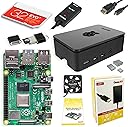
The CanaKit Raspberry Pi 4 8GB Starter Kit combines a powerful 1.5GHz 64-bit quad-core CPU with 8GB LPDDR4 RAM, pre-loaded 32GB EVO+ Micro SD card, and premium accessories including a high-gloss case with integrated fan, low-noise cooling system, and 4K-capable display cable. Designed for both beginners and pros, this all-in-one kit ensures fast setup, reliable performance, and sleek cooling to power your next big project.


| ASIN | B08956GVXN |
| Best Sellers Rank | #54,557 in Computers ( See Top 100 in Computers ) #274 in Mini Desktop Computers |
| Brand | CanaKit |
| Built-In Media | Raspberry Pi 4 8GB Model B, Pre-Loaded 32GB EVO+ Micro SD Card, USB MicroSD Card Reader, CanaKit Premium High-Gloss Raspberry Pi 4 Case with Integrated Fan Mount, CanaKit Low Noise Bearing System Fan, CanaKit 3.5A USB-C Raspberry Pi 4 Power Supply with Noise Filter, Set of Heat Sinks, Display Cable, CanaKit Quick-Start Guide, CanaKit GPIO Reference Card, CanaKit USB-C PiSwitch |
| CPU Model | ARMv7 |
| CPU model | ARMv7 |
| CPU speed | 1.5 GHz |
| Compatible Devices | Bluetooth-enabled devices, USB devices, USB flash drives, external hard drives, USB hubs |
| Connectivity Technology | GPIO, HDMI, USB |
| Customer Reviews | 4.8 out of 5 stars 3,401 Reviews |
| Installed RAM memory size | 8 GB |
| Manufacturer | CanaKit |
| Memory Storage Capacity | 32 GB |
| Memory storage capacity | 32 GB |
| Model Name | Raspberry Pi 4 8GB |
| Model name | Raspberry Pi 4 8GB |
| Operating System | Raspberry Pi OS, LibreELEC, Lakka, RetroPie, Ubuntu |
| Processor Brand | ARM |
| Processor Count | 4 |
| Processor Speed | 1.5 GHz |
| RAM Memory Installed | 8 GB |
| RAM Memory Technology | LPDDR4 |
| Total Usb Ports | 4 |
| UPC | 682710970110 |
| Wireless Compability | Bluetooth |
D**L
Super easy and quick assembly. Very cool product!
First of all, I'm brand new to Raspberry Pi. I loved the CanaKit Raspberry Pi kit. I had everything I needed to get up and running fast, except for a mouse and keyboard, which is clearly indicated in the description, so I was ready to go when the kit arrived (which it did VERY quickly!). INITAL HARDWARE SETUP The design of the included case did not even require one single screw. The top and bottom of the case "snap" off from the middle easily and the board drops into place onto the bottom plate. Be sure to attach the three heatsinks on the chips and the wire connectors for the fan before snapping it all back together if you are going to use them (which I strongly recommend). It's much easier to attach them with the full board exposed. Then you snap the top and bottom back on onto the middle and you're done. It would have been a tiny bit faster to assemble than it was but I had to search the internet for the right pins on the board to connect the fan to. The two rows of pins were not numbered on the board nor referenced in the quick guide included. It took like 10 seconds to verify the board pinout and another 10 seconds to find which pins the fan connects to. There were lots of videos and diagrams available to help, including videos specifically for this brand and model. Since the fan has two power/speed options I wanted to be sure I was connecting to the right pins. I chose the higher power/faster speed. Some review comments mention more noise with the higher speed but I found the "noise" to be almost silent, even at the higher level. I can save you a bit of time on the fan pinout bit. The row closest to the outside of the board are the even numbered pins. Since this is a computer (one's and zero's) that row starts with 0, then 2,4,6, etc. The row towards the inside starts with 1,3,5,7. The numbers go higher as you move from the outside edge to the inside along the row. For the higher fan speed, connect the red wire to pin 4. For the lower fan speed, connect the red wire to pin 3. The black wire is ground and always connects to pin 6. Easy peasy once you know! Overall this part took about 10-15 minutes. INITIAL OS SETUP The pre-loaded NOOBS (New Out Of Box Software) was fast in helping choosing which operating system and what options you wanted. Choosing other options like new password. time zone, wireless and keyboard went fast. After the OS booted up it took a while to check for and install any needed upgrades (perfectly normal and expected for any OS). If you have a 5G wireless wifi, be sure to connect to it (or use an ethernet cable) to save download times for OS and application software upgrades that may be needed. Overall this part took about 30 minutes including downloads, then it rebooted and started working perfectly. CONS The kit would be perfect if it included pin out instructions for the fan and a little more clarity on installing the heatsinks. That's the only parts that caused me any delay in putting it all together. SUMMARY Great kit and good price. It's possible that searching for the individual parts might have save a few pennies or dollars, but having almost everything from one manufacturer in one box, assured me that everything would work together and there would be only one place to go if troubles appeared. I would absolutely recommend this kit if you are getting started in the PI world, and even if you're more experienced. This kit is GREAT!
A**R
جهاز عبقري فذ لمن يجيد استخدامه
جهاز كمبيوتر مصغر جدا يخدم بشكل أساسي فئة المطورين والمبتكرين والمبرمجين ، استخدمته في مجالات عديدة وعلى عدة أنظمة وأثبت كفاءته بعد استخدامي له لأكثر من سنتين حيث يعمل 24 ساعة بدون توقف.
C**Y
Incredible, Love it!
This is crazy. This thing came with 3 heat sinks, a fan, a hard drive (albeit a microsd) preloaded with everything you could need, all the necessary wires, and even some extra stuff just because (a usb microsd reader). I put it together in minutes, had the software installed shortly thereafter, and was up and running in no time. I love Linux, but am used to Ubuntu - I know, I know its evil, corporate and lame, but I know that it works, so I use it, primarily the server edition. So I was thinking I needed to install Ubuntu on this, but once I fired up the terminal, all or most of the commands to install and setup, and navigate are virtually the same on Rasp Pi OS, if not exactly the same. The recommended Rasp Pi OS for install is really good, I was thinking I did not really need the desktop software, etc, but I actually really kind of like it! I configured the hardware during the build (which again, took only minutes) for the high performance fan installation, which is supposed to be noisy, but I don't hear anything at all. My plan is to use it as a linux server for the nginx/uwsgi/web applications I need to run. The extra usb microsd reader will allow me to expand the storage space, I just ordered a Silicon Power 256 gb microsd to mount it as extra drive(s). I ordered this CanaKit with the 32 gb Samsung NOOB microsd, but my recommendation for others would be to get the 128 or 256 gb version if its offered. Also, fyi the unit is pretty fast, not clunky at all. I was able to set up ssh into it from windows quickly. I probably will never buy another Windows desktop or laptop again, I have an older HP laptop that is perfectly fine that I upgraded with RAM and an SSD, so I can remote in to this Rasp Pi 4 machine to do what I need, super easy and love it so far!
H**H
Incredible Starter Kit.
This kit has everything you need to get you up and running. Very simple to assemble (no tools needed). Solid materials, well packaged, quality build. The only complaint I have is I want to run a headless configuration which works great, until you power cycle. If the HDMI cable isn’t connected on boot up, I am unable to get my VNC session to my box. SSH works fine, just not VNC. This requires me to hook it up to a monitor to boot it up, then once the desktop is displayed, I can start my VNC session. I was hoping it wouldn’t need the HDMI except for initial setup and updating. This just means I need to setup an HDMI splitter so I don’t have to keep unplugging my desktop computer HDMI. I am able to SSH and VNC via wireless though, so that is a big bonus. I think this is a Pi issue and not a Cana Kit issue. It’s not a deal breaker, just a “nice to have”. I highly recommend this kit from Cana.
J**S
Excellent all-in-one kit
I purchased this as a birthday present for myself. I wanted an inexpensive playground to relearn unix commands and work on some projects I have in mind without risking my main desktop computer if I get a command wrong. This is an excellent starter kit for getting into the Raspberry Pi. It is well priced for what it offers. It has everything you need to get started. It is easy to put together and it booted up with no problem on the enclosed micro SD card (which is preloaded with a couple of operating systems so you can choose the one that best fits your needs. The assembled kit is about twice the size of a pack of cigarettes and it offers a full Linux operating system with an easy to use windows-based GUI desktop (i.e., based on windows and mouse, not Microsoft Windows). You can accessorize it for many purposes (touchscreen, desktop computer, audio/video player home project, etc.). I am VERY satisfied with it.
Trustpilot
2 months ago
1 week ago