Desertcart purchases this item on your behalf and handles shipping, customs, and support to Austria.
⌨️ Elevate your desk game with the ultra-slim, multi-device Keychron K3 — where style meets productivity.
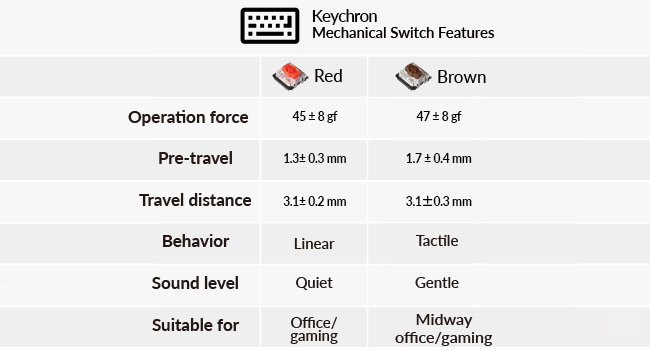
The Keychron K3 Version 2 is a compact 75% wireless mechanical keyboard featuring Bluetooth 5.1 for seamless connection to up to 3 devices, open-source QMK firmware for full customization, and a reinforced aluminum frame for durability. Designed with a low-profile layout and tactile brown switches, it offers a premium typing experience compatible with both Mac and Windows, enhanced by white LED backlighting and a lightweight design ideal for professionals on the move.


| ASIN | B08LSJ4RHH |
| Additional Features | Lightweight, Travel |
| Antenna Location | Everyday Use |
| Best Sellers Rank | #510 in Video Games ( See Top 100 in Video Games ) #4 in Mac Gaming Keyboards #99 in Computer Keyboards |
| Brand | Keychron |
| Built-In Media | 1 x USB-A to USB Type-C Cable, Keycap Puller, User Manual |
| Button Quantity | 84 |
| Color | Keychron Brown Switch |
| Compatible Devices | Laptop, PC, Smartphone, Tablet |
| Compatible Operating System Family | MacOS, Windows |
| Connectivity Technology | wired, wireless |
| Customer Reviews | 4.2 out of 5 stars 806 Reviews |
| Enclosure Material | Acrylonitrile Butadiene Styrene, Aluminum |
| Generation | 1st Generation |
| Hand Orientation | Ambidextrous |
| Item Dimensions L x W x H | 12.05"L x 4.57"W x 0.87"H |
| Item Highlight | Bluetooth 5.1 for 3 devices, USB-C wired, Keychron Launcher, White LED backlight, Brown switches, Compatible with Mac Windows |
| Item Type Name | Low-Profile Wireless Mechanical Keyboard |
| Item Weight | 500 g |
| Keyboard Backlighting Color Support | Single Color |
| Keyboard Description | Multimedia |
| Keyboard Layout | QWERTY |
| Keyboard Plate Material | Aluminum |
| Language | English |
| Manufacturer | Keychron |
| Mfr Part Number | K3-A3-USA |
| Model Name | K3 |
| Model Number | K3A3 |
| Number of Keys | 84 |
| Power Source | Battery Powered |
| Recommended Uses For Product | Everyday Use |
| Special Feature | Lightweight, Travel |
| Style Name | Contemporary |
| Switch Type | Tactile |
| Theme | Minimalist |
| Unit Count | 1 Count |
| Warranty Description | 1 year limited warranty |
| Water Resistance Level | Not Water Resistant |
E**I
Sturdy and nice feel
Very good keyboard, compact and feels sturdy. After around 6 months of use no issues so far
E**O
Excellent keyboard
I've used a lot of keyboards going all the way back to the original IBM PC. Most modern keyboards feel mushy to me. This feels great. I bought both the brown and the blue switch variations. The blue had a great feel, but its relatively high-pitched click was annoying. The brown is closer to a Goldilocks switch, quiet and with good tactility, although just a tiny bit mushy. I chose the K3 for its low-profile design, as I had read that the standard Keychron keyboards are very thick and need wrist rests. The K3 at only 7/8" thick feels fine without one. Key travel is also quite good. Fresh out of the box, I don't seem to have lost any typing speed compared with the MacBook Pro keyboard which I've been using for the last few years. I haven't had any problems with the Bluetooth connection. I have it paired with three devices – an iMac, a MacBook Pro and an iPad Pro. Just a few seconds each to pair initially, then no trouble with any of them. Switching between devices takes just a couple of keystrokes. As a Mac user, I really like that the media function keys work out of the box and are labeled properly. Likewise the command and option keys. I have no real need for the backlighting and certainly not for all the fancy, flashy chasing light modes. It's a keyboard, not a theater marquee. But I do find it handy to have on at minimum brightness when I have to work in a darkened room. If there's one thing I wish Keychron offered, it's a low-profile numeric keypad to go with this. I didn't want a full-size keyboard like the K5 which would force me to reach pretty far for my trackpad. But a numeric keypad comes in handy when I have to type in more than few digits, and it would be nice to have one to put to the right of the trackpad.
B**G
I like it, but wanted to love it. Be sure to disable "power saving" on your Bluetooth adapter!
I needed a good quality wireless mechanical keyboard for using my PC on my living room TV. I like this one a lot, but have a few gripes. The keys have a good feel to them (especially for a keyboard this size), and typing is comfortable. The form factor is quite small, so it works great as a media center keyboard, etc. I don't love the placement of the Home, Page Up, Page Down, End keys. I am getting used to them, but wish they were on the top. Also, the location of the Print Screen button (the at the top one with the icon) is in an inconvenient location, and frequently gets pressed, activating my screen capture utility. Also, I don't love that the Arrow keys are grouped together and not in separated like my Razer. This is a tradeoff for the compact size. Initially, I was having major problems with the keyboard frequently losing it's Bluetooth connection, and with keys pressing multiple times. I disabled "Power Saving" on my Bluetooth adapter in Device Manager (see my screenshot) and this completely solved these problems. Be sure to do this if you buy this keyboard to save yourself some headaches!
J**.
Best K-series I’ve Had
I love the slim design of this keyboard so much more than the previous K2, it weighs so much less and really skyrockets the mobility for myself. I’ve never liked the RBG functionality on these keyboards - it always seemed so out of place for it, so the white backlight only is perfect for me. I had switched from my previous K2 to a few other keyboards over the years but it was nice to come back to the K3 and feel right at home with the keyboard layout. I use both Mac and Windows machines so I love having the option to switch (I wish they made hybrid keycaps though!). The keys don’t feel lacking despite their new slim design, it still has excellent travel / tactile feel. Bluetooth is solid. I think its excellent quality and value for this model and Keychron really shows their care in presentation and design.
J**Z
A good keyboard for work
It may take a while to get used to the keycap profile, but overall, it is a good one for work, with a lightweight yet solid build. I like to keep the white backlight off, as it makes the shine through the keycap hard to read. No complaints about battery life either when the light is off. The brown switches are a bit hard to press, as I noticed when I typed on them for the first time, and I never really got used to them.
F**T
Tried with 2 units. Both were failures.
Update - 2/12/26 I really want to love this keyboard. It would be perfect if it actually worked. The first one had issues with its battery life, then with the keys sticking. I tried unpairing it from my PC, and repairing it. Didn't help. My two other options were to tear the thing apart to try to flash the BIOS (which is not recommended by Keychron because you can brick your device that way) or buy a new one. So I bought a new one. The lights won't stay on at all. Unfortunately, I'm dropping my review down to one star and moving on to a Redragon keyboard. I don't like the size of the Redragon, but at least it's working. Ultimately, I recommend that you find a different keyboard. ------------------------------------------------------------------------------------------------------------------------- I've been using this keyboard almost daily since mid-July. I like the size, the look, the feel... pretty much everything. Unfortunately, the battery only holds a charge for a few days at most. I thought I noticed the decline within the first month, but I wasn't keeping track of it (it was brand new, after all.)
P**R
It JUST WORKS.
I got this to replace the Nuphy Air60 V2, which has been nothing but a PITA for me from jump street. Right away I realized the K3 was the better choice. For starters, it JUST WORKED right out of the box. I had it set up and connected to my Windows laptop via Bluetooth in approximately 5 seconds. No software headaches, no programs needed to download, no "firmware flashing," none of that nonsense. Just connected and ready to go right away. But even aside from that, the key-feel of this is much better. I never jived with the Air60 keys (even when the stupid thing worked) and was constantly mis-typing. The keys were slippery or something--hard to describe. Right out of the gate, the Keychron feels better under my fingers. Oh, and it's half the price of the Air60. Let's not forget that tiny detail. Very happy with this. I also have a Keychron K2 which I've used as my daily workhorse without trouble for years, and the brand will continue to get my business. Well done!
S**L
Bluetooth disconnects constantly after few minutes of use. Rest of the keyboard features are good
I purchased the Keychron mechanical keyboard in March 2026, and up until June 2026, it was a great experience. The keyboard is comfortable to type on, with responsive keys and a satisfying mechanical feel. The build quality also feels solid, and I appreciated the convenience of wireless Bluetooth connectivity. However, in June 2026, I started experiencing issues with the Bluetooth functionality. After just a few minutes of use, the keyboard would stop working consistently and frequently disconnect. At this point, the keyboard only works reliably when connected via cable, which is disappointing given that wireless performance was one of the main reasons I purchased it. Aside from the Bluetooth problem, the keyboard itself is excellent for daily use. If Keychron can address the wireless reliability, it would be an outstanding product.
Z**I
9/10
👍
C**A
Great keyboard but disappointing.
It is a great keyboard. Very light weight and thin. The keys feel nice. Easy to switch between devices, response time is around 1 second. However, I got a defected one. I tried to charge it on day one but I couldn't see any light indicator. So I thought it was charging anyways. After 2 weeks of use, I realized that's actually a led indicator next to the usb C port. and it was flashing red. I read the user manual again and found out that red flashing means battery low. The next thing happened is that my keyboard died. And now I can only use it with wire.
M**D
Perfect for a clean setup for casual use.
Honestly an amazing keyboard for the price. It feels really premium and it's super comfortable to type on for hours. If you've got a Mac setup or just a casual PC desk, this fits in perfectly and the versatility is great. If you’re a video editor or a gamer, you might want to look at some of Keychron's other gear, but for just general day-to-day use, it’s fantastic. Definetly happy with this purchase, it’s made my desk look way cleaner and it's very functional.Perfect for a clean setup
K**.
Worth it..
I have some experience with mechanical keyboards, and the Keychron K3 Version 2 has easily been one of the best typing experiences I've had so far. What immediately stood out to me was the slight angle of the keys. It makes typing feel surprisingly natural and ergonomic, reducing strain during longer typing sessions. The brown switches hit the perfect middle ground not too clicky and not too quiet giving just the right amount of tactile feedback without being distracting. The build quality is excellent, and the keyboard feels premium and solid throughout. Everything from the keycaps to the overall construction gives the impression of a well-made product that will last. For the price, I think this is an outstanding keyboard. If you're considering the Keychron K3 Version 2 and are on the fence about buying it, I'd definitely recommend going for it.
R**N
wow
having some second thoughts in buying this product, but yeah purchased it, and it readily connect to my iOS devices and android system device. I like it, not too noisy when I'm typing- I like the tapping sound when I type unto it. nice build quality.
Trustpilot
2 months ago
1 month ago