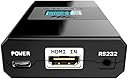
Desertcart purchases this item on your behalf and handles shipping, customs, and support to Austria.
🎬 Elevate your home cinema sound — don’t just watch, experience!
The HDFury 4K Arcana 18GBPS is the world’s first eARC adapter that converts any HDMI ARC source into full eARC audio, delivering Dolby Atmos and TrueHD sound to your soundbar or AVR. With 18Gbps bandwidth, it supports 4K HDR video passthrough and eliminates common ARC issues like lip sync errors and audio dropouts. Ideal for users with non-eARC TVs wanting premium audio without upgrading their display, it requires external players for best performance and expert setup for flawless operation.
| ASIN | B08DF7GRCB |
| Best Sellers Rank | #776 in HDMI Cables |
| Brand | HDFury |
| Color | Black |
| Compatible Devices | Television |
| Connector Type | HDMI |
| Current Rating | 2 A |
| Customer Reviews | 3.8 out of 5 stars 352 Reviews |
| Finish | Matte |
| Input Voltage | 5 volts_of_direct_current |
| Item Dimensions | 3.9 x 2.3 x 0.8 inches |
| Item Weight | 0.12 kg |
| Item dimensions L x W x H | 3.9 x 2.3 x 0.8 inches |
| Manufacturer | HD FURY |
| Mfr Part Number | HDF0160 |
| Model Number | HDF0160 |
| Number of Items | 1 |
| Number of Ports | 3 |
| Package Quantity | 1 |
| Power Plug Type | No Plug |
| Specific Uses For Product | TV |
| UPC | 631384548514 |
| Unit Count | 1 Count |
| Warranty Description | 1 year |
G**W
HDFury Arcana 4K Setup + Review – Projector + Apple TV + Sonos (What Actually Works)
If you’re using a projector, Apple TV 4K, and Sonos soundbar, the Arcana HDFury 4k does solve the audio problems — but only if you configure it correctly. Out of the box defaults will cause black screens, missing movie audio, or broken volume control. Use my settings below and it becomes rock solid. My setup • Source: Apple TV 4K • Display: Epson 3800 projector (HDR10, no Dolby Vision) • Audio: Sonos Beam (Gen 1) + surrounds • Cable run: Long HDMI to ceiling-mounted projector • Use case: Movies and TV only (no gaming) Before Arcana: • Audio dropouts • No volume control • Black screens when starting or exiting movies • SPDIF hacks required • Constant HDMI re-syncs After Arcana (configured correctly): • Stable picture • Proper Dolby Digital 5.1 in movies • Menu audio works • Volume control works • No black screens • No SPDIF needed Important reality check (projector owners read this) Projectors do not handle SDR ↔ HDR switching well. If you let Apple TV auto-switch formats, you will get black screens. This is not an Arcana problem. The fix is to lock the signal. Arcana settings (critical) These are the settings that actually matter. On the Arcana: • Add PCM 8ch: ❌ OFF (This is crucial. If ON, movie audio will fail on Sonos.) • Add DTS:X / DTS-HD: ❌ OFF (Sonos doesn’t support DTS.) • TV ARC Routing: ❌ OFF • eARC Only: ✅ ON • Unmute Delay: OFF • TV Standby Mute: OFF Do not force formats. Let Arcana present a clean EDID. Apple TV settings (projector-safe, stable) This is the key to avoiding black screens. Video • Format: ✅ 4K HDR • Match Dynamic Range: ❌ OFF • Match Frame Rate: ❌ OFF • Chroma: 4:2:2 Yes, this means menus are in HDR. No, you’re not losing anything on a projector. Yes, it stops HDMI resyncs. Audio • Audio Format: Auto • Default Audio Output: Receiver (TV) (Correct even though you’re using Sonos.) Remotes & Devices • Control TVs and Receivers: ON • Volume Control: Auto via HDMI Do not default to AirPlay for TV audio. What “working correctly” looks like This is how you know it’s right: • Menus: PCM stereo (normal) • Movies: Dolby Digital 5.1 (check Sonos app → About My System) • Volume: Controlled by Apple TV remote • Picture: Always HDR, no black screens on pause or exit • Projector Info screen: Shows HDR10 (not Dolby Vision) Apple TV may say Dolby Vision is enabled — that’s fine. The Epson ignores it and displays HDR10. CEC expectations (don’t fight this) - Projector will usually turn off via HDMI - Projector will usually not turn on via HDMI - This is normal for Epson projectors Use the projector remote or a universal remote for power-on. Bottom line The Arcana 4K absolutely works for projector + Sonos setups, but: You must disable PCM 8ch and lock Apple TV to 4K HDR. Once configured: - No SPDIF hacks - No audio dropouts - No black screens - No guessing Once setup, unplug everything, wait a full minute, 60 seconds. Then plug in turn on the projector and Sonos so they are fully booted up. Then plug in and turn on the arcana and let it negotiate with both devices. Then plug in and turn on the Apple TV. Seriously, the timing and order matters! Take your time, it’s worth it. This setup is now boring — and that’s the highest compliment I can give it.
M**F
Absolutely worth the cost for beautiful sound!
I recently upgraded my sound system from an older Sony AV setup with Bose speakers to a new Bose Soundbar 900 w/two Bose Base 700 subwoofers and two Bose Surround 700 speakers to create my dream home theater setup. That's when I realized that I could not get Dolby TrueHD or Dolby Atmos sound through my new system because my 2016 Vizio 65" 4K TV only has an HDMI Arc connection and to get the newest high-definition sound, I would need an HDMI eARC connection on my TV because the Bose soundbar uses an eARC connection for all the newer Dolby sound. I did not want to have to buy a new TV just for the eARC connection so began looking for a solution. That's when I stumbled upon the HDFury Arcana. I originally bought it just so I could plug in my Sony Blu-Ray player as my Blu-Ray player is newer than my 4K TV and has the capability to play Dolby TrueHD and Dolby Atmos. Once I set up the Arcana with my Blu-ray player as the source and then connected to my TV and soundbar was able to get movie quality sound from all my newer Blu-Ray movies. The difference in sound is incredible! Then I decided I also wanted to hook up my XBOX One so I could get the higher quality sound from it too, but the Arcana only has the ability to connect one sound source. I decided that since most of the streaming sites that we watch through our TV have movies and shows in Dolby TrueHD or Atmos, I needed a different source for them too as I couldn't get the quality sound from my TV through the ARC connection and needed to run them through the Arcana too. The solution was to purchase an HDMI switch box. Now I have my Blu-Ray player, XBOX One and Roku plugged into the HDMI switch and the output of the switch connected to the Arcana input. The Arcana is then connected to the TV (for video) and the Bose soundbar (for audio). Now I have movie quality sound from all my devices that was not possible to do using my TV as the sound source. While it is not inexpensive to set up this way, it is cheaper than replacing my 4K TV. The reason I only gave the Arcana 4 stars is because it took me three days to work out the settings to get the system running consistently. After experiencing problems with losing sound to my soundbar when switching between TV viewing and Roku and various apps (Netflix, Disney+, etc.) and having to turn off everything and restart it just to get sound back, I finally was able to determine that it was the way my Visio TV was communicating with the Arcana via ARC that was the problem. Took much researching on the internet and many "trial and error" changes to settings before I could get consistent sound that did not cut out or just stop working. The solution I ended up using was to change the settings to stop using the ARC channel to my TV and just let all sound flow through the Arcana to the soundbar and only allow the video to go to the TV. Once I took the ARC from the TV out of the loop, everything works perfectly. Apparently, each TV manufacturer implements ARC a little differently so there is no set way to know how the systems will "handshake" with each other until you have everything connected and try it out. Since I am now streaming all my TV shows, YouTube, etc., through the ROKU, I don't have a need for TV sound at all so this solution works quite well for me. My TV has become a large "monitor". Sorry for the long-winded explanation but wanted to put all of this out there because if someone buys this as a "plug and play" solution, they may be disappointed and think something is wrong with the Arcana when in reality, it is a problem with ARC implementation in their TV. The Arcana performs all its magic perfectly when set up to allow it to do what it was made to do!
G**N
Awesome little box - does exactly what it says it will do
I bought a Sonos Arc 2 for my 5+ year old Samsung TV (UN49M5300AF) and a Amazon Fire TV Cube (3rd Gen) to improve the sound for my TV setup. The TV only has an ARC port (no eARC) and only supports Dolby Digital Plus, so in principle I should have been able to get Dolby Atmos (compressed), which I would have been happy with. However, it turns out that Amazon Prime and Netflix only deliver Dolby Atmos sound to 4k TVs (WTF Amazon and Netflix?!), so I was never getting Dobly Atmos sound because the TV is only 1080p. I had no interest in buying a new TV because getting rid of the current TV seemed like a waste of a perfectly serviceable TV. The Arcana solves this problem beautifully. The Arcana allows me to tell the Fire TV Cube that the Cube is talking to a 4k TV. This unlocks Dolby Atmos sound from Amazon and Netflix. The Arcana also downscales the 4k picture stream for the 1080p TV. In addition, the Arcana solves lip syncing issues. Before adding the Arcana, I could never get perfect lip sync. I tried all adjustments possible (the Fire TV Cube, TV, Sonos), but I had to adjust for shows/movies that had different audio standards (PCM 2.0, Dolby Digital, Dolby Digital Plus). The only somewhat reliable way to solve the lip sync issue was to match the TV sound standard to the source standard (where possible). Doing this for every show was obviously a pain, and meant that I wasn't able to get the full performance of the Sonos Arc 2 sound system. With the Arcana, I have none of these problems. I get the highest quality sound with no lip sync issues. I did have to change some of the default settings on the Arcana to get the setup to work. From memory, I changed the following settings from the default values: * Audio: eARC only * Scaler: 4K30 422 12b SDR * HDR: Force 1000 nits The firmware version on the Arcana is 0.87. Many older reviews (and a friend of mine) say they have problems with the Arcana and connected devices having to be turned on in a particular order. I have not had this problem with my setup. I suspect that HDFury has solved many of these problems in later firmware versions. The manual for the Arcana is very technical and one can tell it is written by somebody whose native language is not English. You should read the manual (which is available online) very carefully to make sure that the Arcana is a device that will support your use case. This device is not what I'd call a plug and play device like most consumer devices. In my opinion, you need to be willing to read the manual, maybe look up some technical terms and acronyms, and play around with the settings. In short, this is a technical box that requires a user that is interested in going beyond just plugging it in and hoping it will work. I'm super happy with this little box and can highly recommend it for a setup like this (if you're willing to put the time in to configure it for your set up).
R**A
Way too expensive to be this glitchy.
I tried to like it but it was way more bother than it was worth. Read many reviews that said basically the same but thought I would take a chance. It was utterly disappointing. When it worked with my Sonos home theater system, which was rare, it sounded great and picture quality was good. The problem was it would randomly drop picture or sound or both and I would have to reboot everything to get it to function again. And using an hdmi switcher for blu ray, PS and Firestick was a nightmare. If you tried to switch from one source to another the Arcana would have to be rebooted every time. Very aggravating. So I sent it back until a more viable alternative becomes available. For now I’ll use the optical output from the projector sacrificing Dolby Atmos but at least it works flawlessly so we can enjoy a show or movie without all the hassle.
C**E
If sync issues are driving you mad, this is the answer.
I bought this to fix sync issues between my LG C1 OLED and Sonos Arc. It was a last ditch effort that I was sure wouldn't work since nothing was fixing the problem (for those with the same equipment and issue, the only thing that will fix the problem is tinkering with audio delay from one TV show or movie to the next. There is no single solution). The 4K Arcana, to my surprise and relief, actually solved the problem. More than that, the audio is noticeably improved, so I'm additionally grateful for that. There are no overall issues with the Arcana. It is expensive and honestly shouldn't need to exist given the simplicity of the issue it's designed to fix, but the issue exists and it does fix it, so it's worth its cost. The user interface is a little intimidating at first because of how primitive it appears ("I paid $300 and this is what they gave me? No way this works"), but it is ultimately an impressive piece of equipment. Another small complaint some might have: using this with an Apple TV sometimes throws off the apple remote so that your TV won't turn off along with the Apple TV. This issue fixed itself for me, but I was willing to keep turning the TV off on its own in exchange for synced sound. Not a dealbreaker in the least.
J**F
Expensive
I have been struggling with this since I received it. when it works it's great. The problem I have is it keep blinking off the screen like it's resetting the video output but it stays the same. I have purchased 5 different HDMI cables to see if it will stop. waiting on the next 2 to come in and try it again. if this continues I will return this item and look for something else that might work. I have emailed customer service for help in the matter and went through the owners manual several times and watched countless YouTube videos trying to see if there is a fix. Nothing working, possible I have a bad unit. Again with the Sonos ARC the sound is perfect it's just the video cutting out that is driving me crazy.
A**R
Great solution for Atmos sound
HDFURY Arcana was the solution. I have a LG C6 (ARC only) connected to a Apple TV 4K (AT4K). I don't use my LG C6 internal apps. I use my APPLE TV 4K for all my viewing apps and wanted to use a Bose 900 soundbar with my setup. Recommended by another reviewer to go HDFURY and HDFURY DISCORD, which I did. This was a good homework. First impressions after install was very satisfying. Arcana solution was a winner. Bose 900 soundbar came alive in both 5.1 and Atmos. Arcana works as advertised with full audio including Atmos audio and video with Dolby Vision mapping on my HDR signal. HDFURY explains DV/LLDV conversion on HDR in detail on their site. I connected Arcana to HDMI 1 (LG C6) non arc and Bose 900 soundbar. This is the same LG C6 HDMI that Apple TV 4k was connected to before Arcana. After confirming everything was functioning correctly including system CEC control of on and off and volume control with AT4K controller, Bose controller and Alexa. I changed 2 settings in Arcana. 1)Tv ARC routing off. Not sure I needed to do this step as nothing is connected to my lg C6 ARC HDMI. 2) LLDV> HDR ON for LLDV. Because I don't us my LG C6 internal apps the known concern of no sound from Bose soundbar when switching ARC ( internal tv app) to eARC (APPLE TV 4K to Arcana to tv) because Bose can't switch internally on the fly wasn't a issue for me.
G**Y
SAVED THE DAY UPDATE
Customer ordered the new JVC RS2100 Projector but wanted to use SONOS ARC ...I was unaware as an installer of any way to get sound from AppleTV4K to Sonos Arc (maybe a splitter ???) A little research and I came across this gem ... I literally just worked right out of the box. FUll atmos decode to Sonos Arc .. Using RUIPRO 8K Fiber Optic HDMI Cables if that matters to you ..it does to me when installing JVC laser projectors ... Be Aware that new AppleTV4k firmware does NOT maintain Sonos Arc as DEFAULT AUDIO OUTPUT ...it reverts to AppleTV Speaker every time you turn on the system or change back to ATV4k from listening to music with Sonos.... This is NOT the fault of the ARCANA product I do wish it had 1 or 2 more inputs but they do have an upgraded product with that capability... Many of you will only be using this because you have an outdated TV without ARC or eARC support ...but it works very well with Projector and Sonos ARC sound bar ....highly recommended ARCANA has developed multiple issues .. 1 needs hard reset after ANY Sonos or Nvidia Sheild update (loss of audio) 2 and change in settings results in loss of Sonos Arc audio 3 GoBlue purchased to at least reset Arcana to default ...Go232 app does not connect to GoBlue with iOS or Android ...... trying to arrange exchange /warranty EDIT / UPDATE I got fed up with the audio glitch / sound dropping out / email tech support that only tries to blame the hdmi cables and setup ..... this product is flawed I replace it with AVSTAR 4K@60Hz HDMI 2.0 Splitter Switch Bidirectional 2 in 1 Out/1 in 2 Out,ARC/EARC Soundbar,Sonos Soundbar,HDCP 2.2,HDCP 2.3 have not HAD 1 issue for 3 months now ..... great performance and NO issues HD FURY FOR SALE OR TRADE
E**S
Quelle produit incroyable !
Merci aux personnes qui ont créés ce produit ! Mon installation est la suivante : TV LG 55UJ634V, 4k, HDR avec port ARC mais pas de eArc (TV de 2017) Apple TV 4k branchée sur une Hdmi SyncBox. Et la Sonos Arc pour le son. Le HD Fury arcana vient parfaire cette installation, je l'ai branché entre la sortie de la Syncbox (qui fait office de switcher Hdmi) et la TV. Après quelques (pas mal en réalité) réglages et le changement des mes câbles Hdmi qui ne supportaient pas le flux (coupures intempestives de l'images pendant quelques secondes). J'arrive enfin à une installation stable ! Le produit est assez simple, léger, une interface en anglais (uniquement), il fait son job à la perfection ! Et projette un message de log sur le bas de l'écran TV super pratique pour visualiser les caractéristiques des flux qui passent par le boitier. (Ce message est désactivable via les réglages). Je recommande ce produit ! Bien que le prix, pique un peu !
D**I
Mac mini mit Teufel Cinebar One über Hdmi
Der Arcana HDMI Adapter wurde gut verpackt schnell geliefert. Ich habe ihn über hdmi in an einem Mac mini angeschlossen und am Earc out an eine Teufel Cinebar One (neues Modell) mit t6 Subwoofer angeschlossen. Einfach einstecken und läuft. Der Sound ist super. Der Adapter ist zwar nicht ganz billig aber er tut was er soll richtig gut. Ich würde ihn wieder kaufen.
P**L
Dolby Atmos!
I got this HDFury Arcana to send Dolby Atmos to a Sonos Arc from an UHD Player and an Apple TV. My TV (Vizio PX65-G1) wasn’t sending an Atmos signal to the Arc, and after some research, I found that it didn’t have enough eARC support. This little device solved that. It was relatively simple to set up, and after some tinkering (thanks youtube) it’s now working perfectly, without the blue info text on the screen. Can confirm it supports 4K HDR Dolby Vision and Atmos. It’s fantastic. Vision and Atmos films play perfectly through it, and it lets me take full advantage of the Sonos Arc and Era 100s. The only issue is it has only one input. That’s easily solved with a switcher, so I picked up a UGreen HDMI 2.1 8K switcher to go with it. Pairing the switcher with this HDFury has enabled me to enjoy full Dolby Atmos without the need to purchase a new eARC TV. I wholeheartedly recommend this for that upgrade. I dedicated considerable time researching the reasons behind my inability to access Atmos through my existing setup. If you are trying to resolve a similar issue, I hope this review saves you that time!
A**.
Enables DTS to Sonos Arc from Panasonic 4k
I purchased the HD fury Arcana for one reason - to enable my Sonos Arc to play downmoxed DTS from my Panasonic 820 4k player and display on my LG G1 tv. This is quite an expensive solution, however I was getting very frustrated with my DTS audio 4k discs only playing in 2.0 stereo on the Sonos as LG tvs no longer allow DTS pass through. While the Sonos won’t support full DTS master audio, it will at least downmix it to standard DTS which is better than 2.0. I can also confirm that when using an ears or arc capable tv, the tv ARC will still send down mixed audio to the arcana and through to Sonos. In order to get the best benefit, I have used a UGreen 8k 5 port hdmi switch to connect my 4k blu ray player and Apple TV to the arcana. Which means I can now get the full audio through to the Sonos. I have so far not experienced any lip sync or drop out issues. I also have a ps5, but have this connected to the tv direct and the arc allows surround 5.1 to be passed through the arcana to the Sonos. This is because the arcana will not support VRR (I believe the Arcana 2 will). I can live with standard 5.1 for gaming! Picture quality to rough out is exceptional and I can’t notice any difference. I had to fiddle with settings a bit to ensure Dolby Vision displayed properly. Also worth noting - my G1 has 3 usb outputs. I use only one as the power for the arcana. This currently seems to work and also means the arcana will power cycle with the tv I believe. Be aware that usb puts on tvs are generally underpowered, so I don’t plug any thing else in the spareness to ensure all power routes to the arcana. Failing this solution, the arcana does come with a usb power plug if required. This isn’t the solution for most people I’m sure, and certainly not cheap, but for me it works well.
S**A
DENON DTH-S517で動作しました
動作確認機種にはありませんでしたが、DENON DTH-S517で動作しました DMR4S102->HDFury Arcana->DTH-S517 -> Asus RogPG32UQ という構成で、視聴は 閃光のハサウェイ でATMOS再生で認識しました
Trustpilot
2 months ago
4 days ago