Buy anything from 5,000+ international stores. One checkout price. No surprise fees. Join 2M+ shoppers on Desertcart.
Desertcart purchases this item on your behalf and handles shipping, customs, and support to Austria.
๐ Connect More, Stress Less!
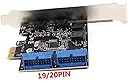
The Mustpoint PCI-E X1 to 2 Ports 19 Pin USB 3.0 Header is a high-performance expansion card that allows you to add two internal USB 3.0 ports to your desktop PC. With a sleek design and lightweight build, it supports data transfer speeds of up to 5Gbps and is fully compatible with existing USB systems, making it an essential upgrade for tech-savvy professionals.
| Asin | B07GSQR6D4 |
| Brand | Mustpoint |
| Compatible Devices | Personal Computer |
| Customer Reviews | 4.5 4.5 out of 5 stars (444) 4.5 out of 5 stars |
| Hardware Interface | PCI, USB |
| Item Dimensions L X W X H | 12L x 9W x 6.9H centimeters |
| Manufacturer | Mustpoint |
| Mfr Part Number | 8541585782 |
| Model Number | 8541585782 |
| Operating System | Windows, macOS, Linux |
| Style Name | Classic |
| Upc | 661585245035 |
User
Nice product!
Handy product!!
User
Great replacement for damaged motherboard header
I was recently performing a case swap / refurbishment on a system, giving an old gaming desktop a second life as a rack mounted server. Unfortunately, in the process of disassembling the old system, I was unable to get the USB 3 header to release the front panel USB 3 cable. I tried everything I could think of for about 20 minutes. I know they are notoriously difficult to remove in some cases, but usually come loose with a couple minutes of wiggling at most. Anway, the USB 3 header on the motherboard was unfortunately destroyed during this process. This was a problem for me because I needed a USB 3 header when I installed the motherboard in the new case to attach to the front panel USB 3 ports. That's where this product comes in. I simply installed it in a spare PCI Express 1x slot and plugged it into the front panel USB 3 cable. Everything works great, no drivers to install, truly plug-and-play (Linux Ubuntu 18.04.6 LTS). Performs as expected.
User
Good quality
Works fine. Good.
User
Tested and delivers high speed data rates with minimal loss
I was very frustrated that no reviewer had managed to test this card to see if it delivers the speeds it claims to deliver. So, I bought a 400MB/s rated USB3.1 flash drive and tested and proved its speed. This setup was using the direct connection to the USB 3.2 Gen1 motherboard connector. As you can see, the sequential read speeds meet the rates 400MB/s for the drive. I then installed the card and moved the USB 3.2 Gen 1 ports to the PCI-e card and repeated the tests using Crystal Disk Mark as shown in the attached images. I lost about 30 MB/s speed in sequential reads going through this PCI-e card compared to the motherboard. The rest of the speed parameters were not affected. I optimized my Asus z690 bios and Windows 10 device manager to optimize the drive for performance. The 30MB/s loss, though surprising, is still good since I get high data rates on my four USB 3.2 Gen 1 ports on my front panel. Now the mobo USB 3.2 Gen 1 header is empty ... future additional USB ports maybe, though I already have plenty of USB 5GBps/10Gbps in the rear. Overall, the card delivers. In summary, do the following ...1. Use Windows newest (June 2022 driver date as of this writing) and optimized drivers for the PCI card. They load up automatically. DO NOT USE NEC's DRIVERS THAT COME WITH THE CD ROM FROM 2012! Too slow at 250 MB/s versus the 370MB/s I'm getting... and windows will complain to you about using old drivers anyways.2. Optimize the USB devices in device manager for best performance.3. Optimize your bios for best performance. In my case, I told the bios that the PCI card is a Gen 3 card although its really Gen 2 (switched setting from AUTO to Gen 3). This helped me increase my speeds from ~ 350 MB/s to 370 MB/s. Not sure why this worked but it extracted the best possible speeds from the PCI card...again not sure why this worked.PCI card is highly recommended, though its pricier than others ... Hope this helps & God bless!EDIT (9/12/2022):------I tested other similar PCI-e cards (from Febsmart, Phoenix) offered here on Amazon and this card bested them overall. No doubt, if you are running or expecting high data transfer rates (e.g 400MB/s), you'll loose speed with all these PCI-e cards as they ALL use the NEC 72020 chip, which supports up to 4 USB 3.1 ports). Duals use the 72010 chip, which supports up to 2 USB 3.1 ports. It seems to be the only chip on the market that expands USB 3.1 Gen 1 ports.I believe the data transfer limit of these cards is ~ 350MB/s. Its up to you to determine if this is a deal breaker or more than enough for you.
User
Biggest problem they do not come with a user manual, and driver disk is lacking!
I find when it's working it doesn't seem to be too bad. However I think the operation is very dependant on the correct drivers or conflicting with windows updates not working correctly.The data cable insertion sockets "Don't " Fit Correctly; thus if your having problems and trying to diagnose operational issue. It also seems the PCIe adaptors are all coming from China from the same manufacturer but in my circumstances I also use PCIe to M2 nvme and I can't recall or recognise which driver disk came with which if the are not actually the same... In my case the jury is still out to further necessary testing, and due to the lack of user manual that is actually translated in all languages or at least
Trustpilot
2 months ago
3 days ago