


🎯 Master your workflow with precision and freedom
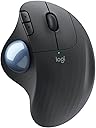
The Logitech M575 Ergo Wireless Trackball Mouse combines ergonomic design with advanced Bluetooth connectivity, offering up to 24 months of battery life and 2000 DPI precision tracking. Compatible with multiple operating systems and featuring an ambidextrous layout, it’s engineered for professionals seeking comfort and efficiency in a sleek, modern package.
| ASIN | B08TLYK78K |
| Additional Features | Wireless |
| Antenna Location | Personal |
| Battery Average Life | 20.0, 24.0 months |
| Best Sellers Rank | #477 in Computer Mice |
| Brand | Logitech |
| Button Quantity | 3 |
| Color | Graphite |
| Compatible Devices | Multi-OS compatible |
| Connectivity Technology | Bluetooth |
| Customer Reviews | 4.6 out of 5 stars 6,950 Reviews |
| Embellishment Feature | LED |
| Enclosure Material | Plastic |
| Global Trade Identification Number | 00097855160621 |
| Hand Orientation | Ambidextrous |
| Hardware Platform | PC, Personal Computer |
| Included Components | 1 x AA battery, ERGO M575 Wireless Trackball, Quick Start Guide, USB Receiver |
| Item Dimensions L x W | 1.9"L x 3.9"W |
| Item Type Name | Trackball |
| Item Weight | 145 g |
| Manufacturer | Logitech |
| Mfr Part Number | 910-005869 |
| Model Name | Ergo M575 |
| Model Number | 910-005867 |
| Mouse Maximum Sensitivity | 2000 dots_per_inch |
| Movement Detection | Trackball |
| Movement Detection Technology | Trackball |
| Number of Batteries | 1 AA batteries required. (included) |
| Number of Buttons | 3 |
| Operating System | Android, Linux, Mac OS, Windows 10, Windows 11, Windows 7, iPadOS |
| Power Source | Battery Powered |
| Range | 33.0 feet |
| Special Feature | Wireless |
| Style Name | Modern |
| Theme | Ergonomics, Wireless Trackball Mouse |
| UPC | 097855160621 |
| Unit Count | 1 Count |
| Warranty Description | Manufacturer’s warranty can be requested from customer service. |
T**S
My Go-To Trackball Mouse!
I have been using Logitech Trackball mice for many years -- ever since I developed RSS repetitive stress syndrome in my dominant hand. Most inconvenient and painful! Logitech trackball to the rescue! Trackball use cannot cure RSS, but it might do wonders to ease your discomfort/pain as it did (and still does) for me. Nowadays, trackball mice are getting difficult to find as user needs and interests evolve. I kept searching for a NEW (not refurbished) Logitech trackball and finally found this model. There are very few changes between this trackball and my previous similar Logitech models; those micro-differences don't matter to me. All I care about is that my new Trackball is working perfectly for my needs. Scrolling has always been the primary indicator that my trackball was wearing out. My new Trackball's scrolling is reliable and smooth. If you're still old school in some of your tech habits as I am, this Logitech wireless trackball may be your best replacement or a good introduction to using a trackball mouse. Wireless, no cords to tangle (or find a spare port to plug into is a big plus! I anticipate I'll get another 10 years of trackball use out of this new model. And when I'm ready to move beyond this tech level, I'll start my new device search with Logitech.
D**S
Worth the $$$
As someone who spends hours working at a desk or gaming, finding the right mouse can make all the difference, and the Logitech mouse has truly raised the bar in both performance and comfort. From the moment I opened it, I could feel the attention to detail. The contours of the mouse fit my hand perfectly, reducing strain during long hours of use. The mouse's smooth surface and solid grip provide a comfortable, fatigue-free experience, especially considering that it requires no more mouse movement. The precision of the Logitech mouse is top-notch; every movement is fluid and accurate. It's especially noticeable when performing detailed tasks like photo editing or executing quick movements in fast-paced games. The responsiveness is simply unmatched. Battery life is impressive too—if you opt for a wireless model. I rarely have to worry about charging, and when I do, the process is quick and efficient. In terms of value for money, the Logitech mouse strikes the perfect balance of quality and affordability. It’s durable, reliable, and performs at a high level across all tasks.
W**R
⭐️⭐️⭐️⭐️⭐️
I owned the previous model of this wireless trackball mouse and have owned 3 Logitech mice so far, so I decided to upgrade to the latest version—and Logitech has done it again with another fantastic product! The improvements are noticeable, from the refined design to the seamless wireless connectivity and lack of any latency issue's. It offers incredible value for the price, combining top-notch quality with flawless performance. The precision and smooth tracking make it perfect for both work and everyday use, and the ergonomic design ensures hours of comfort. Setup was quick and effortless, and the battery life is as reliable as ever. If you’re looking for a quality trackball mouse, I can’t recommend this one enough!
A**R
Excellent product
I've used these for decades now. If anything they last longer than they used to! The only failures I used to have were when I'd wear out the buttons.
P**.
Eliminates my hand and wrist issues
I do 3D design work and consider this trackball an absolute must-have. I spend anywhere from 8-14 hours/day working at my desk, with my hand on the trackball for large percentage of the time. The design fits my hand perfectly, with the buttons and wheel falling in exactly the right spot. Most importantly, it eliminates the fatigue, pain, and numbness that a regular mouse causes me. If you haven't tried a trackball before, there is a day or so of learning curve, but it's worth it! Being able to leave your hand in one place instead of sliding around the desk is something. Because it sits in one place, you always know exactly where it is on your desk. And once you've set up the speed to fit your taste, you can move from one side of the screen to another with the flick of your thumb. Additionally, it's very precise with slower, finer movement. I also find the connectivity with the dongle/adapter to be seamless. You will need an open USB-A port on your computer to use it that way or you can use Bluetooth if you don't. You will occasionally need to pop the ball out (just stick your pinky finger through the hole on the bottom and push) to clean out a little grime when the ball stops spinning freely. But it only takes a few seconds. My reason for only four stars is durability. I have to buy a new one about once a year or so because the left-click button wears out, but I probably click harder than I should, and I put a lot of miles on it. If you have a lighter touch or don't use it for as many hours a day as I do, it will probably last much longer for you. I view having to buy new ones as kind of like changing the oil in your car. The tradeoff with no pain or fatigue vs spending $50/year is well worth it.
S**1
Great Mouse
I was a little worried about the quality, but so far so good. The thumb scroll has helped with my arthritis pain and with it being light, it's easy to pack up work in the office and at home.
R**N
Latest incarnation of an absolute necessity
So I've been using Logitech thumb-based trackballs since they were rectangular and connected with a DE-9 serial connection. I swear by them and have converted many others. The advantages are clear: you don't need huge swaths of desk space to move them around, you can remove your thumb from the ball so you don't inadvertently move the cursor when you click, and the interface is extremely intuitive and easy to use. The biggest disadvantage is that they are solely right-handed -- my two lefty kids can't use them. The kids also say they're not great for gaming so that might be a factor; my youngest uses some specialty mouse designed specifically for gaming. As for this particular model, it's not terribly different from the previous M570. Note: in the pictures, the new M575 has the more silver ball; the one with the more blue ball is an M570. The forward/backward buttons (between the left mouse button and the trackball) are less prominent on the newer model and include indentations that appear to be simple circles. I'm guessing that the circles are meant to give your finger a reference point to be able to click without looking but I find them more annoying than useful (they feel like there's a piece of dirt or something stuck to them) and the prominent buttons of the M570 were easier to feel, as well as being less susceptible to accidental clicks. The palmrest part of new M575 as some subtle ribbing, probably meant to keep your hand from slipping from side to side but it's honestly just another annoyance. Not enough to prevent me from using it but given the choice, I would prefer it without. The activity light/battery warning light has moved from just behind the forward/back buttons to the middle behind the main mouse buttons. Not a problem at all, just different. I will note that the light on the M570 can be seen even when your hand is on the trackball whereas this one is covered up by your hand. The trackball itself is fine; I think I like the old blue color better but there doesn't seem to be any other difference. The bottom of the trackball is not functionally different from the old version and it's good to see that the slot is still there in the battery compartment to hold the receiver. The power switch is a little smaller and harder to access but still perfectly functional. There is a new button that appears to switch the trackball from using the receiver to using bluetooth -- a handy feature if you want to use it with something like a tablet, I suppose. (I've not tried it via bluetooth.) If you're thinking about upgrading from an older M570, you'll feel right at home, for the most part, but I don't think there's any compelling reason to rush right out and get one. I bought a new one because the scroll wheel on my old one stopped working reliably. Had it not, I'd still be using the M570. (Note: I still use an M570 in my office, as does my wife.) If you're new to this style of trackball, imagine laying your hand on a gently curved rest and moving your thumb around. It's comfortable and less stressful than a traditional mouse and it requires a lot less free desk space. It doesn't need any particular type of surface; I've used it with it on my leg, on the bus seat next to me, and on my bed. It's not the cheapest device in the world but if you're hesitant to spend $50 on a trackball, you're probably not a heavy or serious user. Gamers will probably look elsewhere and possibly even pay more; casual users will be looking for something in the $15-25 range. I'm in front of a computer 8-12 hours per day and I don't mind spending a bit on something to make that experience more efficient and more comfortable. If you want to try a trackball without spending as much, there are some decent knock-offs on Amazon that should be fine. But if you don't mind investing in something like this, it's well worth it.
D**!
Great mouse
I love this mouse! Hated having to move the old one all over the place. Wasn’t doing anything with my thumb anyway.
R**I
Avg. Product considering the price.
Only one negative point for this mouse - at some point the ball stucks.
I**O
Guter Trackball
Wie gewohnt, gute Quali von Logitech. Er ist ein bisschen höher als der Vorgänger und klappbar. Er ist ein bisschen angeraut, was ich ganz angenehm finde.
J**.
Solid replacement for an ol' reliable on its last legs
Needed to replace my old Trackman Marble+ (T-CL13). I'm picky about my peripherals, so was a little weary of trying something new when I could get another of the same model for <$30 on eBay, but I figured the more recent (>20 years lol) sensor would be a plus when I need finer control (e.g. Photoshop/Illustrator). Obviously the feel in the hand is different, but it only took a day before I forgot anything had changed, and the ball is super smooth compared to my old one, which was missing a couple bearings ( :/ ). The DPI is adjustable, but I keep it set at the same DPI as my old one, so I don't have to change the cursor settings on my computer to try and match the sensitivity I'm used to, so like I said, I forgot anything had changed very quickly. So far, I haven't had to clean it out once (although it's only been a couple weeks), which I had to do all the time with the old one. I really appreciate the fact that the ball is just suspended between the bearings, and there's an opening underneath, so theoretically, it won't be collecting as much dust in all the crevices (because there aren't any!). That may have been more of an issue on my specific Marble+, due to the lost bearings; as you can see (img 2), I tried to solve it by sticking down a little piece of a teflon skate from a traditional mouse at the base, which did work as a bearing, but it still collected a lot of dust over time. The newer ones are definitely a more elegant design that takes the conditions of the real world (aka my office not being a dust free NASA facility lol) into account. My one complaint is the colour of the ball, lol. But thankfully, it's the same 34mm diameter as the old Logitech Red™ one, so I just swapped them out. Over all, very happy with the purchase. I thought the fact that this one was shaped more like a traditional mouse would be terrible, but I adapted very quickly, and have no regrets. My only suggestion is that Logitech release a classic "PC case beige" with red ball colourway (ideally with the late-1990s teal logo). I promise I'd buy two in a heartbeat 🤣
A**R
Comfy
Very convenient to use
R**D
Fantastic product
Great product. Bought to replace the same previous model that had lasted for over 10 years. Can't fault Logitech.
Trustpilot
2 weeks ago
2 months ago