Desertcart purchases this item on your behalf and handles shipping, customs, and support to Austria.
Transform Your Space with a Click! ๐
The GE MyTouchsmart Indoor Plug-In Digital Timer (Model 26892) is a versatile and user-friendly device designed to automate your home lighting and appliances. With programmable settings for up to 7 days and a robust capacity of 15A/1800W, it seamlessly integrates into your smart home setup, ensuring energy efficiency and convenience.


| ASIN | B014SGCIR4 |
| Brand | myTouchSmart |
| Customer Reviews | 4.4 out of 5 stars 1,265 Reviews |
| Display Size | 2 |
| Global Trade Identification Number | 00030878268929 |
| Item Type Name | timer |
| Item Weight | 0.25 Pounds |
| Manufacturer | 0 |
| Manufacturer Part Number | 26892 |
| Model number | 26892 |
| Net Quantity | 1.0 Count |
| Screen Size | 2 |
| UPC | 030878268929 |
| Unit Count | 1.0 Count |
D**A
Fรกcil de usar
Al principio es un tanto desesperante esperar a que llegues al ajuste de hora / minuto pero una vez funcionando ningรบn problema y te olvidas de รฉl. Buen producto aunque tengo la impresiรณn que otra persona lo usa como pisa papeles o atorador de puerta :(
P**P
Works flawlessly
Something that works...
B**S
That is a great feature as it would take a bit to reset ...
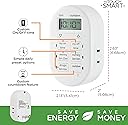
I bought this over many other solutions to a digital plug-in timer. It came powered on which at first I thought was weird but this must have an internal battery that will keep the time active in case of a power outage! That is a great feature as it would take a bit to reset a custom time if the power were to go out. Setting the time was easy. As long as there is some charge to that internal battery. Mine was a bit dying when I first tried to set it up, so it was very hard to see the digital display. It was like trying to see a watch that had a dying battery. After plugging it for a bit I was able to easily set the time. It is a bit slow to setting the time. But you just need to hold down the button and it goes by pretty quickly. Make sure to set it to the correct AM/PM, or whatever you have it hooked up with will be a bit off :) You have several different options for when it will turn on/off your device that you have plugged into it and a custom setting. I only used the custom setting so far but the others are easy to operate. You just push the button to the setting you want and a blue indicator light will turn on next to the button. This says its all set, it will turn on and off at the designated times. If you chose to use the custom my time setting, it is simple to set up. Set up is similar to the same way that you adjusted the time. You push the custom start button, and use the arrows to select your time and push the custom start button again. The same for the custom off button. After you plug it in, plug the device in and select the timer button you want to use. A blue indicator light will turn on to tell you that it is set. There is also a countdown feature that will allow you to have it turn on for a specific amount of time, say for 2 hours and after that it will turn off. Overall this has made my life a bit easier. I don't need to remember to turn on/off my light to my bonsai tree in the morning and at night. This will make sure that everyday my tree gets the much needed light it needs to survive even if I am not home to to do so!
A**Z
Gran producto
Excelente producto.
F**N
Worked great, after I did a simple reset
Easy to use and works great. Note, however, that when I first set it up, it would not properly process my custom time settings. I could set the times, on and off time buttons lit, but it just would not light at the on time. There is a small reset button below and to the right of the larger buttons. Pressing that resets everything. I set the time again, and the custom timers and now it works like a charm. So, if you have any issues, hit the reset, (which, I assume is there to address an issue like this). Or, to same yourself any hassle, hit the reset before you program it for the first time and potentially prevent the issue. I like that this is properly designed to allow you to plug it into the top plug of an outlet and still have room to plug something in to the lower plug. The timer itself has only one outlet, but I assume you could use an extension cord with this if you had more than one item that you wanted to have on the same timer.
Trustpilot
2 months ago
1 week ago