Buy anything from 5,000+ international stores. One checkout price. No surprise fees. Join 2M+ shoppers on Desertcart.
Desertcart purchases this item on your behalf and handles shipping, customs, and support to Austria.
🔀 Master your multi-computer setup with seamless USB switching!
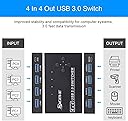
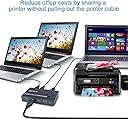
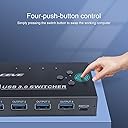
The KCEVE USB 3.0 Switch is a compact, driver-free device that allows you to share 4 USB peripherals across 4 computers effortlessly. Supporting ultra-fast 5Gb/s data transfer and broad OS compatibility, it eliminates cable clutter and boosts productivity with a simple toggle button and stable performance.


| ASIN | B092YSB89D |
| Actuator Type | Toggle |
| Best Sellers Rank | #315 in KVM Switches |
| Brand | KCEVE |
| Brand Name | KCEVE |
| Circuit Type | 4-way |
| Compatible Devices | Personal Computer,Laptop |
| Connectivity Protocol | Usb |
| Connector Type | Usb,wireless |
| Contact Material | Metal |
| Contact Type | Normally Closed |
| Control Method | Remote |
| Control Type | Computer Selection |
| Current Rating | 2 Amps |
| Customer Reviews | 4.2 out of 5 stars 189 Reviews |
| International Protection Rating | IP54 |
| Item Dimensions | 3.94 x 2.56 x 0.75 inches |
| Item Weight | 0.1 Kilograms |
| Manufacturer | KCEVE |
| Model | 404-CY01 |
| Mounting Type | Plug In Mount |
| Number of Positions | 4 |
| Operating Voltage | 5 Volts (DC) |
| Operation Mode | Toggle |
| Part Number | 404-CY01 |
| Specification Met | Ip54, Plug and Play, Driver-free |
| Switch Type | Toggle |
| Terminal | Button |
| UPC | 717664375947 |
| Unit Count | 1 Count |
| Wattage | 10 watts |
E**D
Perfection
Works like a champs can switch 4 USB 3.0 connections between 4 pcs. WIN 10 WIN 11 no issues. A life saver when working with multiple systems. The USB cables provided are a bit too short. Great work on this product so far.
P**R
Works with Logitech Peripherals
Prior to buying this USB switch I read reviews of various such switches with comments that switching speed was sluggish and the devices did not work with Logitch wireless mice. I bought this and have been using it to switch my Logitech Unifying Receiver driven keyboard and mouse, as well as a camera between three different computers. The switching speed is satisfactory and I have had no malfunctions. All peripherals work flawlessly as if they were plugged in directly into the computer. It allowed me to hide away all cable clutter in a wire basket under my desk and I use the little remote to switch between the computers.
D**R
Lights are not helpful and included cables are short, but works great USB3.0
There don't seem to be too many of these switches on Amazon that do USB 3.0 and can connect more than two computers. I actually didn't need 3.0, but wanted to have the option. I'm not sure if the configuration I got is still available (4 computer, 4 port, with wired remote), but most of this should apply anyway. I do not have this connected to power and it works fine for me (though I don't have much plugged into it, and depending on your use case you may need it.) Directly connected to it I have a little USB receiver for my keyboard and mouse, a USB hub built into my monitor (which is obviously powered), and an SD card reader. I use it with two PCs and a Mac and it works great with no noticeable lag switching between them. (The Mac seems to have problems with the USB3.0, but I think that's the Mac's fault.) The wired remote is nice, it comes with adhesive and I just stuck it next to my keyboard. Cons: - No power cable included (I didn't need one though, and if I do I have tons of MicroUSB cables) - The USB cables included for computer connections are very short (2-2.5 feet) and based on another review I was afraid that other cables might not work well, but I bought some 6ft USB A to USB A cables that work fine - This has tiny indicator lights to show which computer is selected. This feature does not work at all for me - I cannot even see the lights unless I look very closely, and even then there is so much bleed-through that I still can't tell what is selected.
C**Y
Great Value for the Price.
I have a business that repairs electronic devices and troubleshoot networks and networking devices. I bought this device so I could use many devices with one Network device, one SSD or HDD, one mouse and one keyboard. This device allows me to switch my test bench peripherals to many different devices depending on which one I'm currently working on. The quality is decent, the included remote works great, and I've been very impressed. I would recommend this product.
L**W
usb-c does not work well
I have a dell laptop which only has usb-c, so I use a usb-c to usb type-A to this device, it worked for the previous months and now stopped working, other non-usb-c devices still work OK, I also made sure the usb-c to usb type-A cable is good. updated in 2025.3 worked well over the years, will buy more when needed. the usb-c issue is not related to this product but the usb-c adapter itself
J**Y
Does the job well
It’s good, doesnt have any problems
D**N
Frequent disconnects on multiple inputs
The USB switcher began having issues about three months after purchase. The PC1 input was experiencing frequent disconnects followed by a reconnect after about two seconds. Frequency varied from once every few minutes to every 10 or so seconds. I switched the connection to PC4 for the impacted computer. A couple months later, I started to experience the same issue with the PC3 connection with a different computer. Different connection slot, different computer, same issue. I made sure the USB cable was securely connected to both the switcher and computer, then replaced the USB cables. The issue persists in both the PC1 and PC3 slots regardless of computer or USB cable connected. While the build quality itself is nice, ultimately this switcher is far too unreliable to be worth purchasing. I would expect this level of breakdown after maybe a few years of ownership, not 3 to 5 months.
S**E
works, but!
I recently purchased the KCEVE USB 3.0 Switch | USB Switcher Selector, and while I was initially excited about its potential to streamline my workspace by allowing me to use one keyboard with four devices, I found that it fell short of my expectations. On the positive side, the switcher looks sleek and feels solid, making it a portable option for those on the go. However, it’s not without its drawbacks. The most significant issue I encountered was the five-second delay when switching between devices, which can be frustrating when trying to maintain productivity. Additionally, the included USB cables are disappointingly short, making it challenging to connect to all four devices comfortably. Even more problematic is the occasional entertainment disconnection that occurs, disrupting workflow and causing unnecessary interruptions. Overall, while the KCEVE USB 3.0 Switch | USB Switcher Selector has its merits, such as its portability and solid construction, the significant delays and occasional disconnections make it difficult to recommend wholeheartedly. I hope future iterations of this product address these issues to provide a more seamless user experience.
I**N
It works!
Without the extra keyboard and mouse on my table, I now have a bunch of space!
C**N
Excelente dispositivo, ideal para conectividad de periféricos en diferentes computadoras.
Este interruptor fue la solución ideal para poder conectar mis periféricos (ratón, teclado, auriculares) en diferentes dispositivos. Pasa que tengo mi PC, macbook, y laptop del trabajo en mi escritorio y a menudo tengo que conectarlos a mis 4 monitores e intercalarlos dependiendo cual necesito usar. Para esto lo primero fue comprar un Dell dock D6000 para solucionar lo de los montiores, y solo se activen dependiendo de cual computador reciben señal. Lo siguiente fue solucionar el uso intercalado de mis periféricos ya que a inicio, era desaconectar y conectar el usb y llegó al punto de hartar. Para esto, encontré este interruptor y fue la solución perfecta ya que solo tengo que presionar un botón asignado para el computador que necesito. Ya a un mes de un año de haberlo adquirido, y sigue funcionando sin problema. Lo recomiendo ampliamente.
E**F
Well made, reliable.
I own 3 of these now bought over a 3 year period as the correct number of computers to own is n+1, just ask my wife. They are well made and function reliability. The only issue I have is that on certain (not all) of my systems they are not initially active to access the bios early in the boot process. I've never been able to figure out why but as I routinely don't have to access the bios this does not cause real issues. I use with both Windows and Debian Linux based systems with both corded and wireless keyboards and mouse. Power from the PC USB itself is sufficient if not using higher drain devices like HDD but a cable for additional external power is provided if you are.
J**D
Works as advertised
Works great! Appreciate the wired switching buttons, no batteries to worry about and instant communication to the switch via wire. Build quality is fine and speed of switch is fast.
M**S
KCEVE USB 3.0 Switch Review: A Mix of Benefits and Drawbacks, with a USB-A to USB-A Connector Quirk
Review of KCEVE USB 3.0 Switch: This product has its benefits and disadvantages. Let's start with the advantages. One of the notable benefits is its well-designed remote control button selector, which has a nice long micro USB cable. This design allows for easy extension, making it convenient for users. However, the biggest drawback of this product is the USB-A to USB-A PC connector wires. It was quite surprising to see this particular style of connector, and unfortunately, they are very short. As a result, you'll need to purchase USB-A to female extension cords separately. Typically, these types of products come with USB-B+ to USB-A connectors, which allow for the option of buying longer wires externally. This design oversight can be inconvenient for users who require more flexibility in their setup. Additionally, this product features a power booster, which theoretically should enhance the signal strength for longer distances. However, in practice, the signal seems to be weak. Even with only one computer connected and a couple of powered USB 3.0 hubs in the system, the connection tends to flicker, particularly when transferring data. It's uncertain whether this issue is specific to my setup, but I hope that with a better configuration, the performance will improve. Considering all these factors, I am currently searching for an alternative product that offers the same features, excluding the USB-A to USB-A connector, which I find to be the weakest aspect of this USB 3.0 switch.
Trustpilot
2 weeks ago
2 weeks ago