🚀 Elevate Your WiFi Game with Archer C7 – Speed, Range & Control in One!
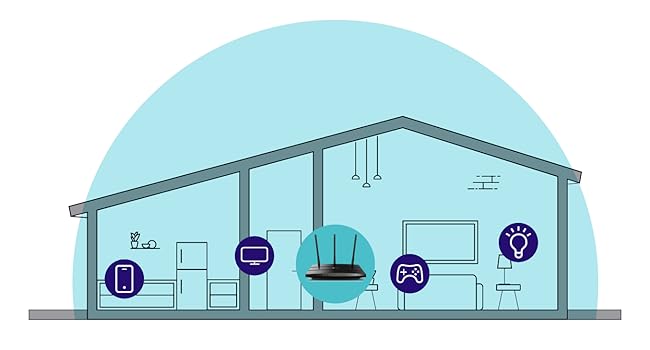
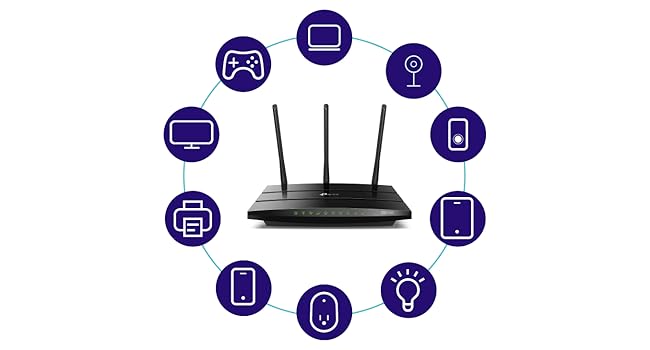
The TP-Link Archer C7 is a high-performance AC1750 dual-band wireless router featuring 1750 Mbps combined speed, three external antennas for extended coverage, and four gigabit LAN ports for wired connections. Compatible with TP-Link OneMesh technology, it enables seamless network expansion and is easily managed via the TP-Link Tether app. Ideal for medium to large homes, it supports the latest WiFi standards and security protocols, delivering reliable, fast internet for streaming, gaming, and smart home devices.


| ASIN | B079JD7F7G |
| Best Sellers Rank | 74,314 in Computers & Accessories ( See Top 100 in Computers & Accessories ) 590 in Routers |
| Box Contents | AC1750 Wireless Dual Band Router Archer A7, Cable Quick Installation Guide, Power Adapter, RJ45 Ethernet |
| Brand | TP-Link |
| Brand Name | TP-Link |
| Colour | black |
| Compatible Devices | Router |
| Connector Type | RJ45 |
| Customer Reviews | 4.4 out of 5 stars 68,404 Reviews |
| Data Transfer Rate | 1750 Megabits Per Second |
| Data transfer rate | 1750 Megabits Per Second |
| Frequency | 5 GHz |
| Frequency Band Class | Dual-Band |
| Frequency band class | Dual-Band |
| Global Trade Identification Number | 00845973083861 |
| Item Weight | 0.93 Pounds |
| Manufacturer | TP-Link |
| Manufacturer Part Number | Archer A7 |
| Model Number | Archer A7 |
| Special Features | Dual-Band, 802.11ac Wireless Standard, Detachable Antennas |
| Special feature | Dual-Band, 802.11ac Wireless Standard, Detachable Antennas |
| UPC | 845973083861 |
| Unit Count | 1.0 count |
| Wireless Compability | 802.11ac, 802.11b, 802.11g, 802.11n |
| Wireless communication standard | 802.11ac, 802.11b, 802.11g, 802.11n |
M**H
Great router although now obsolete
I bought this to add to another TP-Link Archer C7 I bought a couple of years ago with the aim of putting OpenWRT on it. I discovered this model was now no longer made but ordered it anyway since OpenWRT is known to work on it. However, it is an American model with a USA power supply (it came from Florida) but that is no problem with a UK adapter. The router is also an Archer A7 which apparently is identical to the Archer C7 according to the OpenWRT site. Seems to be working fine.
N**L
Good item. Wrong plug
It was easy to setup. Works well in my garden room. The only problem I had was that it came with a US plug on it. So I had to get a adapter uk to us adapter.
K**R
Almost perfect
I just finished installing the A7 TCP-Link 1750AC router replacing a 6 year old Linksys E2500--having had to replace my modem earlier in the week after it failed and went into a reboot loop. The Linksys worked but not reliably of late and it was slow for a dual band router. I opted to use the quick install and then tweak later using the full featured web interface. The install using TP's Tether app from my iPhone worked but not without a few missteps--a failure to connect to the router at first using the 5G SSID worked once I tried with the 2.4G. A second hiccup occurred when binding the router--it froze and I had to go back and repeat the step. I could have just logged in to the router from a laptop but wanted to see how well the app worked. I highly recommend this approach for newbies--as the steps involved and required knowledge of how routers work could prove a bit daunting for a total novice. That said, once installed and configured with the same SSID and password as my old router to save having to reconfigure a lot of devices (including a Netgear extender) everything worked and the entire process took less than 45 minutes. Once I had everything working I logged in to the full web app giving me access to the router through a thoughtfully designed interface . I made my security tweaks, set up a guest network, enabled Alexa control and tested every device to be sure all was in good order and then made a backup of the configuration--having been forewarned that a firmware upgrade would cause me to lose what I had just done. As it happened a firmware upgrade was indicated so I chose the automatic upgrade option but to my surprise everything stayed intact iso I did not have to resort to a restore from the backup--still I am a belt and suspender guy having sent too many years in IT and learning the lesson early on that what can go wrong will. So--the big payoff was the throughput. I used an app called Speedtest and was a very pleased to see a 3x improvement in download-regardless of which server I selected. Upload was slightly better but that is not generally an issue. My TV, Sonos products, 2 iPhones, extender, 2 computers and 2 Kindles all worked without any changes needed ( the virtue of keeping my SSID and passwords the same as before). Performance is obviously much improved. I would have given this a 5 star but for the two hiccups and a little more clarity in the basic quick setup about a few functions. Otherwise as the title say it was a near perfect install and if this router lasts as long as the linksys. Range has also improved greatly and I may not need the extender to get from the router to the most distant room but as the router is in a utility closet where the modem, Sonos bridge and a few other devices live I'll keep it up. Our house is about 2,500 sq. ft if that gives you an idea of range. The signal is robust from every room.
D**D
Muy contento
Estoy super contento con este producto. Mi Internet a cada rato se caÃa, el proveedor nunca pudo arreglar la situación hasta que vi un video que realmente lo que recomiendan es cambiar el router. Asà que lo hice. y ya no he tenido ningún problema con el Internet. El Internet en dos bandas esta excelente, te permite la conexión inteligente para que dependiendo de la posición de tu dispositivo tome automáticamente la mejor banda para la conexión en el momento. Esta muy completo el producto, también tiene una opción de que conectes un dispositivo de almacenamiento que sirve como un disco duro compartido. Muy fácil instalación.
P**P
Reliable, Feature-Rich Router—Great Range and Sturdy Build
I picked up the TP-Link Archer AC1750 when our old router died, and it’s been a fantastic replacement ever since. The range is really solid, it easily covers multiple floors in my house, and I actually have two of these running: one downstairs connected directly to the internet, and one upstairs acting as an access point linked with an ethernet cable. This setup has kept my whole house covered with strong, stable Wi-Fi. Build quality is great, feels sturdy and not flimsy like some cheaper routers I’ve tried. Security has been solid, and I still see firmware updates being pushed out, so it’s nice knowing it’s not abandoned. The router is fast to reboot or reset (about a minute or less), and the interface is loaded with customization options if you dive into the advanced settings. You can set up a DMZ, tweak security, and more. One big tip: always turn off beamforming on this router. In my experience, enabling beamforming actually throttled my speeds and reduced performance, so I keep it off for better throughput. I’ve always been a fan of TP-Link, aside from this router, I use their security doorbell cam, Wi-Fi dongles, and range extenders. Their products have always been reliable and long-lasting for me. Overall, the Archer AC1750 is a great buy for anyone looking for a dependable, full-featured router. Lots of customization, excellent range, and it just keeps working long after you set it up. Highly recommended!
A**R
ARCHER A7 1750, MUY BUEN PRODUCTO
Compré este router después de regresar un TENDA AC1200 que no cumplió con las expectativas, conexión lenta en ambas bandas y con puertos fast ethernet que no dan la velocidad contratada con Infinitum (150 Mb). Este router tiene mejor calidad de materiales y hasta ahora ha cumplido con lo que esperaba, solo que sigue siendo lenta la conexión en la banda de 2.4 Ghz (no sube de 30 en las mediciones de velocidad, aun a pocos metros). En la banda de 5 Ghz, ya es otra cosa, se obtienen 200 Mb de descarga en dos de los cuartos, lo cual es excelente. Los puertos son Giga-bit y permite conexiones de hasta 1000 Mb, en los cuales conecto el AppleTV y el PlayStation. Lo innovador y que me gustó mucho de este router son dos cosas: - Maneja una sola señal de 2.4 Ghz y 5 Ghz, Conexion Smart, que permite a tu dispositivo conmutar automáticamente la conexión a la banda de WiFi que proporciona mayor velocidad. Es decir, salvo que deshabilites esta función, no veras dos señales (2.4 Ghz y 5 Ghz) de manera independiente y el dispositivo se mantiene conectado a una sola señal y conmuta entre ambas bandas. Con otros routers, normalmente te conectas/seleccionas la de 5Ghz, por ser la más rápida, pero tan pronto se debilita la señal salta a la de 2.4 Ghz y allà se queda, por ser una señal más fuerte (pero más lenta). - El Archer A7, con hardware V5, viene habilitado para la función OneMesh, que te permite agregar, dentro de una misma red (nombre y password), repetidores (compatibles) para armar una red inalámbrica en tu casa (mesh), cosa que otros proveedores ofrecen a precios exorbitantes. No tiene tecnologÃa Mu-Mimo para conexiones múltiples simultaneas a mayor velocidad, pero creo que sigue valiendo mucho la pena este equipo.
V**Y
Works Great When It Works, Which Is Most of the Time
Review originally titled, "Plan to Buy A New One Every Few Months" Here's what I originally wrote: "When this device works it's great. Mine failed after 8 months, and trying to deal with TP-Link for technical support or warranty fulfillment is an exercise in futility. Yet at this price I guess the "rent" for this unit is about $8 per month. "So I will just buy another one and hope it lasts at least that long again." I stand by what I said about TP-Link technical support. However, I was able to get this box to work again. I did buy a replacement unit but have not opened it. If my current one continues to work, I will probably return the replacement unit to Amazon unopened. My problems originated with the cable internet provider, Spectrum. Somehow, my internet modem "fell off the grid." Although we were getting internet service at home, Spectrum reported that our modem was "off line." Then after the sixth day in this status our service stopped altogether. It turned out that our modem needed to be "provisioned" again -- basically set up as though it was brand new service. Spectrum used obsolete information to do this, so it took several phone calls and two technician visits to get a working internet signal to come out of the cable modem. I could get internet service with a single computer plugged directly into the cable modem. But the rest of the household was dark. The problem was that this TP-Link router would not "shake hands" with the cable modem. The router could see the modem, but would not engage with it to deliver internet service to the router customers. None of the troubleshooting advice in the TP-Link manual or from their chat-based technical support made the slightest difference. What finally did make a difference was this: Holding the reset button in (with a bent paper clip) for more than 30 seconds. The manual says more than 5 seconds is enough, but that's wrong. After 30 seconds of reset, I was able to navigate to the router's setup screen from my laptop with a hardwired ethernet cable and re-initialize everything (language, time zone, type of service, etc.). The router finally made a successful connection to the internet signal being provided by the cable modem, and now everything works. Things have been working now for a bit more than a week, so I suspect they will continue to work with this current box. Clearly the initial blame for everything lies with Spectrum, which messed up our service by somehow un-provisioning it. But the process of getting this router to work again was needlessly difficult, which is why I offer only four stars. Performance-wise, this unit is quite good, and better than a more expensive Motorola unit that I used previously. The three antennas on the back seem to generate a very powerful wi-fi signal that easily covers our household. The wifi signal is servicing two laptop computers, two iPhones, an iPad, a Kindle Fire tablet, an Apple TV box, and a Sony Blu-Ray player's online streaming functions. They all seem to coexist happily. The unit is also servicing a Brother printer/scanner and a third computer via hardwired Ethernet (there are four outlets on the back). For the price is seems pretty hard to beat. And if I run into this kind of problem again I expect to be able to solve it much more quickly.
Trustpilot
3 days ago
1 month ago