


Desertcart purchases this item on your behalf and handles shipping, customs, and support to Austria.
โก Power your productivity with the ultimate Thunderbolt 3 dockโbecause your setup deserves the best.
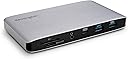
The Kensington SD2500T is a compact, high-performance Thunderbolt 3 and USB-C docking station compatible with Windows, MacBooks, and Surface devices. It supports dual 4K monitors at 60Hz or a single 8K display, delivers 60W power to charge laptops and peripherals, and features ultra-fast 40Gbps data transfer speeds. With integrated UHS II SD card readers and broad device compatibility, itโs engineered to streamline professional workflows and elevate any workspace.


| ASIN | B08KQ9JQZR |
| Best Sellers Rank | #63,212 in Computers ( See Top 100 in Computers ) #1,039 in USB Hubs |
| Brand | Kensington |
| Built-In Media | sd2500t dock, thunderbolt 3 passive cable, power supply |
| Color | black |
| Colour | black |
| Compatible Devices | Windows, macOS |
| Compatible devices | Windows, macOS |
| Customer Reviews | 3.9 out of 5 stars 143 Reviews |
| EU Spare Part Availability Duration | 3 Years |
| Hardware Interface | USB |
| Hardware interface | USB |
| Item Dimensions L x W x H | 14.8L x 8W x 1.8H centimeters |
| Item Weight | 0.71 Pounds |
| Manufacturer | Kensington |
| Mfr Part Number | K36400NA |
| Model Number | K36400NA |
| Number of Items | 1 |
| Number of Packs | 1 |
| Number of Ports | 10 |
| Product dimensions | 14.8L x 8W x 1.8H centimeters |
| Total USB ports | 4 |
| Total Usb Ports | 4 |
| UPC | 085896364009 |
| Unit Count | 1.0 Count |
| Warranty Description | 3 year |
| Wattage | 60 |
R**A
Excelente
Excelente artรญculo
A**R
Works with 14" Macbook Pro M2 (2023)
Nice little macbook dock. I'm using it alongside a kvm switch that has a usb hub with mouse, keyboard, webcam, and microphone and two monitors (1440p ultrawide and 4k) over displayport which all seem to be working great. No issues with any of the ports so far, all 5 in the back and a couple on the front are in use. Build quality is nice, though it is small enough that the cables might be able to pull it around a bit. This thing gets WARM - it could double as a mug warmer if you rest your coffee on it (that's mostly a joke)
M**E
Almost Great...
After trying 3 other docks with usb-C / tb3 and this is the first that hasn't caused issues with my picky odyssey neo monitors. I'm running. My laptop is tb4 capable so bandwidth shouldn't be a problem, but nonetheless others that claim dual 4k were not capable. It isn't a perfect device though. I'm running the monitors and a USB 3.0 switch to it and it runs VERY hot. I was hoping to stash it away in the channel in the back of my desk, but I wouldn't want it touching wood 24/7. So it's on top of the aluminum laptop which isn't ideal, but in the channel it created an oven and had to be aborted. Even up on top, letting the cables pull down on it it a little so that the front is lifted a few mm, it's hot. Hot enough I wouldn't want to hold it. Going to try to let it float between the desk and wall and see if that helps. I'd buy it again, but wish Kensington would have made the device a bit larger in favor of allowing for better cooling. It works and that is what matters. If it dies early I'll remember to update this. Edit: Just an update, doesn't effect rating but of note. I am using it with a 11th gen i7 (on the lower end mobile i7) and it has worked great for the most part. It does run hot and I even am moving away from running the dual 4k on it to a single output and the HDMI from the device itself. I have a lot running on this device, and I did encounter a few times when the cpu was struggling with the workload and pushing both displays. Would get numerous symptoms. This was not a constant and would imagine for less demanding uses wouldn't have the same problems. BUT this is something to consider if you are using a less powerful device and intend on doing memory and / or CPU intense processes. This is not unique to this dock, and I have no comparison since all the other docks failed out of the box and no way to see if they would have been better or worse! The other thing that came up is, I have to play with network settings often and once after disabling the ethernet it decided not to repopulate for a couple weeks. If I didn't have Wifi 6 and a VPN client that could have been a problem I would have had to troubleshoot. By the time I got around to it the problem had resolved itself.
M**E
Finicky
Thanks to Mario from AMD, this docking station is compatible with dual 4k tiled panel monitors (via DisplayPort video wall mode) on Linux. This is great, and means that in theory it supports four 2k monitors. This can be seen in KDE where this display mode isn't supported, and it sees four monitors. However, to get this to work properly on my AMD laptop, I need to selectively turn on and off my monitors so that they are recognized by my laptop.
C**S
Works well, but might need a driver update
This dock does what it should do, that is, getting all your DisplayPort monitors, ethernet, and various USB devices connected to your laptop through a single Thunderbolt port. The dock also provides a few ports that are easily in reach such as SD Card, headphone jack, and a couple of nearby USB ports so that you're not having to go to your notebook to plug those things in. All of this works quite well. My complaints, and two reasons for knocking off a star: 1) The dock runs very very hot, and 2) The ethernet port just isn't at all reliable on my laptop as it all works right out of the box. I was having the ethernet just stop working after a while, usually happening at least once per sitting. It doesn't show as being disconnected, it just doesn't pass traffic through and everything needing network connectivity times out. Eventually I found that there is a Realtek USB ethernet driver that may need to be installed (to update whatever is there by default), and either that or the DockWorks software which tech support suggested I try has fixed the problem. Unfortunately I installed both at the same time so I can't tell which was the fix. The symptoms I was having were exactly like another thunderbolt dock I previously used which also had a Realtek USB ethernet controller which that driver fixed for that dock, and I'm also leery of the idea that the DockWorks which is meant to manage the WiFi connection when using the system in different places and in plugging and unplugging should fix it. Maybe it did, and maybe it does more than the description would imply, but I don't think this is a WiFi management problem so I lean toward the driver being the fix with the caveat that anyone else having the problem might just try both. Support was slow at responding and the dock runs hotter than I'd like so I land on 4 stars.
Trustpilot
1 month ago
1 month ago