Buy anything from 5,000+ international stores. One checkout price. No surprise fees. Join 2M+ shoppers on Desertcart.
Desertcart purchases this item on your behalf and handles shipping, customs, and support to Austria.
๐ฅ Turn vintage reels into digital goldโdonโt let your memories fade away!
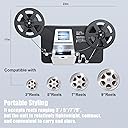
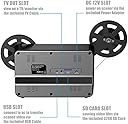
The Eyesen 8mm & Super 8 Film Scanner is a fully automated digitizer that converts old film reels up to 9" diameter into 1080P MP4 digital videos. Featuring a built-in 2.4" LCD screen and TV output, it requires no computer or software, saving footage directly to an included 32GB SD card. Compatible with Windows, Mac, and Linux, it offers frame-by-frame scanning at 20 fps, preserving your familyโs cinematic history with ease.


| ASIN | B097RMKXR1 |
| Best Sellers Rank | #111 in Video Converters |
| Brand | eyesen |
| Connection Type | USB |
| Connectivity Technology | USB |
| Customer Reviews | 3.6 out of 5 stars 621 Reviews |
| Item Weight | 4 Pounds |
| Light Source Type | LED |
| Manufacturer | eyesen |
| Media Type | Video |
| Minimum System Requirements | Windows 7 |
| Model Name | 8mm Film Scanner |
| Optical Sensor Technology | CMOS |
| Resolution | 1080P |
| Scanner Type | Film |
| Standard Sheet Capacity | 8 |
| UPC | 711379826992 |
| Unit Count | 1.0 Count |
| Warranty Description | 1 Year |
R**E
Did exactly what I wanted for 3" and 7" reel 8mm films. I liked this product and it performed well.
Someone else wrote to put the instruction manual under the front of the device - and I agree that helps when pushing the buttons. Some other tips I have for Novice 8mm Home Movie Converters: * SD card - tape down the locking tab on the SD card. my first time trying to record I got the message that the SD Card was not available. I formatted and tried again. I ejected the SD card - and realized the SD card tab was in the "locked" position. Flipped to unlocked, reinserted and tried again - Same message. Ejected the card to replace with another I had - and noticed the tab was in the lock position again. So I applied a piece of cellophane tape over the notch tightly so that the tab could not move - reinserted the card, and was able to start recording. * Clean the foot the film runs through after running each reel. Dust and particles will need to be cleaned off the foot that holds the film in place as it passes to capture the images. A cloth and a "puff brush" are provided and are helpful, but I also used cotton buds (make sure they are the tight, hard tip type, so as not to introduce loose fibers) to wipe the path clean. They also come in handy to help feed the film under the clips in the foot mechanism. * Use the mechanism to open AND close the foot over the film - don't just click closed. It's only plastic, you'll wear out the clip. * If you have a shorter reel - use that one first - I ran my first reel a few times to get the hang of positioning * This takes long. It's taking a individual image of each frame. A three minute reel will take 30 minutes to complete. I included a video clip to show how s-l-o-w this runs. It is taking a shot of each frame - and these films in a projector would run at 15 frames per second. * You will need to babysit and stay with the device during the process. You can't walk away for a while and expect to come back when it's near done. I had a leader (the white part that feeds through before the film starts) break off as it was going into the foot, and had spliced film get stuck a few times because it was not spliced well. Plus just checking on your home movies while running thru gives you a chance to figure out how you want to edit once you have it in it's digital format, jot notes of what music would be great in the background. These YOUR family memories, and the advantage of doing yourself is putting correct period music (or sound effects) to your family stories. Something that would not happen if you send off to get processed. After Processing Once I had the reel processed - I left the SD Card in and opted to use the USB transfer cable to copy over to my Windows laptop. Once on my laptop, I was going to use the highly recommended OSB Studio (free) - but found it a little too much of a learning curve for my use. I was able to get great results using Microsoft's ClipChamp (free version) that has an easy and pretty intuitive interface to drag and drop my clips and then add titles, transitions, sound, and other effects. Exporting to 720p was plenty of resolution to enjoy up on my 50" TV at home. I was fortunate that my old movies were stored in a cool (and dry) back corner of a garage. My 8mm reels were in pretty good condition and the film itself did not show cracks, splits or broken sprocket holes. If your film has issues - the conversion may not go as smoothly as mine did. Hope this info is helpful to someone who wants to convert those old home movies!
J**N
Is it Worth the Price?
I have given this product a one star because it never worked as promised right out of the box and I expect more for the price I paid. I am familiar with the "sister" Converter "Wolverine" which worked most of the time. But too often I had to digitize the same footage several time to get a good picture. I say "sister" machine, although the first one was called "Wolverine" and this digitizer goes by "Eyesen" the two machines are identical in design! Then the Eyesen 8MM to digital came out and I eventually bought that in hope it would be a better machine. By better I mean this digitizer allowed larger reels and bosted a 1080p picture quality. I have only used SD cards on both machines so I cannot comment on the other functions. I set up the "Eyesen" digitizer, plugged it in, adjusted the frame and started to copy a Super 8MM movie! After running the machine for about 10 minutes it stopped! The light went off. The machine was dead! The first thing I did was to change the power supply , That did not do anything! So I let the machine sit over night, thinking that a good night rest would do the machine good! But the following morning the machine was still dead. I had read the Amazon Help page and the manual is useless. So I changed the power supply out with the power supply from my first machine. Not believing my eyes, the machine lit up. But now it would not accept the SD card that came with the machine. I tried to format it in the machine, But that never happened, so I formatted the SD card in my computer and now it worked. In conclusion. I have a hard time recommending this product. A power supply that last for 10 minutes that is just beyond what you expect for $259.-. I have power supply for external hard drives that have lasted for 20 years working 24 hours a day! Make sure if you buy this product you put it through all the set up functions to make sure they work properly and if not you can return it.
D**Z
Pretty Good (Not Great) Film Digitizer
I've found this 8mm film digitizer to be a decent product for the price. However, it has several issues, and I found it necessary to use video editing software afterwards to get the best result. General thoughts: - The unit runs reliably. I have converted thousands of feet of 8mm and Super 8 film, and it's still going strong. TIP: Rewind your movies manually, not using the unit's motor. Some reviews mentioned the motor failing, so it seems like avoiding extra wear and tear might be a good idea. - The unit offers an OK selection of zooming and positioning options to fill and center the picture in the video, so it's "possible" to get finished videos straight out of this unit without further editing them on a computer. The resulting videos will be okay quality, definitely not great. The two main problems are that when you "zoom" to fill the screen properly, it tends to add a blotchy effect. Also, the resulting video runs too fast, 20 frames per second instead of 16 (for regular 8mm) and 18 (for Super 8). That extra speed is definitely noticeable. (See workarounds below). - The conversion process is SLOW. A single 50 ft movie takes 1/2 hour; a 400 ft roll takes 4 hours. And you can't just walk away while it runs, because it jams sometimes on splices or wrinkled film. There is no pause, so if you stop it, it will start a new .MP4 video when you start it again. - The unit sometimes adds "jitter" to the picture. - Even though it's good for up to a 400 ft roll, they only give you a takeup reel for 200 ft (eye roll...) So make sure you have an empty 400 ft reel if you have films that big. Here's how you can vastly improve the image quality problems: If you want a better result, you need to use video editing software. Basically do this: 1) Digitize your film with the digitizer set to NO ZOOM. (You'll see the edges and sprockets of the film.) 2) When it's done, you'll have one or more .MP4 files on the SD card that they give you. Copy those files into your PC. 3) Load your .MP4 file into a video editing program. I used Davinci Resolve because it does everything and is free for home use, as of this writing. (I had to watch a few YouTube videos to figure out how to use it.) There others out there also. 4) You can then splice and edit bits of video, and zoom and position the picture (better quality than you would have gotten from the digitizer). Also, you can slow the video to the correct speed, and stabilize the picture to get rid of jitters. (Specifically in Davinci Resolve, you click a button called Inspector, and in that menu, use "Transform" for sizing/positioning, "Speed Change" set to 80% for regular 8mm or 90% for Super 8, "Stabilization" (makes things amazingly SMOOTH) and "Retime and Scaling" (also helps smooth things.) Your resulting videos will be not quite what a professional conversion would give you, but pretty darn good. If you've got a lot to convert, this is totally worth it, and honestly is kind of a fun process. You also don't need to put your precious films in the mail.
W**S
It works great and replaced broken product
Good product. Works perfectly. Definitely time consuming. You need to babysit in case a splice gets caught. My grandpa took good care of his films. Easy to use. I only have a basic program so besides croping and trimming I can't change the look much. I recommend highly. EDIT 12/21/25 THE MACHINE STOPPED WORKING. Stuck on Wolverine logo screen. I emailed company and I am waiting for reply. I'm 2 9inch reels away from completing my project. Update 12/23/25: Company contacted and I was told they are going replace faulty machine. Back to five stars. Update 12/28/25 recieved replacement and it's quieter and works great.
T**R
Nice. Small. Quiet. Tiresome. Corrupts SD Cards.
Had this brand less, Film Scanner Digitizer with 2.4" Screen, converter for 1 week. We've converted about 25 8mm & Super 8mms so far. There is definitely a learning curve, even for those who are tech savvy. If you can, plug directly into an extra TV so you will see EXACTLY what you will be recording. The ability to perfectly X-Y-Z Adjust is nearly impossible on the tiny screen. I highly suggest digging out the old TV with the yellow jack inputs to get the best result the first time. We've had to redo many videos because the unit advances 2-4 mm with every press of the "Menu" button. The older the film, the grainier the outcome. That is NOT this machines fault. It's merely the way "analog" film was back then. Sharpening the video does very little. More current videos are actually recorded rather nicely! The unit is front heavy, meaning you'll need to use the owners manual to keep it upright, which works perfectly well. It actually works as a "shock" absorber should you be in an environment where the floor is rather "giving", like me who is in an RV. WORST COMPLAINT is... it corrupts SD cards about every 10 conversions, even if you Format every handful couple of times. Yeah, you read that right. Formatting is to avoid corruption, not create it. This chronic problem is not very cost effective for the price tag. (No, our SD Card Adapters were not on "Lock" either. ) Would I suggest this product, no, not really. But being the only one available for consumer purchase, it really doesn't matter what I have to say, does it.
J**D
Works well once you figure it out a bit
I have been pleasantly surprised by this machine. As others have noted, it takes individual pictures of each frame and then stitches them together. It works surprisingly well and is pretty simple to operate. Mine definitely had been used before as there were around 20 files already done with it when I got it. It shows a "Wolverine" logo when starting up. I have scanned probably close to 3-4000 ft of reel at this point, both a mix of standard 8mm and super 8 footage. If you film is clean/undamaged, this really should not have any issues chugging through it. If there are any tears in the holes or any significant amount of tape, it may get hung up. If it does get hung up, you release the holder in the middle and just skip a few frames till its out of the mechanism. You can adjust position, exposure, and the rewind feature works decently as well. One key is to make sure the film is going through all 3 tabs. This will ensure proper positioning of the image. It does make a new file every time you start/stop it, but using a program like AVI Joiner, this is not an issue at all for me. You're not going to get the touch up that a professional service will offer, but those places are also charging 10 cents a foot which adds up quick. If you're looking for one of the cheapest ways to convert a decent amount of 8mm or super 8 film, this is a great option.
R**N
Marginal quality.
Good conceptual design but the quality is marginal. This is the second unit replacing an earlier unit that failed. This unit's 'take-up-reel' snaps/jerks every 5 seconds while taking-up in record mode after only 10 hours of use. Sounds like a gear is skipping. Not satisfied with this product's performance. Returned this item after giving 2 opportunities to deliver a sound product.
T**Y
Works Great!
I have tried other methods to digitize 8mm film, and this one is the best by far. I have several vintage projectors that I can project onto screens, walls, and mirror boxes, but all of those methods end up being more complicated, more time consuming, and produce inferior results. This little workhorse chugs away by itself and creates excellent digital files. I've digitized five 400 foot reels so far without a hitch. Once you get it set up with the film threaded under the 3 tabs and hooked to the takeup reel, you can let it go and just glance at it now and then. The splices in the films I'm digitizing have all been great and passed easily except for one that caught in the mechanism and stopped the film travel. No big deal though since the scanner stopped and saved the file. I just cleared the jam and started up from that point. I joined the files back together in my editing program. Occaisionaly, near the end of a large reel, the takeup reel may pause and the film will play out onto the table, but simplifying the exiting film path by not wrapping the film around all of the spindles solves the problem. The feet under the machine are a bit too narrow from front to back to hold the machine level when loaded with a large film reel, but slipping a 1/4 to 1/2 inch spacer under the front center easily solves this problem. I used a wooden pencil. It's a good idea to have extra storage if you are digitizing a lot of footage since the gigabytes add up quickly. All in all I recommend highly.
Trustpilot
1 week ago
1 day ago