Desertcart purchases this item on your behalf and handles shipping, customs, and support to Austria.
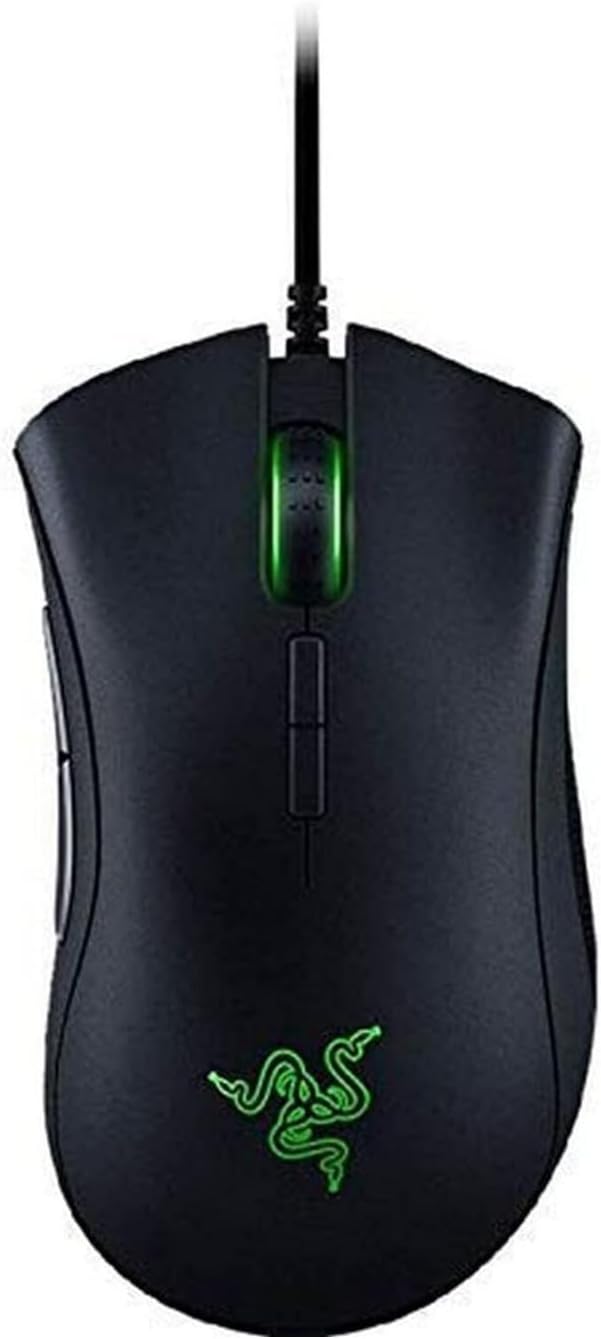
๐ฎ Own the Game with Precision and Style!
The Razer DeathAdder Elite is a professional-grade gaming mouse featuring a world-class 16,000 DPI optical sensor with 99.4% accuracy, 7 programmable buttons for ultimate customization, and vibrant Chroma RGB lighting. Designed for comfort and speed, it offers 1000 Hz ultrapolling and 450 IPS tracking, making it the go-to choice for competitive gamers seeking precision and style.


| ASIN | B01LXC1QL0 |
| Additional Features | Programmable Buttons |
| Antenna Location | Gaming |
| Best Sellers Rank | #5,414 in Video Games ( See Top 100 in Video Games ) #282 in PC Gaming Mice |
| Brand | Razer |
| Button Quantity | 7 |
| Color | Black |
| Compatible Devices | Personal Computer |
| Connectivity Technology | USB |
| Customer Reviews | 4.5 out of 5 stars 16,777 Reviews |
| EU Spare Part Availability Duration | 2 years |
| Embellishment Feature | LED |
| Enclosure Material | Plastic |
| Global Trade Identification Number | 00814855021871, 08886419332084 |
| Hand Orientation | Right |
| Hardware Platform | PC |
| Included Components | mosue |
| Item Dimensions L x W | 5"L x 2.83"W |
| Item Type Name | Razer DeathAdder Elite - Multi-Color Ergonomic Gaming Mouse - World's Most Precise Sensor - Comfortable Grip - The eSports Gaming Mouse |
| Item Weight | 13 g |
| Manufacturer | Razer Inc. |
| Mfr Part Number | RZ01-02010100-R3U1 |
| Model Name | Deathadder Elite |
| Model Number | RZ01-02010100-R3U1 |
| Mouse Maximum Sensitivity | 16000 dots_per_inch |
| Movement Detection | Optical |
| Movement Detection Technology | Optical |
| Number of Batteries | 1 AA batteries required. |
| Number of Buttons | 7 |
| Operating System | Microsoft Windows |
| Pattern | Mouse |
| Power Source | Corded Electric |
| Range | 30.0 feet |
| Special Feature | Programmable Buttons |
| Style Name | DeathAdder Elite |
| UPC | 814855021871 |
| Unit Count | 1 Count |
| Warranty Description | 2 Years |
G**R
Very Impressed
Last week the middle mouse button on my Corsair M65 finally gave out after months of poor functionality, and I was compelled to buy a new mouse. On Amazon, I looked at reviews for a Logitech Mouse, a similar Corsair, and the Death Adder. At the time, I liked my Corsair very much and probably would have bought another one if it hadn't been for a few reviews stating that the middle mouse button was effectively prone to failure. So I went with the Death Adder despite some otherwise glowing reviews of the Corsair, and a higher price tag. The first thing I noticed about the Death Adder was how light it is. The box itself felt feather light. The next, how large; it really is a big mouse. The cord, too, is light but supple, an improvement over the thicker, stiffer Corsair's. When I plugged it in, the Razer logo was set to "breathing." After downloading Synapse, the Razer software app, I changed the lighting to "static" and lowered the brightness to its dimmest setting. My Death Adder now emits a dim green glow that is not over powering. The Corsair's lighting effects were so aggressive I'd turned them off long ago. After getting into a game to check out the mouse feel, I realized I didn't like the default lack of acceleration. Many gamers think acceleration is entirely bad, but in my experience a touch of acceleration is a good thing (for an example of awful acceleration software, use a mouse on a Macintosh computer). So I went into Synapse and landed on a DPI of 1800, with acceleration at "2" out of 10. With those settings I was very happy with the mouse performance, and am using it like that a few days later without complaint. After I'd calibrated the mouse to my liking I decided to plug in the Corsair to see how they compared. At the time, I expected no big difference. I thought, if someone were to ask me about which mouse to buy, I wouldn't have a strong opinion. A mouse is a mouse. The Corsair is heavier, so if you want a heavy mouse, avoid the lighter Death Adder.... Wow, was I wrong. Even after trying to tweak the Corsair settings (which were less robust, with seemingly no way to adjust acceleration), I could not get it to feel as zippy and responsive as the Death Adder. The heaviness of the mouse was oppressive, whereas the lightness of the Death Adder made it slightly addictive and fun to use. Now, I find myself holding the Death Adder and mousing around for no reason but the pleasure of it. The only thing I'm on the fence about with this mouse is the size. It really is a big mouse, with a pronounced arch. I think I've gotten used to it, though. This is coming from a really big guy who can almost palm a basketball. So if you have small hands you may not like this mouse, though it most certainly is worth giving a shot. Another thing I'd like to touch on is the aesthetics. I think this is a really cool looking mouse, though some may find it tacky. It's a fun gaming mouse design with a really neat logo that glows dim green (as per my setting). I find myself glancing over at it a lot, and I think it's cool. One thing this experience has reminded me of is how important it is to invest in quality products. I got into a game of Borderlands 2 the other day, and I couldn't believe how great it felt. It's because of the mouse. Don't cheat yourself by using cheap stuff if you can afford otherwise.
J**S
Quality mouse, been using for 6 years and still going strong!!
Updated Review (original review listed at bottom) I have been using this mouse for almost 6 years (I bought it in September 2017), and it is still working very nicely. The main isues I have noticed is that I have to clean the mouse every few months to remove dust that accumulates mainly attaching to the braided cord and the rubber side grips. Plus, I have had issues in the past with synapse version 3 not saving its profiles correctly for a couple of months period about a year ago. The one main pain point I have found is that the synapse software doesn't always work. In the past I have had periods where my saved button profiles stopped in being able to work properly. Basically, it would stop being able to utilize the cloud saved profiles and if I tried to change them locally it would basically fail to save and or crash the program. After a bunch of troubleshooting which I don't really remember but most likely involve things like uninstalling and reinstalling the program and drivers et cetera, I was able to get it to work again and since then I have not really had any issue with the software. One thing I you think may have caused the issue was a conflict between the razor drivers and windows, that issue not withstanding I have not really noticed any major issues with the mouse. Certainly not enough where I would consider getting another mouse. The only exception being that sometimes the cord gets in the way, and I have considered replacing it because of that, however I have not been bothered quite enough to fully committed to doing that. - My favorite part of this mouse is the reprogrammable buttons, especially the Razer Hypershift button that allows you to basically double the number of buttons available. I think that one of my favorite shortcuts to program into my mouse is being able to execute a "CTRL+Up arrow key" macro or the "CTRL+W key" macro. These two handy shortcuts allow me to go up a level in folders while using the file explorer or to either close tabs I am done with in a browser or to close folders I am done using. However, I also, love being able to control the volume of my music using my mouse. This is very nice to easily adjust the volume of video games while playing or to adjust the volume of music on the fly. - One other issue I wanted to point out was that finger oil sometimes accumulates on the rubber side grips and is actually pretty gross if I think about it too long. Most of the time I ignore it, but every once in a while, I clean it off. The best way to do so I have found is putting rubbing alcohol on a cloth and rubbing that. It actually works surprisingly well. One tip for cleaning is to either use a microfiber cloth or a denser than normal paper towel. Personally, I use the blue paper towels that are designed for machine shops or mechanics. They can either be found online or you can always get them in places like AutoZone or Home Depot/Lowes. The reason I prefer these types of paper towels is that they are a lot more tightly woven and don't fall apart as easily as white paper towels you find in kitchens. -------- Original Review Below -------- The mouse works well. I like the DPI adjustment buttons on the top of the mouse. I also like how I can use the software to adjust the increments of the jumps in DPI.
E**I
Unsponsored Hardcore Gamer Approved
I hated the Razer Boomslang as well as the Naga, this is my first Razer purchase in years as I've been a Logitech fanboy since the late 90s. Mouse feet design of the DeathAdder Elite is a beefy slippery plastic with large foot prints of the feet for durability, I retired a Logitech G Pro after the feet wore out. Clicks on the DeathAdder Eliite are responsive and snappy and rapid clicking is not an issue. Tracking seems consistent that I can use medium to high DPI settings to rely on muscle memory for precise quick aim down scopes for games like Call of Duty / Battlefield / PUBG. The mechanical left click switch appears to be redesigned to last 50M clicks which is good because the Razer Naga left click button only lasted a year for me. The cable appears to have a softer/flexible insulating jacket that is surrounded by a fabric braided sleeve which reduces any friction or impact on the mouse movements. The wire is not STIFF like on some Logitech mice. The tracking appears perfect as I can't get the mouse tracking to skip with quick flicks at lower DPI FPS games like overwatch. In Overwatch I'm a GM player with the following setting: 800 mouse DPI, 1000hz polling, 5 in-game, windows mouse setting = 6. Make sure you turn off pointer precision enhance and calibrate the mouse to your mouse surface. I used a QCK Heavy for a while but switched to a Zowie GSR (both are fine). I've tried hard mouse pads but prefer cloth/sponge for softer landings of the mouse, and I need large mouse pads if I play a game that favors lower DPI settings. This DeathAdder Elite fits my hand better than the Logitech G Pro, my right hand laying flat is 7.75 inches from base of palm to tip of middle finger. I use a fingertip grip with index on left click and middle finger on right click, ring and pinky hold the right side of the mouse and thumb holds left side of mouse to lift mouse and track. There are rubber grips at these contact points that feel great. Mouse is light weight, in both of my Logitech G500 mice I tried for many months various weights and ultimately removed any and all weights as I felt weight being detrimental to the acceleration capabilities. I would not put a weight in this mouse even if it was an option. I want the fastest acceleration possible to move a cross hair to a target and any added weight will require more effort to stop the mouse once it reaches a target. So coming from a hardcore gamer I approve of the mouse after using it for a week. TBH, if something wears out in a year I would still give it 5 stars because when it's design life is rated for 50M clicks. The mouse is like tires for a car... people will get different mileage from them and don't expect them to last if you are racing (hardcore gaming). One more observation is I don't trust suggestions by sponsored gamers as their decisions can be biased towards their sponsors, I look at the factors that determine which mouse will be best for an individual. I don't care for any lighting effects so I turn off LEDs to reduce any potential distractions. In a mouse I look for: fit/size, responsive clicks, error/skip free tracking, long lasting friction reducing movement, unimposing mouse cable, fits hand and can be lifted off the mouse pad without slipping, light weight for acceleration, build quality (does it rattle when tapping it on the mouse pad) and durability and tactile feel of the buttons. This mouse meets my expectations and the price on sale was reasonable so I give it 5 stars.
J**F
Seemed big at first, but got used to it. (3.5 yeas later - Click button failure through daily use)
UPDATE - June 23, 2023: I guess 3.5 years is a decent life expectancy for a mouse. Just wanted to let anyone looking at this model know. My mouse has become mostly unusable due to the double click problem. Like many other mouses, including my previous razer model, this mouse has began to lose function in it's ability to click. More specifically, when I hold down the left click, and drag, I can see that it is disengaging and reengaging multiple times. This means whatever I was dragging gets released and then something new can be picked up. Something as simple as resizing a browser/app window is now a hard task to achieve. Using this mouse for work such as 3D modeling and Painting is out of the question. It worked flawlessly for the first 3.5 years. I will be removing 1 star (from 5 down to 4) because I feel like mouses should last longer before suffering this issue. ---- Original Post (November, 2019): When I hold the mouse in my normal grip I cannot reach both side buttons. My thumb rests comfortably on the bottom side button, but I simply cant reach the top side button without releasing my grip on the mouse and shifting. I had no idea a mouse fitting in my grip style was a thing, but this is just uncomfortable for me. EDIT to original (November, 2019): I Love this mouse now! I've gotten used to it naturally over the course of a week or so, and everything seems fine about it. It must have just been a lot bigger than my previous mouse and overwhelmed me a little. I'll leave what I wrote below, because that was my true initial response, but I also just want to say I'm happy I didnt return it too hastily. It fits my hand very nicely now. Also, the colors are beautiful! You can choose from the full RBG, not just a few.
R**F
Incredible improvement from my old 3.5G Deathadder
I had been using a Deathadder 3.5G for about six years so my opinions are mostly going to be based around the comparison between the two (for anyone thinking of upgrading). As far as I have heard, the Deathadder 2013 was the first iteration to change the texture of the mouse's plastic and added rubber grips where your thumb and pinky finger would rest. I believe every version older than that was made up a rubberized plastic on the top and glossy plastic on the sides and mouse 4/5. While the ergonomics have not really changed (that's a good thing) the biggest improvement is that the entire mouse now has the textured plastic rather than the slick and glossy plastic finish on the sides of the pre-2013 Deathadders. As for the mouse, in general, it is extremely comfortable to use although it does feel a tad bit long (which is the only problem I have with the Deathadder mice). I use this mouse on a Razer Vespula pad and find there is not much room to move vertically with length of the mouse as it is without the back of it hitting the wrist rest. Not too much of a problem seeing as how most people won't need to move their mouse too much but if you plan on utilizing the lower DPI settings, you may want to use this mouse on a larger pad or surface area so you don't have to keep picking your mouse up to adjust it so that it doesn't go off of your pad. A small complaint, but something to be aware of if you use a small pad. I don't have the biggest hands. I would say mine are on the higher end of small to about medium size but this mouse fits my hand perfectly although my ring and pinky finger tend to cramp up after hours of use. This likely won't be an issue for anyone that doesn't use their mouse almost all day every day and it is likely just my own problem but I think it's important I recognize even the slightest things about a product you will spend about 60-70 dollars on. The lighting is par for the course with Razer products. I don't see any issue with any off colors in the lighting although that shouldn't matter too much seeing as how your hand will cover all lighting on the mouse anyway when you use it. Each mouse button feels good to the press. My right click has a noticeably softer right click, although it still has a nice tactile feedback. Left click feels much more "clicky" in comparison to the more mushy clicking sound of the right click. The scroll wheel has a nice bumpy feel to it and has nice grip. Clicking it does not feel as though you need to really push down hard to click it but has enough resistance to not accidentally click. Overall, this is a great mouse in comparison to the older Deathadder mice. While you will likely never utilize the insane 16,000 DPI (not sure why companies keep trying to raise the DPI any further than 4,000 or 5,000 since most gamers will usually stay below 2400) and the sensitivity changing buttons below the scroll wheel are rarely used (by me) but those remain out of the way and you hardly notice they are there most of the time, although if you were to use them, it may be a bit uncomfortable to have to adjust your grip and curl your finger in considerably to hit them. This mouse feels incredible to use and the placement of each button makes sense. You shouldn't have to use the sensitivity buttons constantly and the mouse 4 and 5 are large, easy to press and have a nice texture. If you are thinking of getting this mouse, I don't see any serious reason to decide against this choice unless you are tight on cash. Update: After about two months with this mouse, I found the grip on the thumb rest came loose, likely from me gripping it tightly and it sliding off over time. It's strange to think it would come off that easily but I thought I'd try and just fix it myself by putting super glue under it to hold it for sure. I screwed that up though and the grip seemed to suddenly be too big to fit in the space it was meant for so I had to buy a new one since it would have been void for warranty. I'm not sure if the adhesive is really bad or I just fiddled with it too much on my previous one but I wouldn't suggest keeping a very tight grip on it to ensure the grip stays on longer.
S**L
Great Gaming Mouse
This is a very solid mouse, its not super heavy, and its smooth to use. I used this mouse for over 5 years before having to replace it. I was able to put thousands of hours of use into it without having any issues, the controllability of this mouse is pretty phenomenal. The clicks are tactile but not too noisy, the scroll wheel has some resistance to it, its not a free spinning wheel, and id say its a good size for almost all sizes of hands, not too large not too small.
J**Y
Good So far, comparison with other mice.
- I have big hands - My hands often sweat a lot(Playing games) - I play League of Legend, Overwatch. - I didn't get any money for writing this. DeathAdder Elite (Been only a week) - Just purchased, I think it's pretty good. Personally the height is lacking for my hands I think. Imma update soon. I played league with this, and there were lots of mis-clicking moments(eg: misclicked and didn't aa resulting - missing a kill). Maybe it is because the fact that I have only used for a week. I'll see. M7000 (Been a year and a half) - This is the most recent mouse I've been using. It's been a year. legit. good for big hands. Although it's been really ergonomic mouse, when I used to play 8+ hrs gaming during summer break, my right hand was in pain. Anker 8200 DPI(Been 2 yrs) - this was great, I personally felt it was somewhat flat, and my hand was in pain sometimes. *My palm was sweating a lot by this mouse somehow. Twisted Gamer (Been 2 yrs)- Sinister Arch FPS/MMO Ergonomic Gaming Mouse - This was really cheap and was really great quality. Was my laptop mouse(portable). Gigabyte GM-M6980 Pro-Laser Gaming Mouse - Was good mouse for a while. However, the rubber started to fall apart after a year I think. Mainly, it was so easy to accidentally click middle button, causing dpi changing. Had the worst sweating experience. =================== (PHOTO) CURRENTLY TRYING: Corsair M65 (just got it) - Clicking buttons somewhat require more force, compared to the G502. G502 (just got it)- extremely comfortable to click side button(left). I see why people are calling this mouse #1mouse for overwatch. So convenient setting for melee button. Razer DeathAdder Elite - (previously mentioned) Conclusion: Had enough time to pick my favorite. The deathadder Chroma wasn't comfortable for me, unfortunately. I think its height was a bit too high for me. Corsair was really good, but bcz I also play mmorpg/league , which require frequent right clicking, this wasn't for me. This mouse is definitely specialized as "sniper mouse", where clicking once(shooting) requires stable, precise clicking. personally g900 fit my hand perfectly. This was good for both League and Overwatch plays. And my right hand was in rarely sweat. Naos M7000 is perfect mouse, but can't play with it unless I have my fan on in front of my hand. so conclusion: 1st: g900, 2nd: Naos7000, 3rd~#th: rest I don't know.
O**G
Broke after 2 solid years of use
I love the feel of the deathadder elite. I have big hands and I couldnโt find any mouse that fit my hand until I found this one. I recommend it if you like to game or just do whatever work you need as well. Besides all that, I do have a few issues that I have encountered over the two years of owning this mouse. After about 8 months of use, the right click on the mouse started to become harder to press and felt sticky. I checked it for gunk and what not but there was nothing inside the mouse that would interfere with the right click. After some time and more use with it, it started to feel a lot better than before. Another flaw that I have noticed is with the dpi buttons. The dpi button nearest to the scroll wheel barely has any click when you press it and sometimes I will accidentally click it while in a game and mess up because my sensitivity is too high. Finally, after a long 2 years of quarantine, gaming, and school work, the scroll wheel broke. One night I was scrolling on YouTube talking to friends when I noticed it was making a loud clicking sound every time I would scroll it. The more I scrolled the worse it got but I didnโt think anything of it at the time. I then scrolled some more then all of the sudden the clicking stopped. I tried to scroll it but it moved freely as if it had no friction (watch video) and it didnโt respond at all. Every other part of the mice was fine and I didnโt have any problems the day before with it at all. I am still looking for new mice to get but after much consideration, I may have to get another deathadder. Thereโs a lot to love about this mouse with the custom light settings and the ergonomics so I do recommend this mouse for anyone with big hands. If you have hands on the smaller side, this mouse may be a little too big for your hands. Besides every other flaw Iโve had with the mouse, Iโll have to rate it a 10/10. I would buy it again.
E**A
maus
Gut und Gรผnstig !
E**A
ANTES!! era el mejor ratรณn, pero las gomas de agarre son un asco y la vida รบtil muy breve
Para mรญ, la versiรณn anterior era el mejor ratรณn del mercado, preciso y muy ergonรณmico. Con esta nueva versiรณn, lo han empeorado. Estoy muy decepcionada. Le han puesto unas gomas de agarre en los laterales que hacen el agarre mรกs complejo. Lleva varias texturas y te vuelves loc@ para encontrar los botones. Ademรกs el ratรณn se rompe enseguida. Duran.. 3 aรฑos? Lo uso bastante, supongo que tendrรกn una vida en horas. Pero, para el precio que tiene 60-70โฌ, pienso que se rompe demasiado rรกpido ( doble click, botones rotos, botones que clicas y no van). Creo que despuรฉs de ยฟ10 aรฑos? usando razer... me cambiarรฉ a otra marca, por ejemplo un Zowie con el mismo agarre y la superficie LISA!!
A**E
My thoughts on the Deathadder Elite
Great mouse been using it for 3 months love the scroll wheel and the feel of the mouse in my hand, (does take a bit to get used too). It has the 2 buttons behind the scroll wheel for adjusting dpi (or whatever you like) the scroll wheel texture and the better dpi tracker thingy (dont really know what it is). Those are the 3 main differences between this and and deathadder chroma, do be warned my buddy has a deathadder chroma and i tried it and it had a similar feeling at least for me. There is definetly a difference its just very suttle. This is basically the better brother of the deathadder chroma. The deathadder chroma and the elite have the exact same lighting the basic static breathing reactive etc, that you see. It has no wave so it cant sync up with your razer keyboard pretty big bummer cause I thought it did. (if you dont have the razer keyboard no biggy) All the chroma lighting is controlled through the razer synapse software you'll find the chroma there. The mouses dpi is also controlled though there if you dont use the other 2 buttons behind the scroll wheel. It supports up to 16,000 dpi [honestly no reason to go over 5000] the mouse has 5 default presets 800 (pain fully slow :just dont use it, unless you like your mouse extremely slow) 1800 (Basic speed :normal browsing web speed for me maybe gaming for some of you guys) 4500 (Probably the highest you want to go with this mouse: extremely fast for most, took me quite a long time to get used to playing league with this) 9000 (I.. if your high on a day use this) 1600 [MAX] (Litrally nobody uses this l... , you move your mouse 2 inches and its on the other side of the screen:Don't f#$king use it) Or ignore all that and make your own dpi and even change the presets if you like razer is all about that customization life OH YEAH!! Anyways I would recommend this mouse for anyone whos used previous high end gaming mice and need an upgrade. Or if you got some money and wanna treat yourself. Honestly if you dont care about the chroma just get the regular deathadder that was my previous mouse before this I picked this up becausr my old one was getting warn out and I wanted it to match with my keyboard. If you want this to match with your keyboard with the fancy ripples and waves get the lancehead that mouse has those features. I wouldn't have gotten this mouse if I knew about that. DO YOUR RESEARCH KIDS! For a gaming mouse with decent chroma lighting Id give it a 10/10 and its not from ign, its from me.
M**K
The best "Simple" gaming mouse yet!
While this mouse does not have any of the funky features such as a precision aim button or a rapid fire button which are found in Mad Catz Mouses and Logitech Mouses, this mouse delivers the most to the point and precise design for a mouse i have ever seen. "Please, the chroma is not to be compared with the elite as they are different models and at different price points." This mouse does not come with a weight adjustment system which i think is not even required as Razer has made such a terrificaly well balanced product. While most manufacturers are aiming at jam packing their products, razer is aiming at function. Plus with Razer Synapse, one can't possibly go wrong in the customization aspect of the mouse, be it macros, dpi, lift off, surface calibration or any other thing you might ever need. And as this mouse has 2 zone chroma lightning, the color combos that you can get with this mouse are simply gorgeous. I recommend this mouse over almost every other gaming mouse even including the M65, RAT 3,4,5 and g502 etc. The only mouses which one can upgrade from this mouse would be the Mad Catz RAT 7 or the Mad Catz Pro X. *IF YOUR MOUSE'S SCROLL WHEEL LIGHT HAS STOPPED ILLUMINATING THEN PRESS AND HOLD LEFT CLICK, RIGHT CLICK AND THE MIDDLE MOUSE BUTTON UNTIL THEY BLINK. THIS WILL RESET YOUR MOUSE AND YOUR ISSUE WILL BE RESOLVED! *
A**A
Ottimo
Nel complesso e un ottimo maus, un po caro ma ci sta.. P. S. Ottimo e robusto alle TILTATE ๐
Trustpilot
1 week ago
2 weeks ago