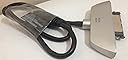
⚡ Upgrade your data game with speed and style!
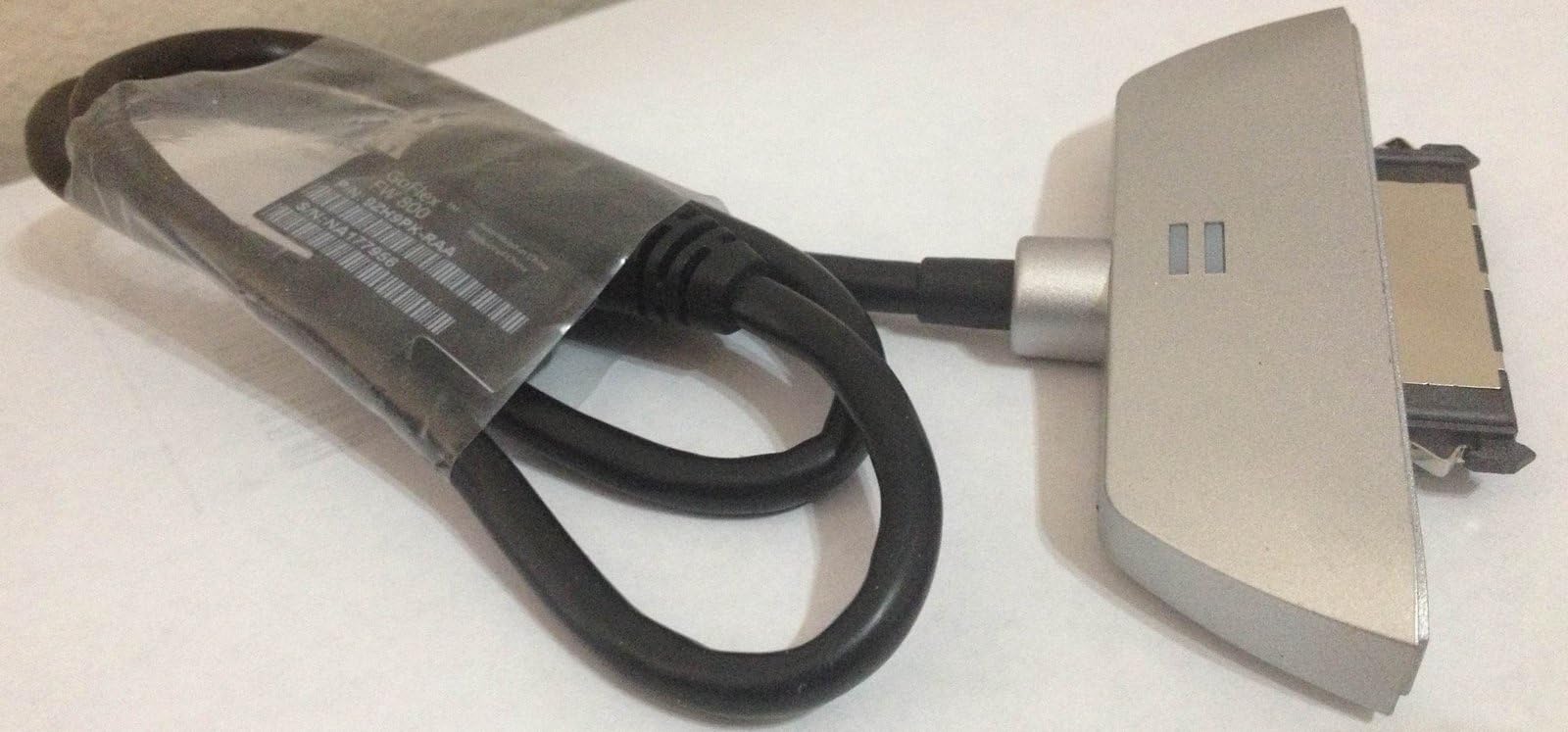
The Seagate FreeAgent GoFlex Upgrade Cable FireWire 800 (STAE102) is a high-performance interface cable that doubles transfer speeds compared to USB 2.0, supports all GoFlex and GoFlex Pro ultra-portable drives, and features LED indicators for real-time drive activity. Designed for professionals seeking fast, reliable, and easy-to-use storage upgrades, this compact cable ensures seamless connectivity and enhanced productivity.
| ASIN | B003IT6PHC |
| Best Sellers Rank | #587 in Mini-SAS Cables |
| Brand | Seagate |
| Brand Name | Seagate |
| Cable Type | USB |
| Color | Black |
| Compatible Devices | Laptop |
| Connector Gender | Male-to-Male |
| Connector Type | USB Type A |
| Customer Reviews | 4.3 out of 5 stars 206 Reviews |
| Data Transfer Rate | 960 Megabits Per Second |
| Global Trade Identification Number | 00887614578305 |
| Indoor Outdoor Usage | Indoor |
| Item Shape | Round |
| Item Weight | 1.44 ounces |
| Manufacturer | SEAGATE |
| Model | STAE102 |
| Part Number | STAE102 |
| Recommended Uses For Product | Data Transfer |
| Specification Met | IEEE, USB-IF |
| UPC | 887614578305 763649023051 |
| Unit Count | 1 Count |
M**E
Love it. Can use also with bare drive! No issues for me w MacBook Pro
When I bought the drive and added this cable I was thrilled to have a FW 800 option for my MacBook Pro. Then the cable came and worked well, all was just fine. Looking at it, I wondered if it would also work fine with a bare drive. Tried it and it worked perfectly! Best investment in such things I have made in a long time. Fast. Use with multiple bare drives, not just the Seagate one you can buy with matching colors (also good, but shhhhh--don't tell them you need not use that one). Not sure about the other reviews, but to me this is a winner. So much so I bought an extra cable. Great for drive transfers and more.
L**N
Works exactly as I had hoped. Much faster than USB 2.
I had to make an overseas trip and I wanted to have a back up hard drive with all my files with me. The 1.5 TB - Seagate FreeAgent GoFlex, 2 1/2 inch drive has worked perfectly. I formated it for my Mac Powerbook (OS 10.5). The drive is extremely quite and this Firewire 800 optional Cable/Dock is perfect for my needs. Firewire allows the option of speed and can be used as an external boot drive if needed. Check around on prices - I have now bought a total of 3 of the 1.5 TB drives. Compact, huge capacity and fantastic prices. I am going to get another Firewire cable/dock for my wife. She has a powerbook as well.
E**E
Worth the investment
After reading through the reviews here, I wasn't sure if I was going to pick this up for my new GoFlex drive or not. I went ahead and got it, and I'm so glad I did. The speeds are blazing fast compared to USB 2.0. I started using this drive as a new Time Machine backup drive on a Mac running Lion, and the initial backup of 150 GB completed in about 3.5 hours, compared to the 6 it took to transfer to my USB 2.0 drive. I haven't noticed the speed difference that much when transferring smaller files, but when considering large backups it's definitely worth it. Also in regards to the flaws of this cable other reviewers have mentioned, I haven't experienced any such issues. After that 3.5 hour Time Machine backup, my cable was just as cool as when I had plugged it in. And speaking of plugging in, I also have not had any issues with the cable fitting my FW800 port in my mid-2010 MacBook Pro. It goes in and out with ease, and the cable is just fine. I'm assuming Seagate must have made some revision to the cable to resolve these issues, or something else is at play. I have had none of the issues others have mentioned. Overall, I think it's a worthy investment for any Mac user looking for a way to speed up a backup, use the drive as a Photoshop scratch disk, or any other application where you want faster file transfer. Otherwise, I think the original drive's USB 2.0 cable should be just fine for the average Joe.
R**R
Awesome till it melted
I purchased this interface cable (12/2010) to go with the 1.0 TB FreeAgent GoFlex drive for my wife's laptop (MacBook Pro). I have used numerous Seagate drives with satisfaction over years of use, thousands of hours of cycle time. The data transfer rate with this cable is the maximum you can get on a MacBook Pro (they do not support USB 3.0 yet), and I wanted the fast rate to use it as a TimeMachine backup disk. I had read some reviews of this cable (FireWire 800 interface) that indicated it ran warm under use, but I had purchased one for my work laptop and used it for several months with good results so I bought this one for personal use. Note that in my experience with both my work cable and the cable for my wife's computer, this cable interface where it attaches to the GoFlex drive gets VERY warm during normal use. This is the first time I have seen a significant issue with any Seagate product. My wife had put her laptop in "sleep" mode (spins down all the drives, shuts off the display, and puts everything on the machine into a dormant mode - apparently the FireWire drive interfaces stay up during sleep and still remain "lit", producing heat), and went to bed. First thing the next morning, she asks me to come look at the FireWire 800 Seagate cable going into the 1.0 TB Seagate drive: the cable housing for the interface to the drive had severely distorted and deformed, like heat damaged plastic. It had gotten hot enough that it deformed the housing of the Seagate drive as well. From a performance standpoint, this cable is top notch; from a durability point of view, be forewarned this product has very little consideration designed into it for heat release and thermal management. Do NOT use this cable attached to a machine if the room temperature will be warm for any extended period of time, or for a machine that will be left in a "sleep" mode. I have two of these cables, this is the first one to fail this way but it was pretty surprising when it happened. The normal USB 2.0 interface does not generate even 25% of the heat the FireWire 800 one does. Update 6/26/2011. Seagate did replace the heat damaged cable with a new one under warranty without any difficulty, it shipped promptly.
E**D
Works With MacBook Late 2011
I used this firewire connector with a go-flex portable drive and it works perfectly. The connection to my MacBook (late 2011 model) is is not to sung and does not get hot as reported by other users. Maybe the late 2011 Mac Book has a better designed fire wire connector. The drive speed is double the USB 2 connection. I have also used the connector with two "bare" 2.5' drives (the SATA connection is standard) by WD and Toshiba with double the speed vs USB 2.
C**E
Silent Recalls Aside...
Seagate doesn't say it anywhere online, but there is a silent recall for this device overheating. Considering how much New Old Stock (NOS) of this device is out there, odds are good that you'll wind up with an old one. Symptoms are sporadic and include the device dismounting randomly. You'll be most likely to encounter it if you boot from the drive itself, or defragment a drive attached with this. Then you have to deal with the terrible Seagate RMA process, which isn't set up for GoFlex adapter cables, basically forcing you to call in and waste 30 minutes setting up the RMA. Oh, and then you have to mail it in and wait to get back a replacement... did I mention you have to pay for the "silent recall" shipping. Epic-ly frustrating, though eventually Seagate agreed that since it was a recall, they would make an exception and pay for shipping to take the broken unit in. In all, buy the Backup Plus edition of the FireWire 800 cable. It's the same cable (GoFlex and Backup Plus are the same, just with newer case designs on Backup Plus), and you'll know it isn't a recalled unit. Oh, and once fixed by Seagate, the cable works fine. Does what it's supposed to, converts any 2.5-inch SATA drive into a FireWire 800 machine. I actually use it the most with my Thunderbolt MacBook Air, with the Thunderbolt to FireWire 800 adapter from Apple. It's much more portable than Seagate's massive Thunderbolt adapter, and quite speedy even though it's a 5 year old port design.
A**R
Awesome speed!
See my review below of the 1TB Seagate Ultra-Portable GoFlex drive, I purchased the unit with the USB 3.0 adapter. You can get it with any adapter you like, and then add more later, hence the "flex." I didn't go right for the Firewire, as the USB 3.0 is fast, and backwards compatible with everything. I do use two Macs, as my primary machines, both with 1394 Firewire interfaces, and I was so happy with the drive itself, I just added the Firewire 800 adapter. As happy as I was, I am now happier. This unit is blazing fast, whisper quiet, and really small. I probably have about 15 externals ranging from the first Iomega's, like a 20G, all the way to pretty new 320G, 500G, and 750G, of every brand, even a 1TB Apple Time Capsule, plus both a 2 TB 802.11N & an 3 TB 802.11AC Time Capsules. This is the best drive I ever purchased. There are many reviews about this interface running too hot. It does get very warm, but nothing to worry about. Either they solved the issue, or I am just lucky, but this drive, with the multi-interfaces is highly recommended! Seagate FreeAgent GoFlex 1 TB USB 3.0 Ultra-Portable External Hard Drive with Paramount in Black STAA1000101
R**K
Rounds out GoFlex interface options, inconsistant performance
I have a collection of GoFlex portable drives I use with both Mac and PC. I have mostly USB 3.0 drives but my 2011 MacBook Pro only has USB2.0 ports. It also has Firewire 800 and Thunderbolt which are faster. I purchased the Mac GoFlex 1TB Thunderbolt drive about 8 weeks ago and it works surprisingly well, although it does not allow me to daisy chain Thunderbolt devices. I occasionally need more than one external drive attached, so I have been keeping my eye on this Firewire 800 interface. Purchased mine from Amazon for $27.25 and a few days latter they seemed to have dropped it and another seller now has it for under $20 but not eligible for Prime shipping. The GoFlex Thunderbolt drive is a faster than normal GoFlex drive, most likely a 6MB SATA drive with a large cache, I have not cracked the case to verify. I used this drive to compare the various interface performance and this is what I found. Using BlackMmagic Disk Speed Test app for all tests on 2011 MacBook Pro. Thunderbolt 89.5 MB/s write 90.9 MB/s read FireWire 800 59.5 MB/s write 70.5 MB/s read USB 3.0 interface on USB 2.0 port 26.9 MB/s write 33.8 MB/s read So, the Thunderbolt interface is about 50% faster than the Firewire 800 and 3.3X faster than USB on the Mac for writes. The FireWire 800 is about 2.2X faster than the USB, which is limited by my MacBook Pro USB 2.0 implementation. Out of curiosity I re-ran the same test but with a 1.5TB GoFlex drive that shipped with a USB 3.0 interface. Thunderbolt 56.6 MB/s write 57.5 MB/s read FireWire 800 42.3 MB/s write 25.6 MB/s read <<-- (this is not a typo!) USB 3.0 interface on USB 2.0 port 25.4 MB/s write 32.0 MB/s read Based on the Thunderbolt results the 1.5 TB drive is about 37% slower than the 1TB drive shipped with the Thunderbolt interface. I was surprised to see the poor FireWire 800 read performance, was kinda hard to believe the USB read performance was significantly better. Ran the test several time with identical results. Both test drives are formated as Mac OS Extended (Case-sensitive, Journaled). Perhaps this has some impact the FireWire read performance, more likely an issue with the drive/interface combination. If you are looking for a way to speed up an old GoFlex drive on a MacBook / Pro, proceed with caution. If you have a known speedy drive you will probably appreciate the FireWire 800 interface. As always your milage may vary. Frankly I have not messed with the FireWire 800 interface on my PC as they are equipped with USB 3.0 ports and the GoFlex drives perform admirably, at a far less scientific 50-60 MB/s moving large directories of various size files. In Summary, this interface with the right disk is worth it.
X**P
Fastest thing eva!
FireWire 800 is the fastest thing if you don't have a USB 3.0 or Thunderbolt port. Minutes turn to seconds with this baby.
B**D
Parfait
Cet adaptateur de connexion a parfaitement répondu a mes attentes. Connexion FireWire 800 entre un disque dur externe et un Mac.
R**B
About double the speed of USB 2
Purchased this firewire cable for my GoFlex Satellite and it works a treat. Its downloading files to my satellite a little bit better than twice as fast as USB 2 on my MacBook Pro. No doubt USB 3 will be even quicker but until I update my Mac this will do nicely. Very competitively price and arrived within a few days of ordering. Happy to recommend, its a big improvement on USB 2
K**8
Klasse System!
Das Upgrade auf FW800 bringt eine deutliche Beschleunigung. Angeschlossen habe ich es am MB Pro. Als Beispiel: Eine 4,6 GB Datei wird mit USB 2.0 in 2:30 min. kopiert. Mit FW800 ist der Vorgang in 2:00 min. erledigt. Das ist schon spürbar. Die in einer anderen Rezession beschriebene Wärmeentwicklung am Adapter jedoch auch. Ist durch die technischen Spezifikationen allerdings auch leicht erklärt. Stromversorgung USB: max. 5 V/0,5 A FireWire 8 bis 33 V bei 1,5 A.
F**S
UTILISSIMO
QUANDO AVEVO GIA' DECISO DI BUTTARE IL MI HARD DISK PORTATILE ECCO APPARIRE QUESTO PICCOLO GENIALE ACCESSORIO CHE CONSENTE DI COLLEGARE ATTRAVERSO LA PORTA USB QUALSIASI HARD DISK. VE LO CONSIGLIO, SOLDI SPESI BENE
Trustpilot
4 days ago
1 month ago