

Desertcart purchases this item on your behalf and handles shipping, customs, and support to Austria.
๐ Elevate your workspace with powerhouse performance in a mini frame!
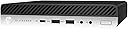
The HP EliteDesk 705 G4 Mini Desktop is a certified refurbished powerhouse featuring an AMD Ryzen 5 Pro 2400GE quad-core processor clocking up to 3.8GHz, 8GB DDR4 RAM for smooth multitasking, and a 256GB SSD for rapid storage access. Pre-installed with Windows 11 Pro, this compact desktop is designed to deliver professional-grade performance and reliability in a sleek, space-saving form factorโperfect for the modern manager who demands efficiency and style.
| ASIN | B08L9NB7RD |
| Additional Features | Microphone |
| Aspect Ratio | 16:9 |
| Best Sellers Rank | #924 in Amazon Renewed ( See Top 100 in Amazon Renewed ) #122 in Mini Computers #266 in Renewed Computers & Accessories |
| Brand | HP |
| Built-In Media | Keyboard |
| CPU Model | Ryzen 5 |
| CPU Model Number | 2400GE |
| CPU Model Speed Maximum | 4 GHz |
| CPU Speed | 3.2 GHz |
| Cache Memory Installed Size | 4 MB |
| Cache Size | 4 MB |
| Color | Black |
| Connectivity Technology | Ethernet, LAN, USB |
| Cooling Method | Air |
| Customer Reviews | 4.0 out of 5 stars 261 Reviews |
| Display Resolution Maximum | 3840x2160 |
| Display Type | LCD |
| Graphics Card Description | Integrated |
| Graphics Card Interface | Integrated |
| Graphics Coprocessor | AMD Radeon Vega 11 |
| Graphics Description | Integrated |
| Graphics Ram Type | DDR4 SDRAM |
| Hard Disk Description | SSD |
| Hard Disk Interface | Solid State |
| Hardware Interface | Bluetooth |
| Human-Interface Input | Keyboard, Mouse |
| Item Dimensions | 6.9 x 1.3 x 6.88 inches |
| Item Weight | 4 pounds |
| Keyboard Description | Wired |
| Keyboard Layout | QWERTY |
| Manufacturer | HP |
| Memory Speed | 6300 MHz |
| Memory Storage Capacity | 256 GB |
| Model Name | A5 |
| Model Number | HP 705 G4 EliteDesk Tiny |
| Model Year | 2016 |
| Native Resolution | 1024 x 600 |
| Number of Component Outputs | 2 |
| Operating System | Windows 11 Pro |
| Personal Computer Design Type | Mini PC |
| Power Plug Type | Type B - 3 pin (North American) |
| Processor Brand | AMD |
| Processor Count | 2 |
| Processor Series | Ryzen 5 |
| Processor Socket | Socket AM4 |
| Processor Speed | 3.2 GHz |
| RAM Memory Installed | 8 GB |
| RAM Memory Technology | DDR4 |
| RAM Type | DDR4 SDRAM |
| Ram Memory Maximum Size | 8 GB |
| Resolution | 3840 x 2160 |
| Specific Uses For Product | Business, Education |
| Style Name | mini|AMD R5-2400|16GB+1TB |
| Total Expansion Slots Quantity | 1 |
| Total Number of HDMI Ports | 1 |
| Total Usb Ports | 2 |
| UPC | 649661376422 |
| Unit Count | 1 Count |
| Video Output | Displayport |
| Video Output Interface | HDMI |
| Video Processor | AMD |
| Warranty Description | 90 days limited warranty |
| Wireless Compability | 802.11ac |
| Wireless Network Technology | Wi-Fi |
| Wireless Technology | Bluetooth, Wi-Fi |
J**N
Great little system, just ok accessories
My system came pretty well cleaned. It had something oily on part of the top, but that wiped off, though some had gotten into the dust screen so that had to be removed to clean. There were no scratches on the system, and everything seems in good working order. As most other reviews have mentioned, mine came with the Ryzen pro 5 2400g, which is a 65W part, vs. the 2400ge which is 35W TDP but lower clocked. The top is covered in mesh for better airflow, probably because the 2400g does get hot in this little machine. Running a stress test, I was able to get it up to 93C but the cooling system, in a room at 68F, was able to keep it there so it never throttled (which it should do if it gets to 95C) and maintained just under 3.6ghz on all 4 cores (the base clock). Stressing a single core, it will go up to 3.9ghz, so it could be that others who were having issues with performance might have some problem with their system. It came with 8GB of SK hynix DDR4 2666mhz RAM and a 256GB (older) Samsung PCI-E SSD. I got the SATA drive cage as well, which does have a fan for both its drive and the PCI-E drive that sits under the fan. I actually had a 16GB DDR4 3200mhz RAM set not being used, so I put that in and the system sees it as 2933mhz, which is the maximum RAM frequency supported for this CPU without overclocking, which this system does not do. So, I'd recommend at least picking up a second stick to get the benefits of dual channel which is supported, but if you buy all new RAM, I'd recommend picking up the faster stuff as well as it'll handle it. My system came with the HDMI module so it has 1 HDMI and 2 display ports. Accessories were a very generic USB wired keyboard, a very generic USB wired mouse, a mini USB wireless dongle and a mini USB bluetooth dongle. You can put a PCI-E wireless/bluetooth module in this system, so that might be a better option. Keep in mind that this system has antenna for the PCI-E wireless/bluetooth module, but does not come with the module, and you will most likely (I had to, someone else mentioned this as well) have to remove the motherboard to get to the antenna wires, as they seem to have been tucked underneath. To remove the motherboard, you have 4 screws plus the 3 that hold the heatsink onto the CPU. The problem here is that you shouldn't remove the heatsink without cleaning and reapplying thermal paste, so you basically will have to rebuild the system to install the wireless module properly. The power adapter this comes with has been mentioned at least once before. Mine was not a HP OEM power brick, but a generic one. It had the right barrel connector, but it's a 90W 19V 4.7A adapter. It appears the OEM adapter should be a 19.5V 4.62A, but finding the OEM 90W adapter is tough unless you want to spend a lot. My system does immediately power on when plugged in as others have mentioned, but you can turn it off and it will stay off, and seems to run ok on the generic adapter. One thing I think someone else mentioned, but the first generation Zen processors (Ryzen 1000 and 2000 series) are not on the Windows 11 supported CPU list, and you will be blocked from upgrading to Windows 11 on this machine. It does have TPM 2.0, so it's just the CPU that is blocking you. Microsoft does have instructions for getting around this, by entering a registry entry to tell the installer to allow unsupported CPUs, but Windows updates still will not let you upgrade directly. You'll need to download the installer/updater from Microsoft then run that. It does appear that upgrading from the installer works, though people were originally saying you would have to install fresh. Anyway, doing this, you have to agree that you are fine with possible issues and lack of driver support, so do it at your own risk I guess.
N**N
Good value
Quality Product and quick
B**N
Nice
I've been wanting to upgrade my Lenovo intel i7 ThinkCentre Mini PC to a newer Ryzen Mini for a while and this Refurb deal from StallionTek looked too good to be true . When it arrived I noticed right away that one of the back USB ports was clearly broken with the pins touching each other . I nearly sent it back right there , but they were out of stock and I couldn't set up a replacement so I decided that if there no other problems that I'd keep it . I separated the pins in the bad USB and put some electrical tape in it to keep it from shorting out and powered the PC on . It fired right up and wanted to update Windows so I went ahead and updated everything and checked the system specs to find that it was the same as most people reportedly received . A Ryzen 2400g , 256gb NVME SSD , 1x 8gb memory stick , an HDMI in the optional port , and has the HDD caddy for a SATA HDD as well which is great because I wanted to add a second HDD for storage . It does not have a wireless card in it , but it does have the antennas and an empty M.2 for one . The PC is fast and seems to be a happy little PC . I wanted to install a wireless card and put some Thermal Grizzly thermal paste on the processor so I had to completely disassemble the PC to get the antennae wires out from under the motherboard and got a good look at everything in the process . This thing is really clean inside , no dust at all . It already had brand new thermal paste on the APU which is really good to see . So as far as the refurb I would give it an 8 out of 10 , the bad USB port is the only thing that I can complain about , it really shouldn't have shipped like that . So close to perfect . With a few more upgrades it'll be a little beast . I have 32gb of DDR4 coming and will add a 2TB NVME in place of the 256gb and will end up adding a storage HDD sometime in the future as well . I assume that I just had bad luck with the USB port so I will recommend this product , it's great . **Edit - Installed the m.2 wireless and it works really well (Intel model# 9260NGW) Installed 2x 16gb (32gb total) G.Skill Ripjaws 2666 memory with no problems Installed 2TB Kingston NVME SSD and cloned the HDD to it with no problems Installed 2TB 2.5 SATA Seagate Barracuda HDD This mini is certainly a step up from my old one , love it .
J**F
Fan Detection Error
It works, but when turning on the device you get a fan detection error. Really disappointing. I took off the cover, disconnected and reconnected the fan wires to make sure the fan connection was well seated, but I still got the same error message. Going to return this unit and order another one. Hopefully not defective this time.
D**A
Perfect Little Box for Tinkering
TL;DR: Great computer with expandability and solid hardware. Unit came with a brand new mouse/keyboard and wifi adapter. I cracked it open to find some very interesting things. Internals: The case has some very minor dings and a fully vented top plate with vent grilling underneath. Mine came with the Ryzen 5 Pro 2400G like other recent purchases. No wifi/bluetooth card but it does come with a wifi adapter (2.4ghz but I plan to wire it in once my switch arrives so no biggie there) and the wires are pre-run so I can add one later if desired. 1x 8GB stick of DDR4 RAM (I had a second laying around with the same speed/size so I popped it in for a total of 16GB running in dual channel mode) SATA SSD instead of M.2 but that means I have the SATA caddy so I can upgrade later and get a bigger SATA drive for storage. The drive caddy also has a dedicated fan? That's new for me but not unwelcome as it will help with thermals. The Flex i/o port came with HDMI which netted me 2x DP and 1x HDMI which was excellent for my needs. I hit it all with some canned air and blew out the teeniest amount of dust. Thermal tests show that it's currently idling around 42C. Software: Windows initialized on the first boot with no issues. Initial setup was painless and the key was activated automatically. Updates ran smoothly and it's now on version 21H2 of Windows 10. According to the HP website, it is not currently compatible with Windows 11 because of the processor. It just arrived in the mail today so I haven't installed too much on it yet. I am planning to use this as a remote only computer and it had no qualms about booting without a keyboard/mouse/monitor. I don't plan to game on it or anything too crazy so I can't speak to gaming performance but it'll do what I intended for it to do with no problems. I'll update later if things change but it's currently a fantastic unit and I'm impressed with the refurb job and reseller.
L**E
Perfect use for a home lab
I purchased 3 of these to setup a low-power server environment at home to replace several servers / applications that I was running in the Cloud (and paying monthly for). I purchased the 8GB model, I also purchased 2 32GB (2x16) SO-DIMM modules separately. Original intention was to upgrade two to 32GB and reclaim one of the 8GB for the third to make 16GB(2x8GB) for that one. As luck would have it, all 3 of them came with 16GB(2x8) instead, so now I just have extra memory. Inside they were a bit dusty, could use some compressed air, but they did come with the 2.5" caddy and an HDMI port in the back. Linux also identifies my CPU as the Ryzen 5 Pro 2400G (not 2400GE in the description), the biggest difference here is in the power, the GE requires less (35 vs 65), which would be ideal. I have not yet seen any issues with the systems due to this as they came with 90W power bricks. I currently have them all loaded up with Proxmox, in a cluster, and provisioned a complete/HA k3s (kubernetes) environment to deploy my multiple services into. This keeps the nodes around 25% CPU and 80% memory used at all times, and separately I'm using VAAPI in a Tdarr cluster to do some background video processing using the APU. Everything pretty much works exactly as expected, if even a little better as it feels like these boxes are more responsive than the Hetzner cloud machines I was running costing me monthly. As long as these devices last more than a few months they will have saved me money. On that note, one of them did fail to start up after I got it loaded with Proxmox which ultimately appeared to be a bad RAM module. I replaced it with one of the spares mentioned above and it's been fine since. As I purchased it expecting 8, got 16, and one out of 6 total failed - I'm not too upset. I imagine if someone else purchased 8, got 8, and it failed making it unusable they might be - but that's the nature of refurbished hardware. As long as you understand that these aren't the best hardware on the market, so expectations are set right, these are fantastic little boxes and are definitely a great alternative to a Raspberry-Pi or SBC-style mini cluster. Similarly, if all you need is a College workstation, PC for the Kids to play Minecraft, or something similar these serve that purpose great too.
B**S
2026 UPDATE*** COMPUTER IS STILL RUNNING STRONG***
Computer arrived in a horrible state! It was filthy with dust deep down into the top vents of the computer as you can see by the picture. Again, as you can see by the picture one of the USB ports in the front of the computer was damaged and looked like something had broken off inside of it. Another port in the back also did not work. I ended up buying an external USB port to plug into the USB port that did actually work. The computer arrived completely outdated and would not boot. Luckily, my husband knows about updating computers so after several hours of updating the operating system, drives, and a few other programs I was able to boot and use the computer. Also, the mouse they sent was broken into several pieces so completely unusable but I just used my wireless mouse anyway so not a huge deal for me. The PROS are since then this computer has ran very well and is now a great little computer for the price! I bought it in October of 2022 and it is now April 2023 and no problems with it whatsoever. I love it's small size and it boots really quickly and the processor is very quick. It is not a gaming computer by any means but the company does not advertise it as such and it plays a few games like the Sims4 and all of it's large add on packs really well. This computer has a lot of storage which is another huge plus. Also worth noting, this computer is not compatible with Windows 11 so you will not be able to update it from Windows 10 to Windows 11. So, to sum up this computer ended up being a pretty good quick little every day computer in the end but the company sent me a filthy, outdated, computer with broken components both on the computer and sent with the computer so sadly, I cannot recommend. BUT the price was very good and we were able to get this computer cleaned up and up and running to make it worth that price which may make it worth it to you in the end. Also, to be fair I did not contact the seller with the issues I had because my husband fixed the problems so I cannot attest to how well this company handles problems when there are problems. I would just HIGHLY RECOMMEND you read through all of the reviews for this product as many people seem to have had issues similar to mine with this computer.
A**M
Ultimate 100$ PC for child, TV multimedia or homelab node.
Good packaging, should survive most "experienced" amazon delivery driver. Arrived cleaned, not a single mark of dust, fresh CR2023 battery with good voltage. Thermal paste also seems fresh but (!) heatsink had a big empty spot in the center of the chip, good that I decided to re-check it before putting as a home lab node in some place with hard access. Looks like thermal pads for CPU power lines were refreshed as well but for me they appeared to be too sticky and kind of low quality so they were replaced with some spare cuts I had. Provided m2 SSD is fine and had around 93% of health. Device was quipped with two identical sticks of 4gb Samsung M471A5244CBO-CRC. After re-paste I performed couple of stress tests to check that cooling system is working properly, wasn't able to make it hotter than 78C and CPU boosted for max of almost (!) 3.9GHz with effective clock around 3.7GHz. Included keyboard is meh, mouse is terrible but better than nothing I guess (?). Also I got WIFI5 dongle, also better to have one for spare parts. Didn't have a chance to test SATA slot, but it was clean and have dedicated fan for your 2.5SSD or HDD and overall unit cooling. Had some troubles with BIOS update, default HP tool could not flash USB drive with latest firmware but after connecting Ethernet I just clicked "download from hp site" and it got it with no problem and installed via internet. I was surprised how easy and convenient it was lol. Conclusion: seems to be a good choice for some cheap home PC and especially cheap and almost energy efficient home lab node. Plan to buy more of these puppies in the future.
Trustpilot
1 month ago
5 days ago