We remain fully operational. Our teams are working around the clock to ensure your deliveries continue safely.

DOWNLOAD THE APP


Copyright © 2025 Desertcart Holdings Limited
DOWNLOAD THE APP


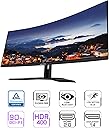

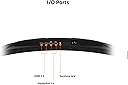



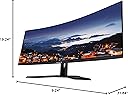
🚀 Elevate your workspace and gameplay with panoramic power!
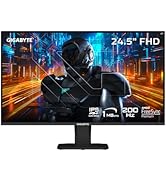
The GIGABYTE G34WQC A-SA is a 34-inch ultrawide curved gaming monitor featuring a sharp 3440x1440 VA panel with a 1500R curve for immersive viewing. It delivers smooth visuals with a 144Hz refresh rate and 1ms response time, enhanced by AMD FreeSync Premium to eliminate screen tearing. With 90% DCI-P3 color coverage and VESA DisplayHDR400 certification, it offers vibrant, accurate colors ideal for both professional and gaming use. Ergonomically designed with tilt and height adjustments plus versatile connectivity options, this monitor balances productivity and immersive entertainment at a competitive price point.









| ASIN | B09JBLHBWJ |
| Adaptive Sync | FreeSync |
| Additional Features | Adaptive Sync, Blue Light Filter, Curved, Flicker-Free, Height Adjustment, High Dynamic Range, USB Hub, Ultrawide Screen |
| Aspect Ratio | 21:9 |
| Best Sellers Rank | #124,921 in Electronics ( See Top 100 in Electronics ) #2,986 in Computer Monitors |
| Brand | GIGABYTE |
| Brightness | 320 cd/m2 |
| Built-In Media | 2x 2W Speakers 2x Display Port 1.4, 2x HDMI 2.0,AC Adapter,Earphone Jack |
| Color | G Series |
| Color Gamut | 120 |
| Compatible Devices | Apple Computers, Desktop, MAC, PS5, PlayStation, Windows Computers, Xbox |
| Connectivity Technology | wired |
| Contrast Ratio | 4000:1 |
| Customer Reviews | 4.5 4.5 out of 5 stars (1,071) |
| Display Resolution Maximum | 3440 x 1440 Pixels |
| Display Technology | VA |
| Display Type | VA |
| Hardware Connectivity | DisplayPort, HDMI, Headphone, USB 3.0 Type A |
| Has Color Screen | Yes |
| Item Dimensions D x W x H | 9.24"D x 31.84"W x 19.24"H |
| Item Weight | 18.5 Pounds |
| Manufacturer | GIGABYTE |
| Model Name | G34WQC A-SA |
| Model Number | G34WQC A-SA |
| Mounting Type | Wall Mount |
| Native Resolution | 3440x1440 |
| Number of Component Outputs | 4 |
| Number of Height Positions | 34 |
| Picture Quality Enhancement Technology | HDR, Wide Color Gamut |
| Pixel Pitch | 110 |
| Power Consumption | 0.5 Watts |
| Refresh Rate | 144 Hz |
| Resolution | WQHD 1440p |
| Response Time | 1 Milliseconds |
| Screen Finish | Matte |
| Screen Size | 34 Inches |
| Specific Uses For Product | Business, Gaming, Video Editing |
| Total Number of HDMI Ports | 2 |
| Total USB 3.0 Ports | 2 |
| Total Usb Ports | 2 |
| UPC | 889523028681 |
| Viewing Angle | 178 Degrees |
| Voltage | 240 Volts |
| Warranty Description | 3 |
J**O
A stunning Monitor for Productivity and Gaming!
This is a stunning monitor for productivity and gaming at a bargain price! (That price being about $330, in my case). For productivity, such as research or school work, the screen real estate allows three full windows to be opened simultaneously (as shown in my blurry picture, the monitor is sharp tho). For instance, I have my school assignments in one, a textbook in another, and a Word document in the third. My 32” 1440p monitor only allowed for two, which meant constantly minimizing and moving around windows while researching. The dot pitch also makes for sharp text and is about the equivalent of a 27” 1440p monitor. Coming from my 32” 1440p monitor, this is a massive improvement. For gaming, this is also a stunning monitor. Since it is a VA panel, there is always the potential problem of ghosting and pixel overshooting (reverse ghosting). This monitor has a quirk that vastly improves its resistance to ghosting. Everyone knows about overdrive, which should be set to BALANCED to avoid overshoot, but you may prefer SPEED. The secret to this monitor is the “BLACK STABALIZATION” setting, which dramatically reduces ghosting. Set it to one, and it will help immensely. Set it to ten, and it will do infinitely more, which is close to the best setting for appearance anyway. Lastly, this is not the same monitor as the original G34WQC, but this is the “A” version, which is brighter and possibly improved in other ways. Old reviews only somewhat apply. For instance, I would not use the RTINGS color profile (ICC Profile) for this version. It does not need a custom profile to look spectacular unless you are a content professional who needs stellar accuracy. The gamma is a little bright out of the box but is easily adjusted. Here are my settings if you want a place to start. BRIGHTNESS-100, CONTRAST-59, COLOR VIBRANCE-10, SHARPNESS-6, GAMMA-4, TEMPERATURE-NORMAL, LOW BLUE LIGHT-OFF, DCR-OFF, BLACK EQUALIZER-9, OVERDERIVE-BALANCED. I tried setting Windows 10 to HDR mode, but it did not help get the best appearance. I hope this review is helpful for you. This is a terrific monitor!
_**_
Excellent gaming monitor, features for sensitive eyes, ultrawide is amazing.
I bought this monitor to replace a 1-2 year old 32" LG 2560x1440p G-SYNC monitor that hurt my eyes (specifically the whites were too bright no matter what I lowered brightness to). I was used to a Dell 1440p monitor that had a VA panel and an anti-glare coating and have light sensitivity to begin with (I have to wear sunglasses to drive even on cloudy days). The LG was great for gaming, but I couldn't tolerate web-browsing or excel. Decided to give this Gigabyte monitor a try because it was on sale for a great price ($379), was advertised as having features to reduce eye-strain (blue light filtering and flicker free) and was an ultrawide which I was interested in trying. First, I will never go back to a standard dimension monitor after using this ultrawide monitor. It's amazing. Both for gaming and for productivity. The eye care features do work. Still not as easy on my eyes as my 27" Dell VA Panel was, but MUCH better than the LG. No headaches so far. Free Sync works just fine with an NVIDIA card (I have an RTX 3070). No issues whatsoever making the switch from using G-SYNC monitors. Gigabyte's packaging was excellent. Everything safe and sound and a perfect screen. The base of the monitor is VERY heavy. Major plus IMO. Includes the obligatory and much welcomed cable management hole in the middle of the stand.
F**A
Great monitor at great price for gaming or for simply multi tasking.
The amount of screen real estate on this thing is incredible. Prior to buying this behemoth, I was using dual 27 inch monitors and my plan was to upgrade to this and put one of the 27 inch monitors over this to have an upper/lower setup. I have had this widescreen for about 2 months now and have yet to mount the 27 inch over this because I just don't need anymore screen space than what this provides. The curve looks cool but I don't think it really adds anything to the usage of it and seems more gimmick than function. If I would have to choose a monitor all over again I'd probably get this same one but flat, if that exists. I'm giving it 4 starts because it has an annoying light that flashes on the desk when in standby mode. It's not crazy bright but if you have this in the room you sleep and you like it pitch black you are out of luck. The only way to disable the standby light is to reach around the monitor and physically turn it off which then requires turning it back on when you want to use it again. You could also cover the light with tape or something...I guess...This is not a huge inconvenience but it not as convenient as just pressing a key on your keyboard to come out of standby.
A**R
Good
Good monitor
R**N
Excellent monitor for gaming or multitasking
This was a bit of a splurge purchase for me, but I am completely satisfied with this monitor for use with everyday tasks and for gaming. The monitor has amazing specs, and they are noticeable compared to my old monitor. The resolution, and refresh rate really made a difference for me. The screen has a brightness adjustment and it is easy to setup. I find it to be a great value.
B**E
Great widescreen monitor for remote work
I ordered this for my home office as I work remotely. I primarily work on web-based apps and communicate with coworkers and customers via Zoom calls, so I don't have any crazy expectations around graphics or performance. I connect to a macbook pro with an adapter. This monitor is a replacement for an older widescreen flat monitor that was starting to fail. I debated between a curved screen or going back to two smaller flat monitors because the flat widescreen was a bit problematic at some angles, and it was hard to adjust the screen so you could easily see everything you need and not have glare. I am very happy with this monitor - the curved screen allows you to take complete advantage of the width in a way that a flat screen just doesn't. It's much easier to scan across from one side to the other and I can organize all of the apps and windows I need. The display is crisp and I didn't have to make any adjustments, just plug it in and it worked immediately.
K**.
First of all, this showed up in 3 days, which I was SUPER excited for, so thank you for that! It was super easy to set up, the DP input got all the settings right except for the refresh rate which you have to manually set at 100hz. It only shows 144hz in 1080p mode, but that's ok! You're probably not going to notice the difference between 144 and 100 anyway. The colors are gorgeous and my first few games I played, I really felt surrounded... Being as this is my first curved monitor. The settings are easy to toggle through with the little button on the back. There's slzerp dead pixels on mine, which I was surprised about for being such a large display. This review may be bias because I came from a 19" 10 year old monitor, but who cares. This thing is awesome!
A**R
Have had this for about a week now. So far so good, no dead pixels. Image quality is excellent, and I’m running F1 23 at 3000x1440. Great monitor for the price.
R**Z
En mi opinión es un buen monitor con más cosas buenas que malas. Comenzaré por su único punto debil y es que tiene un poco de fugas de luz cuando la pantalla esta en negro, no es nada que moleste porque solo te das cuenta cuando la imagen esta en negro absoluto. En cuanto a sus cosas buenas es que monitor por el solo hecho de que es grande y curvo se ve bastante pro y bonito estéticamente. - Tiene su base que es fácil elevar y bajar. - es comodo para disfrutar de juegos y películas - comodo para trabajar y mantener varias ventanas al mismo tiempo acomodadas en la pantalla sin necesidad de abrir una u otra. - tiene buenos perfiles de color para elegir y configurar a tu gusto - cuenta con un jack 3.5 mm para conectar un sistema de sonido aparte - cuenta con 2 puertos hdmi y 2 display port para una buena cantidad de dispositivos de video conectados al mismo tiemo - es fácil configurar las salidas de video Podria nombrar muchos puntos más a su favor y solo veo en contra uno, el que ya describí primero. Lo recomiendo, si lo pueden agarrar en menos de 9k como fue mi caso estaría bien. El vendedor para este monitor fue zegucom por lo que puedo decir que su embalaje y tiempo de envio me pareció muy bueno.
N**O
very good monitor 100% recommended
J**A
La verdad investigó mucho y lo agarre en buen precio (6300) y se ve muy bien, lo compre por q siempre quise un ultrawide y los juegos si se ven mejor y más amplio el campo de visión. Tiene buena nitides y colores. También lo ocupe para multimonitor en asseto corza competizione y se ve muy bien. Tiene bocinas pero son muy chicas y se escucha muy bajas. Por el precio me gustó mucho y aun no he tenido problemas.
Trustpilot
2 days ago
3 weeks ago