




Universal Remote Attachment for Apple TV Streaming Players
Product ID: 38158929
📦Sleek Design
📺Universal Control
🔧Easy Setup
🎮 Simplify Your Entertainment Experience!
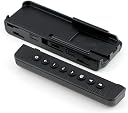
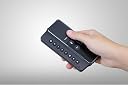
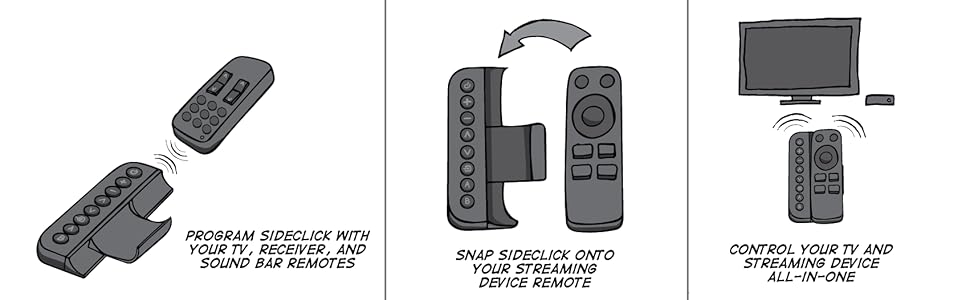
The Sideclick Remotes SC2-APG4K is a slim universal remote attachment designed specifically for Apple TV Gen 4, allowing users to control multiple devices including TVs, receivers, soundbars, and Blu-ray players with ease. It features a straightforward programming process using your original remote, making it an essential accessory for a clutter-free entertainment setup.



| ASIN | B01N3PL81R |
| Additional Features | Universal |
| Battery Type | 2 AAA batteries |
| Best Sellers Rank | #256,000 in Electronics ( See Top 100 in Electronics ) #20,353 in Remote Controls (Electronics) |
| Brand | Sideclick |
| Button Quantity | 8 |
| Color | Black,Silver |
| Compatible Devices | 2nd Gen Apple TV (Silver Remote), 3rd Gen Apple TV (Silver Remote), 4th Gen Apple TV (Black Touchpad Remote), 5th Gen Apple TV (Black Touchpad Remote) Compatible Devices 2nd Gen Apple TV (Silver Remote), 3rd Gen Apple TV (Silver Remote), 4th Gen Apple TV (Black Touchpad Remote), 5th Gen Apple TV (Black Touchpad Remote) See more |
| Connectivity Technology | Infrared |
| Controller Type | Button Control |
| Customer Reviews | 4.3 out of 5 stars 659 Reviews |
| Global Trade Identification Number | 00859585006125 |
| Item Weight | 1.76 ounces |
| Manufacturer | Sideclick |
| Max Number of Supported Devices | 1 |
| Maximum Number of Supported Devices | 1 |
| Maximum Range | 10 meters |
| Mfr Part Number | SC2-APG4K |
| Model Name | SC2-APG4K |
| Model Number | SC2-APG4K |
| Number of Batteries | 2 AAA batteries required. |
| Number of Items | 1 |
| Special Feature | Universal |
| UPC | 859585006125 |
| Unit Count | 1 Count |
B**R
BEST PURCHASE OF 2018
I purchased this January of 2018. I can say with 99% certainty this is going to be the best thing I buy this year. Setup - EASY Functionality - AMAZING Works just as advertised. Better even. They undersold it. I have the Apple TV 4th Generation with Siri remote. Holds the remote well, doesn’t obstruct the lightning charging port. Makes it harder to lose! This thing, within 2 days, I could not ever live without again. If I were homeless, I’d still want my Sideclick (which, by the way, is marketing gold and whomever dubbed that name deserves a capitalism Medal of Honor or something). Add in the fact that my Apple TV remote has Siri, with HomeKit integration. I have a remote that controls all my media electronics AND with Siri can turn my lights on/off amongst other things. I’m living in the future and boy let me tell you, the future is bright as **** thanks to Sideclick. BUY THIS THING
K**K
Works as Advertised, Bye Bye Second Remote.
The remote came yesterday and it worked as advertised. It learned the codes from my existing TV remote and was plenty powerful enough to work from across a sizable room. It came with the two AAA batteries it runs on. I hope they will last a year or so. I use this one in the bedroom at night so it would be handy if it has some kind of button illumination but it doesn't. I just had to keep the order of the buttons straight and go by touch. Power is at the top so that is easy to use by touch but the input button is third from the bottom so that was only slightly harder to keep straight. I could have used the "B" button for the input button since its at the bottom and I did not assign it a function yet. Its hard plastic so I miss the rubbery grip of my old case but not a big loss. The remote feels wide in the my hand now but no problems reaching the buttons on the far left side or any buttons/touch pad on the apple remote. The remote sits snugly in the device, which is nice. I am happy enough with it that I bought another one for my Family room ATV. This is definitely not a required product but for me I love not having to deal with two remotes anymore and for $30 it doesn't break the bank.
F**V
Great solution for the Apple TV user who only needs minimal TV functionality
This is a great little gadget if you almost exclusively use your Apple TV for your TV programming. It was super simple to program, just aim your TV remote at this remote and press the corresponding buttons. The buttons can be programmed to be anything, even though they are marked with icons for things like power, volume, channel, source. Because the Apple TV remote takes care of my TV volume, I used the (+) and (-) keys and right and left respectively to replicate the 4 direction pad on my TV remote (along with the UP and DOWN buttons below it). This works well for me to reach the Sleep function of my TV which is hidden in a menu and not directly accessible from the remote. My one suggestion would be that the keys have different textures so that you can distinguish them by feel. Although the (+) key and the DOWN key have little nubs, they are not very noticeable and really don't guide your fingers to the right keys in the dark.
S**B
Returned once I learned about HDMI-CEC - Please Read On....
I switched from Amazon Fire TVs to Apple TV, and naturally thought that I would want a Sideclick for the Apple TV remote as it was very useful with the Amazon Fire TVs so I bought a Sideclick at the same time that I bought an Apple TV HD. Once I figured out how to control my TV with the Apple TV remote, I returned the sideclick. Understand the limitations, however. The Apple TV remote contains an IR blaster and will likely control the volume of your TV. The Apple TV magically detects the TV type through the HDMI cable and sends the correct codes to the remote. The Apple TV itself, or the remote, can turn the TV on/off. I have purchased 4 Apple TV HDs using various TV models and can share the following from my experience. If the TV supports HDMI-CEC*: -When the Apple TV is put in "Sleep" mode, it will send a signal via HDMI-CEC to the TV to shut off. -When the Apple TV is woken up again, it will send a signal via HDMI-CEC to the TV to turn on, and to select the correct HDMI input. *HDMI-CEC is known by different technologies depending on the TV type, and it may need to be enabled in the settings. Google your TV make/model and the term "HDMI-CEC" to find out if it is supported. If the TV does not support HDMI-CEC: -When the Apple TV is put in "Sleep" mode, the remote will send a signal via IR to turn the TV off. If the remote is not pointing at the TV, it won't turn it off. You'll need to try to sleep the Apple TV again and make sure the remote is pointing at the TV...or wait for the TV to shut off automatically after a while. -When the Apple TV is woken up again, the remote will send a signal via IR to turn the TV on. If the remote is not pointing at the TV, it won't turn it on. In this case, you need to kind of remember the button presses to re-trigger the sleep action. Kind of a pain...or wait for the TV to shut off automatically after a while. Now, you may ask, how do you switch the input on your TV without a sideclick? With a non-HDMI-CEC TV.... you're out of luck. That's when you need a sideclick or another remote. If the TV supports HDMI-CEC, AND all of the devices connected to it also support HDMI-CEC, AND you're using HDMI cables 1.2a or newer, the TV will detect which device just started sending a signal and will switch automatically to that input. You'll have to test this out and see if you can deal with it. In my case, I have the following connected to my TV: -Apple TV - supports CEC and takes over the input/turns on the TV when woken up or when the home button is pressed. -Google Chromecast - supports CEC and takes over the input when I start casting something. Since my chromecast gets power from the TV, it cannot be used to turn the TV on. In this case I turn on the TV with the Apple TV remote and then start casting when the chromecast is available. -Nintendo Switch - supports CEC and takes over the input/turns on the TV when powered on -Nintendo Wii-U - DOES NOT support CEC but the large controller has a built-in TV remote which can be used to control the TV input. All of these things together enabled me to return the sideclick. As for my non-HDMI-CEC TVs...they only have an AppleTV and no other devices so just having volume/power and the Apple TV remote by itself works just fine. Lastly, I want to point out that it is nice to start AirPlay from my MacBook or iPhone and see the TV automatically turn on. Since I use a VIZIO soundbar, I programmed the AppleTV remote with the soundbar's IR codes...which means even if I turn the TV on with my Macbook/iPhone/Switch, I need the AppleTV remote within reach to turn on the sound bar (which turns on with the volume up action) and adjust volume. These are all things I decided to live with just to not have a sideclick, and my wife/kids can deal with it just fine. You decide for yourself if this is worth it for you. Hopefully this review helps you if you decide to come to the dark side....
F**M
Great solution for too many remotes
This is great. My tv setup requires 3 remotes- stereo receiver, tv and Apple TV. Too many considering two of the remotes are primarily used only for minimal function- on/off and volume. Wanted a universal remote, but don’t want to lose voice and touch capabilities of Apple TV remote. The sideclick has been a great solution. Easy to program and easy to use. Only issue I found is the power button on the sideclick could not be programmed to turn vizio tv on. However the power button works fine with my receiver and the vizio power was programmed to a different button on remote. Weird glitch but not a big deal. Side benefit: makes the Apple remote a little larger and harder to lose in the cushions.
R**.
Nice and handy!
The Sideclick remote does a good job filling in for the Apple TV Siri Remote which lacks a simple option like a mute button to work along side the included volume buttons. Being able to program any of the Sideclick’s buttons to do whatever you’d like and not necessarily what is printed on the button is rather convenient. Right out of the box it was easy to install the Apple TV remote and program the buttons. Having something to make the Apple TV remote larger isn’t a bad thing since it’s small enough to be quickly devoured by your favorite chair or couch cushion only to never be found again. Worth while purchase!
C**R
Amazing but NOT durable
This thing is great. One remote when we mostly use Apple TV for all our needs. Being able to modify the buttons and really the sheer fact that I can turn the tv on and off. Huge. Biggest setback: it is not durable at all. We have had ours for 1 year. Sideclick was nice enough to replace it once but now it’s broken again. We have two children so this thing gets tossed. We are very hard on it. I just wish it had lasted longer. Not sure I will get a 3rd one.
R**H
Makes things less complicated with only 8 programmable buttons
This is a great learning remote. It only has 8 programmable buttons, but if you think about what you really need, it will serve you well. My stereo is a Bose that has HDMI inputs from my DVR and AppleTV Gen 4. Here are my button assignments: 1) Bose on/off, 2) DVR on/off, 3) AppleTV Menu button, 4) TV on/off, 5) TV picture button, 6) TV down arrow, 7) TV up arrow, 8) TV select. My DVR is complicated with a lot of buttons, so I use that remote separately. But with just two remotes, I very rarely use my Bose and TV remotes. Not trying to have one remote do everything has made it much more simple for my wife and I. We are so well pleased with this product that we ordered a second one as a spare. Again—if you sit down to think about what functions you need, and let Anynet functionality work for you, you might find that most of the time you only need a few buttons, too. Isn’t that much better than remembering to hit the TV button to select TV mapped functions, DVR buttons to hit DVR mapped functions, and so on? Incidentally: this is an easy to use learning remote that took only 5 minutes to program.
M**K
Eine tolle Idee
Nach dem ich einen Wutanfall nach dem anderen,wegen der blöden Apple TV Fernbedienung bekommen habe. (Wischtechnik) Bin ich auf diese Fernbedienung gestoßen. Sie ist ein echter Segen. Das Anlernen ist Super einfach und danach kann man diesen Apple TV endlich ordentlich bedienen. Einfach nur toll.
C**N
Excelente complemento al Apple TV remote
Un excelente artículo que simplifica todo el arsenal de controles remoto. Su practicidad hace que guardes el resto de controles y lo mejor es que opera las barras de sonido
G**E
Nice solution that simply replaces a number of remotes
Really frustrating to have 4 remotes and only need 1 button on each. This replaces the remote for my sound bar, cable tv box, and tv remote. Between this and the Apple TV remote, we are all set! Find that the plastic is light and feels a little cheap, but functionality is good so far.
L**A
Game Changer
Gone are all of the remotes that cluttered my usage of Apple TV, external speakers, TV, and HDMI switch. The Sidekick is a genius idea that allows you to hook your device remote (in my case the Apple TV 4K) to it and use it as an all in one remote. It doesn't allow you to replace all functionality of each remote, but it allows you to replace the functionality that is used 99% of the time - turning the power on and off and adjusting the volume. Amazingly, it makes the small and slippery Apple TV remote easier to operate as well, which is an added and unexpected bonus! Highly recommended.
G**.
Echte Mehrwert für das Apple TV
Sideclick verwandelt die Fernbedienung des Apple TV in eine Universalfernbedienung, die die wichtigsten Funktionen von Fernseher und Soundanlage steuert. Passt perfekt zur Originalfernbedienung und ist sehr einfach zu programmieren. Klare Kaufempfehlung.
Trustpilot
1 month ago
5 days ago