Desertcart purchases this item on your behalf and handles shipping, customs, and support to Austria.
โก Upgrade your Ender 3 to silent, smart, and sleek 3D printing mastery!
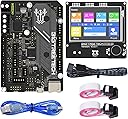
The BIGTREETECH SKR Mini E3 V3.0 combo set pairs a cutting-edge 32-bit STM32G0 MCU control board with a versatile TFT35 E3 V3.0.1 touchscreen display, designed specifically for Ender 3/5 series printers. Featuring silent TMC2209 UART stepper drivers, advanced heat dissipation via triple PWM fans, and smart features like filament runout detection and power-off resume, this plug-and-play upgrade transforms your 3D printer into a high-performance, whisper-quiet powerhouse with intuitive touchscreen control.


| ASIN | B09MYT45BQ |
| Brand | BIGTREETECH |
| Built-In Media | SKR MINI E3 V3.0 Motherboard & TFT35 E3 V3.0.1 Touchscreen |
| CPU socket | M4 |
| Chipset Type | STM32G0B0RET6 |
| Chipset type | STM32G0B0RET6 |
| Compatible Devices | Printer |
| Compatible Processors | STM32G0B0RET6, STM32G0B1RET6 |
| Compatible devices | Printer |
| Compatible processors | STM32G0B0RET6, STM32G0B1RET6 |
| Customer Reviews | 4.2 out of 5 stars 190 Reviews |
| Graphics Card Interface | Integrated |
| Main Power Connector Type | 24-Pin |
| Manufacturer | BIGTREETECH Direct |
| Memory Clock Speed | 12864 MHz |
| Memory Slots Available | 1 |
| Memory Storage Capacity | 8 GB |
| Mfr Part Number | 1060000518 |
| Model Name | BIGTREETECH SKR MINI E3 V3.0+TFT35 E3 V3.0.1 |
| Model Number | SKR MINI E3 V3.0+TFT35 E3 V3.0.1 |
| Number of Items | 1 |
| Number of Ports | 2 |
| Platform | Windows XP |
| Processor Socket | M4 |
| RAM Memory Technology | DDR4 |
| Ram memory technology | DDR4 |
| System Bus Standard Supported | SATA 2 |
| Total Usb Ports | 2 |
| USB 2.0 | 2 |
M**J
Way better than my stock board!
Installed on an Ender 5 Plus. This little kit was just what I was looking for. It's a fun DYI upgrade project. Just go online to figure out the pinouts of all the wires for your specific printer if you don't know them. Also, there is tons of ready to use firmware you can find for just about every printer as well. If I ever have an issue with this board I'm going to upgrade it to the bigger SKR 3 board but I think this thing will work just fine for a long time, Happy with the purchase!
D**E
.
Needs a bit more documentation on set up.
R**D
Great upgrade for Monoprice Select 3D
Fantastic little combo. Targeted for the Ender 3, I used it for a Monoprice Select 3D to replace a fried main board. Getting Marlin configured took some time, but the SKR mini e3 v3 perfectly matched the Monoprice interface requirements.
A**I
So quiet, and has accurate completion time
Bought this for my Ender 3 V2 with a 4.22 board. I was a little nervous installing it myself, but it ended up being much easier than I thought. I think the first board was defective (or maybe operator error) but they immediately sent a new board out and returning the other one was painless. Once I got the second one hooked up it worked just fine with the software. It's so quiet compared to the stock board. It loads quickly and I am super happy that the estimated completion time is way more accurate than the OEM board. It's been performing well with no hiccups after updating the build. It was plug and play, but I updated to to the most current version of Marlin. The only thing I didn't think about when I bought this board was adding wifi. If you are thinking about going that route, look up boards that already have it installed, so you don't need an extra component (unless you want it that way). I plan on going wifi soon for the convenience and so my 9 year old can start a print without having to be to close the the printer in case it's hot. So I will have to get a lil pi and program it accordingly with klipper.
S**N
Impossible to get up and running
I have an Ender 5 Pro and purchased this to replace a failed stock motherboard and touchscreen. I wired it up without much issue and confirmed all of the steppers, heaters, and fans work. The BLTouch is completely worthless - I get error after error for seemingly no reason. After hours of searching, I found several people saying the prebuilt firmware is garbage. OK, no problem. I compiled my own based on settings in the Marlin config files. That seemed to fix some of the BL Touch issues, and I was eventually able to get through a bed leveling. Then the other problems started to come. First, I can't connect this to my PC via USB. It's an unsigned driver, which is against the law for WIndows 11. I can go through the process of restarting my PC into recovery mode and stop enforcing driver signatures, but that only works for one power cycle of the printer. If I reboot the printer, I have to reboot my PC. Unacceptable. I figured I would at least get through a test print and worry about the USB issues later - nope. I sliced a test cube in Cura, which estimates the print to take 30 minutes. I load up the SD card, walk back to my printer, and start the print. 3 seconds. The printer homes and then calls the print finished. If you're going to stay with Marlin, don't waste your time on this piece of trash. Buy a Creality board and save yourself the headache.
Trustpilot
3 weeks ago
2 weeks ago