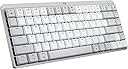
Desertcart purchases this item on your behalf and handles shipping, customs, and support to Austria.
⌨️ Elevate your Mac setup with the keyboard that works as hard as you do.
The Logitech MX Mechanical Mini Mac Wireless Keyboard in Pale Grey is a compact, low-profile mechanical keyboard engineered for Mac users. Featuring tactile yet quiet switches, smart backlighting that adapts to your environment, and multi-device Bluetooth connectivity for up to three devices, it enhances productivity with seamless device switching and customizable function keys via Logi Options+. Its USB-C rechargeable battery offers up to 15 days of use with backlighting or up to 10 months without, making it a powerhouse for professionals seeking precision, style, and endurance in a minimalist design.


| ASIN | B09LK63PKB |
| Additional Features | Illuminated |
| Antenna Location | Office |
| Best Sellers Rank | #453 in Computer Keyboards |
| Brand | Logitech |
| Built-In Media | Logi Bolt Receiver, Master Series MX Mechanical Wireless Illuminated Performance Keyboard, USB Cable, User Documentation |
| Button Quantity | 78 |
| Color | Pale Grey |
| Compatible Amazon Tablet Models | Amazon Fire 7 Kids 12th Generation, Amazon Fire 7 Kids 5th Generation, Amazon Fire 7 Kids 7th Generation, Amazon Fire 7 Kids Pro 11th Generation, Amazon Fire 7 Kids Pro 9th Generation, Amazon Fire HD 10 Kids 11th Generation, Amazon Fire HD 10 Kids 13th Generation, Amazon Fire HD 10 Kids 7th Generation, Amazon Fire HD 10 Kids 9th Generation, Amazon Fire HD 10 Kids Pro 13th Generation, Amazon Fire H… |
| Compatible Devices | Tablet |
| Compatible Operating System Family | Windows |
| Connectivity Technology | Bluetooth Low Energy |
| Customer Reviews | 4.2 out of 5 stars 532 Reviews |
| Enclosure Material | Plastic |
| External Testing Certification | Não aplicável |
| Global Trade Identification Number | 00097855174505 |
| Hand Orientation | Ambidextrous |
| Item Dimensions L x W x H | 12.3"L x 5.2"W x 1"H |
| Item Highlight | Low-profile full-size, 3 device Bluetooth pairing, Smart backlight auto-adjusts, USB-C rechargeable, Up to 15 day battery |
| Item Weight | 2 pounds |
| Keyboard Backlighting Color Support | Single Color |
| Keyboard Description | Mechanical |
| Keyboard Layout | QWERTY |
| Manufacturer | Logitech |
| Mechanical Keyboard Switch Model | logitech_romer_g_tactile |
| Mfr Part Number | 920-010553 |
| Model Name | MX Mechanical Mini Master |
| Model Number | 920-010553 |
| Number of Items | 1 |
| Number of Keys | 84 |
| Number of Packs | 1 |
| Number of Sections | 8 |
| Power Source | Battery Powered |
| Recommended Uses For Product | Office |
| Special Feature | Illuminated |
| Style Name | Keyboard |
| Switch Type | Tactile |
| Theme | computing |
| UPC | 097855174505 |
| Unit Count | 1 Count |
| Warranty Description | 1 Year Limited Hard Warranty |
M**W
Great keyboard for any Apple user; comparison between Logitech, Nuphy, and Keychron
First of all, the seller that fulfilled my order was great- it's on Prime and the keyboard came new in its packaging. I was able to snag this keyboard at a 45% discount from the MSRP. For the keyboard itself: it's great! I'm happy with the purchase and it has a lot of benefits which I'll cover below. I actually have had the Nuphy Air75 v1, and if you're a heavy Apple/Mac user, you're likely looking between Nuphy, Logitech, LoFree, and Keychron for Mac-forward/specific keyboards. All offer wireless but have some differences between them. Are you a person who's looking to customize their keyboard to the extent of changing switches? Then you're going to go for Nuphy, LoFree, and Keychron. Nuphy is cheaper than Logitech at full price, and also cheaper than LoFree. But! LoFree is a nicer build out-of-the-box where the feeling and sound is better than Nuphy. In comparison, Keychron has more Mac-forward options and many options are cheaper than the other mentioned brands but lacks that portability the others have. All are solid keyboards with their pros and cons and again offer some great customization options. Keychron is cheapest (while still being heavily lauded), and then Nuphy is next (while also heavily lauded), then Lofree is the most expensive (while being most lauded) but it does offer a great typing experience and feel in comparison to the rest. Now back to this Logitech MX Mechanical Mini- does it offer the same customization down to the switch-level? Absolutely not. You cannot hot-swap on the Logitech. However, what it does the best is the incredible battery life (10 months w/o the backlighting) and the software/connectivity. An oft-complaint with Nuphy, Lofree, and Keychron is that on wireless, it will take time to have the keyboard turn on + connect (in the matter of seconds, some say 3-5 seconds and more/less). For Logitech, it has a nifty feature that turns on the keyboard as your hands come close and it quickly turns on/connects. The software is easy to use and you can customize buttons. It's also very easy to switch between devices on the Logitech keyboard. All say they can connect with different devices (at least 3) but Logitech has them beat on the connectivity of the keyboard. Now, you CAN customize the keycaps but certain keys have odd configurations and therefore cannot be replaced. Specifically, the space bar and maybe the right shift key. The Logitech space bar has a proprietary configuration and cannot be replaced (at least not easily). But I'd still recommend finding low-profile PBT keycaps. For a keyboard that retails at $150, it's a bit of a surprise that the keys that come with it are not PBT or higher quality plastic. These keys will display wear (and stuff like oil, etc.) much more quickly than PBT keycaps, and so I would recommend replacing them at some point. Besides that, PBT keycaps just feel better. So: are you a person looking for a good typing feeling with a keyboard that has great connectivity (and especially for switching devices/waking up the computer) and battery life that is also portable enough to take with you? And you don't care so much for customization of the switches and keys? Then Logitech is for you! However, if this was at full MSRP, I would hesitate and consider the other options. But at a discount, I think the Logitech is a sound choice and what I went with AFTER having the Nuphy Air 75 v1 (of which I never customized anyways). I liken this keyboard to being something that's office/professional-coded while giving you some of the benefits of mechanical keyboards. I think it looks fantastic and I'm happy with my choice!
E**R
Great keyboard, loud
The keyboard is great so far - i like that you can turn on or off the keyboard lights, the battery lasted a long time, and the Bluetooth connection works perfectly. (I returned another brand's high quality keyboard because it was known to be glitchy with Bluetooth). I wish this one was more quiet when typing but that wasn't a selling point for me since i work from home, just something I wanted to flag in case that's important to you.
M**N
One-and-Done "Clicky" Yet Satisfying Keyboard
Taking a look at the Logitech MX Mechanical Mini for Mac Wireless Illuminated Keyboard from a video editor's perspective, there's a lot to appreciate, but a few considerations too. Starting with the positives, the compact design is a real space-saver on your desk. The mechanical keys deliver that satisfying click, making typing a breeze and potentially boosting your editing speed. The Mac-specific keys are a handy touch, and the illuminated feature is a game-changer, especially if you're burning the midnight oil on edits or working in dimly lit spaces. However, here are a couple of things to keep in mind. The smaller form factor might feel a bit cramped initially, especially if you're accustomed to larger keyboards. Plus, those function keys might be a touch too small for some intricate editing shortcuts. Lastly, while it's a great keyboard, the price might give you pause. It's tailored for Mac users, but the premium might feel a bit steep considering there are other mechanical keyboards available for less. All in all, the Logitech MX Mechanical Mini for Mac Wireless Illuminated Keyboard brings a lot to the table for video editors. It's got the tactile keys, Mac-specific features, and that illuminating perk—just be ready to adjust to its smaller size and consider if the price matches up with what you need for your editing setup.
R**R
Looks and sounds great, but a little tiring on the wrists
I've been using the Keychron K3 for a couple of years now, but broke my escape key clean off, so I wanted to try something new. I saw this keyboard on one of my favorite vlogger's channels on YouTube and it looked like a solid choice...plus, I really wanted to try out a lighter color. PROS: -It looks REALLY nice sitting on your desk. -The sounds are probably the best I've heard from mechanical keyboards (that I've tried and owned). I definitely prefer this over my Keychron in that aspect. -The backlight is nice and bright, but not so much so that it's distracting or draws too much attention. Even at the highest brightness, it's not giving too much. -Bluetooth connectivity is quick and solid. I haven't had any issues with connection dropping. CONS: -It does require more pressure to activate the keys, so it can be a bit more exhaustive on the wrists if you're typing a lot. This is probably the biggest problem I have with it. - I have noticed a squeaky noise that comes from the spacebar after several hours/days of use. It comes and goes, but can be kind of annoying. -The cord that comes with it for charging is really short. Not sure why they did that, but I have to use my Keychron one to charge it since my monitors are on risers. All-in-all, it's a good keyboard for aesthetics and sounds, but if you're someone who does a lot of typing, it might be a little uncomfortable after long periods.
G**.
Hard to fault this keyboard!
I love the new Logitech MX Mechanical keyboards, including this one. This keyboard integrates with the iMac 24" very well, with no connectivity issues on Bluetooth at all, very solid connection. Which brings up the fact that this keyboard does not come equipped with the Logitech Bolt USB dongle, as does its brother, the MX Mechanical. However, I have had zero issues, or delayed start up, while using the BT connection on this keyboard. The quality is very high, well made, and I really like the keycap material and feel. Typing is excellent, although this keyboard is equipped with "tactile" key switches, while very nice, do not have a "clicky" experience, but is more like Cherry MX brown type switches, with a tactile bump, but not really much of a click. Others have mentioned that they are somewhat stiff in operation, while I find them about average. I waited for this "Pale Gray" color way, and I love it. Not a huge fan of the darker/bi color keycaps of the original. I have had no issues with the key backlighting, as some have mentioned, mine works very well, and the key caps are very well, and uniformly lit, Logi did a great job here. It also has all the Apple/Mac keys you would want, including for display brightness, and key cap brightness, and the usual, volume up/down/play/pause. Nicely laid out, and easy to find everything. I find myself very much enjoying typing on this keyboard. It's like the keyboard that Apple should have made! Not a fan of the very short travel Magic keyboard keys. This is a great keyboard for your Mac, I know I love it for mine!
H**S
Expensive and Unreliable
"T" key went ou intermittently after 1.5 years, 6 months afer the 1 year warranty went out. Logi support is no help.
D**V
An otherwise great keyboard, but it goes above & beyond in function.
The keyboard is dense, solid, and feels great to hold & use. The sound of the keys is not as obnoxious as other keyboards, and is actually pretty pleasant. The function keys are all useful, albeit forward & backwards play not being there is a little disappointing, but understandable considering the crowd the keyboard is for. What's really cool is how you feel like some kind of wizard whenever you can hover your hand over the keyboard, and the backlighting turns on smoothly-- very satisfying. Overall, if you consider the keyboard's price point without the functionality, it would be pricey; however, the extra features and long battery more than justify the price, and actually provides good value. Very recommended.
P**N
Look & feel - A. Bluetooth connectivity issues - D
Keyboard looks great and feels great to use. Some odd key placement but I chalk that up to the smaller (Mini) form factor. Other reviewers noted that the keys have caps next to the lower case keys. Not the case on mine. BUT it will, at least once a week if not more often, simply stop responding to bluetooth once the Mac has been asleep. This never happens with my other keyboard. Checked firmware- all up to date. On latest version of MacOS. The fact that you can ONLY use this keyboard via bluetooth, means I have to switch to my other keyboard, forget the MX Mechanical in bluetooth and reconnect it. Pain in the neck. Shame really because I otherwise really like this keyboard.
R**K
Good Performance
Great keyboard. Space grey is a nice option Apple doesn’t offer. Smart Backlighting works well.
J**E
Excellent (except for the backlighting...turns off)
The backlight turns off so you have to press a key for it to turn on ... no way to modulate the backlighting time period. Other than that, it is excellent.
B**Y
Wow
Je l’adore
M**K
Almost Perfect
Fantastic keyboard. Looks amazing. Only thing lacking is the software. It doesn’t let you truly customize your keys, only choose from a list of presets.
A**H
Could be great if it weren’t half baked
I want to love this keyboard but overall, it’s a disappointment to me and I regret buying it. I’m used to 60% mechanical keyboards. This one is slightly larger so that I constantly hit the wrong key. The battery drains fast when using keyboard lighting effects, but does hold a long time without lighting. I’m not a huge fan of fancy lighting effects, but it’s nice for the keys to light up in the dark as your hands approach the keyboard. Unfortunately, that doesn’t last very long. Another gripe is with bluetooth pairing, which should be easy, but isn’t. I’ve been having endless trouble getting the keyboard to remember hosts I pair it with. That makes switching computers very difficult. And that is made infinitely worse by the fact that the cable doesn’t let you use the keyboard without a bluetooth connection; it’s a bluetooth-ONLY keyboard. So if bluetooth doesn’t let you connect to your host, you simply have no keyboard at all. Logitech normally doesn’t make duds, but this keyboard is definitely half baked.
Trustpilot
2 weeks ago
4 days ago