Desertcart purchases this item on your behalf and handles shipping, customs, and support to Austria.
โก Upgrade your home network to pro-level speed and security โ because buffering is so last decade!
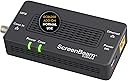
The ScreenBeam ECB7250S02 is a high-performance MoCA 2.5 network adapter that delivers up to 2.5 Gbps Ethernet over existing coaxial cables. Designed as a single add-on for existing MoCA networks, it enhances streaming, gaming, and work-from-home setups with carrier-grade speed and advanced security via MoCA Protected Setup. Compatible with most MoCA-enabled routers and devices, it offers easy plug-and-play installation without router reconfiguration, supporting up to 16 network nodes for seamless multi-room connectivity.


| ASIN | B08ML634YB |
| Best Sellers Rank | 86,046 in Computers & Accessories ( See Top 100 in Computers & Accessories ) 227 in Powerline Network Adapters |
| Box Contents | Coax Cable, ECB7250 Single Adapte, Ethernet Cable, Power Adapter, quick start guide |
| Brand | ScreenBeam |
| Brand Name | ScreenBeam |
| Color | Black |
| Colour | Black |
| Compatible Devices | MoCA/Ethernet/Wireless Extenders/coax |
| Compatible devices | MoCA/Ethernet/Wireless Extenders/coax |
| Customer Reviews | 4.4 out of 5 stars 373 Reviews |
| Data Link Protocol | Gigabit Ethernet |
| Data Transfer Rate | 2.5 Gigabits Per Second |
| Data link protocol | Gigabit Ethernet |
| Hardware Interface | Ethernet |
| Hardware interface | Ethernet |
| Item Dimensions L x W x H | 13.7L x 6.6W x 2.8H centimetres |
| Item Type Name | MoCA Adapter |
| Item Weight | 0.3 Pounds |
| Manufacturer | ScreenBeam |
| Manufacturer Part Number | ECB7250S02 |
| Model Number | ECB7250S02 |
| Product dimensions | 13.7L x 6.6W x 2.8H centimetres |
| UPC | 789286809483 |
| Unit Count | 1.0 count |
A**E
Compatible with the ECB6250
Given the number of properties in the UK with coax distribution, this is an excellent way to link rooms together. Purchased the ECB7250 add-on to work with an existing ECB6250 starter kit pair. It's worth nothing that despite the manufacturer's table, this IS compatible with the ECB6250. The difference being that the ECB6250 has a 1Gbps ethernet port and the ECB7250 has a 2.5Gbps ethernet port. It's unlikely your network equipment will have a 2.5Gbps port (nothing I do has one) so it'll work at 1Gbps perfectly fine. In theory, the ECB6200 should also be compatible, even though the 6200 runs MoCA 2.0 and the xx50 models run MoCA 2.1 but as I don't have any 6200s I can't test. Other than that, the three devices now work perfectly and we've got three rooms connected.
G**.
Great alternative to routing ethernet cables
Had decent WiFi speed of around 300Mbps but now have a more stable speed of around 940Mbps. Obviously not as good as ethernet, and much more expensive but save lots of hassle. Another downside is the running cost since these are powered units consuming around 10 watts per pair when active and virtually nothing when idle. Nevertheless I'm happy with them.
A**C
Saved my pre-wired coaxial setup and network integrity/speed going to Verizon FiOS
Some background. My house is prewired with coaxial. The coaxial comes from the outside and into my house. When I was using Optimum the setup was simple. Optimum just connects the cable from the pole to my existing cable outside my home and the signal is brought inside to my house on the 1st floor. There, I plug in my cable modem and my router (Netgear Orbi RBK53S and later an Orbi RBK753S). My setup was perfect. The Orbi has a "good" status for the backhaul and all my devices had as advertised WIFI speeds and solid connections. So why do I need this MoCA adapter? Optimum did not want to keep me as a customer, so I switched over to Verizon FiOS, who offered me more for less $. I already had FiOS before, and the ONT was in my walk-in. When I had FiOS years ago, they were still using coaxial so the same setup applied as with Optimum. The installer just had to install the ONT and then connect the coaxial from the ONT to my outside coaxial cable and the rest would be in my house (quantum gateway/router). Flash forward to present time, to my surprise, the installer told me that over 100MBPS, it is no longer coaxial, and they have to run things through ethernet. I don't have prewired ethernet, and I don't want him to redo the ONT install in my house and run wiring all over. So I told the guy to keep everything the way it was, I'll move the Orbi downstairs since its a mesh router and it should be fine. But it was not. The Orbi positioning was out of whack now. Sometimes a satellite would go out of sync, and another would just show poor. Most of my devices were showing poor performance overall. Before you ask did this guy try resetting the setup for the Orbi. Yes, I initially plugged and played, however I ended up doing a full factory reset setup on the Orbi. So with my frustration, I looked for ways to potentially convert coaxial to ethernet so that I can reuse my pre-existing coaxial setup and position the Orbi router/satellites back to where they were. Which brings us to this Actiontec MoCA adapter. Prior to my recent Verizon install, I had purchased a G1100 router refurbed for less than $40 as I did not know VZ had gone to the ethernet route and I can use any router; not just their routers. Anyways, this purchase turned out to be vital to my setup. My current setup is this and it works perfect for me: Pre-existing ONT in the walk-in. G1100 connected to the ONT next to each other via ethernet WAN. A coaxial cable is plugged into the G1100 router (which switches the coaxial to LAN). This coaxial cable from the G1100 is then connected to my pre-existing coaxial cable that was outside and then brought the signals into my house. From there, I plugged in this Actiontec MoCA adapter via coaxial. The ethernet from the MoCA adapter is then plugged into my Orbi router. I rearranged my Orbi router/satellites back to how they were originally. I switched the Orbi to AP mode as my Qnap NAS had trouble recognizing the dual router setup when I had the Orbi set as router mode with the G1100. Now my network is back to peak performance. Advertised speeds, and stable internet. I'm glad I found this adapter as if this did not work, I would have had to drill a hole through the floor and run ethernet to where I keep all the networking equipment. This adapter saved me from all that hassle.
E**N
Great MOCA adapter
This is my third unit and it works like a charm.
J**H
Amazing value for the speed increase you get
Love these, they work very well allowing me to use my coax cable all around my house. Who would have thought I could use old cable to get gigabit speeds. I have 3 of these without any issues.
D**E
Plug-n-play extension of wired ethernet throughout the house!
I have a larger house, and while the wifi signal of my router is able to get everywhere, the speed definitely is a bit lacking in many areas. Unfortunately the house wasn't built with ethernet in mind but it does have plenty of coax that I'm not using as the TV system is all wireless. Initially, I got a unit to connect my daughter's system in the basement to get faster connection speeds and it worked great. Plugged it in on both sides, and that was all we had to do to get going. It just worked. My wife's work laptop stopped being able to VPN over wifi but worked fine on ethernet after her work made some software changes. So I got an additional receiver, and after getting it plugged in, she was up and running without issue. I can't speak to how this would work in a house that is sharing coax with a cable modem or with TVs on coax. I get internet over a fiber ISP, and my TVs all just stream over wifi. Also my coax is not connected to anything outside the house so I don't have anything sharing my coax lines. With that setup, it works great.
M**X
Great!
Works great, high speed internet to the end devices.
Trustpilot
3 weeks ago
5 days ago