Buy anything from 5,000+ international stores. One checkout price. No surprise fees. Join 2M+ shoppers on Desertcart.
Desertcart purchases this item on your behalf and handles shipping, customs, and support to Austria.
๐ Double your screen, double your impact โ work smarter anywhere!
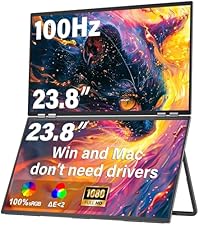
The InnoView Dual Portable Monitor features two 15.6-inch Full HD IPS screens with 1920x1080 resolution, offering expansive multitasking capabilities in a sleek, foldable design. With 315ยฐ screen adjustment and versatile USB-C/HDMI connectivity, it supports plug-and-play for Windows and driver-assisted Mac use. Ideal for professionals on the move, it combines portability with powerful display performance, backed by an 18-month warranty and dedicated support.


| ASIN | B0DS4N8YJT |
| Adaptive Sync | FreeSync |
| Additional Features | Portable |
| Aspect Ratio | 16:9 |
| Best Sellers Rank | #3,135 in Electronics ( See Top 100 in Electronics ) #126 in Computer Monitors |
| Brand | InnoView |
| Brightness | 300 Candela |
| Built-In Media | 30W adapter, Full-featured Type-C cable, HDMI cable, Type-C power cable |
| Color | black |
| Compatible Devices | Laptop, Mac, Smartphone, Windows |
| Connectivity Technology | HDMI, USB Type C |
| Contrast Ratio | 1000:1 |
| Customer Reviews | 4.2 out of 5 stars 952 Reviews |
| Display Resolution Maximum | 1920 x 1080 Pixels |
| Display Technology | LCD |
| Display Type | IPS |
| Hardware Connectivity | HDMI, Headphone, USB 3.0 Type C |
| Has Color Screen | Yes |
| Image Contrast Ratio | 1000:1 |
| Item Dimensions D x W x H | 8.5"D x 14"W x 0.85"H |
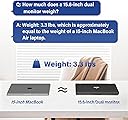
| Item Weight | 3.1 Pounds |
| Manufacturer | InnoView |
| Model Name | INVPM009 |
| Model Number | INVPM009 |
| Native Resolution | 1920x1080 |
| Number of Component Outputs | 2 |
| Picture Quality Enhancement Technology | HDR |
| Refresh Rate | 60 Hz |
| Resolution | FHD 1080p |
| Response Time | 3 Milliseconds |
| Screen Finish | Matte |
| Screen Size | 15.6 Inches |
| Screen Surface Description | Matte |
| Shape | Flat |
| Specific Uses For Product | Business, Entertainment |
| Total Number of HDMI Ports | 1 |
| Total Thunderbolt Ports | 2 |
| Unit Count | 1.0 Count |
| Viewing Angle | 178 Degrees |
| Warranty Description | Rest easy with our 30-day return policy and 18-month warranty. Our dedicated support team is always ready to assist you. |
| Warranty Type | Rest easy with our 30-day return policy and 18-month warranty. Our dedicated support team is always ready to assist you. |
J**D
Game changer for travel + working on the go
This monitor has been critical for my recent travels. Having a dual-screen setup without needing a full desk setup has made life 5000x easier. The setup is surprisingly easy, and it connects quickly without a lot of hassle. The folding design is super convenient for packingโit fits easily into my bag and doesnโt feel overly bulky for what it offers. Picture quality is solid and more than enough for everyday work like spreadsheets, emails, and presentations. I also appreciate how stable it feels once set upโit doesnโt feel flimsy like some portable monitors. Overall, this is one of those purchases that actually improves your day-to-day workflow. If you travel often or work remotely, itโs definitely worth it.
A**A
Works great with Mac very easy to use
Excellent product, very easy to use and truly practical for working with greater comfort and productivity. It includes 3 cables: one for power, a USB-C to USB-C cable, and an HDMI cable, making it compatible with different devices without needing extra adapters. In my case, I use it with a Mac and it works perfectly. I simply connected the USB-C cable, and the image was transmitted automatically. It allows you to work in both mirrored and extended display modes immediately. The image quality is very sharp, with excellent resolution and great color contrast. Text looks clear and images are well defined, which makes it ideal for working with documents, spreadsheets, presentations, or teaching. On the right side, it has physical buttons that let you easily adjust the settings, change display modes, and customize how the image appears on the screen. It is relatively lightweight, easy to carry, and fits well in a laptop bag. The mounting system is very practical and secure, allowing the screen to attach firmly to the laptop while still being adjustable to different angles. It feels stable and well supported at all times. It can work using only the USB-C cable, drawing power directly from the laptop, which makes cable management simple. It can also be powered with the dedicated power cable when needed, giving flexibility depending on the setup. The materials feel strong and durable, and overall, the product offers excellent value for money considering its quality, portability, and performance.
O**L
Excellent Portable Dual Monitor System
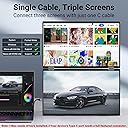
After we got the driver situation figured out, it is EXCELLENT. Using MacBook 2023 and it is an excellent addition for portability and continued productivity. Should have bought this a long time ago. With the MacBook, we're able to use the USB-C cables and avoid the HDMI which limits screen usage to just a dual monitor system. With the USB-C cable, we can have 3 screens which is what we wanted. We initially installed the power USB-C cable for the monitors into the computer and inadvertently were using the video USB-C cable for power. There is a little tag on one of the cables that tells you "This is for power only." Yeah, we didn't read that and had the cables backwards. That led to having to download the driver from the manufacturer website. Of course it still didn't work after we installed the driver from the manufacturer. Getting frustrated and about to give up, I had the thought to check the USB-C cables and sure enough, they are slightly different thicknesses and foudn the "This is for power supply only." tag. We switched them and with the driver already installed, it worked exactly as expected. (You have to go into Settings and choose the display and configure it like you would any other additional monitor.) Had we plugged in the right cables the first time, I am confident the monitors would have installed on their own without any problems as others indicated has been the case. The screens themselves are sturdy and the picture clarity is great. Stand is sturdy and the hinges hold the top screen without any issues - solid feel. I can run the screens from the laptop without a power supply to them from the laptop by itself but obviously that will drain your battery. It is nice to know it can be done. I haven't tried running the screens from the powered laptop but I'm sure that would work as well. They recommend using the additional power supply. Very happy, would recommend and I will probably buy one for myself at some point, this one was for my spouse.
J**N
Great Portable Monitor with Some Docking Station Quirks
Overall, this InnoView 18โ 2K portable monitor is a great product. The display is crisp, the 100Hz refresh rate makes everything feel smooth, and the dual-screen foldable design is excellent for multitasking on the go. I especially appreciate how lightweight and stable it isโitโs perfect for travel or moving between workspaces. That said, Iโve had some compatibility issues with my Surface Studio docking station. The monitor doesnโt always work properly unless I plug both cords directly into my laptop, and even then, there are times when my device doesnโt detect both screens. Another quirk is when the device goes to sleepโI sometimes have to unplug and replug the monitor to get it working again. Despite those minor frustrations, I still really like the product for its portability, stability, and performance. Itโs a great solution for dual-screen productivity without needing drivers, and Iโm hoping future updates might improve compatibility with docking stations. Many of my coworkers want one now.
O**E
Excellent dual monitor, great value
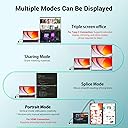
Excellent dual monitor for the money! It has two USB C ports, one of which is for power supply (included in package), the other for connecting to your computer. Doesnโt matter which port is for which, but you must supply power. So this means a single C port is used for video connection which further means the two panels are treated as a single monitor by default. This last point has ramifications for Mac users (Iโm not sure about the other operating systems). My attached photo shows this InnoView dual monitor (each panel 18.5 inches) connected to my MacBook Pro M3 Max in docking mode, together with a LuckyFive 24-inch WQHD monitor. Out of box when connected to a compatible Mac, the InnoView is in โsplicing mode,โ which means the two panels are used as a single vertical monitor. You can also, of course, use InnoView in mirror mode, where both panels duplicate the main screen, great for one-on-one sales pitches. To use the two panels as separate monitors, on the Mac youโll need to install a driver thatโs supplied from the monitor itself. The instructions are clearly given, although the steps are a little involved if youโre not used to installing drivers on a Mac. Not too bad if you want this โextend modeโ (meaning two separate monitors). I didnโt do this. Instead I simply stay in splicing mode but rely on Macโs windows arranging functions to place windows on the InnoView as I like. Macs remember windowsโ positions as long as you donโt update the system and restart, so itโs pretty straightforward. The InnoView panels are each 1080p in resolution, with refresh rates of 60, 75 and 100. The frame is well made and the stand can stop at different angles and support the monitor securely. Image quality is very good for a 1080p monitor. And in splicing mode, the total resolution is 1920x2160. If you trade or code for a living and your desktop space is limited, I highly recommend this InnoView dual monitor. Just make sure your computer supports external displays, especially if you want to use InnoView in extend mode where the two panels display contents independently.
A**K
Size/$. Ideal price great value. Nice, nice display, but now
Outstanding option for large screen area and portability. I bought as a stop gap for a broken 14โ MBP screen, Was not expecting much. Overdelivered. ((Caveat!!! I am not a gamer so my use NOT game oriented!).. That being said, for ease of setup - 5 Stars - est to unpack and setup. 10 minutes max, chilling no rush or stress, 5 or less of in a hurryI am on a Apple Mac Book Pro Silicon latest MacOS. Ease of use - working right out of the box - 5 Stars More setup option available but.having to plug I HDMI usb C and power cord and done? Yes please. Satisfactions of daily use -5 Stars. Now I use for drawing, painting, video, and web crap. I have large quality monitors for my Mac mini m4. And I am thrilled in general just its performance for what I need. I apologize not a spec guy. If it works, decent price I am generally satisfied for my daily user. Colors were bright, fresh, Realyl nice to work on. Size - 5 Stars- at least double to a fourth added to viewing area. Or in my case a sub-$200 screen vs. $700 smaller screen. If you are looking at a fair price, very, kind huge display area. Stop and spend your cash with this scree,
A**A
External Power Is Required to Use Both Screens
I like the display quality and the idea behind the dual-screen setup, but one major downside is portability. The monitor seems to require external power to work reliably, especially when trying to use both screens. I expected a USB-C connection to provide both video and enough power from a newer MacBook, but in practice I had to keep it plugged into a power source.For a product marketed as a portable dual monitor, needing a wall outlet significantly reduces convenience for travel, remote work, or using it in places without easy access to power. It would be much better if both screens could run directly from a modern laptop through USB-C alone.Good concept, decent image quality, but portability is more limited than expected.
A**R
Awesome Monitor
Crystal clear 4K monitors. Both monitors operate with a single usb c connection and my laptop gets power from the monitors once I started using a100W power supply connected to the monitors. Light, thin and easy to transport from home to office when needed. I would have given 5 stars except occasionally in the morning after being in standby all night the monitors will not power back up unless I unplug power for a minute and plug back in. A little annoying but all is okay once they reset and power back up.
H**U
A must have monitor for working on the go!
Since the pandemic there has been a major shift of office work to partly working from home. This also meant that sometimes I have to take my work somewhere other than my home office. Having this monitor drastically improved my work efficiency. The monitor is very bright and the resolution is very sharp. As advertised it has the ability to splice the screen if you are a programmer to view long pieces of code. The build quality is really solid where one might have concerns. It has a strong built-in kickstand to prop up both monitors. The hinges are not flimsy at all and there is no wobble for the second monitor on top! Since this is an 18.5โ monitor it is actually large enough to practically mount it as part of your desktop suite. As you can see from my pictures that the design has included standard VESA holes that you can make this mountable. Overall a very solid product and would highly recommend
B**E
Waste of money. Within 6 months bottom half of screen stopped working
Monitor started off great. All functions worked and could use it as 3 separate screens. Within 3 months the 3 screen function stopped working which was the main feature I was looking forward to using. Support was useless.. told me i was incorrectly using the cables; I was not. I fully detailed how i was connecting it, and asked for next steps then never heard back. 2 months later, now the bottom half of the screen sometimes doesn't turn on at all. Would strongly recommend against this product as support is useless and it was a waste of my money :(
I**S
Awesome Screen Extender.
I had a double screen extender that attached to my laptop and it was a little cumbersome. I saw this one and it was much larger with two a double screen and isn't attached to the back of the laptop so I purchased. The color is amazing and it sure helps me in doing my work. It's tops in my book. I highly recommend it.
D**N
Nice monitor
Great monitor
E**S
Must have
Beautiful 2 x 18.5" screen , nice resolution
Trustpilot
1 month ago
3 days ago