Desertcart purchases this item on your behalf and handles shipping, customs, and support to Austria.
โก Power up your data game with the ultimate all-in-one SSD dock!
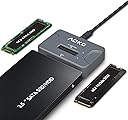
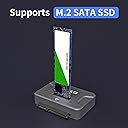
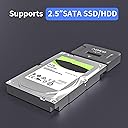
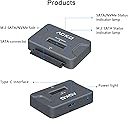
The AOKO NVMe to USB 3.2 SSD Reader Docking Station is a versatile, portable adapter supporting M.2 PCIe NVMe, M.2 SATA, and 2.5'' SATA drives. Featuring USB 3.2 Gen 2 speeds up to 10Gbps, plug-and-play compatibility across Windows and Linux, and a smart vertical design for heat dissipation, itโs the perfect tool for IT pros and data enthusiasts who demand speed, flexibility, and convenience on the go.


| ASIN | B0BDLZQCJY |
| Best Sellers Rank | #46 in Enclosures |
| Brand | AOKO |
| Built-In Media | NO |
| Color | black |
| Compatible Devices | 2.5 inch sata ssd/hdd, m.2 nvme ssd, m.2 sata ssd |
| Customer Reviews | 4.3 out of 5 stars 308 Reviews |
| Hardware Interface | USB 3.2 Gen 2 |
| Manufacturer | AOKO |
| Mfr Part Number | M2 SATA/NVMe or 2.5'' SATA Read |
| Model Number | M2 SATA/NVMe or 2.5'' SATA Read |
| Number of Ports | 2 |
| Total USB Ports | 1 |
| Total Usb Ports | 1 |
| UPC | 706409439914 |
| Warranty Description | 1 |
G**T
Compact, Reliable SSD Docking Station for IT Professionals
As someone who works in IT and frequently handles data recovery, this docking station has been a lifesaver. It supports both NVMe and SATA M.2 drives, eliminating the need to carry multiple adapters, a particularly convenient feature when youโre unsure of the drive type youโll encounter. Transfer speeds are excellent, taking full advantage of USB 3.2 for fast and reliable data movement. In practice, Iโve been able to copy large files and images quickly without any bottlenecks, which is critical when working in the field. The unit is completely plug-and-play, requiring no external power. Itโs compact, small enough to fit in a pocket, and includes a USB-C to USB-A adapter, making it compatible with both modern laptops and older systems. I originally purchased one for myself, but after seeing how useful it was, I had my company buy four more for our vehicles and offices. That way, everyone has access without needing to borrow mine. Between the speed, portability, and versatility, this dock has more than paid for itself. If mine ever breaks, I wouldnโt hesitate to buy another.
N**N
About time!
Iโve been looking for something like this for years that supports both SATA and M.2 and so happy this worked for me for both types of drives. My older adapters only worked for one or the other. I recently used this to come one drive to another, cloning an older SATA NVMe drive to a M.2 and it was so easy and painless. I had two of these used on the same computer to transfer between one directly to the other using Clonezilla in KDE Neon Linux. No special drivers were needed in either Linux or Windows either :) If I had to gripe about one thing, and itโs really very minor, it would be that these only included one USB cable which is a USB type C male to two USB type A male adapters, one for data and one for power. The secondary for power only seems to be needed when working with older SATA drives and likely only the 3.5โ drives that require additional power beyond SATA, unlike 2.5โ which typically can run off SATA alone. But thatโs really not even a problem because this cable does exactly whatโs needed. I just would have preferred another USB type C to USB type C like many others offer but itโs not a big deal because you typically have a few on hand.
E**K
Exposed as mass storage device and not NVME device
I was able to use this device to transfer data from an old NVME to a new NVME after doing a replacement. I have used this adapter successfully for both M.2 SSD and NVME drives. Although keep in mind that it shows up as a mass storage device and NVME tools won't work when connected to the adapter. One thing I would have liked to do would be format namespaces for securely erasing data. In fact you don't even see the namespaces so I assume it's only exposing namespace 1? This limitation might not be possible to overcome unless you have a USB-4/Thunderbolt adapter and it gets exposed as a PCI-e device. I had this connected to a USB-C 3.1 port, which offers 10Gbps (which is the link speed I was seeing on the port in Linux), but the transferred speed was around 300 MB/s, occasionally rising to 500MB/s. When the drive was previously directly attached being a PCI-e 4.0 NVME drive it was getting up to 4 GB/s. EDIT: I was using this dock once again to erase a 2.5" SATA SSD. I can confirm this device supports UASP, or USB Attached SCSI, which means you can secure erase a SATA SSD with this external device. This was really handy for me so I didn't need to open up my desktop.
T**N
Reliable and fast
Very versatile and so far has read everything I've put in it.
D**G
Handy Storage Adapter
This Adapter worked as advertised. It is plug and play, and I haven't had any issues useing various media with this adapter. This adapter is not an enclosure, and I wouldn't recommend it for permanent media access. I got it so I could connect spare drive to my PC for temporary use such as backups or retrieving data from older storage.
A**D
Good
Item as expected. Good product. Thanks
S**A
Afraid of it.
I have used this on SSD's up to 2 TB and it works great. I needed to access a couple of PCIe's and my hopes were smashed. The smaller, less than 500 GB worked like the SSD's but when I plugged in a 1 TB Kingston KC3000 PCIe 4.0 NVMe M2 it worked but got hot, very hot before I noticed it. It was working in my laptop just fine until I replaced with a 2 TB one. I don't know if it is damaged while getting hot and haven't had time and actually a bit afraid to reinstall in in my laptop to check it out. I hope it wasn't damaged but can't say for sure yet and don't know when I'll get time to take the laptop apart again as it is daily use.
J**.
Didnt work for all cards.
Didn't read all my SSD cards. Not sure why but returned it anyhow.
Trustpilot
1 month ago
3 days ago