Desertcart purchases this item on your behalf and handles shipping, customs, and support to Austria.
🛫 Elevate your flight game — command the skies with VelocityOne precision!
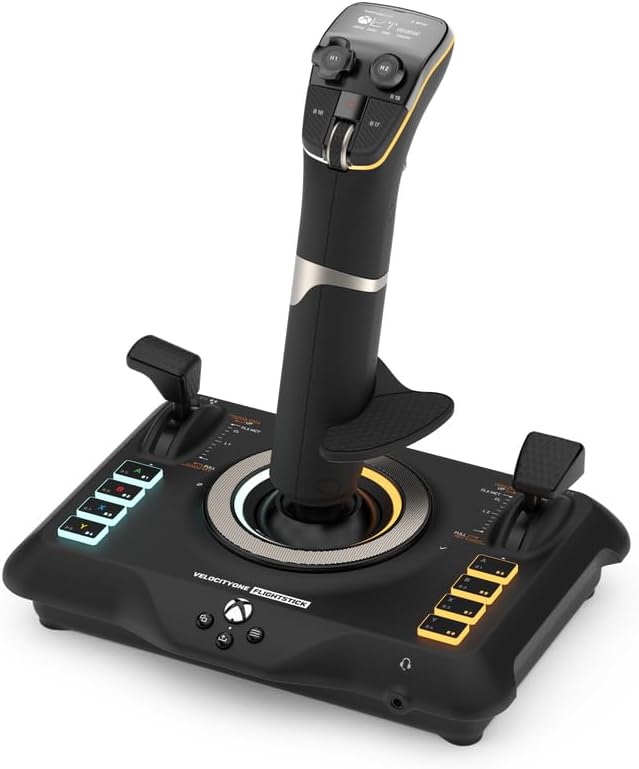
The Turtle Beach VelocityOne Flightstick is a high-precision, ambidextrous joystick designed for Xbox Series X|S, Xbox One, and PC flight simulation enthusiasts. Featuring 27 programmable buttons, 8 axes, an OLED Flight Management Display, and customizable RGB lighting, it offers unparalleled control and immersion. Its non-contact sensors ensure durability and accuracy, while multi-function throttle and flap levers with swappable heads adapt to any aircraft. Compatible with top flight sims like Microsoft Flight Simulator 2020/2024 and Elite Dangerous, it’s the ultimate tool for serious virtual pilots.


| ASIN | B0BHTPP71M |
| Additional Features | Ergonomic |
| Best Sellers Rank | #3,238 in Video Games ( See Top 100 in Video Games ) #12 in PC Game Flight Controls |
| Brand Name | Turtle Beach |
| Button Quantity | 27 |
| Color | Black |
| Compatible Devices | Windows, Xbox One, Xbox Series X |
| Compatible Video Game Console Models | Microsoft Xbox One, Microsoft Xbox One S, Microsoft Xbox One X, Microsoft Xbox SERIES S, Microsoft Xbox SERIES X |
| Connectivity Technology | USB C |
| Controller Type | Joystick |
| Customer Reviews | 4.3 4.3 out of 5 stars (1,932) |
| Global Trade Identification Number | 00731855007226 |
| Hardware Platform | Desktop, Gaming Console, Laptop |
| Included Components | 10ft/3m USB-A to USB-C Cable, M5 Screws (3), Quick Flight Guide, VelocityOne Flightstick |
| Item Dimensions | 6.46 x 8.54 x 9.07 inches |
| Item Type Name | Game Controller |
| Item Weight | 1.81 Pounds |
| Manufacturer | Turtle Beach |
| Manufacturer Part Number | TBS-0722-05 |
| Model Name | VelocityOne Flight Stick (TBS-0722-05) |
| Model Number | TBS-0722-05 |
| Package Quantity | 1 |
| Power Source | Corded Electric |
| UPC | 731855007226 |
| Warranty Description | 1 year limited manufacturer |
R**N
Great stick!
This has been awesome for flight simulator 24. I'm playing it through Xbox and it works great. The only thing that it doesn't seem to register is the trim wheel, but I just decided to use a different button for it. Not a big deal. Everything else seems to be working great and definitely makes the game a lot more interesting than using a controller. If anybody else is having the same problem I had trying to play flight simulator through Xbox cloud gaming..... (I have an Xbox One s which does not support the game hardware wise)....But if you have a PC that can support the game, you can download the Xbox app on your PC and then play the game with a stick that way. Because Xbox cloud gaming does not recognize this stick as a peripheral.... BUT hooked up to a PC with the game locally downloaded will register the stick so you can play as long as the stick is in PC input mode.
G**Y
A Very Comfortable Joystick
So, I started playing War Thunder and I was using the Logitech 3D Extreme and after some time playing in the simulator mode, I realized I wanted to upgrade to a more quality joystick that had more features (buttons) that would suit my game play. I saw that Turtle Beach offered the Velocity One joystick listed on Amazon and after reading a few reviews and watching a couple YouTube videos I decided to go ahead and invest in one since I already owned the Turtle Beach gaming headset and ordered the joystick through Amazon. Now that I have been using it for the past three weeks, I can give an honest review. I love it. There are so many ways you can configure this stick and it comes with more than just extra buttons... it's got two throttles and a middle mouse wheel along with a touch pad to control the mouse pointer. It is unique in that you can adjust, calibrate, modify and do everything right on the stick that has a small navigation screen you use to adjust your settings. I could even adjust the audio and mic settings on the Turtle Beach gaming headphones right on the stick which is so cool. You can even change the button lights right on the stick for heaven's sake! Since I am a PC player, I cannot speak to how it performs on Xbox, but it does have a compatibility feature that enables a player to use it on an Xbox console. You just have to go to their website and download and install the new firmware version. You should do that whether you are a PC or console player right off the bat. It was painless for me. There is one thing that I must admit that I don't use on the stick and that is the mouse pointer pad. It is so sensitive that even the slightest touch will activate the mouse pointer when you don't want or have the need for it, so I turn that feature off. But it is really unique that it has that feature. One other thing I experienced when I first started using it is that it may seem a little stiff at first, but once you use it for a few hours it seems to get "broken in" and now it is very comfortable for me, I think that's due to the heavy spring that is inside. It can be configured for right or left-handed players and the palm rest is height adjustable in case you have large or small hands. I play a lot of War Thunder and this joystick has performed perfectly for me. I honestly feel that I really got my money's worth, and it is absolutely an upgrade from my Logitech's 3D Extreme stick. A solid 5 stars from me.
E**R
This product is not for Xbox players
FOR ANYONE LOOKING TO GET THIS FOR XBOX: Fairly nice feeling build quality but still 90% plastic. The flight stick is EXTREMELY stiff and did not come calibrated correctly as I had drift. The buttons are satisfying and the screen was nice and clear. This would be a nice simple starter stick ON PC. On Xbox this is pretty much useless unless all you play is Microsoft Flight Sim. The “compatibility mode” meant for use with games like War Thunder have extremely limited functionality and are very unsatisfying. Please do not get this for Xbox you will waste time and money.
G**O
Amazingly good.
Great for Glider/Center stick SIM. Multiple programmable switch options and great slides.
J**.
Super good for the price!
The materials used are super durable and feels nice and heavy. Not like cheap plastic. All the buttons and levers feel very nice. I use it in both Microsoft Flight Simulator and X-Plane 12 and it works almost flawlessly in both. The only issue is the trim. If I let autopilot control my trim for a bit, it doesn’t sync that with the controller, so when I disengage autopilot and it swaps over to user controlled trim, it can very easily mess the flight up. The only solution to that is to use the trim wheel as a button input, not an axis. Which works, it’s just a little slower. The options and customization is super cool and allows for a lot of things. I highly recommend this flight stick to anybody
A**D
Awesome
Use this for MSFS2024 and it's amazing! Its adjustable for left or right hand and adjustable for height. Works great and simple to set up
T**J
Very disappointed.
Unfortunately, doesn't work... Plugged it in to Xbox X and it worked to navigate all xbox functions but when you start either MSFS 24 or War Thunder it doesn't work at all. I contacted Turtle Beach Tech support and they direct me to upload a youtube video showing the issue! No help at all! The problem was thoroughly explained in the tech support request. i'll be returning it and trying a Thrusmaster stick. Update: here's their response: "We will not be able to proceed without the video requested I need to see the issue and verify it, then I will decide on the best next steps for troubleshooting This is standard for our troubleshooting process of this device, and I will need it to proceed. Please reply with the video of what was asked for when you are ready to proceed, thank you!"
C**N
Good product.
Good product works on Windows 11 with the presentation already in place and easy to use.
Q**.
Convenient
Quality
P**R
Outstanding Flight Stick
Great value for the price, a real bargain. Ease of setting up was really non stressing. Typical Turtle Beach Product, Quality.
M**O
Flight Stick turtle beach
Questi Flight Stick si presenta in una confezione curata e ben strutturata. Al suo interno, oltre al controller, troviamo il cavo USB c. È possibile invertire il poggia polso sul dorso dello Stick per i mancini ed è anche regolabile in altezza con relative tacche di orientamento. Il feedback è buono, forse un po' troppo resistente al suo rientro in posizione centrale. Ha un ottima compatibilità grazie all'ultimo update che consente oltre alla modalità PC e Xbox quella per terze parti, ovvero per tutte quei giochi non ottimizzati dalla casa produttrice. Si dovrà soltanto eseguire una mappatura dei pulsanti. Sostanzialmente verrà letto come un normale controller. Le impostazioni sono davvero molte, relative a trim, sensibilità, inversione assi, colore dei led, luminosità display e led ecc. Il mini touch pad sarebbe davvero utile, peccato che ad oggi soffra di una sensibilità decisamente imprecisa. Il cursore viene mosso correttamente in basso e verso l'alo l'input non è coerente con il movimento del dito. Ha molti tasti fisici personalizzabili, molti inaspettati, che rendono il controller, utilizzato da solo, molto sfruttabile per tutte le shortcut utili a chi lo usa con il simulatore e non. Con Flight simulator 2020 si comporta egregiamente, lo utilizzo prettamente su Xbox series x. Mi è bastato impostare alcuni parametri per mia comodità ed ero già pronto al volo. Unica pecca ancora non risolta è che pigiando il pulsante home dell' Xbox il cursore tenderà ad andare in basso a destra senza fermarsi, il che rende impossibile spostarsi nel menù della dashboard. A livello di feedback non ho apprezzato gli spostamenti dal punto zero, troppo rigidi e accompagnati da un ticchettio un po' fastidioso. In conclusione lo trovo un ottimo prodotto e con un buon qualità prezzo, ha tutte le comodità per chi vuole usare mfs da console e dal punto di vista estetico è veramente piacevole.
J**D
VélocityOne
Parfaitement reconnu et intégré à Flight simulator 2020. Facile à programmer. Fonctionne bien. Certaines personnes regrettent sa stabilité sans doute pour des jeux de combat. Mais pour piloter dans l'aviation civile, il n'y a aucun problème.
T**E
جودة عالية
جودة عالية وفيها اكثر الخيارات لألعاب الطيران ... اقترانها سهل ... إن أمكن مكان مناسب لها لمتعة اكثر في اللعب
Trustpilot
2 weeks ago
3 weeks ago