Desertcart purchases this item on your behalf and handles shipping, customs, and support to Austria.
🎶 Ignite your live sets with color, control, and creativity!
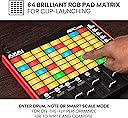
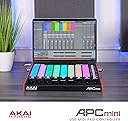
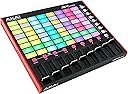
The Akai Professional APC Mini MK2 is a compact USB MIDI pad controller designed for seamless Ableton Live integration. Featuring a vibrant 64 RGB pad matrix, 9 assignable faders, and dual drum/note modes, it empowers musicians and producers to launch clips, mix tracks, and perform live with intuitive hands-on control. USB-powered and plug-and-play, it includes Ableton Live Lite and a suite of virtual instruments, making it the ultimate tool for creative looping, mixing, and live performance.
| ASIN | B0BPC32YZ1 |
| Best Sellers Rank | 1,305 in Musical Instruments & DJ ( See Top 100 in Musical Instruments & DJ ) 6 in MIDI Controller |
| Brand | Akai Professional |
| Brand Name | Akai Professional |
| Colour | APC Mini - black |
| Compatible Devices | Computer (Desktop/Laptop) - Windows or Mac |
| Connectivity Technology | USB |
| Connectivity technology | USB |
| Connector Type | USB |
| Control Method | Touch |
| Control Type | track faders, clip launching |
| Country of Origin | China |
| Customer Reviews | 4.4 out of 5 stars 3,240 Reviews |
| Global Trade Identification Number | 00694318025604 |
| Hardware Interface | USB 2.0 Type B |
| Hardware Platform | General-Purpose |
| Human Interface Input | Buttons |
| Included Components | APC mini mk2, Quickstart Guide, USB Cable, Safety and Warranty Manual, Software download card |
| Instrument | digital audio workstation |
| Instrument Key | Any |
| Item Dimensions D x W x H | 20.8D x 23W x 3.5H centimetres |
| Item Highlight | 64 RGB Pads, 9 Faders, Drum and Note Mode, 1:1 Mapping for Ableton Live, for Live Performance and Music Production |
| Item Type Name | AKAI Professional APC Mini MK2 - USB MIDI Pad Controller for Clip Launching with Ableton Live Lite, 64 RGB Pads, Drum and Note Mode and MIDI Mixer |
| Item Weight | 810 Grams |
| Keyboard Description | Ergonomic |
| Manufacturer | inMusic Europe Limited |
| Manufacturer Part Number | APCMINI2 |
| Material Type | Durable High-Grade Plastic |
| Mixer Channel Quantity | 9 |
| Model Name | APCMINI2 |
| Model Number | APCMINI2 |
| Model Year | 2023 |
| Model name | APCMINI2 |
| Noise Control | None |
| Number of Items | 1 |
| Outer Material | Velvet |
| Platform | Mac, Windows |
| Product Style | APC Mini |
| Product Warranty | 1 year manufacturer. |
| Product dimensions | 20.8D x 23W x 3.5H centimetres |
| Size | 240 x 210 x 32 mm |
| Special Features | RGB backlit pads, USB powered, drum and notes mode, pre-mapped for Ableton Live, production software included |
| Special feature | RGB backlit pads, USB powered, drum and notes mode, pre-mapped for Ableton Live, production software included Special feature RGB backlit pads, USB powered, drum and notes mode, pre-mapped for Ableton Live, production software included See more |
| Supported Software | Ableton Live |
| Total USB 2.0 Ports | 1 |
| Total USB Ports | 1 |
| UPC | 694318025604 |
| Unit Count | 1.0 count |
M**N
Great upgrade to teh previous model but ...
AKAI have done well with this. It is cheap and yet feels a fraction more robust than the previous model. The sliders are a touch more "smooth" The RGB pads are also great so you do not get "Lost" in the 64 pad matrix. I was thinking of knocking off a star or two for two reasons (but then I remembered that most people will buy this for working with Ableton). I did try it quickly with Ableton and it is a great budget midi controller with super portability. However, we use MIDI controllers for many purposes and so the documentation is important. We have 8 of the old APC pro mini and they have served well, mainly as midi controllers for our lighting suite for small to medium events. We have had three failures on the old controllers (all USB connector problems). We have resoldered in one which is holding up. It is now pretty difficult to find NEW Mk1s and so we looked at many midi controllers from £50 to £1000. For our purpose there was really only this one that ticked the boxes we needed. We needed to paginate the controller, to have at least 8 rotaries or sliders and be able to map main pages that are 6 by 5 with extra pad control available. For around £100 with a case, these are great value. When I unboxed this one, it feels and looks a tad better than its predecessor. Sadly it is also a little bigger and so we have to get more cases but that is small beer. I "assumed" which was very silly of me that this would be a simple plug and play with the same basic coding to the previous model and that we could get the RGB colours sorted afterwards. Sadly this is not the case. The documentation is not complete and so you have to guess at some of the coding and we will be making a quick youtube and making a spreadsheet of eh coding available shortly. The main 64 pad centre has the same note keys and the sliders are 100% compatible to the Mk1. The bottom and right side small pads have different notes and so we had to remap those before starting. The default brightness is the dimmest and very much TOO dim for a normally lit workplace. The colours are a prescribed list of 127 and there is documentation on the RGB codes for each value but no help on teh actual colours. Unless you are well versed in reading RGB hex codes then you might need a side list to indicate roughly what each code represents as a colour. We do read HEX and RGB but even then the documentation was painful to go back and forth. We are fortunate in that we can fully control our midi control stream and feedback to the mid controller and so almost 24 hours later we can see how to get this controller to light up on bighter settings, but for those using it as plug and play they might have a bit more difficulty or they might simply not know that actually the pads are much brighter. One other worry is the USB connector. They are of course a weak point for portable equipment but they have been more problematic on the old controllers. It looks like the actual connector on the new boards is the same. An old school USB 4 connector that does not quite go in all the way. We will wait and see if my fears are out of place and of course we will be taking extra care of that bit. Overall, this a a great piece of kit and we will buy another 8 to upgrade all our MK1s. If you are considering it as an entry into using a midi controller with Ableton or some of the DJ software then it is stunning and you should be using it within seconds of unboxing. If you need to customize the MIDI then look for our documentation supplement as AKAIs is woeful. If you are upgrading from MK1 to MK2 note that you WILL have to remap the outer pads and do something about the velocity and value settings. Have fun and make music, lighting or whatever.
J**Z
Great quality akai
Quality product from akai ….does what it says on the box just make sure your pc or laptop has a good chip and ram size and use a 1tb ssk for storage
M**Y
Great controller for Ableton
This has been a really useful Controller for me using Ableton. I liked the easy of use and especially the touch controls when performing. They are easy to assign in Ableton. Would definitely recommend but with alternatives out there, it’s worth reviewing what your actual needs are. I prefer this over some of the other Akai controllers but that’s down to how I like to use Ableton.
D**N
Great value Ableton Live controller
The Akai APC mini MK2 is designed to control Ableton Live music production software (Lite, intro, standard or suite, version 11.2.7 and above), primarily in Live’s ‘session view’. It is extremely portable and should fit into the side pocket of an average laptop bag. The device is truly ‘plug and play’ via the provided lead into a single USB socket. I plugged it in to my laptop, started Ableton Live and it worked. Simple. A coloured outline appears around the visible screen clip slots to confirm that the APC mini is working properly. A user guide is included in the box with the correct configuration settings, just in case. Full control over clip and scene launch is available as well as track solo, mute, stop, record and track select. The built-in manual faders (not motorised) can be used to control track volumes and Ableton Live’s devices. The pad colours reflect the ‘on screen’ clip colours, all hopefully making Ableton Live more user friendly. Also included is a ‘note mode’ for playing instruments (VSTs) and a ‘drum mode’ for finger drumming and beat creation. To be honest, I found ‘note mode’ a bit awkward. I prefer to play notes on a midi keyboard. Having said that, it’s still completely usable. If you don’t have Ableton Live, the included free ‘Lite’ version (download) provides 8 tracks (midi/audio) and 8 ‘scenes’ plus 2 send and return tracks (reverb and delay) and a master track. It also includes a shed load of instruments, samples, drum loops, effects etc. The APC mini Mk2 has to be registered on the Akai website first to generate an Ableton Live activation code. A card is included inside the box with the Akai website address. Note: The current version of Ableton Live is 12 (as of 16/04/2026). It’s advisable to check that your computer/laptop meets the correct operating requirements. These can be found on the Ableton website. Ableton Live 12 will not install if it doesn’t. In conclusion, The Akai APC mini is a fun device and is excellent for home use or playing ‘live’ gigs with Ableton Live and a laptop. IMO it provides great value at this price point.
A**R
Very good but poor pad sensitivity
I bought this to interface with ableton live 12. It is impressive value for money and mostly suits me well. I already had an apc25 mk2 which worked well and I expected the apc64 to replace. Unfortunately it doesn't. I've found the sensitivity of touch pads to be disappointing they are nothing like as good as the keys on the apc25. Even with light touch selected in app the I have to press far too hard to get maximum velocity. I've wasted 3 days using the several live Midi effects to try to compensate but without a satisfactory result. I'm now using the apc25 together with the apc64 and this is a very powerful setup which I would recommend as the best solution to the problem but I'm still quite limited in the way I use key and chord on the apc64 without satisfactory velocity sensitivity. Since writing the above I've found that the velocity tool in Kontakt 8 does work to give fair sensitivity but not as good as my apc25. Probably good enough for drums but not the more delicate touch needed for melody I'm guessing that in the end the quality of the pads is the issue
L**Z
Takes a bit of knowledge and also register before you attempt to
Would of been 5 stars but was really hard to set up and get sound coming out,also listed as a sequencer but not really a sequencer ,although it is fun to use
I**.
Poor build quality, tons of bloatware, confusing to use.
First things first... There seem to be a lot of glowing reviews here. But a quick look will show that many of them are not actually for the APC64, but for the APC25 or the APC Mini, which are very different devices (I have the APC Key 25 and yes, that's good for the price that it is). But The APC64 is a very different thing, and costs roughly double what those do. . Next up, be warned, once you have registered this and are about to claim what looks like tons of free software, DON'T!! There's a reason that AIR software comes free with everything ever, it's garbage bloatware! Even the included plug-in manager here is just bloatware. It's ridiculously sluggish, and 95% of what it's there for is to fill your computer with adware and trials. Just register your APC64, check your firmware is up to date, claim your free copy of Ableton Lite, and just forget the rest. The only other worthy software here is the MPC DAW, but the included plug-in manager can't even manage to download that. You are better off claiming your free copy the normal way (MPC Beats is always free) while you are on the Akai website. . Also, the build quality of the APC64 feels a little creaky to me, especially for the cost compared to the other APC's i mentioned earlier. The APC Key 25 is cheaper, but this FEELS cheaper to me, and not just a little. . But my most negative comments have to be for actually using this thing. Whoever says that the APC64 is intuitive is (IMO) subscribing to the moto of ''Make the lie so big that people will think that it can't possibly be a lie.'' Because intuitive is the very opposite of what the APC64 is. . It is supposed to be plug and play with Ableton, but just trying to use it's drum pads setting and the basics don't even line up. Even devices from the same company that are a tiny fraction the cost of this (the LPD8) are way better at that. I can't even fix the issue with MIDI mapping as that seems to be just a fantasy here. Plus the touch sensitive strips are far to sensitive and rather than solving any problems, they ARE the problem. And it certainly doesn't help that, even brand new, their design team thought it would be a good idea to have the writing on the buttons look like it's already worn away by years of use, so you don't know what the hell you are doing until it's done. . Whoever designed this has obviously never played live. .
A**R
Great controller from Akai - thanks for resuming production.
Probably the best controller for Resolume and great for Ableton. So pleased they have resumed production after discontinuing a couple of years ago.
P**L
Parfait
Juste le top avec ableton Très bonne qualité de fabrication
W**T
good quality keyboard controller
professional controller
R**N
More than it seems
There are a lot of reviews for this as a DAW. This isn't one of them. Welcome to my newest DJ Deck. My greatest love in this digital DJing world is the flexibility that DJs have with workflow. My greatest complaint is that everyone is still stuck in the thought processes that began with a two deck setup and a 3 band eq. It's time to move on from the hardware defined to the software mindset. This thing helps. It only took three days for me to custom map this to the two DJ programs I use; TRAKTOR and Virtual DJ. I can control stems, pitch, key, hot cues, transport pads, and a heck of a lot of effects. With all of them on the main page. Since then, I've had more time to work on my art due to it's size and portability, and having all my options on the main page means that I'm not flipping through pages, but just playing music and working my my sets. Being able to be software defined, it matters not that your use if different than mine, just program it for what you need. And the size is perfect to carry along - or just have near your desk so when the work day is done, you just move your keyboard out of the way... No big deck, No location change, No big deal. And performance? Let's be honest. Very few DJs need platters. I certainly don't. And neither does anyone else who isn't scratching, as long as you've got the nudge buttons, which I may add are trivial to map. I use this along my main deck for gigs to give me flexibility, but it would work just as well with a basic 2 or 4 channel mixer, and I wouldn't even need the mixer is someone, hint hint, would make an appropriately sized and priced 4x4 or 4x6 rotary encoder box. But if you want a new button or slider to bust out or cut a stem? It's right there! You want to set an instant double or loop? It can be right there! You have effects that are sick, but are a pain to set up and find in the menu? Program it! These can all be right there. There are 64 RGB pads, 17 led backlit buttons, and 9 sliders. The sliders aren't innofaders. (Duh) But they are consistent and smooth. And the pads are what you expect for $100. But they work every time, even if they are a bit more sensitive than I like. Programming was straightforward for my DJ software with no unexpected hiccups. Build quality is fine. I wouldn't want this for $300, but it is a super good value buy at $100. Especially considering the costs of it's competitors in this space. But the real benefit is the variety of pads and sliders. Depending upon your priorities, you can use 16 pads for 4 decks, 32 pads for 2 decks, or even 64 for one deck if you wanted. I use one row for common actions and loading. Two rows for effects, two for hot cues, one for loops/beatjumping, one for pitch/key (I do a lot of key mixing), and one for transport. The sliders run main volume, vocals, melody, and rhythm. There are still a few pads and a lot of buttons not in use. It is tools like this that make the age of digital DJing the magic that it is. I Highly Recommend this for anyone looking to try something different in their DJ skills, to move on to the next level, to get more mobile. After 3 weeks of use I'm already doing things I've never done, and sounding better and more entertaining that I've been in a while. You can do it. This can help.
M**O
Un contrôleur compact, solide et ultra inspirant !
J’ai acheté l’Akai APC25 pour produire et jouer en live, et je suis vraiment impressionné par la qualité du produit. Le clavier 25 touches est réactif et agréable à jouer, et les pads ainsi que les boutons dédiés offrent un contrôle très fluide dans Ableton. La construction est robuste malgré sa taille compacte, ce qui en fait un compagnon idéal pour le studio comme pour les déplacements. L’intégration avec Ableton Live est impeccable : tout fonctionne immédiatement, sans prise de tête. Les pads sont très réactifs, parfaits pour déclencher des clips ou jouer des drums, et les potards permettent un vrai confort pour mixer ou automatiser. En bref : simple, efficace, portable et inspirant. Pour le prix, c’est difficile de trouver mieux. Je recommande à 100 % !
C**E
Great Controller on the Bigger Side
Great controller! I was looking for a supplementary Ableton Live controller for performance and production, and this was a great fit. My main complaint is that it is on the bigger side, but that is probably so that it can accommodate so many features.
Trustpilot
5 days ago
3 weeks ago